1
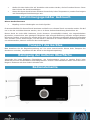
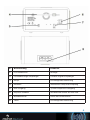
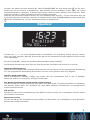
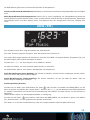
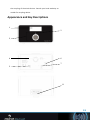
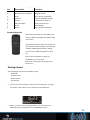
No. Description Functions 1 LCD dot matrix screen Display 2 3 4 Remote control interface Knob Antenna IR signal receiver Basic control of operation Enhance DAB/FM reception 5 6 7 AUX IN ON/ OFF switch DC IN 3.5mm jack for audio in Power on/off control Power Supply 8 Button Basic control of operation Remote Controller Remember to pull out the clear plastic tab from the battery compartment before using the remote. To remove the battery from the remote, use your thumb to press and pull it out. Replace it with aRisk CR2025 type 3V of battery, Caution: of explosion batterytaking is care to insert with thetype. positive (+) side replaced by an itincorrect up. Dispose of used batteries according to the instructions. Caution: Risk of explosion of battery is replaced by an incorrect type. Dispose of used batteries according to the instructions. Getting Started The packaging box contains the following items: DAB8813BT DABSTEP Getting Started Remote Control Power adaptor The packaging box contains the following items: User Manual DAB8813BT Remote Control DABSTEP and plug Connect the power adaptor to the back of the DAB8813BT Power adaptor DABSTEP. into power socket. Switch it on at the back of the DAB8813BT. User Manual Connect the power adaptor to the back of the DAB8813BT and plug into power socket. Switch it on at the back of the DAB8813BT. When it is the first time running the device, the radio will enter DAB mode and automatically scan the DAB/DAB+ stations. 16 When it is the first time running the device, the radio will enter DAB mode and automatically scan the DAB/DAB+ stations.