1
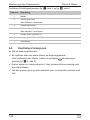
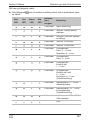
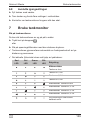
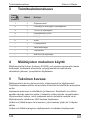
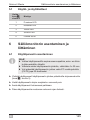
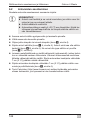
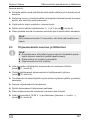
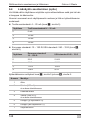
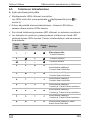
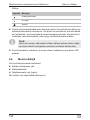
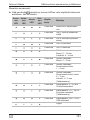
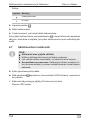
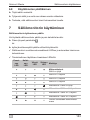
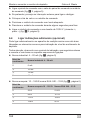
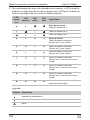
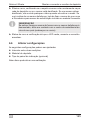
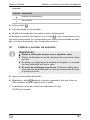
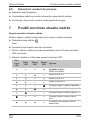
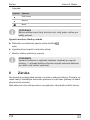
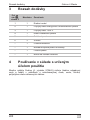
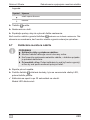
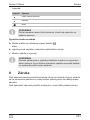
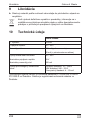
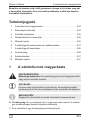
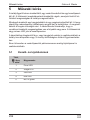
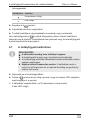
FM Marin AB
DE
EN
FR
Tankmonitor
Montage- und Bedienungsanleitung . 7
trol Unit
Gobius Con
Tank monitor
Installation and Operating Manual . . 22
Dispositif de surveillance du
réservoir
Instructions de montage
et de service . . . . . . . . . . . . . . . . . . 36
ES
IT
NL
DA
SV
NO
FI
PT
Monitor de depósitos
Instrucciones de montaje y de uso . 53
Monitor per serbatoi
Istruzioni di montaggio e d’uso . . . . 68
Tankmonitor
Montagehandleiding en
gebruiksaanwijzing . . . . . . . . . . . . . 83
Gobius 4 Waste
Tankmonitor
Monterings- og
betjeningsvejledning . . . . . . . . . . . . 98
RU
. . . . . . . . . . . . . . . . 172
Tankmätare
Monterings- och bruksanvisning . . 113
PL
Monitor zbiornika
Instrukcja montau i obsugi . . . . . 187
Tankmonitor
Monterings- og bruksanvisning . . . 127
CS
Monitor obsahu nádrže
Návod k montáži a obsluze. . . . . . 203
Säiliömonitori
Asennus- ja käyttöohje . . . . . . . . . 142
SK
Monitor de depósito
Instruções de montagem e manual de
instruções . . . . . . . . . . . . . . . . . . . 156
HU
Monitor nádrže
Návod na montáž a uvedenie do
prevádzky . . . . . . . . . . . . . . . . . . . 218
Tartályfigyel berendezés
Szerelési és használati útmutató . 233
Gobius 4 Waste
1
1
2
3
4
5
6
2
3
1
2
3
4
5
3
Gobius 4 Waste
4
A
B
C
min 7 cm (2 ¾")
min 7 cm
(2 ¾")
min 7 cm (2 ¾")
4
min 7 cm (2 ¾")
5
Gobius 4 Waste
6
1
7
2
3
4
7
6
yellow
5
green
red
black
red
4
3
-
+
2
1
5
Gobius 4 Waste
8
7
6
5
yellow
black
green
red
red
4
black
blue
-
3
2
+
1
6
blue
yellow
green
red
black
DE
Blau
Gelb
Grün
Rot
Schwarz
EN
Blue
Yellow
Green
Red
Black
FR
Bleu
Jaune
Vert
Rouge
Noir
ES
Azul
Amarillo
Verde
Rojo
Negro
IT
Blu
Giallo
Verde
Rosso
Nero
NL
Blauw
Geel
Groen
Rood
Zwart
DA
Blå
Gul
Grøn
Rød
Sort
SV
Blå
Gul
Grön
Röd
Svart
NO
Blå
Gul
Grønn
Rød
Svart
FI
Sininen
Keltainen
Vihreä
Punainen
Musta
PT
Azul
Amarelo
Verde
Vermelho
Preto
RU
PL
Niebieski
óty
Zielony
Czerwony
Czarny
CS
Modrá
Žlutá
Zelená
ervená
erná
SK
Modrá
Žltá
Zelená
ervená
ierna
HU
Kék
Sárga
Zöld
Piros
Fekete
Gobius 4 Waste
Erklärung der Symbole
Bitte lesen Sie diese Anleitung vor Einbau und Inbetriebnahme sorgfältig durch und bewahren Sie sie auf. Geben Sie sie im Falle einer
Weitergabe des Produktes an den Nutzer weiter.
Inhaltsverzeichnis
1
Erklärung der Symbole . . . . . . . . . . . . . . . . . . . . . . . . . . . . . . . . . . . 7
2
Sicherheitshinweise . . . . . . . . . . . . . . . . . . . . . . . . . . . . . . . . . . . . . . 8
3
Lieferumfang . . . . . . . . . . . . . . . . . . . . . . . . . . . . . . . . . . . . . . . . . . . 9
4
Bestimmungsgemäßer Gebrauch . . . . . . . . . . . . . . . . . . . . . . . . . . . 9
5
Technische Beschreibung . . . . . . . . . . . . . . . . . . . . . . . . . . . . . . . . . 9
6
Tankmonitor einbauen und anschließen . . . . . . . . . . . . . . . . . . . . . 10
7
Tankmonitor benutzen . . . . . . . . . . . . . . . . . . . . . . . . . . . . . . . . . . . 19
8
Gewährleistung . . . . . . . . . . . . . . . . . . . . . . . . . . . . . . . . . . . . . . . . 20
9
Entsorgung. . . . . . . . . . . . . . . . . . . . . . . . . . . . . . . . . . . . . . . . . . . . 21
10
Technische Daten . . . . . . . . . . . . . . . . . . . . . . . . . . . . . . . . . . . . . . 21
1
!
A
I
Erklärung der Symbole
WARNUNG!
Sicherheitshinweis: Nichtbeachtung kann zu Tod oder schwerer
Verletzung führen.
ACHTUNG!
Nichtbeachtung kann zu Materialschäden führen und die
Funktion des Produktes beeinträchtigen.
HINWEIS
Ergänzende Informationen zur Bedienung des Produktes.
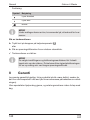
➤ Handlung: Dieses Symbol zeigt Ihnen, dass Sie etwas tun müssen. Die
erforderlichen Handlungen werden Schritt für Schritt beschrieben.
✓ Dieses Symbol beschreibt das Ergebnis einer Handlung.
DE
7
Sicherheitshinweise
Gobius 4 Waste
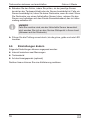
Abb. 1 5, Seite 3: Diese Angabe weist Sie auf ein Element in einer Abbildung hin, in diesem Beispiel auf „Position 5 in Abbildung 1 auf Seite 3“.
2
Sicherheitshinweise
Der Hersteller übernimmt in folgenden Fällen keine Haftung für Schäden:
z Beschädigungen am Produkt durch mechanische Einflüsse und Überspannungen
z Veränderungen am Produkt ohne ausdrückliche Genehmigung vom
Hersteller
z Verwendung für andere als die in der Anleitung beschriebenen Zwecke
2.1
Allgemeine Sicherheit
!
WARNUNG!
z Wenn das Gerät sichtbare Beschädigungen aufweist, dürfen
Sie es nicht in Betrieb nehmen.
z Reparaturen an diesem Gerät dürfen nur von Fachkräften
durchgeführt werden. Durch unsachgemäße Reparaturen
können erhebliche Gefahren entstehen.
z Wenn das Anschlusskabel dieses Gerätes beschädigt wird,
muss es durch den Hersteller, seinen Kundendienst oder eine
ähnlich qualifizierte Person ersetzt werden, um Gefährdungen
zu vermeiden.
z Beachten Sie beim Verlegen der Kabel, dass diese
– nicht stark geknickt oder verdreht werden,
– nicht an Kanten scheuern,
– nicht ohne Schutz durch scharfkantige Durchführungen verlegt werden.
z Befestigen Sie die Kabel sicher, um ein Verfangen (Sturzgefahr) zu vermeiden. Dieses kann erfolgen durch den Einsatz
von Kabelbindern, Isolierband oder durch Ankleben mit Klebstoff.
8
DE
Gobius 4 Waste
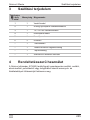
3
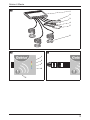
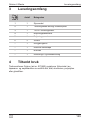
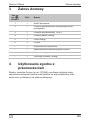
Lieferumfang
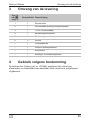
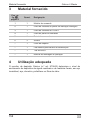
Lieferumfang
Pos. in
Abb. 1,
Seite 3
Menge
1
1
Steuermodul
2
1
Anschlusskabel analoges Anzeigepanel
3
1
12/24-V-Anschlusskabel
4
1
Bedienpanelkabel
5
1
Bedienpanel
6
3
Sensor
–
1
Reinigungstuch
–
1
Ersatz-Sensorklebeband
–
1
Klettband
–
1
Montage- und Bedienungsanleitung
4
Bezeichnung
Bestimmungsgemäßer Gebrauch
Der Tankmonitor Gobius (Art.-Nr. 970442) ermittelt den Füllstand von
Abwasser- und Fäkalientanks aus Edelstahl, Stahl, Aluminium, Polyethylen
oder Glasfaser.
5
Technische Beschreibung
Der Tankmonitor besteht aus drei Sensoren, einem Steuermodul und einem
Bedienpanel. Der Füllstand wird mithilfe von Sensoren ermittelt, die von außen in unterschiedlicher Höhe auf den Tank geklebt werden.
Jeder Sensor besteht aus einem Schallsender und einem Schwingungssensor. Der Schallsender erzeugt für eine Sekunde eine Vibration an der
Tankwand. Der Schwingungssensor misst die Stärke der Vibration. Das
Steuermodul errechnet, ob sich in Höhe des entsprechenden Sensors
Flüssigkeit befindet oder nicht. Vier farbige LEDs auf dem Bedienpanel
zeigen den Füllstand an.
DE
9
Tankmonitor einbauen und anschließen
Gobius 4 Waste
Sie können zusätzlich jeweils eine zusätzliche Lampe oder einen Summer
anschließen, um bei einem leeren oder ¾ vollem Tank gewarnt zu werden.
Sie können zusätzlich ein analoges Anzeigepanel parallel zum Bedienpanel
anschließen.
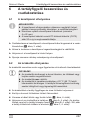
5.1
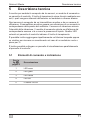
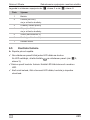
Bedien- und Anzeigeelemente
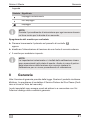
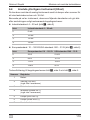
Pos. in
Abb. 2,
Seite 3
Bezeichnung
1
rote LED
2
gelbe LED
3
grüne LED
4
blaue LED
5
Taste Ein/Aus
6
Tankmonitor einbauen und
anschließen
6.1
Bedienpanel anbringen
I
HINWEIS
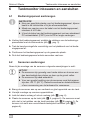
z Wählen Sie eine geeignete Stelle für das Bedienpanel aus,
z. B. im Toilettenraum in der Nähe des Abwassertanks.
z Fertigen Sie eine Öffnung für die Kabel des Bedienpanels,
mind. 4 x 22 mm.
z Sie können das Kabel des Bedienpanels mit einem StandardPC-Netzwerkkabel (CAT5) von bis zu 50 m Länge verlängern.
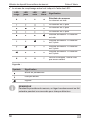
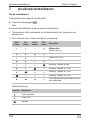
➤ Verbinden Sie das Bedienpanel mit den Steckern des Bedienpanelkabels
zum Steuermodul (Abb. 3, Seite 3).
➤ Ziehen Sie vorsichtig die Schutzfolie vom Klebeband des Bedienpanels
ab.
➤ Platzieren Sie das Bedienpanel an der gewünschten Stelle.
➤ Drücken Sie das Bedienpanel für ein paar Sekunden fest an.
10
DE
Gobius 4 Waste
6.2
Tankmonitor einbauen und anschließen
Sensoren anbringen
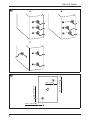
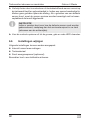
Beachten Sie bei der Montage der Sensoren folgende Hinweise:
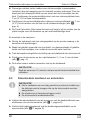
A
ACHTUNG!
z Die Sensoren sind empfindlich gegen harte Schläge und
können beschädigt werden, wenn sie Stößen ausgesetzt sind
oder auf den Boden fallen.
z Die Sensoren sind nicht wasserdicht.
z Damit die Sensoren gut haften, sind Temperaturen über
+20 °C (68 °F) nötig. Verwenden Sie gegebenenfalls ein Heißluftgebläse oder einen Heizlüfter, um die Tankwand zu erwärmen.
z Bringen Sie die Sensoren auf einer vertikalen und glatten Fläche des
Tanks an.
z Vermeiden Sie die Montage auf konkaven Oberflächen.
z Führen Sie die Kabel nach unten oder schräg nach unten (Abb. 4,
Seite 4).
z Platzieren Sie die Sensoren am Tank (Abb. 4 A, Seite 4). Die Sensoren
müssen sich nicht in der Mitte des Tanks befinden (Abb. 4 B, Seite 4).
Sie können sich sogar auf verschiedenen Seiten des Tanks befinden
(Abb. 4 C, Seite 4).
z Manche Metalltanks haben innen Zwischenwände (Schwallwände), die
die Bewegung der Flüssigkeit mindern sollen. Eine äußere Schweißnaht
deutet auf eine solche Zwischenwand an der Innenseite des Tanks hin.
Platzieren Sie die Sensorenmittelpunkte mit einem Mindestabstand von
7 cm (2 ¾") zu diesen Zwischenwänden.
z Platzieren Sie die Sensorenmittelpunkte mit einem Mindestabstand von
7 cm (2 ¾") zu den Kanten des Tanks und zu Rohranschlüssen (Abb. 5,
Seite 4).
z Der Tank Calculator (http://www.fmmarin.se) hilft Ihnen, die richtige Höhe
für die Sensoren an einem nicht rechteckigen Tank zu finden.
DE
11
Tankmonitor einbauen und anschließen
Gobius 4 Waste
So montieren Sie die Sensoren:
➤ Reinigen Sie die Tankwand mit dem Reinigungstuch an den Stellen, an
denen Sie die Sensoren anbringen möchten.
➤ Rauen Sie glatte Stellen von Kunstoff- und Glasfasertanks oder gestrichenen Tanks mit Schleifpapier auf, damit die Sensoren besser haften.
➤ Ziehen Sie vorsichtig die Schutzfolie vom Klebeband des Sensors ab.
➤ Platzieren Sie die Sensoren auf den Füllständen ¼, ½ und ¾ des Tanks
(Abb. 4, Seite 4).
➤ Drücken Sie jeden Sensor für ein paar Sekunden fest auf die Tankwand.
I
HINWEIS
Berühren Sie die Sensoren für 15 Minuten nicht, damit der Klebstoff aushärten kann.
6.3
Steuermodul montieren und anschließen
I
HINWEIS
z Es empfiehlt sich, eine Schicht Vaseline (verhindert Oxidation)
auf die Stecker aufzutragen, die am Steuermodul angeschlossen werden.
z Die Elektronik ist gegen Feuchtigkeit geschützt.
z Das Steuermodul ist nicht wasserdicht.
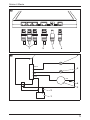
➤ Verbinden Sie die Anschlusskabel der Sensoren mit den entsprechenden
Anschlussbuchsen des Steuermoduls (Abb. 6 1, Seite 5).
➤ Verbinden Sie das Bedienpanel mit dem Bedienpanelkabel am Steuermodul (Abb. 6 2, Seite 5).
➤ Falls gewünscht, sehen Sie einen externen Schalter zum Ein- und Ausschalten vor.
➤ Bringen Sie das Klettband am Steuermoduls an.
➤ Platzieren Sie das Steuermodul an einer geeigneten Stelle.
➤ Drücken Sie das Steuermodul für ein paar Sekunden fest an.
➤ Schließen Sie das Steuermodul an eine Spannung von 12/24 V an
(grau: +; schwarz: –) (Abb. 6 3, Seite 5).
12
DE
Gobius 4 Waste
6.4
Tankmonitor einbauen und anschließen
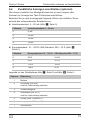
Zusätzliche Anzeigen anschließen (optional)
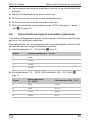
Sie können zusätzlich ein Messgerät sowie bis zu zwei Lampen oder
Summer zur Anzeige des Tank-Füllstandes anschließen.
Beachten Sie je nach Anzeigepanel folgende Werte und schließen Sie es
anhand des entsprechenden Schaltplans an:
z Industriestandard: 4 – 20 mA (Abb. 7, Seite 5)
Füllstand
Industriestandard 4 – 20 mA
0
6 mA
¼
10 mA
½
14 mA
¾
18 mA
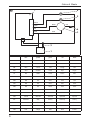
z Europastandard: 10 – 180 /USA-Standard: 240 – 33 (Abb. 8,
Seite 6)
Füllstand
Europastandard 10 – 180 USA-Standard 240 – 33 0
23 214 ¼
68 161 ½
112 109 ¾
158 56 Legende zu den Schaltplänen Abb. 7, Seite 5 und Abb. 8, Seite 6:
Nummer
DE
Bedeutung
1
Batterie
2
Sicherung (500 mA)
nicht im Lieferumfang enthalten
3
Zusatzmessgerät
4
Widerstand (nur 24 V)
nicht im Lieferumfang enthalten
5
Lampe (über Füllstand ¾)
6
Lampe (unter Füllstand ¼)
7
Steuermodul
13
Tankmonitor einbauen und anschließen
6.5
Gobius 4 Waste
Funktion prüfen
➤ Schalten Sie die Spannungszufuhr ein.
✓ Eine LED nach der anderen auf dem Bedienpanel blinkt.
Falls die LEDs nicht blinken, drücken Sie die Taste
Bedienpanel (Abb. 2 5, Seite 3).
auf dem
✓ Gobius startet eine Funktionsprüfung. Jede LED blinkt gleichzeitig mit
der blauen LED.
✓ Wenn die grüne, gelbe und rote LED leuchten, ist die Prüfung erfolgreich
abgeschlossen.
14
DE
Gobius 4 Waste
Tankmonitor einbauen und anschließen
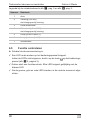
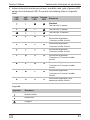
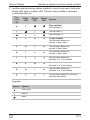
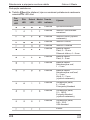
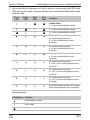
✓ Falls die Prüfung nicht erfolgreich war, leuchtet die rote, gelbe oder grüne
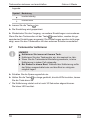
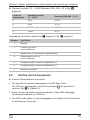
LED zusammen mit der blauen LED. Die genaue Fehlermeldung entnehmen Sie der folgenden Tabelle:
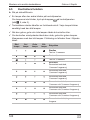
rote
LED
gelbe
LED
grüne
LED
blaue
LED
Bedeutung
Startphase
Test des ¼-Sensors
Test des ½-Sensors
Test des ¾-Sensors
Sensorfehler
Sensor-Test abgeschlossen,
¼-Sensor ohne Funktion
Sensor-Test abgeschlossen,
½-Sensor ohne Funktion
Sensor-Test abgeschlossen,
¾-Sensor ohne Funktion
Sensor-Test abgeschlossen,
¼-Sensor und ½-Sensor ohne
Funktion
Sensor-Test abgeschlossen,
¼-Sensor und ¾-Sensor ohne
Funktion
Sensor-Test abgeschlossen,
½-Sensor und ¾-Sensor ohne
Funktion
Sensor-Test abgeschlossen, alle
Sensoren ohne Funktion
Legende:
Symbol
Bedeutung
leuchtet ständig
leuchtet nicht
blinkt
DE
15
Tankmonitor einbauen und anschließen
Gobius 4 Waste
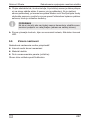
➤ Beheben Sie den Fehler, indem Sie prüfen, ob der jeweilige Sensor
korrekt an der Tankwand klebt oder der Sensor beschädigt ist. Falls ein
Sensor beschädigt ist, hören Sie keine Geräusche, wenn er misst. Wenn
Sie Geräusche von einem fehlerhaften Sensor hören, müssen Sie den
Sensor neu befestigen mit dem Ersatz-Sensorklebeband, das im Lieferumfang enthalten ist.
I
HINWEIS
Falls Sie unsicher sind, wie der fehlerhafte Sensor demontiert
wird, wenden Sie sich an den Service-Stützpunkt in Ihrem Land
(Adressen auf der Rückseite).
➤ Führen Sie die Prüfung erneut durch, bis die grüne, gelbe und rote LED
leuchten.
6.6
Einstellungen ändern
Folgende Einstellungen können angepasst werden:
z Intervall zwischen zwei Messungen
z Tankmaterial
z Art des Anzeigepanels (optional)
Darüber hinaus können Sie eine Kalibrierung auslösen.
16
DE
Gobius 4 Waste
Tankmonitor einbauen und anschließen
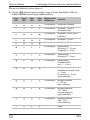
Gehen Sie wie folgt vor:
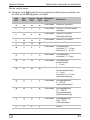
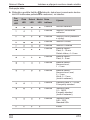
➤ Halten Sie die Taste
gedrückt, bis die gewünschte Einstellung durch
das Leuchten der LEDs angezeigt wird, siehe Tabelle:
rote
LED
gelbe
LED
grüne
LED
blaue
LED
Anzeigedauer
Bedeutung
5 Sekunden Kalibrierung auslösen
5 Sekunden Intervall 1 Minute zwischen
Messungen
5 Sekunden Intervall 5 Minuten
(Werkseinstellung)
5 Sekunden Intervall 10 Minuten
5 Sekunden Intervall 10 Sekunden
5 Sekunden Tankmaterial:
Kunststoff, 5 – 12 mm
Glasfaser, 4 – 8 mm
5 Sekunden Tankmaterial:
Kunststoff, 2 – 5 mm
5 Sekunden Tankmaterial:
Rostfreier
Stahl, 1 – 2 mm
5 Sekunden Tankmaterial:
Rostfreier Stahl/Stahl,
2 – 3 mm,
Aluminium, 2 – 5 mm
(Werkseinstellung)
5 Sekunden Anzeigepanel, 4 – 20 mA,
Industriestandard
5 Sekunden Anzeigepanel, 10 – 180 ,
Europastandard
(Werkseinstellung)
5 Sekunden Anzeigepanel, 240 – 33 ,
USA-Standard
Ende
DE
17
Tankmonitor einbauen und anschließen
Gobius 4 Waste
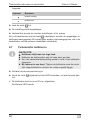
Legende:
Symbol
Bedeutung
leuchtet ständig
leuchtet nicht
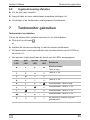
➤ Lassen Sie die Taste
los.
➤ Die Einstellung wird gespeichert.
➤ Wiederholen Sie den Vorgang, um weitere Einstellungen vorzunehmen.
Wenn Sie den Tankmonitor mit der Taste
ausschalten, werden die gespeicherten Einstellungen angezeigt. Die Einstellungen werden nicht angezeigt, wenn Sie den Tankmonitor mit dem externen Schalter ausschalten.
6.7
I
Tankmonitor kalibrieren
HINWEIS
z Kalibrieren Sie immer mit leerem Tank.
z Kalibrieren Sie den Tankmonitor ein- bis zweimal im Jahr.
z Wenn Sie die Tankmaterial-Einstellung wechseln, ist eine
Kalibrierung in jedem Fall notwendig.
z Bei Einbau in einem Boot: Während der Kalibrierung sollte
der Motor ausgeschaltet sein und das Boot so ruhig wie
möglich liegen.
➤ Schalten Sie die Spannungszufuhr ein.
➤ Halten Sie die Taste
so lange gedrückt, bis alle LEDs leuchten, lassen
Sie die Taste dann los.
✓ Die Kalibrierung startet und ist nach 30 Sekunden abgeschlossen.
Die blaue LED leuchtet.
18
DE
Gobius 4 Waste
6.8
Tankmonitor benutzen
Inbetriebnahme abschließen
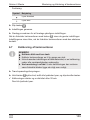
➤ Füllen Sie den Tank mit Flüssigkeit.
➤ Leeren Sie den Tank und führen Sie währenddessen mehrere
Messungen durch.
➤ Kontrollieren Sie, ob der Tankmonitor wie gewünscht funktioniert.
7
Tankmonitor benutzen
Tankmonitor einschalten
Sie können den Tankmonitor auf zwei Arten ein- und ausschalten:
➤ Drücken Sie kurz die Taste
oder
➤ schalten Sie die Spannungszufuhr mit dem externen Schalter ein.
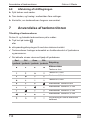
✓ Der Tankmonitor führt automatisch eine Funktionsprüfung der LEDs und
Sensoren durch.
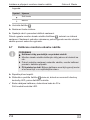
✓ Der aktuelle Füllstand wird anhand der LEDs angezeigt:
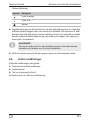
rote
LED
gelbe
LED
grüne
LED
blaue
LED
Bedeutung
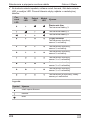
Messergebnisse
Tank ist leer
Tank ist ¼ voll
Tank ist ½ voll
Tank ist ¾ voll
Messergebnis: Tank ist leer
Messergebnis: Tank ist ¼ voll
Messergebnis: Tank ist ½ voll
Messergebnis: Tank ist ¾ voll
Bei Lieferung ist Gobius noch
nicht kalibriert
DE
19
Gewährleistung
Gobius 4 Waste
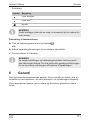
Legende:
Symbol
Bedeutung
leuchtet ständig
leuchtet nicht
blinkt
I
HINWEIS
Während des Messvorgangs ertönt ein leises, brummendes
Geräusch, eine Sekunde pro Sensor.
Tankmonitor ausschalten
➤ Drücken Sie am Bedienpanel kurz die Taste
oder
➤ schalten Sie die Spannungszufuhr von einer externen Stromquelle aus.
✓ Der Tankmonitor ist ausgeschaltet.
I
8
HINWEIS
Die gewählten Einstellungen und Kalibrierungsergebnisse bleiben im ausgeschalteten Zustand gespeichert. Auch bei längerer
Unterbrechung der Spannung müssen Sie die Kalibierung für einen neuen Messvorgang nicht wiederholen.
Gewährleistung
Es gilt die gesetzliche Gewährleistungsfrist. Sollte das Produkt defekt sein,
wenden Sie sich bitte an einen Service-Partner in Ihrem Land (Adressen
siehe Rückseite der Anleitung).
Unsere Spezialisten helfen Ihnen gerne weiter und besprechen mit Ihnen
den weiteren Verlauf der Gewährleistung.
20
DE
Gobius 4 Waste
9
Entsorgung
Entsorgung
➤ Geben Sie das Verpackungsmaterial möglichst in den entsprechenden
Recycling-Müll.
M
Wenn Sie das Produkt endgültig außer Betrieb nehmen, informieren Sie sich bitte beim nächsten Recyclingcenter oder bei
Ihrem Fachhändler über die zutreffenden Entsorgungsvorschriften.
10
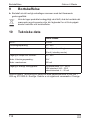
Technische Daten
Gobius 4 Waste
Art-Nr.:
970442
Anschlussspannung:
10 – 29 V
Nennstrom:
200 mA (während Messung)
40 mA (im Stand-By-Modus)
Ausgang für Lampe oder Summer:
10 – 29 V
Maximale Anschlussspannung:
29 V
Maximaler Nennstrom:
200 mA
Ausgang für analoges Anzeigepanel:
Europastandard: 10 – 180 USA-Standard: 240 – 33 Industriestandard: 4 – 20 mA
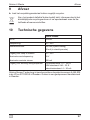
Gobius Sensor Technology ist geschützt durch die Patent-Nummern
8,448,509 in den USA und 0701520-9 in Schweden. Gobius ist eingetragenes Warenzeichen in Schweden.
DE
21
Explanation of symbols
Gobius 4 Waste
Please read this instruction manual carefully before installation and
first use, and store it in a safe place. If you pass on the product to
another person, hand over this instruction manual along with it.
Table of Contents
1
Explanation of symbols . . . . . . . . . . . . . . . . . . . . . . . . . . . . . . . . . . 22
2
Safety instructions . . . . . . . . . . . . . . . . . . . . . . . . . . . . . . . . . . . . . . 23
3
Scope of delivery . . . . . . . . . . . . . . . . . . . . . . . . . . . . . . . . . . . . . . . 24
4
Intended use . . . . . . . . . . . . . . . . . . . . . . . . . . . . . . . . . . . . . . . . . . 24
5
Technical description . . . . . . . . . . . . . . . . . . . . . . . . . . . . . . . . . . . . 24
6
Installing and connecting the device . . . . . . . . . . . . . . . . . . . . . . . . 25
7
Using the tank monitor . . . . . . . . . . . . . . . . . . . . . . . . . . . . . . . . . . . 33
8
Warranty . . . . . . . . . . . . . . . . . . . . . . . . . . . . . . . . . . . . . . . . . . . . . 34
9
Disposal . . . . . . . . . . . . . . . . . . . . . . . . . . . . . . . . . . . . . . . . . . . . . . 35
10
Technical data . . . . . . . . . . . . . . . . . . . . . . . . . . . . . . . . . . . . . . . . . 35
1
!
A
I
Explanation of symbols
WARNING!
Safety instruction: Failure to observe this instruction can cause
fatal or serious injury.
NOTICE!
Failure to observe this instruction can cause material damage and
impair the function of the product.
NOTE
Supplementary information for operating the product.
➤ Action: This symbol indicates that action is required on your part. The
required action is described step-by-step.
✓ This symbol describes the result of an action.
22
EN
Gobius 4 Waste
Safety instructions
Fig. 1 5, page 3: This refers to an element in an illustration. In this case,
item 5 in figure 1 on page 3.
2
Safety instructions
The manufacturer accepts no liability for damage in the following cases:
z Damage to the product resulting from mechanical influences and excess
voltage
z Alterations to the product without express permission from the manufacturer
z Use for purposes other than those described in the operating manual
2.1
General safety
!
WARNING!
z Do not operate the device if it is visibly damaged.
z This device may only be repaired by qualified personnel. Inadequate repairs may cause serious hazards.
z If the power cable of this device is damaged, it must be replaced
by the manufacturer, customer service or a similarly qualified
person in order to prevent safety hazards.
z When laying the cables, make sure:
– they are not kinked or twisted
– they do not rub on edges
– they are not laid in sharp-edged ducts without protection.
z Attach the cables securely to prevent tripping hazards. This can
be performed by using cable binders, insulating tape or gluing
in place with adhesives.
EN
23
Gobius 4 Waste
Scope of delivery
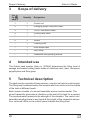
3
4
Scope of delivery
No. in
fig. 1,
page 3
Quantity
1
1
Control unit
2
1
Analogue gauge connection cable
3
1
12/24 V connection cable
4
1
Control panel cable
5
1
Control panel
6
3
Sensor
–
1
Cleaning cloth
–
1
Extra sensor tape
–
1
Velco strap
–
1
Installation and operating manual
Designation
Intended use
The Gobius tank monitor (item no. 970442) determines the filling level of
sewage and waste holding tanks made of stainless steel, steel, aluminum,
polyethylene and fibre glass.
5
Technical description
The tank monitor consists of three sensors, a control unit and a control panel.
The filling level is determined by the sensors which are stuck onto the outside
of the tank at different levels.
Each sensor consists of a sound transmitter and an accelerometer. The
sound transmitter generates a vibration on the wall of the tank for a second.
The accelerometer measures the strength of the vibration. The control unit
calculates whether there is any liquid at the height of the respective sensor.
Four coloured LEDs on the control panel indicate the filling level.
24
EN
Gobius 4 Waste
Installing and connecting the device
You can also connect an extra lamp or a buzzer to warn you when the tank
is empty or ¾ full.
You can also connect an analogue gauge parallel with the control panel.
5.1
Operating and display elements
No. in fig. 2,
Designation
page 3
1
Red LED
2
Yellow LED
3
Green LED
4
Blue LED
5
On/Off button
6
Installing and connecting the device
6.1
Attaching the control panel
I
NOTE
z Select a suitable place for the control panel, e. g. in the
head/toilet or near your sewage tank.
z Prepare an opening of at least 4 x 22 mm for the cable of the
control panel.
z You can extend the control panel cable by up to 50 metres with
a standard PC network cable (CAT5).
➤ Connect the control panel using the plugs on control panel cable to the
control unit (fig. 3, page 3).
➤ Carefully remove the protective film from the adhesive strip on the control
panel.
➤ Position the control panel in the required place.
➤ Press the control panel down firmly for a few seconds.
EN
25
Installing and connecting the device
6.2
Gobius 4 Waste
Attaching the sensors
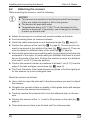
When mounting the sensors, note the following:
A
NOTICE!
z The sensors are sensitive to hard knocks and will be damaged
if they are subject to impact or fall on the ground.
z The sensors do not resist water.
z Temperatures above +20 °C (68 °F) are necessary for the
sensors to bond well. If necessary, use a heat gun or a heater
to warm up the tank wall.
z Attach the sensors on a vertical and smooth surface on the tank.
z Avoid mounting them on concave surfaces.
z Guide the cable downwards or at a downward angle (fig. 4, page 4).
z Position the sensors at the tank (fig. 4 A, page 4). The sensors do not
need to be placed in the middle of the tank (fig. 4 B, page 4). They can
even be placed on different sides of the tank (fig. 4 C, page 4).
z Some metal tanks have inner partition walls (surge plates) to minimise the
movement of the liquid. An outer weld joint indicates that there is a partition on the inside of the tank. Position the sensors‘s center at a distance
of at least 7 cm (2 ¾") from the partition.
z Position the sensors‘s center at a distance of at least 7 cm (2 ¾") from the
edge of the tank and pipe connections (fig. 5, page 4).
z The Tank Calculator (http://www.fmmarin.se) helps to find the right level
for the sensors on a non-rectangular tank.
Mount the sensors as follows:
➤ Use a cloth to clean the tank wall in the places where you want to attach
the sensors.
➤ Roughen the smooth surface on plastic or fibre-glass tanks with sandpaper to ensure the sensors bond properly.
➤ Carefully remove the protective film from the adhesive strip on the sensors.
➤ Position the sensors at the ¼, ½ and ¾ filling levels on the tank (fig. 4,
page 4).
➤ Press each sensor firmly onto the tank wall for a few seconds.
26
EN
Gobius 4 Waste
Installing and connecting the device
I
NOTE
Do not touch the sensors for 15 minutes so that the adhesive is
able to harden.
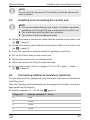
6.3
Installing and connecting the control unit
I
NOTE
z It is recommended that you put a layer of Vaseline (prevents
oxidation) on the plugs that are connected to the control unit.
z The electronics are protected from moisture.
z The control unit does not resist water.
➤ Connect the sensor connection cables with the sockets on the control unit
(fig. 6 1, page 5).
➤ Connect the control panel with the control panel cable to the control unit
(fig. 6 2, page 5).
➤ If you like, provide an external switch for switching on and off.
➤ Put on the velcro strap on the control unit.
➤ Position the control unit in a suitable place.
➤ Press the control unit firmly for a few seconds.
➤ Connect the control unit to a voltage of 12 V or 24 V (grey: +; black: –)
(fig. 6 3, page 5).
6.4
Connecting additional indicators (optional)
You can also connect a gauge and up to two lamps or buzzers to indicate the
tank filling level.
Note the following values depending on the gauge and connect it using the
appropriate circuit diagram:
z Industry standard: 4 – 20 mA (fig. 7, page 5)
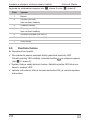
EN
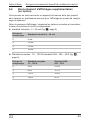
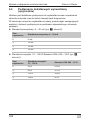
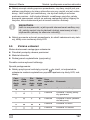
Filling level
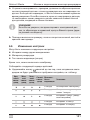
Industry standard 4 – 20 mA
0
6 mA
¼
10 mA
½
14 mA
¾
18 mA
27
Gobius 4 Waste
Installing and connecting the device
z European standard: 10 – 180 /US standard: 240 – 33 (fig. 8,
page 6)
Filling level
European standard
10 – 80 USA standard
240 – 33 0
23 214 ¼
68 161 ½
112 109 ¾
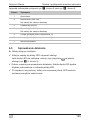
158 56 Key to the cicuit diagrams fig. 7, page 5 and fig. 8, page 6:
Item
6.5
Meaning
1
Battery
2
Fuse (500 mA)
not included in the supply
3
Extra gauge
4
Resistor (24 V only)
not included in the supply
5
Lamp (above ¾ level)
6
Lamp (below ¼ level)
7
Control unit
Checking the functions
➤ Switch on the power supply.
✓ The LEDs flash one after the other on the control panel.
If the LEDs do not flash, press the
(fig. 2 5, page 3).
button on the control panel
✓ Gobius starts a function test. Each LED flashes simultaneously with the
blue LED.
✓ Once the green, yellow and red LEDs light up, the test has been successfully completed.
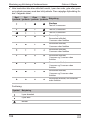
28
EN
Gobius 4 Waste
Installing and connecting the device
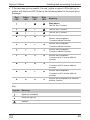
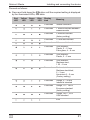
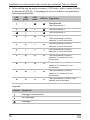
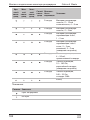
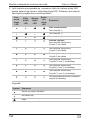
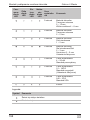
✓ If the test was not successful, the red, yellow or green LEDs light up together with the blue LED. Refer to the following table for the exact error
message:
Red
LED
Yellow
LED
Green
LED
Blue
LED
Meaning
Start phase
Test for the ¼ sensor
Test for the ½ sensor
Test for the ¾ sensor
Sensor fault
Sensor test completed
¼ sensor without function
Sensor test completed
½ sensor without function
Sensor test completed
¾ sensor without function
Sensor test completed
¼ sensor and ½ sensor without
function
Sensor test completed
¼ sensor and ¾ sensor without
function
Sensor test completed
½ sensor and ¾ sensor without
function
Sensor test completed, all sensors
without function
Key:
Symbol
Meaning
lights up constantly
does not light up
flashes
EN
29
Installing and connecting the device
Gobius 4 Waste
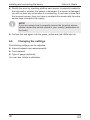
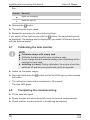
➤ Rectify the error by checking whether each sensor is properly bonded to
the tank wall or whether the sensor is damaged. If a sensor is damaged,
you will not hear any noise when it is measuring. If you hear a noise from
the incorrect sensor, then you have to re-attach the sensor with the extra
sensor tape included in the supply.
I
NOTE
If you are unsure how to properly remove the incorrect sensor,
please contact the service centre in your country (addresses on
the back).
➤ Perform the test again until the green, yellow and red LEDs light up.
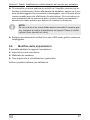
6.6
Changing the settings
The following settings can be adjusted:
z Interval between two measurements
z Tank material
z Type of gauge (optional)
You can also initiate a calibration.
30
EN
Gobius 4 Waste
Installing and connecting the device
Proceed as follows:
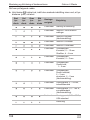
➤ Press and hold down the
button until the required setting is displayed
by the illuminated LEDs, see table:
Red
LED
Yellow
LED
Green
LED
Blue
LED
Display
time
Meaning
5 seconds
Initiate calibration
5 seconds
1 minute intervals between
measurements
5 seconds
5 minutes intervals
(factory setting)
5 seconds
10 minutes intervals
5 seconds
10 seconds intervals
5 seconds
Tank material:
Plastic, 5 – 12 mm
Fibre glass, 4 – 8 mm
5 seconds
Tank material:
Plastic, 2 – 5 mm
5 seconds
Tank material:
Stainless steel,
1.25 – 2 mm
5 seconds
Tank material:
Stainless steel/steel,
2 – 3 mm,
Aluminium 2 – 5 mm
(Factory setting)
5 seconds
Gauge, 4 – 20 mA
Industrial standard
5 seconds
Gauge, 10 – 180 European standard
(factory setting)
5 seconds
Gauge, 240 – 33 USA standard
End
EN
31
Installing and connecting the device
Gobius 4 Waste
Key:
Symbol
Meaning
lights up constantly
does not light up
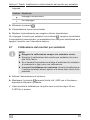
➤ Release the
button.
➤ The setting has been saved.
➤ Repeat the procedure to make further settings.
If you switch off the tank monitor with the
button, the saved settings will
be displayed. The settings are not displayed if you switch off the tank monitor
with the external switch.
6.7
I
Calibrating the tank monitor
NOTE
z Calibrate always with empty tank.
z Calibrate the tank monitor once or twice a year.
z If you change the tank material setting, then calibrating will be
required in each case.
z Installing in a boat: During calibration, the engine should be
switched off and the boat positioned as still as possible.
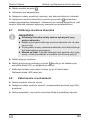
➤ Switch on the power supply.
➤ Press and hold down the
the button.
button until all the LEDs light up, then release
✓ The calibration starts and is completed in 30 seconds.
The blue LED glows.
6.8
Completing the commissioning
➤ Fill the tank with liquid.
➤ Empty the tank and while doing this carry out several measurements.
➤ Check whether the tank monitor is functioning as required.
32
EN
Gobius 4 Waste
7
Using the tank monitor
Using the tank monitor
Switching on the tank monitor
You can switch the tank monitor on and off in two ways:
➤ Briefly press the
button
or
➤ Switch the power supply on using the external switch.
✓ The tank monitor performs a function test on the LEDs and sensors automatically.
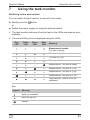
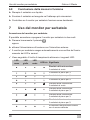
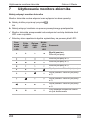
✓ The current filling level is displayed using the LEDs:
Red
LED
Yellow
LED
Green
LED
Blue
LED
Meaning
Measurement results
The tank is empty
The tank is ¼ full
The tank is ½ full
The tank is ¾ full
Measurement: The tank is empty
Measurement: The tank is ¼ full
Measurement: The tank is ½ full
Measurement: The tank is ¾ full
Upon delivery, Gobius is not yet
calibrated
Key:
Symbol
Meaning
lights up constantly
does not light up
flashes
EN
33
Gobius 4 Waste
Warranty
I
NOTE
During the measuring procedure, you will hear a slight humming
noise, one second per sensor.
Switching off the tank monitor
➤ Briefly press the
button on the control panel
or
➤ Switch the power supply off from an external power source.
✓ The tank monitor is switched off.
I
8
NOTE
The selected settings and calibration results are saved when it is
switched off. Even for prolonged interruptions to the power, you
do not need to repeat the calibration for a new measurement.
Warranty
The statutory warranty period applies. If the product is defective, please
contact the service partner in your country (addresses on the back on the
instruction manual).
Our experts will be happy to help you and will discuss the warranty process
with you in more detail.
34
EN
Gobius 4 Waste
9
Disposal
Disposal
➤ Place the packaging material in the appropriate recycling waste bins
wherever possible.
M
If you wish to finally dispose of the product, ask your local recycling
centre or specialist dealer for details about how to do this in
accordance with the applicable disposal regulations.
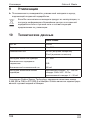
10
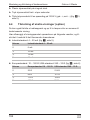
Technical data
Gobius 4 Waste
Item no.:
970442
Supply voltage:
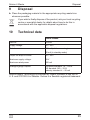
10 – 29 V
Rated current:
200 mA (while measuring)
40 mA (in standby mode)
Output for lamp or buzzer:
10 – 29 V
Maximum supply voltage:
29 V
Maximum rated power:
200 mA
Analogue gauge outputs:
European standard: 10 – 180 US standard: 240 – 33 Industry standard: 4 – 20 mA
Gobius Sensor Technology is protected by Patent Numbers 8,448,509 in
U. S. and 0701520-9 in Sweden. Gobius is a Swedish registered trademark.
EN
35
Explication des symboles
Gobius 4 Waste
Veuillez lire attentivement cette notice avant le montage et la mise en
service. Veuillez ensuite la conserver. En cas de passer le produit,
veuillez le transmettre au nouvel acquéreur.
Table des matières
1
Explication des symboles. . . . . . . . . . . . . . . . . . . . . . . . . . . . . . . . . 36
2
Consignes de sécurité . . . . . . . . . . . . . . . . . . . . . . . . . . . . . . . . . . . 37
3
Contenu de la livraison . . . . . . . . . . . . . . . . . . . . . . . . . . . . . . . . . . 38
4
Usage conforme. . . . . . . . . . . . . . . . . . . . . . . . . . . . . . . . . . . . . . . . 38
5
Description technique . . . . . . . . . . . . . . . . . . . . . . . . . . . . . . . . . . . 39
6
Montage et raccordement du dispositif de surveillance du réservoir . 40
7
Utilisation du dispositif de surveillance du réservoir . . . . . . . . . . . . 49
8
Garantie . . . . . . . . . . . . . . . . . . . . . . . . . . . . . . . . . . . . . . . . . . . . . . 51
9
Retraitement . . . . . . . . . . . . . . . . . . . . . . . . . . . . . . . . . . . . . . . . . . 51
10
Caractéristiques techniques. . . . . . . . . . . . . . . . . . . . . . . . . . . . . . . 52
1
!
A
I
Explication des symboles
AVERTISSEMENT !
Consigne de sécurité : le non-respect de ces consignes peut
entraîner la mort ou de graves blessures.
AVIS !
Le non-respect de ces consignes peut entraîner des dommages
matériels et des dysfonctionnements du produit.
REMARQUE
Informations complémentaires sur l'utilisation du produit.
➤ Manipulation : ce symbole vous indique une action à effectuer. Les
manipulations à effectuer sont décrites étape par étape.
✓ Ce symbole décrit le résultat d’une manipulation.
36
FR
Gobius 4 Waste
Consignes de sécurité
Fig. 1 5, page 3 : cette information renvoie à un élément figurant sur une
illustration, dans cet exemple à la « position 5 de l'illustration 1 à la page 3 ».
2
Consignes de sécurité
Le fabricant décline toute responsabilité pour des dommages dans les cas
suivants :
z des influences mécaniques et des surtensions ayant endommagé le
matériel
z des modifications apportées au produit sans autorisation explicite de la
part du fabricant
z une utilisation différente de celle décrite dans la notice
2.1
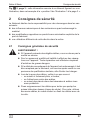
Consignes générales de sécurité
!
AVERTISSEMENT !
z Si l'appareil présente des dégâts visibles, vous ne devez pas le
mettre en service.
z Seul un personnel qualifié est habilité à effectuer des réparations sur l'appareil. Toute réparation mal effectuée risquerait
d'entraîner de graves dangers.
z Si le câble de raccordement de l'appareil est endommagé, il doit
être remplacé par le fabricant, son service après-vente ou une
personne de qualification similaire, afin d'éviter tout danger.
z Lors de la pose des câbles, veillez à ce que ceux-ci
– ne soient ni fortement pliés, ni tordus,
– ne frottent pas contre des arêtes,
– ne soient pas placés dans des traversées à arêtes vives
sans protection.
z Fixez soigneusement les câbles pour éviter que quelqu'un
puisse trébucher dessus (risque de chute). Pour cela, utilisez
des serre-câbles, du ruban isolant ou fixez les câbles avec de
la colle.
FR
37
Gobius 4 Waste
Contenu de la livraison
3
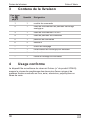
Contenu de la livraison
Pos. dans
fig. 1,
page 3
Quantité
1
1
module de commande
2
1
câble de raccordement du panneau d'affichage
analogique
3
1
câble de raccordement 12/24 V
4
1
câble de panneau de commande
5
1
panneau de commande
6
3
détecteur
–
1
chiffon de nettoyage
–
1
ruban adhésif de rechange pour détecteur
–
1
bande velcro
–
1
notice de montage et d'utilisation
4
Désignation
Usage conforme
Le dispositif de surveillance du réservoir Gobius (n° de produit 970442)
mesure le niveau de remplissage des réservoirs d'eaux noires et de
matières fécales construits en inox, acier, aluminium, polyéthylène ou
fibres de verre.
38
FR
Gobius 4 Waste
5
Description technique
Description technique
Le dispositif de surveillance du réservoir est composé de trois détecteurs,
d'un module de commande et d'un panneau de commande. Le niveau de
remplissage est mesuré à l'aide de détecteurs collés sur le réservoir à
différentes hauteurs.
Chaque détecteur se compose d'un émetteur sonore et d'un détecteur de
vibrations. L'émetteur sonore génère une vibration sur la paroi du réservoir,
pendant une seconde. Le détecteur de vibrations mesure la force de la vibration. Le module de commande calcule si du liquide se trouve à la hauteur du
détecteur correspondant ou non. Quatre LED de couleur sur le panneau de
commande affichent le niveau de remplissage.
Vous pouvez en outre raccorder une lampe supplémentaire ou un avertisseur sonore afin d'être averti si le réservoir est vide ou plein aux ¾.
Vous pouvez en outre raccorder un panneau d'affichage analogique en
plus du panneau de commande.
5.1
Eléments de commande et d'affichage
Pos. dans
Désignation
fig. 2, page 3
FR
1
LED rouge
2
LED jaune
3
LED verte
4
LED bleue
5
Touche MARCHE/ARRÊT
39
Montage et raccordement du dispositif de surveillance du réservoir
Gobius 4 Waste
6
Montage et raccordement du
dispositif de surveillance du réservoir
6.1
Installation du panneau de commande
I
REMARQUE
z Choisissez un emplacement adapté au panneau de commande, p. ex. dans les toilettes, à proximité du réservoir à
eaux noires.
z Pratiquez une ouverture pour les câbles du panneau de
commande, min. 4 x 22 mm.
z Vous pouvez rallonger le câble du panneau de commande
avec un câble réseau PC standard (CAT5) de jusqu'à 50 m de
longueur.
➤ Raccordez le panneau de commande au module de commande grâce
aux connecteurs du câble du panneau de commande (fig. 3, page 3).
➤ Retirez avec précaution le film protecteur du ruban adhésif du panneau
de commande.
➤ Placez le panneau de commande à l'emplacement souhaité.
➤ Appuyez pendant quelques secondes sur le panneau de commande pour
le fixer.
6.2
Pose des détecteurs
Lisez attentivement les remarques suivantes lors du montage des
détecteurs :
A
40
AVIS !
z Les détecteurs sont sensibles aux chocs et peuvent être
endommagés s'ils sont exposés à des coups ou tombent sur
le sol.
z Les détecteurs ne sont pas étanches.
z Pour que les détecteurs adhèrent bien, les températures
doivent être supérieures à +20 °C (68 °F). Le cas échéant,
utilisez un souffleur d'air chaud ou un radiateur soufflant pour
chauffer la paroi du réservoir.
FR
Gobius 4 Waste
Montage et raccordement du dispositif de surveillance du réservoir
z Installez les détecteurs sur une surface verticale et lisse du réservoir.
z Évitez le montage sur des surfaces concaves.
z Faites passer les câbles vers le bas ou en biais vers le bas (fig. 4,
page 4).
z Placez les détecteurs au niveau du réservoir (fig. 4 A, page 4). Les
détecteurs ne doivent pas obligatoirement se trouver au milieu du réservoir (fig. 4 B, page 4). Ils peuvent même se trouver de différents côtés
du réservoir (fig. 4 C, page 4).
z Certains réservoirs métalliques disposent à l'intérieur de parois intermédiaires (brise-flots) censées réduire les mouvements du liquide. Un
cordon de soudure extérieur laisse supposer une telle paroi intermédiaire
à l'intérieur du réservoir. Placez le milieu des détecteurs à une distance
minimale de 7 cm (2 ¾") de ces parois intermédiaires.
z Placez le milieu des détecteurs à une distance minimale de 7 cm (2 ¾")
des bords du réservoir et des raccordements de la tuyauterie (fig. 5,
page 4).
z Le Tank Calculator (http://www.fmmarin.se) vous aide à trouver la bonne
hauteur des détecteurs sur un réservoir non rectangulaire.
Pour monter les détecteurs :
➤ nettoyez la paroi du réservoir avec le chiffon de nettoyage aux endroits où
vous souhaitez installer les détecteurs.
➤ Grenelez les endroits lisses des réservoirs en plastique ou en fibres de
verre ou des réservoirs vernis avec du papier émeri pour que les détecteurs adhèrent mieux.
➤ Retirez avec précaution le film protecteur du ruban adhésif du détecteur.
➤ Placez les détecteurs aux niveaux de remplissage ¼, ½ et ¾ du réservoir
(fig. 4, page 4).
➤ Appuyez fermement chaque détecteur sur la paroi du réservoir pendant
quelques secondes.
I
FR
REMARQUE
Ne touchez pas les détecteurs pendant 15 minutes afin que la
colle puisse durcir.
41
Montage et raccordement du dispositif de surveillance du réservoir
6.3
I
Gobius 4 Waste
Montage et raccordement du module de commande
REMARQUE
z Il est recommandé d'appliquer une couche de vaseline (empêche l'oxydation) sur les connecteurs raccordés au module
de commande.
z Le système électronique est protégé contre l'humidité.
z Le module de commande n'est pas étanche à l'eau.
➤ Raccordez les câbles de raccordement des détecteurs aux douilles de
raccordement correspondantes du module de commande (fig. 6 1,
page 5).
➤ Raccordez le panneau de commande au module de commande
(fig. 6 2, page 5) grâce au câble du panneau de commande.
➤ Si vous le souhaitez, prévoyez un commutateur externe pour la mise en
marche et à l'arrêt.
➤ Fixez la bande adhésive sur le module de commande.
➤ Placez le module de commande à un emplacement adapté.
➤ Appuyez pendant quelques secondes sur le module de commande pour
le fixer.
➤ Raccordez le module de commande à une tension de 12/24 V (gris : + ;
noir : –) (fig. 6 3, page 5).
42
FR
Gobius 4 Waste
6.4
Montage et raccordement du dispositif de surveillance du réservoir
Raccordement d'affichages supplémentaires
(en option)
Vous pouvez en outre raccorder un appareil de mesure ainsi que jusqu'à
deux lampes ou avertisseurs sonores pour l'affichage du niveau de remplissage du réservoir.
Selon le panneau d'affichage, respectez les valeurs suivantes et raccordezle selon le schéma du circuit correspondant :
z standard industriel : 4 – 20 mA (fig. 7, page 5)
Niveau de
remplissage
Standard industriel 4 – 20 mA
0
6 mA
¼
10 mA
½
14 mA
¾
18 mA
z Standard européen : 10 – 180 /standard USA : 240 – 33 (fig. 8,
page 6)
FR
Niveau de
remplissage
Standard européen
10 – 180 Standard USA
240 – 33 0
23 214 ¼
68 161 ½
112 109 ¾
158 56 43
Montage et raccordement du dispositif de surveillance du réservoir
Gobius 4 Waste
Légende des schémas de connexion fig. 7, page 5 et fig. 8, page 6 :
Numéro
6.5
Signification
1
Batterie
2
Fusible (500 mA)
non compris dans la livraison
3
Appareil de mesure supplémentaire
4
Résistance (uniquement 24 V)
non comprise dans la livraison
5
Lampe (pour niveau de remplissage supérieur à ¾)
6
Lampe (pour niveau de remplissage inférieur à ¼)
7
Module de commande
Test de fonctionnement
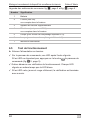
➤ Allumez l'alimentation en tension.
✓ Sur le panneau de commande, une LED après l'autre clignote.
Si les LED ne clignotent pas, appuyez sur la touche
commande (fig. 2 5, page 3).
du panneau de
✓ Gobius démarre une vérification du fonctionnement. Chaque LED
clignote en même temps que la LED bleue.
✓ Si les LED verte, jaune et rouge s'allument, la vérification est terminée
avec succès.
44
FR
Gobius 4 Waste
Montage et raccordement du dispositif de surveillance du réservoir
✓ Si la vérification n'a pas été réussie, la LED rouge, jaune ou verte clignote
avec la LED bleue. Consultez le tableau suivant pour connaître le message d'erreur exact :
LED
rouge
LED
jaune
LED
verte
LED
bleue
Signification
Phase de démarrage
Test du détecteur ¼
Test du détecteur ½
Test du détecteur ¾
Panne du détecteur
Test détecteur terminé,
détecteur ¼ sans fonction
Test détecteur terminé,
détecteur ½ sans fonction
Test détecteur terminé,
détecteur ¾ sans fonction
Test détecteur terminé,
détecteur ¼ et détecteur ½ sans
fonction
Test détecteur terminé,
détecteur ¼ et détecteur ¾ sans
fonction
Test détecteur terminé,
détecteur ½ et détecteur ¾ sans
fonction
Test détecteur terminé, tous les
détecteurs sans fonction
Légende :
Symbole
Signification
allumé en permanence
n'est pas allumé
clignote
FR
45
Montage et raccordement du dispositif de surveillance du réservoir
Gobius 4 Waste
➤ Remédiez à l'erreur en vérifiant si le détecteur concerné est correctement
collé à la paroi du réservoir ou si le capteur est endommagé. Si un détecteur est endommagé, vous n'entendez aucun bruit pendant qu'il effectue
les mesures. Si vous entendez des bruits d'un détecteur défectueux, vous
devez fixer de nouveau le détecteur à l'aide du ruban adhésif de rechange
fourni à la livraison.
I
REMARQUE
Si vous ne savez pas comment démonter le détecteur, adressezvous au point de service après-vente de votre pays (adresses au
verso).
➤ Procédez de nouveau à la vérification jusqu'à ce que les LED verte, jaune
et rouge s'allument.
6.6
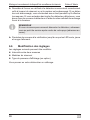
Modification des réglages
Les réglages suivants peuvent être modifiés :
z Intervalle entre deux mesures
z Matériau du réservoir
z Type du panneau d'affichage (en option)
Vous pouvez en outre déclencher un calibrage.
46
FR
Gobius 4 Waste
Montage et raccordement du dispositif de surveillance du réservoir
Procédez comme suit :
➤ Maintenez la touche
enfoncée jusqu'à ce que le réglage souhaité soit
affiché par l'allumage des LED, voir tableau :
LED
rouge
LED
jaune
LED
verte
LED
bleue
Durée
d'affichage
Signification
5 secondes
Déclenchement du
calibrage
5 secondes
Intervalle 1 minute entre les
mesures
5 secondes
Intervalle 5 minutes
(réglage d'usine)
5 secondes
Intervalle 10 minutes
5 secondes
Intervalle 10 secondes
5 secondes
Matériau du réservoir :
plastique, 5 – 12 mm
fibre de verre, 4 – 8 mm
5 secondes
Matériau du réservoir :
plastique, 2 – 5 mm
5 secondes
Matériau du réservoir :
acier inoxydable,
1 – 2 mm
5 secondes
Matériau du réservoir :
acier inoxydable /acier,
2 – 3 mm,
aluminium, 2 – 5 mm
(réglage d'usine)
5 secondes
Panneau d'affichage,
4 – 20 mA,
standard industriel
5 secondes
Panneau d'affichage,
10 – 180 ,
standard européen
(réglage d'usine)
5 secondes
Panneau d'affichage,
240 – 33 ,
standard USA
Fin
FR
47
Montage et raccordement du dispositif de surveillance du réservoir
Gobius 4 Waste
Légende :
Symbole
Signification
allumé en permanence
n'est pas allumé
➤ Relâchez la touche
.
➤ Le réglage est enregistré.
➤ Répétez la procédure pour effectuer d'autres réglages.
Si vous éteignez le dispositif de surveillance du réservoir à l'aide de la
touche , les réglages mémorisés s'affichent. Les réglages ne sont pas
affichés si vous éteignez le dispositif de surveillance du réservoir à l'aide du
commutateur externe.
6.7
I
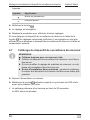
Calibrage du dispositif de surveillance du réservoir
REMARQUE
z Calibrez toujours avec un réservoir vide.
z Calibrez le dispositif de surveillance du réservoir une à deux
fois par an.
z Si vous modifiez le réglage du matériau du réservoir, un calibrage est nécessaire dans tous les cas.
z En cas d'installation dans un bateau : pendant le calibrage,
le moteur doit être éteint et le bateau doit être aussi stable que
possible.
➤ Allumez l'alimentation en tension.
➤ Maintenez la touche
enfoncée jusqu'à ce que toutes les LED s'allument, puis relâchez la touche.
✓ Le calibrage démarre et se termine au bout de 30 secondes.
La DEL bleue est allumée.
48
FR
Gobius 4 Waste
6.8
Utilisation du dispositif de surveillance du réservoir
Fin de la mise en service
➤ Remplissez le réservoir de liquide.
➤ Videz le réservoir et effectuez plusieurs mesures pendant ce temps.
➤ Vérifiez que le dispositif de surveillance du réservoir fonctionne de la
manière souhaitée.
7
Utilisation du dispositif de
surveillance du réservoir
Mise en marche du dispositif de surveillance du réservoir
Vous pouvez allumer et éteindre le dispositif de surveillance du réservoir de
deux manières :
➤ appuyez brièvement sur la touche
ou
➤ allumez l'alimentation en tension à l'aide du commutateur externe.
✓ Le dispositif de surveillance du réservoir effectue automatiquement une
vérification du fonctionnement des LED et des détecteurs.
FR
49
Gobius 4 Waste
Utilisation du dispositif de surveillance du réservoir
✓ Le niveau de remplissage actuel est indiqué à l'aide des LED :
LED
rouge
LED
jaune
LED
verte
LED
bleue
Signification
Résultats des mesures
Le réservoir est vide
Le réservoir est ¼ plein
Le réservoir est ½ plein
Le réservoir est ¾ plein
Résultat de mesure : Le réservoir
est vide
Résultat de mesure : Le réservoir
est ¼ plein
Résultat de mesure : Le réservoir
est ½ plein
Résultat de mesure : Le réservoir
est ¾ plein
Lors de la livraison, Gobius n'est
pas encore calibré
Légende :
Symbole
Signification
allumé en permanence
n'est pas allumé
clignote
I
50
REMARQUE
Pendant la procédure de mesure, un léger bourdonnement se fait
entendre pendant une seconde pour chaque détecteur.
FR
Gobius 4 Waste
Garantie
Extinction du dispositif de surveillance du réservoir
➤ Sur le panneau de commande, appuyez brièvement sur la touche
ou
➤ éteignez l'alimentation en tension à partir d'une source externe de
courant.
✓ Le dispositif de surveillance du réservoir est éteint.
I
8
REMARQUE
Les réglages sélectionnés et les résultats du calibrage restent
mémorisés même lorsque le dispositif est éteint. Même en cas
d'interruption prolongée de la tension, vous ne devez pas répéter
le calibrage pour une nouvelle procédure de mesure.
Garantie
Le délai légal de garantie s'applique. Si le produit s'avérait défectueux,
veuillez vous adresser à un de nos partenaires de service présent dans votre
pays (voir adresses au dos du présent manuel).
Nos spécialistes vous aideront avec plaisir et répondront à vos questions
concernant la suite de la procédure pour la garantie.
9
Retraitement
➤ Jetez les emballages dans les conteneurs de déchets recyclables prévus
à cet effet.
M
FR
Lorsque vous mettrez votre produit définitivement hors service,
informez-vous auprès du centre de recyclage le plus proche ou
auprès de votre revendeur spécialisé sur les prescriptions relatives
au retraitement des déchets.
51
Gobius 4 Waste
Caractéristiques techniques
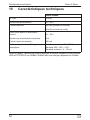
10
Caractéristiques techniques
Gobius 4 Waste
N° d'art. :
970442
Tension de raccordement :
10 – 29 V
Courant nominal :
200 mA (pendant la mesure)
40 mA (en mode de veille)
Sortie pour lampe ou avertisseur
sonore :
10 – 29 V
Tension de raccordement maximale :
29 V
Courant nominal maximal :
200 mA
Sortie pour panneau d'affichage
analogique :
Standard européen : 10 – 180 Standard USA : 240 – 33 Standard industriel : 4 – 20 mA
Gobius Sensor Technology est protégé par le brevet numéro 8,448,509 aux
USA et 0701520-9 en Suède. Gobius est une marque déposée en Suède.
52
FR
Gobius 4 Waste
Explicación de los símbolos
Lea detenidamente estas instrucciones antes de llevar a cabo la instalación y puesta en funcionamiento, y consérvelas en un lugar seguro.
En caso de vender o entregar el producto a otra persona, entregue
también estas instrucciones.
Índice
1
Explicación de los símbolos. . . . . . . . . . . . . . . . . . . . . . . . . . . . . . . 53
2
Indicaciones de seguridad . . . . . . . . . . . . . . . . . . . . . . . . . . . . . . . . 54
3
Volumen de entrega. . . . . . . . . . . . . . . . . . . . . . . . . . . . . . . . . . . . . 55
4
Uso adecuado . . . . . . . . . . . . . . . . . . . . . . . . . . . . . . . . . . . . . . . . . 55
5
Descripción técnica . . . . . . . . . . . . . . . . . . . . . . . . . . . . . . . . . . . . . 56
6
Instalación y conexión del monitor de depósitos . . . . . . . . . . . . . . . 57
7
Usar el monitor del depósito . . . . . . . . . . . . . . . . . . . . . . . . . . . . . . 65
8
Garantía legal . . . . . . . . . . . . . . . . . . . . . . . . . . . . . . . . . . . . . . . . . 66
9
Gestión de residuos . . . . . . . . . . . . . . . . . . . . . . . . . . . . . . . . . . . . . 67
10
Datos técnicos . . . . . . . . . . . . . . . . . . . . . . . . . . . . . . . . . . . . . . . . . 67
1
!
A
I
Explicación de los símbolos
¡ADVERTENCIA!
Indicación de seguridad: su incumplimiento puede acarrear la
muerte o graves lesiones.
¡AVISO!
Su incumplimiento puede acarrear daños materiales y perjudicar
el correcto funcionamiento del producto.
NOTA
Información adicional para el manejo del producto.
➤ Paso a seguir: este símbolo le indica que debe realizar un paso. Todos
los procedimientos necesarios se describen paso a paso.
✓ Este símbolo describe el resultado de un paso realizado.
ES
53
Indicaciones de seguridad
Gobius 4 Waste
Fig. 1 5, página 3: esta indicación hace referencia a un elemento de una
figura, en este ejemplo a la “Posición 5 en la figura 1 de la página 3”.
2
Indicaciones de seguridad
El fabricante declina toda responsabilidad ante daños ocurridos en los
siguientes casos:
z daños en el producto debido a influencias mecánicas y sobretensiones
z modificaciones realizadas en el producto sin el expreso consentimiento
del fabricante
z utilización del aparato para fines distintos a los descritos en las instrucciones.
2.1
Seguridad general
!
¡ADVERTENCIA!
z No ponga el aparato en funcionamiento si presenta desperfectos visibles.
z Sólo personal especializado está autorizado a realizar reparaciones en el aparato. Las reparaciones que se realicen incorrectamente pueden dar lugar a situaciones de considerable
peligro.
z Si se daña el cable de conexión del aparato, el fabricante, su
servicio de atención al cliente o una persona cualificada debe
reemplazarlo para evitar así posibles peligros.
z Al tender los cables asegúrese de que:
– no se doblen ni se retuerzan,
– no rocen con bordes,
– no se tiendan sin protección a través de guías con aristas
afiladas.
z Fije los cables de un modo seguro para evitar un enganche (peligro de caídas). Para lograr este propósito, utilice abrazaderas
para cables, cinta aislante o péguelos con pegamento.
54
ES
Gobius 4 Waste
3
Volumen de entrega
Volumen de entrega
Pos. en
fig. 1,
página 3
Cantidad
1
1
Módulo de control
2
1
Cable de conexión de un panel de indicación
analógico
3
1
Cable de conexión de 12/24 V
4
1
Cable del panel de control
5
1
Panel de control
6
3
Sensor
–
1
Paño de limpieza
–
1
Cinta adhesiva del sensor de repuesto
–
1
Cinta velcro
–
1
Instrucciones de montaje y de uso
4
Denominación
Uso adecuado
El monitor de depósitos Gobius (n.° art. 970442) supervisa el nivel de
llenado de los depósitos de aguas residuales y fecales hechos de acero
inoxidable, acero, aluminio, polietileno o fibra de vidrio.
ES
55
Descripción técnica
5
Gobius 4 Waste
Descripción técnica
El monitor de depósitos consta de tres sensores, un módulo de control y un
panel de control. El nivel de llenado se determina por medio de sensores que
se adhieren por fuera al depósito, a distintas alturas.
Cada sensor consta de un emisor de sonido y de un sensor de oscilación. El
emisor de sonido produce durante un segundo una vibración en la pared del
depósito. El sensor de oscilación mide la intensidad de la vibración. El
módulo de control calcula si hay líquido a la altura del sensor en cuestión o
no. Cuatro LED de colores situados en el panel de control indican el nivel de
llenado.
Usted puede conectar opcionalmente una lámpara adicional o un dispositivo
zumbador para avisarle de que el depósito está vacío o bien lleno al 75 %.
También puede conectar un panel de visualización paralelo al panel de
control.
5.1
Elementos de mando y de indicación
Pos. en
fig. 2,
página 3
56
Denominación
1
LED rojo
2
LED amarillo
3
LED verde
4
LED azul
5
Tecla ON/OFF
ES
Gobius 4 Waste
Instalación y conexión del monitor de depósitos
6
Instalación y conexión del monitor de
depósitos
6.1
Colocar el panel de control
I
NOTA
z Seleccione el lugar de montaje adecuado para el panel de
control, p. ej. cerca del depósito de aguas residuales en el
aseo.
z Practique un orificio, de por lo menos 4 x 22 mm, para el cable
del panel de control.
z Puede prolongar el cable del panel de control con un cable de
red para el PC estándar (CAT5) que tenga una longitud de
hasta 50 m.
➤ Conecte el panel de control al módulo de control (fig. 3, página 3) con
los conectores del cable de dicho panel.
➤ Retire cuidadosamente la lámina de protección de la cinta adhesiva del
panel de control.
➤ Coloque el panel de control en el lugar que desee.
➤ Apriete durante unos segundos el panel de control.
6.2
Colocar los sensores
Durante el montaje de los sensores, tenga en cuenta las siguientes indicaciones:
A
ES
¡AVISO!
z Los sensores son sensibles a golpes fuertes y podrían resultar
dañados si sufren golpes o se caen al suelo.
z Los sensores no son herméticos al agua.
z Para que los sensores queden bien adheridos es necesario
una temperatura superior a +20 °C (68 °F). En caso necesario, utilice una pistola de calor o un termoventilador para calentar la pared del depósito.
57
Instalación y conexión del monitor de depósitos
Gobius 4 Waste
z Coloque los sensores sobre una superficie vertical y lisa del depósito.
z Evite colocar los sensores sobre una superficie cóncava.
z Introduzca el cable hacia abajo o en posición oblicua hacia abajo (fig. 4,
página 4).
z Posicione los sensores en el depósito (fig. 4 A, página 4). Los sensores
no se deben encontrar en el centro del depósito (fig. 4 B, página 4),
pero sí se pueden encontrar en distintos lados del mismo (fig. 4 C,
página 4).
z Algunos depósitos metálicos tienen paredes intermedias interiores (paredes sonoras) para reducir el movimiento del líquido. Una costura soldada
en el exterior indica que hay una pared intermedia en el interior del depósito. Posicione los puntos centrales de los sensores guardando una distancia mínima de 7 cm (2 ¾") respecto a estas paredes intermedias.
z Posicione los puntos centrales de los sensores guardando una distancia
mínima de 7 cm (2 ¾") respecto a los bordes del depósito y a las conexiones de las tuberías (fig. 5, página 4).
z La herramienta Tank Calculator (http://www.fmmarin.se) le ayudará a determinar la altura correcta para los sensores en el caso de un depósito no
cuadrado.
Para montar los sensores, proceda de la siguiente manera:
➤ Limpie con un paño de limpieza los puntos de la pared del depósito en los
que vaya a colocar los sensores.
➤ Lije los puntos lisos de depósitos de plástico o de fibra de vidrio o que tengan una capa de pintura con papel de lija para que los sensores se adhieran mejor.
➤ Retire cuidadosamente la lámina de protección de la cinta adhesiva del
sensor.
➤ Coloque los sensores a la altura de los niveles de llenado al 25 %, al 50 %
y al 75 % del depósito (fig. 4, página 4).
➤ Apriete durante unos segundos cada sensor contra la pared del depósito.
I
58
NOTA
Deje transcurrir 15 minutos antes de tocar los sensores para que
se endurezca el pegamento.
ES
Gobius 4 Waste
6.3
Instalación y conexión del monitor de depósitos
Montar y conectar el módulo de control
I
NOTA
z Es recomendable aplicar una capa de vaselina (impide la oxidación) en los conectores conectados en el módulo de control.
z El sistema electrónico está protegido frente a humedad.
z El módulo de control no es hermético al agua.
➤ Una el cable de conexión de los sensores con las hembrillas de conexión
correspondientes del módulo de control (fig. 6 1, página 5).
➤ Conecte el panel de control con su cable correspondiente al módulo de
control (fig. 6 2, página 5).
➤ Si lo desea, puede instalar un interruptor externo para encender y apagar.
➤ Coloque la cinta adhesiva en el módulo de control.
➤ Ubique el módulo de control en un lugar adecuado.
➤ Apriete durante unos segundos el módulo de control.
➤ Conecte el módulo de control a una tensión de 12/24 V (gris: +; negro: –)
(fig. 6 3, página 5).
6.4
Conectar visualizaciones adicionales (opcional)
También se puede conectar un aparato de medición y hasta dos lámparas o
un dispositivo zumbador para indicar el nivel de llenado del depósito.
Según el panel de indicación, observe los siguientes valores y realice la
conexión conforme al esquema de conexiones correspondiente:
z Estándar industrial: 4 – 20 mA (fig. 7, página 5)
ES
Nivel de
llenado
Estándar industrial 4 – 20 mA
0
6 mA
¼
10 mA
½
14 mA
¾
18 mA
59
Gobius 4 Waste
Instalación y conexión del monitor de depósitos
z Estándar europeo 10 – 180 /estándar estadounidense: 240 – 33 (fig. 8, página 6)
Nivel de
llenado
Estándar europeo
10 – 180 Estándar estadounidense
240 – 33 0
23 214 ¼
68 161 ½
112 109 ¾
158 56 Leyenda de los esquemas de conexión fig. 7, página 5 y fig. 8, página 6:
Número
6.5
Significado
1
Batería
2
Fusible (500 mA)
no incluido en el volumen de entrega
3
Aparato de medición adicional
4
Resistencia (solo 24 V)
no incluido en el volumen de entrega
5
Lámpara (nivel de llenado superior al 75 %)
6
Lámpara (nivel de llenado inferior al 25 %)
7
Módulo de control
Comprobación del funcionamiento
➤ Conecte la alimentación de tensión.
✓ En el panel de control parpadea un LED tras otro.
Si los LED no parpadean, pulse la tecla
(fig. 2 5, página 3).
del panel de control
✓ Gobius inicia una comprobación del funcionamiento. Cada LED
parpadea simultáneamente con el LED azul.
✓ Cuando se iluminan los LED verde, amarillo y rojo, la comprobación ha
finalizado con éxito.
60
ES
Gobius 4 Waste
Instalación y conexión del monitor de depósitos
✓ Si la comprobación no ha tenido éxito, los LED rojo, amarillo o verde se
iluminan junto con el LED azul. En la siguiente tabla puede consultar el
mensaje de error en concreto:
LED
rojo
LED
amarillo
LED
verde
LED
azul
Significado
Fase de arranque
Prueba del sensor de llenado al
25 %
Prueba del sensor de llenado al
50 %
Prueba del sensor de llenado al
75 %
Fallo en el sensor
Prueba de sensores finalizada:
sensor de llenado al 25 % no
funciona.
Prueba de sensores finalizada:
sensor de llenado al 50 % no
funciona.
Prueba de sensores finalizada:
sensor de llenado al 75 % no
funciona.
Prueba de sensores finalizada:
sensores de llenado al 25 % y al
50 % no funcionan.
Prueba de sensores finalizada:
sensores de llenado al 25 % y al
75 % no funcionan.
Prueba de sensores finalizada:
sensores de llenado al 25 % y al
75 % no funcionan.
Prueba de sensores finalizada: no
funciona ningún sensor.
ES
61
Instalación y conexión del monitor de depósitos
Gobius 4 Waste
Leyenda:
Símbolo Significado
Se ilumina de forma permanente
No se ilumina
Parpadea
➤ Elimine el fallo comprobando si el sensor en cuestión está correctamente
adherido a la pared del depósito o si el sensor está dañado. Si hay un
sensor dañado, no se oirá ningún ruido mientras se produce la medición.
Si se oyen ruidos procedentes de un sensor defectuoso, deberá fijar nuevamente el sensor con la cinta adhesiva del sensor de repuesto incluida
en el volumen de entrega.
I
NOTA
Si no está seguro sobre cómo se desmonta el sensor defectuoso,
consulte con el centro de atención al cliente de su país (las direcciones se encuentran al dorso).
➤ Vuelva a realizar la prueba hasta que se iluminen los LED verde, amarillo
y rojo.
6.6
Modificar ajustes
Se pueden ajustar los siguientes ajustes:
z Intervalo entre dos mediciones
z Material del depósito
z Tipo del panel de visualización (opcional)
Si lo desea, también puede activar una calibración.
62
ES
Gobius 4 Waste
Instalación y conexión del monitor de depósitos
Proceda de la siguiente manera:
➤ Mantenga pulsada la tecla
hasta que se indique el ajuste deseado por
medio de los LED. Véase la siguiente tabla:
LED
rojo
LED
amarillo
LED
verde
LED
azul
Duración
de la
indicación
Significado
5 segundos
Activar la calibración
5 segundos
Intervalo de 1 minuto entre
las mediciones
5 segundos
Intervalo de 5 minutos
(ajuste de fábrica)
5 segundos
Intervalo de 10 minutos
5 segundos
Intervalo de 10 segundos
5 segundos
Material del depósito:
plástico, de 5 a 12 mm
fibra de vidrio, de 4 a 8 mm
5 segundos
Material del depósito:
plástico, de 2 a 5 mm
5 segundos
Material del depósito:
acero inoxidable,
de 1 a 2 mm
5 segundos
Material del depósito:
acero inoxidable / acero
de 2 a 3 mm,
aluminio, de 2 a 5 mm
(ajuste de fábrica)
5 segundos
Panel de indicación, de 4 a
20 mA
Estándar industrial
5 segundos
Panel de indicación de 10 a
180 ,
Estándar europeo
(ajuste de fábrica)
5 segundos
Panel de indicación, de 240
a 33 ,
Estándar estadounidense
Final
ES
63
Instalación y conexión del monitor de depósitos
Gobius 4 Waste
Leyenda:
Símbolo Significado
Se ilumina de forma permanente
No se ilumina
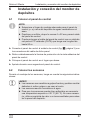
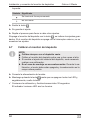
➤ Suelte la tecla
.
➤ Se guarda el ajuste.
➤ Repita el proceso para llevar a cabo otros ajustes.
Si apaga el monitor del depósito con la tecla
, se indican los ajustes guardados. Si el monitor del depósito se apaga con el interruptor externo, no se
muestran los ajustes.
6.7
I
Calibrar el monitor del depósito
NOTA
z Calibre siempre con el depósito vacío.
z Calibre el monitor del depósito entre una y dos veces al año.
z Si cambia el ajuste del material del depósito, será necesario
realizar una calibración.
z En el caso de montaje en una embarcación: Durante la calibración, el motor debe estar apagado y la embarcación en la
mayor calma posible.
➤ Conecte la alimentación de tensión.
➤ Mantenga pulsada la tecla
hasta que se apaguen todos los LED y,
seguidamente, suelte la tecla.
✓ Comienza la calibración y finaliza transcurridos 30 segundos.
El indicador luminoso LED azul se ilumina.
64
ES
Gobius 4 Waste
6.8
Usar el monitor del depósito
Finalizar el funcionamiento
➤ Llene el depósito con líquido.
➤ Vacíe el depósito y realice varias mediciones mientras se vacía.
➤ Controle si el monitor del depósito funciona como es de esperar.
7
Usar el monitor del depósito
Encender el monitor del depósito
El monitor del depósito se puede encender y apagar de dos maneras:
➤ Pulse brevemente la tecla
O bien
➤ Active la alimentación de tensión con el interruptor externo.
✓ El monitor del depósito realiza automáticamente una comprobación del
funcionamiento de los LED y los sensores.
✓ El nivel de llenado actual se indica a través de los LED:
LED
rojo
LED
amarillo
LED
verde
LED
azul
Significado
Resultados de la medición
El depósito está vacío.
El depósito está lleno a un 25 %.
El depósito está lleno a un 50 %.
El depósito está lleno a un 75 %.
Resultado de la medición: depósito
vacío
Resultado de la medición: depósito
lleno a un 25 %
Resultado de la medición: depósito
lleno a un 50 %
Resultado de la medición: depósito
lleno a un 75 %
En el estado de entrega, el Gobius
todavía no está calibrado
ES
65
Garantía legal
Gobius 4 Waste
Leyenda:
Símbolo Significado
Se ilumina de forma permanente
No se ilumina
parpadea
I
NOTA
Durante el proceso de medición suena un zumbido grave en tono
bajo que dura un segundo por sensor.
Apagar el monitor del depósito
➤ En el panel de control pulse brevemente la tecla
O bien
➤ Desactive la alimentación de tensión procedente de una fuente de
corriente externa.
✓ El monitor del depósito está apagado.
I
8
NOTA
Los ajustes seleccionados y los resultados de calibración permanecen guardados cuando el monitor está apagado. Aunque se interrumpa la tensión durante un largo periodo de tiempo, no es
necesario repetir la calibración para un nuevo proceso de medición.
Garantía legal
Rige el plazo de garantía legal. Si el producto presenta algún defecto,
diríjase a nuestro socio de servicio en su país (ver direcciones en el dorso
de este manual).
Nuestros especialistas estarán encantados de poder ayudarle y de poder
orientarle en los siguientes pasos a dar respecto a la garantía.
66
ES
Gobius 4 Waste
9
Gestión de residuos
Gestión de residuos
➤ Deseche el material de embalaje en el contenedor de reciclaje correspondiente.
M
Cuando vaya a desechar definitivamente el producto, infórmese en
el centro de reciclaje más cercano o en un comercio especializado
sobre las normas pertinentes de eliminación de materiales.
10
Datos técnicos
Gobius 4 Waste
N.° art.:
970442
Tensión de conexión:
10 – 29 V
Corriente nominal:
200 mA (durante la medición)
40 mA (en modo de standby)
Salida para lámpara o dispositivo
zumbador:
10 – 29 V
Tensión máxima de conexión:
29 V
Corriente nominal máxima:
200 mA
Salida para un panel de indicación
analógico:
Estándar europeo: 10 – 180 Estándar estadounidense: 240 – 33 Estándar industrial: 4 – 20 mA
Gobius Sensor Technology está protegido con los números de patente
8,448,509 en EE. UU. y 0701520-9 en Suecia. Gobius es una marca registrada en Suecia.
ES
67
Spiegazione dei simboli
Gobius 4 Waste
Prima di effettuare il montaggio e la messa in funzione leggere
accuratamente questo manuale di istruzioni, conservarlo e in caso di
trasmissione del prodotto, consegnarlo all'utente successivo.
Indice
1
Spiegazione dei simboli . . . . . . . . . . . . . . . . . . . . . . . . . . . . . . . . . . 68
2
Indicazioni di sicurezza . . . . . . . . . . . . . . . . . . . . . . . . . . . . . . . . . . 69
3
Dotazione. . . . . . . . . . . . . . . . . . . . . . . . . . . . . . . . . . . . . . . . . . . . . 70
4
Uso conforme alla destinazione. . . . . . . . . . . . . . . . . . . . . . . . . . . . 70
5
Descrizione tecnica . . . . . . . . . . . . . . . . . . . . . . . . . . . . . . . . . . . . . 71
6
Installazione e allacciamento del monitor per serbatoio . . . . . . . . . 72
7
Uso del monitor per serbatoio . . . . . . . . . . . . . . . . . . . . . . . . . . . . . 80
8
Garanzia . . . . . . . . . . . . . . . . . . . . . . . . . . . . . . . . . . . . . . . . . . . . . 81
9
Smaltimento . . . . . . . . . . . . . . . . . . . . . . . . . . . . . . . . . . . . . . . . . . . 82
10
Specifiche tecniche . . . . . . . . . . . . . . . . . . . . . . . . . . . . . . . . . . . . . 82
1
!
A
I
Spiegazione dei simboli
AVVERTENZA!
Avviso di sicurezza: la mancata osservanza di questo avviso
può causare ferite gravi anche mortali.
AVVISO!
La mancata osservanza di questa nota può causare danni materiali e compromettere il funzionamento del prodotto.
NOTA
Informazioni integranti relative all'impiego del prodotto.
➤ Modalità di intervento: questo simbolo indica all'utente che è necessario
un intervento. Le modalità di intervento necessarie saranno descritte
passo dopo passo.
68
IT
Gobius 4 Waste
Indicazioni di sicurezza
✓ Questo simbolo descrive il risultato di un intervento.
Fig. 1 5, pagina 3: questi dati si riferiscono ad un elemento in una figura,
in questo caso alla “posizione 5 nella figura 1 a pagina 3”.
2
Indicazioni di sicurezza
Il produttore non si assume nessuna responsabilità per danni nei seguenti
casi:
z danni al prodotto dovuti a influenze meccaniche o a sovratensioni
z modifiche al prodotto senza esplicita autorizzazione del produttore
z impiego per altri fini rispetto a quelli descritti nel manuale di istruzioni
2.1
Sicurezza generale
!
AVVERTENZA!
z Se l'apparecchio presenta danni visibili, non metterlo in funzione.
z Questo dispositivo deve essere riparato solo da personale specializzato. Le riparazioni effettuate in modo scorretto possono
causare rischi enormi.
z Se il cavo di allacciamento di questo apparecchio viene danneggiato, esso deve essere sostituito dal produttore, da parte
del suo servizio clienti, oppure da una persona sufficientemente
qualificata, al fine di evitare pericoli.
z Durante la posa dei cavi assicurarsi che essi
– non vengano torti o piegati eccessivamente,
– non sfreghino contro spigoli,
– non vengano posati in canaline con spigoli vivi senza protezione.
z Fissare i cavi in modo sicuro per evitare che si impigli (pericolo
di ribaltamento). Questa situazione si può verificare se si utilizzano fascette serracavi, nastro isolante o adesivi.
IT
69
Gobius 4 Waste
Dotazione
3
Dotazione
Pos. in
fig. 1,
pagina 3
Quantità
1
1
Modulo di controllo
2
1
Cavo di collegamento pannello di visualizzazione
analogico
3
1
Cavo di collegamento da 12/24-V
4
1
Cavo pannello di controllo
5
1
Pannello di controllo
6
3
Sensore
–
1
Panno di pulizia
–
1
Nastro adesivo per sensori di ricambio
–
1
Nastro in velcro
–
1
Istruzioni di montaggio e d’uso
4
Denominazione
Uso conforme alla destinazione
Il monitor per serbatoi Gobius (n. art. 970442) rileva il livello di riempimento di serbatoi delle acque nere e di escrementi in acciaio inox,
acciaio, alluminio, polietilene e fibra di vetro.
70
IT
Gobius 4 Waste
5
Descrizione tecnica
Descrizione tecnica
Il monitor per serbatoi è composto da tre sensori, un modulo di comando e
un pannello di controllo. Il livello di riempimento viene rilevato mediante sensori, i quali vengono attaccati dall'esterno sul serbatoio a diverse altezze.
Ogni sensore è composto da un trasmettitore acustico e da un sensore di
vibrazione. Il trasmettitore acustico genera una vibrazione di un secondo in
corrispondenza della parete del serbatoio. Il sensore di vibrazione misura
l'intensità della vibrazione. Il modulo di comando calcola se all'altezza del
corrispondente sensore vi è o meno la presenza di liquido. Quattro LED
colorati sul pannello di controllo indicano il livello di riempimento.
È possibile inoltre aggiungere rispettivamente un'ulteriore lampada oppure
un cicalino per ricevere un avvertimento nel caso di un serbatoio vuoto o
pieno per ¾.
È inoltre possibile collegare un pannello di visualizzazione parallelamente
al pannello di controllo.
5.1
Elementi di comando e indicazione
Pos. in
fig. 2,
pagina 3
IT
Denominazione
1
LED rosso
2
LED giallo
3
LED verde
4
LED blu
5
Pulsante On/Off
71
Installazione e allacciamento del monitor per serbatoio Gobius 4 Waste
6
Installazione e allacciamento del
monitor per serbatoio
6.1
Collocazione del pannello di controllo
I
NOTA
z Scegliere un luogo d’installazione opportuno per il pannello di
controllo, ad es. nel locale toilette nelle vicinanze del serbatoio
delle acque nere.
z Realizzare un'apertura per il cavo del pannello di controllo, di
dimensioni minime pari a 4 x 22 mm.
z È possibile prolungare il cavo del pannello di controllo mediante un cavo di rete per PC standard (CAT5) con una lunghezza
fino a 50 m.
➤ Collegare al modulo di comando il pannello di controllo con le spine del
cavo del pannello di controllo (fig. 3, pagina 3).
➤ Togliere con cautela la pellicola di protezione dal nastro adesivo del pannello di controllo.
➤ Incollare il pannello di controllo nella posizione desiderata.
➤ Premere con decisione il pannello di controllo per alcuni secondi.
6.2
Collocazione dei sensori
Durante il montaggio dei sensori, prestare attenzione alle seguenti indicazioni:
A
72
AVVISO!
z I sensori sono sensibili verso forti impatti e possono essere
danneggiati se soggetti a urti oppure se cadono a terra.
z I sensori non sono a tenuta stagna.
z Affinché i sensori abbiano una buona presa sono necessarie
temperature superiori a +20 °C (68 °F). Eventualmente utilizzare una soffiante ad aria calda oppure un termoventilatore
per riscaldare la parete del serbatoio.
IT
Gobius 4 Waste Installazione e allacciamento del monitor per serbatoio
z Applicare i sensori su una superficie verticale e piatta del serbatoio.
z Evitare il montaggio su superfici concave.
z Infilare i cavi verso il basso oppure inclinati verso il basso (fig. 4,
pagina 4).
z Posizionare i sensori sul serbatoio (fig. 4 A, pagina 4). I sensori non
devono trovarsi al centro del serbatoio (fig. 4 B, pagina 4). Essi possono
trovarsi anche su diversi lati del serbatoio (fig. 4 C, pagina 4).
z Alcuni serbatoi in metallo hanno internamente pareti divisorie (paratie
frangiflutti), con la funzione di ridurre il movimento del liquido. La presenza di un cordone di saldatura esterno è segno di una parete divisoria di
questo genere sul lato interno del serbatoio. Posizionare i punti centrali
dei sensori ad una distanza minima di 7 cm (2 ¾") da queste pareti divisorie.
z Posizionare i punti centrali dei sensori ad una distanza minima di 7 cm
(2 ¾") dai margini del serbatoio e dagli attacchi dei tubi (fig. 5, pagina 4).
z Il serbatoio Calculator (http://www.fmmarin.se) rappresenta un aiuto per
individuare l'altezza esatta per i sensori su un serbatoio non rettangolare.
Il montaggio dei sensori avviene come segue:
➤ Pulire la parete del serbatoio col panno di pulizia in corrispondenza dei
punti in cui desiderate applicare i sensori.
➤ Passare una carta abrasiva sui punti lisci di serbatoi di plastica o in fibra
di vetro, oppure sui serbatoi verniciati, per renderli ruvidi, affinché i sensori possano avere una presa migliore.
➤ Togliere con cautela la pellicola di protezione dal nastro adesivo del
sensore.
➤ Posizionare i sensori corrispondentemente ai livelli di riempimento ¼, ½
e ¾ del serbatoio (fig. 4, pagina 4).
➤ Premere con decisione ogni sensore sulla parete del serbatoio per alcuni
secondi.
I
IT
NOTA
Non toccare i sensori per 15 minuti, in modo che la colla si possa
indurire.
73
Installazione e allacciamento del monitor per serbatoio Gobius 4 Waste
6.3
Montaggio e collegamento del modulo di comando
I
NOTA
z Si consiglia di applicare uno strato di vaselina (impedisce l'ossidazione) sulle spine che vengono collegate al modulo di comando.
z L’elettronica è protetta contro l‘umidità.
z Il modulo di comando non è a tenuta stagna.
➤ Allacciare i cavi di collegamento alle corrispondenti prese di collegamento
del modulo di comando (fig. 6 1, pagina 5).
➤ Collegare il pannello di controllo col cavo del pannello di controllo al modulo di comando (fig. 6 2, pagina 5).
➤ Se si desidera, si può predisporre un interruttore esterno per l'accensione
e lo spegnimento.
➤ Applicare il velcro al modulo di comando.
➤ Incollare il modulo di comando in un punto adatto.
➤ Premere con decisione il modulo di comando per alcuni secondi.
➤ Collegare il modulo di comando ad una tensione da 12/24 V (grigio: +;
nero: –) (fig. 6 3, pagina 5).
6.4
Collegamento di ulteriori dispositivi di segnalazione (opzionale)
Potete collegare un ulteriore apparecchio di misurazione e fino a due
lampade o cicalini per segnalare il livello di riempimento del serbatoio.
A seconda del pannello di visualizzazione, rispettare i seguenti valori ed
effettuare il collegamento dello stesso in base al corrispondente schema
elettrico.
z Standard industriali: 4 – 20 mA (fig. 7, pagina 5)
74
Livello di
riempimento
Standard industriali 4 – 20 mA
0
6 mA
¼
10 mA
½
14 mA
¾
18 mA
IT
Gobius 4 Waste Installazione e allacciamento del monitor per serbatoio
z Standard europei: 10 – 180 /Standard USA: 240 – 33 (fig. 8,
pagina 6)
Livello di
riempimento
Standard europei
10 – 180 Standard USA 240 – 33 0
23 214 ¼
68 161 ½
112 109 ¾
158 56 Legenda per gli schemi elettrici fig. 7, pagina 5 e fig. 8, pagina 6:
Numero
6.5
Significato
1
Batteria
2
Fusibile (500 mA)
non in dotazione
3
Apparecchio di misurazione supplementare
4
Resistenza (solo 24 V)
non in dotazione
5
Lampada (sotto il livello di riempimento ¾)
6
Lampada (sotto il livello di riempimento ¼)
7
Modulo di controllo
Verifica del funzionamento
➤ Inserire l'alimentazione di tensione.
✓ Sul pannello di controllo lampeggiano un LED dopo l'altro.
Se i LED non lampeggiano, premere il pulsante
controllo (fig. 2 5, pagina 3).
sul pannello di
✓ Gobius avvia una verifica del funzionamento. Ogni LED lampeggia
contemporaneamente col LED blu.
✓ Se i LED verde, giallo e rosso lampeggiano, ciò significa che la verifica si
è conclusa con successo.
IT
75
Installazione e allacciamento del monitor per serbatoio Gobius 4 Waste
✓ Se la verifica non ha avuto successo, i LED rosso, giallo o verde si illumina insieme al LED blu. Il messaggio di errore è indicato con precisione
nella seguente tabella:
LED
rosso
LED
giallo
LED
verde
LED blu Significato
Fase di avvio
Test del sensore ¼
Test del sensore ½
Test del sensore ¾
Errore del sensore
Test del sensore concluso,
sensore ¼ non funzionante
Test del sensore concluso,
sensore ½ non funzionante
Test del sensore concluso,
sensore ¾ non funzionante
Test del sensore concluso,
sensore ¼ e sensore ½ non
funzionanti
Test del sensore concluso,
sensore ¼ e sensore ¾ non
funzionanti
Test del sensore concluso,
sensore ½ e sensore ¾ non
funzionanti
Test del sensore concluso, tutti i
sensori non funzionanti
Legenda
Simbolo Significato
lampeggia costantemente
non lampeggia
lampeggia
76
IT
Gobius 4 Waste Installazione e allacciamento del monitor per serbatoio
➤ Si commette un errore qualora si controlli se il rispettivo sensore sia attaccato correttamente o meno alla parete del serbatoio, oppure se il sensore sia danneggiato Se un sensore è danneggiato, non si avverte alcun
rumore quando esso sta effettuando la misurazione. Se si avvertono rumori provenienti da un sensore guasto, occorre fissare nuovamente il
sensore col nastro adesivo per sensori di ricambio in dotazione
I
NOTA
Se non si è sicuri su come debba essere smontato il sensore guasto, rivolgersi al centro di assistenza nel proprio Paese (i relativi
indirizzi sono riportati sul retro).
➤ Eseguire nuovamente la verifica fino a che i LED verde, giallo e rosso non
lampeggiano
6.6
Modifica delle impostazioni
È possibile adattare le seguenti impostazioni:
z Intervallo tra due misurazioni
z Materiale del serbatoio
z Tipo di pannello di visualizzazione (opzionale)
Inoltre è possibile attivare una calibratura.
IT
77
Installazione e allacciamento del monitor per serbatoio Gobius 4 Waste
Procedere quindi come segue:
➤ Mantenere premuto il pulsante
finché non viene segnalata l'impostazione desiderata attraverso il lampeggio dei LED, vedi tabella:
LED
rosso
LED
giallo
LED
verde
LED
blu
Durata della
Significato
segnalazione
5 secondi
Attivazione della calibrazione
5 secondi
Intervallo di 1 minuto tra le
misurazioni
5 secondi
Intervallo di 5 minuti
(impostazione di fabbrica)
5 secondi
Intervallo di 10 minuti
5 secondi
Intervallo di 10 minuti
5 secondi
Materiale del serbatoio:
plastica, 5 – 12 mm
fibra di vetro, 4 – 8 mm
5 secondi
Materiale del serbatoio:
plastica, 2 – 5 mm
5 secondi
Materiale del serbatoio:
acciaio inox
1–2mm
5 secondi
Materiale del serbatoio:
acciaio inox /acciaio,
2 – 3 mm,
alluminio, 2 – 5 mm
(impostazione di fabbrica)
5 secondi
pannello di visualizzazione, 4 – 20 mA,
standard industriali
5 secondi
Pannello di visualizzazione, 10 – 180 ,
standard europei
(impostazione di fabbrica)
5 secondi
Pannello di visualizzazione, 240 – 33 ,
standard USA
Fine
78
IT
Gobius 4 Waste Installazione e allacciamento del monitor per serbatoio
Legenda
Simbolo Significato
lampeggia costantemente
non lampeggia
➤ Rilasciare il pulsante
.
➤ L'impostazione viene memorizzata.
➤ Ripetere il procedimento per eseguire ulteriori impostazioni.
Se si spegne il monitor per serbatoio col pulsante , vengono visualizzate
le impostazioni memorizzate. Le impostazioni non vengono visualizzate se si
spegne il monitor con l'interruttore esterno.
6.7
I
Calibrazione del monitor per serbatoio
NOTA
z Eseguire la calibrazione sempre col serbatoio vuoto.
z Eseguire la calibrazione del monitor per serbatoio da una a
due volte l'anno.
z Se si cambia l'impostazione relativa al materiale del serbatoio
è necessaria in ogni caso una calibrazione.
z In caso di installazione in una barca: durante la calibrazione
il motore dovrebbe essere spento e la barca stare ferma il più
possibile.
➤ Attivare l'alimentazione di tensione.
➤ Mantenere il pulsante
premuto finché tutti i LED non si illuminano,
dopodiché rilasciare il pulsante.
✓ Viene avviata la calibrazione, la quale viene conclusa dopo 30 sec.
Il LED blu è acceso.
IT
79
Gobius 4 Waste
Uso del monitor per serbatoio
6.8
Conclusione della messa in funzione
➤ Riempire il serbatoio con liquido.
➤ Svuotare il serbatoio ed eseguire nel frattempo più misurazioni.
➤ Controllare se il monitor per serbatoio funziona come desiderato.
7
Uso del monitor per serbatoio
Accensione del monitor per serbatoio
È possibile accendere e spegnere il monitor per serbatoio in due modi:
➤ Premere brevemente il pulsante
oppure
➤ attivare l'alimentazione di tensione con l'interruttore esterno.
✓ Il monitor per serbatoio esegue automaticamente una verifica del funzionamento dei LED e sensori.
✓ Viene segnalato il livello di riempimento attraverso i seguenti LED:
LED
rosso
LED
giallo
LED
verde
LED blu Significato
Risultati della misurazione
Il serbatoio è vuoto
Il serbatoio è pieno per ¼
Il serbatoio è pieno per ½
Il serbatoio è pieno per ¾
Risultato della misurazione:
Il serbatoio è vuoto
Risultato della misurazione:
Il serbatoio è pieno per ¼
Risultato della misurazione:
Il serbatoio è pieno per ½
Risultato della misurazione:
Il serbatoio è pieno per ¾
Al momento della fornitura Gobius
non è ancora calibrato
80
IT
Gobius 4 Waste
Garanzia
Legenda
Simbolo Significato
lampeggia costantemente
non lampeggia
lampeggia
I
NOTA
Durante il procedimento di misurazione per ogni sensore risuona
un lieve ronzio per la durata di un secondo.
Spegnimento del monitor per serbatoio
➤ Premere brevemente il pulsante sul pannello di controllo
oppure
➤ disattivare l'alimentazione di tensione da una fonte di corrente esterna.
✓ Il monitor per serbatoio è spento.
I
8
NOTA
Le impostazioni selezionate e i risultati della calibrazione rimangono memorizzati nello stato di spento. Anche in caso di prolungata interruzione della tensione non occorre ripetere la
calibrazione per un nuovo procedimento di misurazione.
Garanzia
Vale il termine di garanzia previsto dalla legge. Qualora il prodotto risultasse
difettoso, La preghiamo di contattare il Service Partner del Suo Paese (l'indirizzo si trova sul retro del manuale).
I nostri specialisti sono sempre pronti ad aiutarvi e a concordare con Voi
l'ulteriore disbrigo delle condizioni garanzia.
IT
81
Gobius 4 Waste
Smaltimento
9
Smaltimento
➤ Raccogliere il materiale di imballaggio possibilmente negli appositi
contenitori di riciclaggio.
M
Quando il prodotto viene messo fuori servizio definitivamente,
informarsi al centro di riciclaggio più vicino, oppure presso il proprio
rivenditore specializzato, sulle prescrizioni adeguate concernenti lo
smaltimento.
10
Specifiche tecniche
Gobius 4 Waste
N. art.:
970442
Tensione di allacciamento:
10 – 29 V
Corrente nominale:
200 mA (durante la misurazione)
40 mA (in modalità standby)
Uscita per lampada o cicalino:
10 – 29 V
Tensione di allacciamento massima:
29 V
Corrente nominale massima
200 mA
Uscita per pannello di visualizzazione
analogico:
Standard europei: 10 – 180 Standard USA: 240 – 33 Standard industriali: 4 – 20 mA
Gobius Sensor Technology è tutelato dal brevetto numero 8,448,509 negli
USA e dal brevetto numero 0701520-9 in Svezia. Gobius è un marchio registrato in Svezia.
82
IT
Gobius 4 Waste
Verklaring van de symbolen
Lees deze handleiding voor de montage en de ingebruikname zorgvuldig door en bewaar hem. Geef de handleiding bij het doorgeven van
het product aan de gebruiker.
Inhoudsopgave
1
Verklaring van de symbolen. . . . . . . . . . . . . . . . . . . . . . . . . . . . . . . 83
2
Veiligheidsinstructies . . . . . . . . . . . . . . . . . . . . . . . . . . . . . . . . . . . . 84
3
Omvang van de levering . . . . . . . . . . . . . . . . . . . . . . . . . . . . . . . . . 85
4
Gebruik volgens bestemming . . . . . . . . . . . . . . . . . . . . . . . . . . . . . 85
5
Technische beschrijving. . . . . . . . . . . . . . . . . . . . . . . . . . . . . . . . . . 86
6
Tankmonitor inbouwen en aansluiten . . . . . . . . . . . . . . . . . . . . . . . 87
7
Tankmonitor gebruiken . . . . . . . . . . . . . . . . . . . . . . . . . . . . . . . . . . 95
8
Garantie . . . . . . . . . . . . . . . . . . . . . . . . . . . . . . . . . . . . . . . . . . . . . . 96
9
Afvoer. . . . . . . . . . . . . . . . . . . . . . . . . . . . . . . . . . . . . . . . . . . . . . . . 97
10
Technische gegevens . . . . . . . . . . . . . . . . . . . . . . . . . . . . . . . . . . . 97
1
!
A
I
Verklaring van de symbolen
WAARSCHUWING!
Veiligheidsaanwijzing: Het niet naleven kan leiden tot overlijden
of ernstig letsel.
LET OP!
Het niet naleven ervan kan leiden tot materiële schade en de
werking van het product beperken.
INSTRUCTIE
Aanvullende informatie voor het bedienen van het product.
➤ Handeling: dit symbool geeft aan dat u iets moet doen. De vereiste
handelingen worden stap voor stap beschreven.
✓ Dit symbool beschrijft het resultaat van een handeling.
NL
83
Veiligheidsinstructies
Gobius 4 Waste
Afb. 1 5, pagina 3: deze aanduiding wijst u op een element in een afbeelding, in dit voorbeeld op „positie 5 in afbeelding 1 op pagina 3”.
2
Veiligheidsinstructies
De fabrikant kan in de volgende gevallen niet aansprakelijk worden gesteld
voor schade:
z beschadiging van het product door mechanische invloeden en overspanningen
z veranderingen aan het product zonder uitdrukkelijke toestemming van de
fabrikant
z gebruik voor andere dan de in de handleiding beschreven toepassingen
2.1
Algemene veiligheid
!
WAARSCHUWING!
z Als het toestel zichtbaar beschadigd is, mag het niet in gebruik
worden genomen.
z Reparaties aan dit toestel mogen uitsluitend door vakmonteurs
worden uitgevoerd. Door ondeskundige reparaties kunnen grote gevaren ontstaan.
z Als de aansluitkabel van dit toestel wordt beschadigd, moet deze, om gevaren te vermijden, door de fabrikant, diens klantenservice of een gelijkwaardig gekwalificeerd persoon vervangen
worden.
z Let er bij het leggen van de kabels op dat deze
– niet te sterk worden geknikt of verdraaid,
– niet langs randen schuren,
– niet zonder bescherming door openingen met scherpe
kanten worden gelegd.
z Bevestig de kabels veilig in het voertuig om verstrikken (gevaar
om te vallen) te vermijden. Dit kan gebeuren door kabelbinders,
isolatieband of door vastplakken met lijm.
84
NL
Gobius 4 Waste
3
Omvang van de levering
Omvang van de levering
Pos. in
afb. 1,
pag. 3
4
Hoeveelheid Omschrijving
1
1
Stuurmodule
2
1
Aansluitkabel analoog weergavepaneel
3
1
12/24-V-aansluitkabel
4
1
Bedieningspaneelkabel
5
1
Bedieningspaneel
6
3
Sensor
–
1
Reinigingsdoek
–
1
Reserve-sensorplakband
–
1
Klittenband
–
1
Montage- en bedieningstoestel
Gebruik volgens bestemming
De tankmonitor Gobius (art.-nr. 970442) registreert het vulpeil van
afvoerwater- en fecaliëntank van edelstaal, staal, aluminium, polyethyleen
of glasvezel.
NL
85
Technische beschrijving
5
Gobius 4 Waste
Technische beschrijving
De tankmonitor bestaat uit drie sensoren, een stuurmodule en een bedieningspaneel. Het vulpeil wordt gemeten met sensoren die van buiten op verschillende hoogtes op de tank worden gekleefd.
Elke sensor bestaat uit een geluidszender en een trillingssensor. De geluidszender genereert gedurende een seconde een trilling aan de tankwand. De
trillingssensor meet de sterkte van de trilling. De stuurmodule berekent of
zich op de hoogte van de desbetreffende sensor vloeistof bevindt of niet. Vier
gekleurde LED's op het bedieningspaneel tonen het vulpeil.
Aanvullend kunt u een lamp of een zoemer aansluiten om te worden gewaarschuwd als de tank leeg of ¾ vol is.
Bovendien kunt u een analoog weergavepaneel parallel met de
bedieningspaneel aansluiten.
5.1
Bedienings- en indicatie-elementen
Pos. in
Omschrijving
afb. 2, pag. 3
86
1
rode LED
2
gele LED
3
groene LED
4
blauwe LED
5
toets aan / uit
NL
Gobius 4 Waste
Tankmonitor inbouwen en aansluiten
6
Tankmonitor inbouwen en aansluiten
6.1
Bedieningspaneel aanbrengen
I
INSTRUCTIE
z Kies een geschikte plaats voor het bedieningspaneel, bijvoorbeeld in de toiletruimte of bij de afvoerwatertank.
z Maak een opening voor de kabel van het bedieningspaneel,
minstens 4 x 22 mm.
z U kunt de kabel van het bedieningspaneel met een standaard
PC-netwerkkabel (CAT5) van tot 50 m lengte verlengen.
➤ Verbind het bedieningspaneel middels de stekkers van de bedieningspaneelkabel met de stuurmodule (afb. 3, pag. 3).
➤ Trek de beschermingsfolie voorzichtig van het plakband van het bedieningspaneel af.
➤ Positioneer het bedieningspaneel op de gewenste plaats.
➤ Druk het bedieningspaneel enkele seconden vast aan.
6.2
Sensoren aanbrengen
Neem bij de montage van de sensoren volgende aanwijzingen in acht:
A
LET OP!
z De sensoren zijn gevoelig voor harde stoten en kunnen worden beschadigd door stoten en door op de grond vallen.
z De sensoren zijn niet waterdicht.
z Voor een goede hechting van de sensoren moet het warmer
zijn dan +20 °C (68 °F). Gebruik eventueel en heteluchtblazer
of een verwarming om de tankwand te verwarmen.
z Breng de sensoren aan op een verticaal en glad oppervlak van de tank.
z Vermijd montage op concave oppervlakken.
z Leid de kabels omlaag of schuin omlaag (afb. 4, pag. 4).
z Plaats de sensoren op de tank (afb. 4 A, pagina 4). De sensoren moet
zich niet in het midden van de tank bevinden (afb. 4 B, pagina 4). Ze
kunnen zich zelfs aan verschillende tankzijden bevinden (afb. 4 C,
pagina 4).
NL
87
Tankmonitor inbouwen en aansluiten
Gobius 4 Waste
z Sommige metalen tanks hebben aan de binnenzijde tussenwanden
(schotten) die de beweging van de vloeistof moeten reduceren. Een lasnaad aan de buitenzijde duidt op een schot aan de binnenzijde van de
tank. Positioneer de sensormiddelpunten met een minimumafstand van
7 cm (2 ¾") tot deze tussenwanden.
z Positioneer de sensormiddelpunten met een minimumafstand van 7 cm
(2 ¾") tot de randen van de tank en de buisaansluitingen (afb. 5,
pag. 4).
z De Tank Calculator (http://www.fmmarin.se) helpt u bij het vinden van de
juiste hoogte voor de sensoren op een niet-rechthoekige tank.
Zo monteert u de sensoren:
➤ Reinig de tankwand met een reinigingsdoek op de punten waarop u de
sensoren wilt aanbrengen.
➤ Maak het gladde oppervlak van kunststof- en glasvezeltanks of gelakte
tanks met schuurpapier ruw, zodat de sensoren beter hechten.
➤ Trek de beschermingsfolie voorzichtig van het plakband van de sensor af.
➤ Positioneer de sensoren op de vulpeilwaarden ¼, ½ en ¾ van de tank
(afb. 4, pag. 4).
➤ Druk elke sensor enkele seconden vast op de tankwand.
I
INSTRUCTIE
Raak de sensoren 15 minuten niet aan zodat het hechtmiddel kan
uitharden.
6.3
Stuurmodule monteren en aansluiten
I
INSTRUCTIE
z Het is raadzaam om een laag vaseline (voorkomt oxidatie) op
de stekkers aan te brengen die op de stuurmodule worden
aangesloten.
z De elektronica is beschermd tegen vocht.
z De stuurmodule is niet waterdicht.
➤ Verbind de aansluitkabels van de sensoren met de desbetreffende aansluitbussen van de stuurmodule (afb. 6 1, pagina 5).
➤ Verbind het bedieningspaneel met de bedieningspaneelkabel op de
stuurmodule (afb. 6 2, pagina 5).
88
NL
Gobius 4 Waste
Tankmonitor inbouwen en aansluiten
➤ Indien gewenst een externe schakelaar voor het in- en uitschakelen aanbrengen.
➤ Breng het klittenband op de stuurmodule aan.
➤ Positioneer de stuurmodule op een gewenste plaats.
➤ Druk de stuurmodule enkele seconden vast aan.
➤ Sluit de stuurmodule op een spanning van 12/24 V aan (grijs: +; zwart: –)
(afb. 6 3, pagina 5).
6.4
Aanvullende weergaven aansluiten (optioneel)
U kunt een meetapparaat alsmede tot twee lampen of zoemers voor de weergave van het tankvulpeil aansluiten.
Neem afhankelijk van het weergavepaneel volgende waarden in acht en sluit
het aan de hand van volgend schakelschema aan:
z Industriestandaard: 4 – 20 mA (afb. 7, pag. 5)
Vulpeil
Industriestandaard 4 – 20 mA
0
6 mA
¼
10 mA
½
14 mA
¾
18 mA
z Europastandaard: 10 – 180 /USA-standaard: 240 – 33 (afb. 8,
pag. 6)
NL
Vulpeil
Europastandaard
10 – 180 USA-standaard 240 – 33 0
23 214 ¼
68 161 ½
112 109 ¾
158 56 89
Tankmonitor inbouwen en aansluiten
Gobius 4 Waste
Legenda bij de schakelschema's afb. 7, pag. 5 en afb. 8, pag. 6:
Nummer
6.5
Betekenis
1
Accu
2
Zekering (500 mA)
niet inbegrepen bij levering
3
Extra meettoestel
4
Weerstand (alleen 24 V)
niet inbegrepen bij levering
5
Lamp (boven vulpeil ¾)
6
Lamp (onder vulpeil ¼)
7
Stuurmodule
Functie controleren
➤ Schakel de stroomvoorziening in.
✓ Een LED na de andere op het bedieningspaneel knippert.
Indien de LED's niet knipperen, drukt u op de toets
paneel (afb. 2 5, pagina 3).
op het bedienings-
✓ Gobius start een functiecontrole. Elke LED knippert gelijktijdig met de
blauwe LED.
✓ Als de groene, gele en rode LED branden, is de controle succesvol afgesloten.
90
NL
Gobius 4 Waste
Tankmonitor inbouwen en aansluiten
✓ Indien de controle niet succesvol was, brandt de rode, gele of groene LED
samen met de blauwe LED. De exacte foutmelding staat in volgende
tabel:
rode
LED
gele
LED
groene
LED
blauwe
Betekenis
LED
Startfase
Test van de ¼-sensor
Test van de ½-sensor
Test van de ¾-sensors
Sensorfout
Sensortest afgesloten,
¼-sensor zonder functie
Sensortest afgesloten,
½-sensor zonder functie
Sensortest afgesloten,
¾-sensor zonder functie
Sensortest afgesloten,
¼-sensor en ½-sensor zonder
functie
Sensortest afgesloten,
¼-sensor en ¾-sensor zonder
functie
Sensortest afgesloten,
½-sensor en ¾-sensor zonder
functie
Sensortest afgesloten, alle
sensoren zonder functie
Legende:
Symbool
Betekenis
brandt continu
brandt niet
knippert
NL
91
Tankmonitor inbouwen en aansluiten
Gobius 4 Waste
➤ Verhelp fouten door te controleren of de desbetreffende sensor correct op
de tankwand kleeft en onbeschadigd is. Indien een sensor beschadigd is,
klinken geen geluiden tijdens de meting. Als u geluiden van een defecte
sensor hoort, moet de sensor opnieuw worden bevestigd met het reserveplakband dat wordt bijgeleverd.
I
INSTRUCTIE
Indien u onzeker bent over hoe de defecte sensor moet worden
gedemonteerd, raadpleeg dan het servicesteunpunt in uw land
(adressen aan de achterzijde).
➤ Voer de controle opnieuw uit tot de groene, gele en rode LED's branden.
6.6
Instellingen wijzigen
Volgende instellingen kunnen worden aangepast:
z Interval tussen twee metingen
z Tankmateriaal
z Soort weergavepaneel (optioneel)
Bovendien kunt u een kalibratie activeren.
92
NL
Gobius 4 Waste
Tankmonitor inbouwen en aansluiten
Ga als volgt te werk:
➤ Houd de toets
ingedrukt tot de gewenste instelling door branden van
de LED wordt weergegeven, zie tabel:
rode
LED
gele
LED
groene blauwe WeergaveLED
LED duur
Betekenis
5 seconden
Kalibratie activeren
5 seconden
Interval 1 minuut tussen
metingen
5 seconden
Interval 5 minuten
(fabrieksinstelling)
5 seconden
Interval 10 minuten
5 seconden
Interval 10 seconden
5 seconden
Tankmateriaal:
Kunststof, 5 – 12 mm
Glasvezel, 4 – 8 mm
5 seconden
Tankmateriaal:
Kunststof, 2 – 5 mm
5 seconden
Tankmateriaal:
Roestvrijstaal,
1 – 2 mm
5 seconden
Tankmateriaal:
Roestvrijstaal/staal,
2 – 3 mm,
Aluminium, 2 – 5 mm
(fabrieksinstelling)
5 seconden
Weergavepaneel,
4 – 20 mA,
Industriestandaard
5 seconden
Weergavepaneel,
10 – 180 ,
Europastandaard
(fabrieksinstelling)
5 seconden
Weergavepaneel,
240 – 33 ,
USA-standaard
Einde
NL
93
Tankmonitor inbouwen en aansluiten
Gobius 4 Waste
Legende:
Symbool
Betekenis
brandt continu
brandt niet
➤ Laat de toets
los.
➤ De instelling wordt opgeslagen.
➤ Herhaal het proces om verdere instellingen uit te voeren.
Als u de tankmonitor met de toets
uitschakelt, worden de opgeslagen instellingen weergegeven De instellingen worden niet weergegeven, als u de
tankmonitor met de externe schakelaar uitschakelt.
6.7
I
Tankmonitor kalibreren
INSTRUCTIE
z Kalibreer altijd met een lege tank.
z Kalibreer de tankmonitor een tot twee keer per jaar.
z Als u de tankmateriaalinstelling wisselt, moet u een kalibratie
uitvoeren.
z Bij inbouw in een boot: Tijdens de kalibratie moet de motor
zijn uitgeschakeld en de boot zo rustig mogelijk liggen.
➤ Schakel de stroomvoorziening in.
➤ Houd de toets
los.
ingedrukt tot alle LED's branden, en laat de toets dan
✓ De kalibratie start en is na 30 sec. afgesloten.
De blauwe LED brandt.
94
NL
Gobius 4 Waste
6.8
Tankmonitor gebruiken
Ingebruikneming afsluiten
➤ Vul de tank met vloeistof.
➤ Leeg de tank en voer ondertussen meerdere metingen uit.
➤ Controleer of de tankmonitor zoals gewenst functioneert.
7
Tankmonitor gebruiken
Tankmonitor inschakelen
U kunt de tankmonitor op twee manieren in- en uitschakelen:
➤ Druk kort op de toets
of
➤ schakel de stroomvoorziening in met de externe schakelaar.
✓ De tankmonitor voert automatisch een functiecontrole van de LED's en
sensoren uit.
✓ Het actuele vulpeil wordt aan de hand van de LED's weergegeven:
rode
LED
gele
LED
groene
LED
blauwe
Betekenis
LED
Meetresultaten
Tank is leeg.
Tank is ¼ vol
Tank is ½ vol
Tank is ¾ vol
Meetresultaat: Tank is leeg.
Meetresultaat: Tank is ¼ vol
Meetresultaat: Tank is ½ vol
Meetresultaat: Tank is ¾ vol
Bij levering is Gobius nog niet
gekalibreerd
NL
95
Gobius 4 Waste
Garantie
Legende:
Symbool
Betekenis
brandt continu
brandt niet
knippert
I
INSTRUCTIE
Tijdens de meting klinkt een zacht, brommend geluid, een
seconde per sensor.
Tankmonitor uitschakelen
➤ Druk op het bedieningspaneel kort op de toets
of
➤ schakel de stroomvoorziening van een externe stroombron uit.
✓ De tankmonitor is uitgeschakeld.
I
8
INSTRUCTIE
De geselecteerde instellingen en kalibratieresultaten blijven in uitgeschakelde toestand opgeslagen. Ook bij langere onderbreking
van de spanning moet u de kalibratie voor een nieuwe meting niet
herhalen.
Garantie
De wettelijke garantieperiode is van toepassing. Indien het product defect is,
dient u contact op te nemen met een servicepartner in uw land (zie achterzijde van de gebruiksaanwijzing voor adressen).
Onze specialisten helpen u graag verder en bespreken het verdere verloop
van de garantie met u.
96
NL
Gobius 4 Waste
9
Afvoer
Afvoer
➤ Laat het verpakkingsmateriaal indien mogelijk recyclen.
M
Als u het product definitief buiten bedrijf stelt, informeer dan bij het
dichtstbijzijnde recyclingcentrum of uw speciaalzaak naar de betreffende afvoervoorschriften.
10
Technische gegevens
Gobius 4 Waste
Art-nr.
970442
Netspanning:
10 – 29 V
Nominale stroom:
200 mA (tijdens meting)
40 mA (in stand-bymodus)
Uitgang voor lamp of zoemer:
10 – 29 V
Maximale aansluitspanning:
29 V
Maximale nominale stroom:
200 mA
Uitgang voor analoog weergavepaneel:
Europastandaard: 10 – 180 USA-standaard: 240 – 33 Industriestandaard: 4 – 20 mA
Gobius Sensor Technology is beschermd door de patentnummers 8,448,509
in de VS en 0701520-9 in Zweden. Gobius is een gedeponeerd handelsmerk
in Zweden.
NL
97
Forklaring af symbolerne
Gobius 4 Waste
Læs denne vejledning omhyggeligt igennem før installation og ibrugtagning, og opbevar den. Giv den til brugeren, hvis du giver produktet
videre.
Indholdsfortegnelse
1
Forklaring af symbolerne . . . . . . . . . . . . . . . . . . . . . . . . . . . . . . . . . 98
2
Sikkerhedshenvisninger. . . . . . . . . . . . . . . . . . . . . . . . . . . . . . . . . . 99
3
Leveringsomfang . . . . . . . . . . . . . . . . . . . . . . . . . . . . . . . . . . . . . . 100
4
Korrekt brug . . . . . . . . . . . . . . . . . . . . . . . . . . . . . . . . . . . . . . . . . . 100
5
Teknisk beskrivelse . . . . . . . . . . . . . . . . . . . . . . . . . . . . . . . . . . . . 101
6
Montering og tilslutning af tankmonitoren . . . . . . . . . . . . . . . . . . . 102
7
Anvendelse af tankmonitoren . . . . . . . . . . . . . . . . . . . . . . . . . . . . 110
8
Garanti . . . . . . . . . . . . . . . . . . . . . . . . . . . . . . . . . . . . . . . . . . . . . . 111
9
Bortskaffelse . . . . . . . . . . . . . . . . . . . . . . . . . . . . . . . . . . . . . . . . . 112
10
Tekniske data. . . . . . . . . . . . . . . . . . . . . . . . . . . . . . . . . . . . . . . . . 112
1
!
A
I
Forklaring af symbolerne
ADVARSEL!
Sikkerhedshenvisning: Manglende overholdelse kan medføre
død eller alvorlig kvæstelse.
VIGTIGT!
Manglende overholdelse kan medføre materielle skader og
begrænse produktets funktion.
BEMÆRK
Supplerende informationer om betjening af produktet.
➤ Handling: Dette symbol viser dig, at du skal gøre noget. De påkrævede
handlinger beskrives trin for trin.
✓ Dette symbol beskriver resultatet af en handling.
98
DA
Gobius 4 Waste
Sikkerhedshenvisninger
Fig. 1 5, side 3: Denne information henviser til et element på en figur, i
dette eksempel til „Position 5 på figur 1 på side 3“.
2
Sikkerhedshenvisninger
Producenten påtager sig intet ansvar for skader i følgende tilfælde:
z Beskadigelser på produktet på grund af mekanisk påvirkning og overspænding
z Ændringer på produktet uden udtrykkelig tilladelse fra producenten
z Anvendelse til andre formål end dem, der er beskrevet i vejledningen
2.1
Generel sikkerhed
!
ADVARSEL!
z Hvis apparatet har synlige beskadigelser, må du ikke tage det i
brug.
z Reparationer på dette apparat må kun foretages af fagfolk. Ved
ukorrekte reparationer kan der opstå betydelige farer.
z Hvis dette apparats tilslutningskabel beskadiges, skal det udskiftes af producenten, dennes kundeservice eller en lignende
kvalificeret person for at undgå farer.
z Når kablerne trækkes, skal det sikres, at de
– ikke knækkes eller snos kraftigt,
– ikke skurer mod kanter,
– ikke trækkes uden beskyttelse mod gennemføringer med
skarpe kanter.
z Fastgør kablerne sikkert for at undgå at hænge fast (fare for at
falde). Dette kan foretages ved at anvende kabelbindere, isoleringsbånd eller ved fastklæbning med klæbemiddel.
DA
99
Gobius 4 Waste
Leveringsomfang
3
Leveringsomfang
Pos. på
fig. 1,
side 3
Mængde
Betegnelse
1
1
Styremodul
2
1
Tilslutningskabel analogt visningspanel
3
1
12/24 V-tilslutningskabel
4
1
Betjeningspanelkabel
5
1
Betjeningspanel
6
3
Sensor
–
1
Rengøringsklud
–
1
Reserve-sensorklæbebånd
–
1
Velcrobånd
–
1
Monterings- og betjeningsvejledning
4
Korrekt brug
Tankmonitoren Gobius (art.nr. 970442) beregner niveauet for spilde-vandsog fækalietanken af rustfrit stål, stål, aluminium, polyethylen eller glasfiber.
100
DA
Gobius 4 Waste
5
Teknisk beskrivelse
Teknisk beskrivelse
Tankmonitoren består af tre sensorer, et styremodul og et betjeningspanel.
Niveauet beregnes ved hjælp af sensorer, der klæbes på tanken udefra i forskellig højde.
Hver sensor består af en lydsender og en svingningssensor. Lydsenderen
skaber en vibration på tankvæggen i et par sekunder. Svingningssensoren
måler vibrationens styrke. Styremodulet beregner, hvorvidt der befinder sig
væske på højde med den pågældende sensor. Fire farvede lysdioder på
betjeningspanelet viser niveauet.
Du kan derudover altid tilslutte en ekstra lampe eller en summer for at blive
advaret ved en tom eller ¾ fuld tank.
Du kan også tilslutte et analogt visningspanel parallelt med betjeningspanelen.
5.1
Betjenings- og visningselementer
Pos. på
Betegnelse
fig. 2, side 3
DA
1
Rød lysdiode
2
Gul lysdiode
3
Grøn lysdiode
4
Blå lysdiode
5
Tast til/fra
101
Montering og tilslutning af tankmonitoren
6
Montering og tilslutning af
tankmonitoren
6.1
Placering af betjeningspanelet
I
Gobius 4 Waste
BEMÆRK
z Vælg et egnet sted til betjeningspanelet , f.eks. i toiletrummet
i nærheden af spildevandstanken.
z Lav en åbning til betjeningspanelets kabker, min. 4 x 22 mm.
z Du kan forlænge betjeningspanelets kabel med et standardpc-netværkskabel (CAT5) på en længde op til 50 m.
➤ Forbind betjeningspanelet med styremodulet med betjeningspanelkablets stik (fig. 3, side 3).
➤ Træk forsigtigt beskyttelsesfolien af betjeningspanelets klæbebånd.
➤ Placér betjeningspanelet på det ønskede sted.
➤ Tryk betjeningspanelet fast i et par sekunder.
6.2
Placering af sensorerne
Vær opmærksom på følgende henvisninger ved montering af sensorerne:
A
VIGTIGT!
z Sensorerne er følsomme over for hårde slag og kan blive beskadiget, hvis de udsættes for stød eller falder på gulvet.
z Sensorerne er ikke vandtætte.
z For at sensorerne sidder godt fast, er temperaturer over
+20 °C (68 °F) nødvendige. Anvend evt. en varmluftsblæser
eller en varmeblæser til at opvarme tankvæggen.
z Placér sensorerne på en vertikal og glat flade på tanken.
z Undgå montering å konkave overflader.
z Før kablerne ned eller skråt ned (fig. 4, side 4).
z Placér sensorerne på tanken (fig. 4 A, side 4). Sensorerne må ikke
befinde sig i midten af tanken (fig. 4 B, side 4). De kan sågar befinde sig
på forskellige sider af tanken (fig. 4 C, side 4).
102
DA
Gobius 4 Waste
Montering og tilslutning af tankmonitoren
z Nogle metaltanke har indvendige mellemvægge (skvulpevægge), som
skal reducere væskens bevægelse. En udvendig svejsesøm henviser til
en sådan mellemvæg på tankens inderside. Placér sensormidterpunkterne med en minimumafstand på 7 cm (2 ¾") til disse mellemvægge.
z Placér sensormidterpunkterne med en minimumafstand på 7 cm (2 ¾") til
tankens kanter og til rørtilslutninger (fig. 5, side 4).
z Tank Calculator (http://www.fmmarin.se) hjælper dig til at finde den rigtige
højde til sensorerne på en tank, der ikke er firkantet.
Sådan monteres sensorerne:
➤ Rengør tankvæggen med rengøringskluden på de steder, hvor du ønsker
at placere sensorerne.
➤ Gør glatte steder på kunstof- og glasfibertanke eller malede tanke ru med
sandpapir, så sensorerne sidder bedre fast.
➤ Træk forsigtigt beskyttelsesfolien af sensorens klæbebånd.
➤ Placér sensorerne på niveauerne ¼, ½ og ¾ af tanken (fig. 4, side 4).
➤ Tryk hver sensor fast på tankvæggen i et par sekunder.
I
BEMÆRK
Rør ikke ved sensorerne i 15 minutter, så klæbestoffet kan
hærde.
6.3
Montering og tilslutning af styremodulet
I
BEMÆRK
z Det anbefales at påføre et lag vaseline (forhindrer oxidering)
på stikkene, der tilsluttes til styremodulet.
z Elektronikken er beskyttet mod fugt.
z Styremodulet er ikke vandtæt.
➤ Forbind sensorernes tilslutningskabler til de tilsvarende tilslutningsbøsninger på styremodulet (fig. 6 1, side 5).
➤ Forbind betjeningspanelet med betjeningspanelkablet på styremodulet
(fig. 6 2, side 5).
➤ Montér en ekstern kontakt til at tænde og slukke, hvis du ønsker det.
➤ Placér velcrobåndet på styremodulet.
DA
103
Gobius 4 Waste
Montering og tilslutning af tankmonitoren
➤ Placér styremodulet på et egnet sted.
➤ Tryk styremodulet fast i et par sekunder.
➤ Tilslut styremodulet til en spænding på 12/24 V (grå: +, sort: –) (fig. 6 3,
side 5).
6.4
Tilslutning af ekstra visninger (option)
Du kan også tilslutte et måleapparat og op til to lamper eller en summer til
tankniveauets visning.
Vær afhængigt af visningspanelet opmærksom på følgende værdier, og tilslut det i henhold til det tilsvarende strømskema:
z Industristandard: 4 – 20 mA (fig. 7, side 5)
Niveau
Industristandard 4 – 20 mA
0
6 mA
¼
10 mA
½
14 mA
¾
18 mA
z Europastandard: 10 – 180 /USA-standard: 240 – 33 (fig. 8, side 6)
Niveau
Europastandard 10 – 180 USA-standard 240 – 33 0
23 214 ¼
68 161 ½
112 109 ¾
158 56 104
DA
Gobius 4 Waste
Montering og tilslutning af tankmonitoren
Forklaring til strømskemaerne fig. 7, side 5 og fig. 8, side 6:
Nummer
6.5
Betydning
1
Batteri
2
Sikring (500 mA)
Ikke indeholdt i leveringsomfanget
3
Ekstra måleapparat
4
Modstand (kun 24 V)
Ikke indeholdt i leveringsomfanget
5
Lampe (over niveau ¾)
6
Lampe (under niveau ¼)
7
Styremodul
Funktionskontrol
➤ Tænd spændingsforsyningen.
✓ En lysdiode efter den anden blinker på betjeningspanelet.
Hvis lysdioderne ikke blinker, skal du trykke på tasten
panelet (fig. 2 5, side 3).
på betjenings-
✓ Gobius starter en funktionskontrol. Hver lysdiode blinker samtidigt med
den blå lysdiode.
✓ Når den grønne, gule og røde lysdidde lyser, er kontrollen afsluttet
korrekt.
DA
105
Gobius 4 Waste
Montering og tilslutning af tankmonitoren
✓ Hvis kontrollen ikke blev afsluttet korrekt, lyser den røde, gule eller grønne lysdiode sammen med den blå lysdiode. Den nøjagtige fejlmelding findes i følgende tabel:
Rød
Gul
Grøn
Blå
Betydning
lysdiode lysdiode lysdiode lysdiode
Startfase
Test af ¼-sensoren
Test af ½-sensoren
Test af ¾-sensoren
Sensorfejl
Sensortest afsluttet,
¼-sensor uden funktion
Sensortest afsluttet,
½-sensor uden funktion
Sensortest afsluttet,
¾-sensor uden funktion
Sensortest afsluttet,
¼-sensor og ½-sensor uden
funktion
Sensortest afsluttet,
¼-sensor og ¾-sensor uden
funktion
Sensortest afsluttet,
½-sensor og ¾-sensor uden
funktion
Sensortest afsluttet, alle sensorer
uden funktion
Forklaring:
Symbol
Betydning
Lyser konstant
Lyser ikke
Blinker
106
DA
Gobius 4 Waste
Montering og tilslutning af tankmonitoren
➤ Sørg for at udbedre fejlen ved at kontrollere, om den pågældende sensor
sidder korrekt på tankvæggen, eller om sensoren er beskadiget. Hvis en
sensor er beskadiget, hører du ingen lyde, når den måler. Hvis du hører
lyde fra en defekt sensor, skal du fastgøre den igen med reserve-sensorklæbebåndet, som er indeholdt i leveringsomfanget.
I
BEMÆRK
Hvis du er usikker på, hvordan den defekte sensor afmonteres,
skal du kontakte service-støttepunktet i dit land (adresser på bagsiden).
➤ Foretag kontrollen igen, indtil den grønne, gule og røde lysdiode lyser.
6.6
Ændring af indstillinger
Følgende indstillinger kan tilpasses:
z Interval mellem to målinger
z Tankmateriale
z Visningspanelets type (option)
Derudover kan du starte en kalibrering.
DA
107
Montering og tilslutning af tankmonitoren
Gobius 4 Waste
Gå frem på følgende måde:
➤ Hold tasten
trykket ind, indtil den ønskede indstilling vises ved, at lysdioderne lyser, se tabel:
Rød
lysdiode
Gul
lysdiode
Grøn
lysdiode
Blå
lysdiode
Visningsvarighed
Betydning
5 sekunder
Starting af kalibrering
5 sekunder
Interval 1 minut mellem
målinger
5 sekunder
Interval 5 minutter
(fabriksindstilling)
5 sekunder
Interval 10 minutter
5 sekunder
Interval 10 sekunder
5 sekunder
Tankmateriale:
Kunststof, 5 – 12 mm
Glasfiber, 4 – 8 mm
5 sekunder
Tankmateriale:
Kunststof, 2 – 5 mm
5 sekunder
Tankmateriale:
Rustfrit stål,
1 – 2 mm
5 sekunder
Tankmateriale:
Rustfrit stål/stål,
2 – 3 mm,
aluminium, 2 – 5 mm
(fabriksindstilling)
5 sekunder
Visningspanel, 4 – 20 mA,
industristandard
5 sekunder
Visningspanel, 10 – 180 ,
europastandard
(fabriksindstilling)
5 sekunder
Visningspanel, 240 – 33 ,
USA-standard
Afslutning
108
DA
Gobius 4 Waste
Montering og tilslutning af tankmonitoren
Forklaring:
Symbol
Betydning
Lyser konstant
Lyser ikke
➤ Slip tasten
.
➤ Indstillingen gemmes.
➤ Gentag proceduren for at foretage yderligere indstillinger.
Når du frakobler tankmonitoren med tasten , vises de gemte indstillinger.
Indstillingerne vises ikke, når du frakobler tankmonitoren med den eksterne
kontakt.
6.7
I
Kalibrering af tankmonitoren
BEMÆRK
z Kalibrér altid med tom tank.
z Kalibrér tankmonitoren en til to gange om året.
z Hvis du ændrer indstillingen af tankmaterialet, er en kalibrering
under alle omstændigheder nødvendig.
z Ved montering i en båd: Under kalibreringen bør motoren
være frakoblet båden ligge så roligt som muligt.
➤ Tænd spændingsforsyningen.
➤ Hold tasten
trykke tind, indtil alle lysdioder lyser, og slip derefter tasten.
✓ Kalibreringen starter og er afsluttet efter 30 sek.
Den blå lysdiode lyser.
DA
109
Gobius 4 Waste
Anvendelse af tankmonitoren
6.8
Afslutning af idrifttagningen
➤ Fyld tanken med væske.
➤ Tøm tanken, og foretag i mellemtiden flere målinger.
➤ Kontrollér, om tankmonitoren fungerer som ønsket.
7
Anvendelse af tankmonitoren
Tilkobling af tankmonitoren
Du kan til- og frakoble tankmonitoren på to måder:
➤ Tryk kort på tasten
eller
➤ slå spændingsforsyningen til med den eksterne kontakt.
✓ Tankmonitoren foretager automatisk en funktionskontrol af lysdioderne
og sensorerne.
✓ Det aktuelle niveau vises ved hjælp af lysdioderne:
Rød
Gul
Grøn
Blå
Betydning
lysdiode lysdiode lysdiode lysdiode
Måleresultater
Tanken er tom
Tanken er ¼ fuld
Tanken er ½ fuld
Tanken er ¾ fuld
Måleresultat: Tanken er tom
Måleresultat: Tanken er ¼ fuld
Måleresultat: Tanken er ½ fuld
Måleresultat: Tanken er ¾ fuld
Ved levering er Gobius endnu ikke
kalibreret
110
DA
Gobius 4 Waste
Garanti
Forklaring:
Symbol
Betydning
Lyser konstant
Lyser ikke
Blinker
I
BEMÆRK
Under målingen lyder der en svag, brummende lyd i et sekund for
hver sensor.
Frakobling af tankmonitoren
➤ Tryk på betjeningspanelet kort på tasten
eller
➤ frakobl spændingsforsyningen fra en ekstern strømkilde.
✓ Tankmonitoren er frakoblet.
I
8
BEMÆRK
De valgte indstillinger og kalibreringsresultater forbliver gemt i
den frakoblede tilstand. Du skal heller ikke gentage kalibreringen
for en ny måling ved længere afbrydelse af spændingen.
Garanti
Den lovbestemte garantiperiode gælder. Hvis produktet er defekt, skal du
kontakte en servicepartner i dit land (adresser, se vejledningens bagside).
Vores specialister hjælper gerne videre og diskuterer garantiens videre
forløb.
DA
111
Gobius 4 Waste
Bortskaffelse
9
Bortskaffelse
➤ Bortskaf så vidt muligt emballagen sammen med det tilsvarende
genbrugsaffald.
M
Hvis du tager produktet endegyldigt ud af drift, skal du kontakte det
nærmeste recyclingcenter eller din faghandel for at få de pågældende forskrifter om bortskaffelse.
10
Tekniske data
Gobius 4 Waste
Art.nr.:
970442
Tilslutningsspænding:
10 – 29 V
Mærkestrøm:
200 mA (under måling)
40 mA (i standby-modus)
Udgang til lampe eller summer:
10 – 29 V
Maks. tilslutningsspænding:
29 V
Maks. mærkestrøm:
200 mA
Udgang til analogt visningspanel:
Europastandard: 10 – 180 USA-standard: 240 – 33 Industristandard: 4 – 20 mA
Gobius Sensor Technology er beskyttet med patentnumrene 8,448,509 i
USA og 0701520-9 i Sverige. Gobius er et registreret varemærke i Sverige.
112
DA
Gobius 4 Septik
Förklaring av symboler
Läs igenom anvisningarna noga innan produkten monteras och
används. Spara monterings- och bruksanvisningen för senare bruk.
Överlämna bruksanvisningen till den nya ägaren vid ev. vidareförsäljning.
Innehållsförteckning
1
Förklaring av symboler. . . . . . . . . . . . . . . . . . . . . . . . . . . . . . . . . . 113
2
Säkerhetsanvisningar . . . . . . . . . . . . . . . . . . . . . . . . . . . . . . . . . . 114
3
Leveransomfattning . . . . . . . . . . . . . . . . . . . . . . . . . . . . . . . . . . . . 115
4
Ändamålsenlig användning . . . . . . . . . . . . . . . . . . . . . . . . . . . . . . 115
5
Teknisk beskrivning . . . . . . . . . . . . . . . . . . . . . . . . . . . . . . . . . . . . 115
6
Montera och ansluta tankmätaren . . . . . . . . . . . . . . . . . . . . . . . . . 116
7
Använda tankmätaren . . . . . . . . . . . . . . . . . . . . . . . . . . . . . . . . . . 124
8
Garanti . . . . . . . . . . . . . . . . . . . . . . . . . . . . . . . . . . . . . . . . . . . . . . 125
9
Avfallshantering . . . . . . . . . . . . . . . . . . . . . . . . . . . . . . . . . . . . . . . 125
10
Tekniska data. . . . . . . . . . . . . . . . . . . . . . . . . . . . . . . . . . . . . . . . . 126
1
!
A
I
Förklaring av symboler
VARNING!
Observera: Beaktas anvisningen ej kan det leda till dödsfara eller
svåra skador.
OBSERVERA!
Om anvisningarna inte beaktas kan det leda till materialskador
och produktens funktion kan påverkas negativt.
ANVISNING
Kompletterande information om användning av produkten.
➤ Arbetssteg: denna symbol står framför en arbetsinstruktion.
Tillvägagångssättet beskrivs steg för steg.
SV
113
Säkerhetsanvisningar
Gobius 4 Septik
✓ Denna symbol står framför beskrivningen av resultatet.
Bild 1 5, sidan 3: anger en detalj på en bild, i detta exempel ”position 5 på
bild 1 på sidan 3”.
2
Säkerhetsanvisningar
Tillverkaren övertar inget ansvar för skador i följande fall:
z skador på produkten, orsakade av mekanisk påverkan eller överspänning
z ändringar som utförts utan uttryckligt medgivande från tillverkaren
z ej ändamålsenlig användning
2.1
Allmän säkerhet
!
VARNING!
z Om produkten uppvisar synliga skador får den ej tas i drift.
z Reparationer på produkten får endast utföras av behörigt
fackfolk. Icke fackmässiga reparationer kan leda till att allvarliga
risker uppstår.
z Om produktens anslutningskabel skadas måste den, av säkerhetsskäl, bytas ut av tillverkaren, tillverkarens kundtjänst eller
annan behörig person.
z Observera, när kablarna dras, att
– de inte böjs eller vrids,
– de inte skaver mot kanter,
– skydd används om de dras genom genomföringar med
vassa kanter.
z Fäst kablarna säkert så att man inte kan snubbla på dem.
Använd t.ex. kabelband, isoleringsband eller lim.
114
SV
Gobius 4 Septik
3
Leveransomfattning
Leveransomfattning
Pos. på
bild 1,
sida 3
Mängd
Beteckning
1
1
Kontrollenhet
2
1
Anslutningskabel, analogt instrument
3
1
12/24 V-anslutningskabel
4
1
Kontrollpanelskabel
5
1
Kontrollpanel
6
3
Sensor
–
1
Rengöringsduk
–
1
Reservtejp för sensorer
–
1
Kardborreband
–
1
Monterings- och bruksanvisning
4
Ändamålsenlig användning
Tankmätaren Gobius (art.nr 970473) fastställer nivån i septiktankar av
rostfritt stål/stål 1-3 mm, aluminium 2-5 mm, polyetylen 2-12 mm eller
glasfiber 4-8 mm.
5
Teknisk beskrivning
Tankmätaren består av tre sensorer, en kontrollenhet och en kontrollpanel.
Nivån fastställs av sensorer som fästs på tankens utsida på olika höjder.
Varje sensor består av en shaker och en accelerometer. Shakern skapar under en sekund en vibration i tankväggen. Accelerometer mäter vibrationens
storlek. Kontrollenheten beräknar om det finns vätska i höjd med motsvarande sensor. Fyra lampor i olika färger på kontrollpanelen visar nivån.
Du kan även ansluta en lampa eller summer som varnar när tanken är tom
eller ¾-full.
Det går även att ansluta extra ett analogt instrument ensamt eller
parallellt med kontrollpanelen.
SV
115
Montera och ansluta tankmätaren
5.1
Gobius 4 Septik
Kontrollpanel
Pos. på
Beteckning
bild 2, sida 3
1
Röd lampa
2
Gul lampa
3
Grön lampa
4
Blå lampa
5
Knapp På/Av
6
Montera och ansluta tankmätaren
6.1
Montera kontrollpanel
I
ANVISNING
z Montera kontrollpanelen på en lämplig plats, t.ex. i toalettutrymmet eller nära septiktanken.
z Gör en öppning för kontrollpanelens kabel, min. 4 x 22 mm.
z Du kan förlänga kontrollpanelens kabel med en standard PCnätverkskabel, max 50 m. 10 m kabel finns även att köpa.
➤ Använd kontrollpanelskabelns kontakter och anslut kontrollpanelen till
kontrollenheten (bild 3, sida 3).
➤ Dra försiktigt av skyddsfolien från kontrollpanelens tejp.
➤ Placera kontrollpanelen på önskat ställe.
➤ Håll kontrollpanelen fasttryckt några sekunder.
116
SV
Gobius 4 Septik
6.2
Montera och ansluta tankmätaren
Montera sensorer
Beakta följande anvisningar vid montering av sensorerna:
A
OBSERVERA!
z Sensorerna är känsliga för hårda slag och riskerar att skadas
om de utsätts för stötar eller faller ner på golvet.
z Sensorerna är fuktskyddade men inte vattentäta.
z Temperaturen måste vara högre än +20 °C (68 °F) för att
sensorerna ska fästa. Använd vid behov en värmefläkt eller
värmepistol för att värma tankväggen.
z Montera sensorerna på en vertikal och slät tankyta.
z Montera inte sensorerna på konkava ytor.
z För kablarna nedåt eller snett nedåt (bild 4, sida 4).
z Placera sensorerna på tanken (bild 4 A, sida 4). Sensorerna behöver
inte monteras på mitten av tanken (bild 4 B, sida 4). Sensorerna kan till
och med sitta på olika sidor av tanken (bild 4 C, sida 4).
z Vissa metalltankar har inre mellanväggar (skiljeväggar) för att minska
vätskans rörlighet. En svetsfog på tankens utsida tyder på en sådan
mellanvägg på tankens insida. Placera sensorernas centrum minst 7 cm
(2 ¾") från dessa mellanväggar.
z Placera sensorernas centrum minst 7 cm (2 ¾") från tankens kanter och
från röranslutningarna (bild 5, sida 4).
z Tank Calculator (http://www.fmmarin.se) hjälper dig att räkna ut rätt höjd
för sensorerna på icke-rektangulära tankar.
SV
117
Montera och ansluta tankmätaren
Gobius 4 Septik
Montera sensorerna på följande sätt:
➤ Använd rengöringsduken och rengör tankväggen på de ställen där du vill
montera sensorerna.
➤ Om sensorerna ska fästas på en plast- eller glasfibertank, använd sandpapper på fästytorna för att förbättra fästförmågan.
➤ Dra försiktigt av skyddsfolien från sensorns tejp.
➤ Placera sensorerna på tankväggen på nivåerna ¼-, ½- och ¾-full
(bild 4, sida 4).
➤ Tryck fast varje sensor på tankväggen och håll den fasttryckt några
sekunder.
I
6.3
I
ANVISNING
Rör inte sensorerna under 15 minuter så att limmet kan härda.
Montera och ansluta kontrollenheten
ANVISNING
z Vi rekommenderar att du applicerar ett skikt vaselin (förhindrar
oxidering) på de kontakter som ska anslutas till kontrollenheten.
z All elektronik är fuktskyddad.
z Kontrollenheten är fuktskyddad men är inte vattentät.
➤ Anslut sensorernas anslutningskabel med kontrollenhetens motsvarande
kontaktuttag (bild 6 1, sida 5).
➤ Anslut kontrollpanelen med kontrollpanelskabeln på kontrollenheten
(bild 6 2, sida 5).
➤ Installera vid behov en extern strömbrytare för på- och avstängning.
➤ Sätt fast kardborrebandet på kontrollenheten.
➤ Placera kontrollenheten på ett lämpligt ställe.
➤ Håll kontrollenheten fasttryckt några sekunder.
➤ Anslut kontrollenheten till en spänning på 12/24 V (grå: +; svart: –)
(bild 6 3, sida 5).
118
SV
Gobius 4 Septik
6.4
Montera och ansluta tankmätaren
Ansluta ytterligare instrument (tillval)
Du kan även ansluta ett analogt instrument samt två lampor eller summer för
att visa tanknivåerna tom och 3/4-full.
Beroende på val av instrument, observera följande standarder och gör därefter anslutningen enligt motsvarande kopplingsschema:
z Industristandard: 4 – 20 mA (bild 7, sida 5)
Nivå
Industristandard 4 – 20 mA
0
6 mA
¼
10 mA
½
14 mA
¾
18 mA
z Europastandard: 10 – 180 /USA-standard: 240 – 33 (bild 8, sida 6)
Nivå
Europastandard 10 – 180 USA-standard 240 – 33 0
23 214 ¼
68 161 ½
112 109 ¾
158 56 Teckenförklaring till kopplingsscheman bild 7, sida 5 och bild 8, sida 6:
Nummer
SV
Betydelse
1
Batteri
2
Säkring (500 mA)
(ingår inte i leveransen)
3
Extra instrument
4
Motstånd (endast 24 V)
(ingår inte i leveransen)
5
Lampa (över nivå ¾)
6
Lampa (under nivå ¼)
7
Kontrollenhet
119
Gobius 4 Septik
Montera och ansluta tankmätaren
6.5
Kontrollera funktion
➤ Slå på strömtillförseln.
✓ En lampa efter den andra blinkar på kontrollpanelen.
Om lamporna inte blinkar, tryck på knappen
(bild 2 5, sida 3).
på kontrollpanelen
✓ Tankmätaren startar därefter en funktionskontroll. Varje lampa blinkar
samtidigt med den blå lampan.
✓ När den gröna, gula och röda lampan tänds är kontrollen klar.
✓ Om kontrollen misslyckades tänds den röda, gula eller gröna lampan
tillsammans med den blå lampan. Förklaring av felkoder finns i följande
tabell:
Röd
lampa
Gul
lampa
Grön
lampa
Blå
lampa
Betydelse
Startfas
Test av ¼-sensorn
Test av ½-sensorn
Test av ¾-sensorn
Sensorfel
Sensortest avslutad,
¼-sensor fungerar ej
Sensortest avslutad,
½-sensor fungerar ej
Sensortest avslutad,
¾-sensor fungerar ej
Sensortest avslutad,
¼-sensor och ½-sensor fungerar ej
Sensortest avslutad,
¼-sensor och ¾-sensor fungerar ej
Sensortest avslutad,
½-sensor och ¾-sensor fungerar ej
Sensortest avslutat, inga sensorer
fungerar
120
SV
Gobius 4 Septik
Montera och ansluta tankmätaren
Teckenförklaring:
Symbol
Betydelse
Lyser konstant
Lyser inte
Blinkar
➤ Åtgärda felet genom att kontrollera om den aktuella sensorn är ordentligt
fastsatt på tankväggen eller om sensorn är skadad. Om sensorn är skadad ger den inte ifrån sig ljud under mätning. Om du hör ljud från en defekt
sensor måste du fästa sensorn på nytt med reservtejpen (för sensorer)
som ingår i leveransen.
I
ANVISNING
Om du är osäker på hur den defekta sensorn ska demonteras,
kontakta oss (adress mm finns på baksidan).
➤ Utför kontrollen på nytt tills den gröna, gula och röda lampan tänds.
6.6
Ändra inställningar
Följande inställningar kan göras:
z Tidsintervall mellan mätningar
z Tankmaterial
z Typ av instrument (tillval)
Dessutom kan du utföra en kalibrering.
SV
121
Gobius 4 Septik
Montera och ansluta tankmätaren
Tillvägagångssätt:
➤ Håll knappen
tabellen:
Röd
lampa
Gul
lampa
intryckt tills önskad inställning visas med lamporna, se
Grön
lampa
Blå
lampa
Visningstid
Betydelse
5 sekunder Starta kalibrering
5 sekunder Intervall, 1 minut mellan
mätningar
5 sekunder Intervall, 5 minuter
(fabriksinställning)
5 sekunder Intervall, 10 minuter
5 sekunder Intervall, 10 sekunder
5 sekunder Tankmaterial:
Plast, 5 – 12 mm
Glasfiber, 4 – 8 mm
5 sekunder Tankmaterial:
Plast, 2 – 5 mm
5 sekunder Tankmaterial:
Rostfritt stål,
1–2mm
5 sekunder Tankmaterial:
Rostfritt stål/stål,
2 – 3 mm,
Aluminium, 2 – 5 mm
(fabriksinställning)
5 sekunder Instrument, 4 – 20 mA,
Industristandard
5 sekunder Instrument, 10 – 180 Europastandard
(fabriksinställning)
5 sekunder Instrument, 240 – 33 USA-standard
Slut
122
SV
Gobius 4 Septik
Montera och ansluta tankmätaren
Teckenförklaring:
Symbol
Betydelse
Lyser konstant
Lyser inte
➤ Släpp knappen
.
➤ Inställningen sparas.
➤ Upprepa processen för att göra fler inställningar.
Om du stänger av tankmätaren med knappen
visas de sparade
inställningarna på kontrollpanelen. Inställningarna visas inte om du stänger
av tankmätaren med extern strömbrytare.
6.7
I
Kalibrera tankmätaren
ANVISNING
z Kalibrera alltid med tom tank.
z Kalibrera tankmätaren en till två gånger per år.
z Om du ändrar inställningen för tankmaterial måste alltid en
kalibrering utföras efteråt.
z Vid montering i båtar: Under kalibreringen bör motorn vara
avstängd och båten ligga så stilla som möjligt.
➤ Slå på strömtillförseln.
➤ Håll in knappen
tills alla lampor tänds. Släpp sedan upp knappen.
✓ Kalibreringen startar och avslutas efter 30 sekunder.
Den blå lampan tänds.
6.8
Avsluta installationen
➤ Fyll på tanken med vätska.
➤ Töm tanken och utför flera mätningar under tömningen.
➤ Kontrollera att tankmätaren fungerar som den ska.
SV
123
Gobius 4 Septik
Använda tankmätaren
7
Använda tankmätaren
Slå på tankmätaren
Tankmätaren kan slås på två olika sätt:
➤ Tryck kort på knappen
eller
➤ slå på strömtillförseln med en extern strömbrytare.
✓ Tankmätaren utför automatisk en funktionskontroll av lamporna och
sensorerna.
✓ Den aktuella nivån visas med hjälp av lamporna:
Röd
lampa
Gul
lampa
Grön
lampa
Blå
lampa
Betydelse
Mätresultat
Tanken är tom
Tanken är ¼-full
Tanken är ½-full
Tanken är ¾-full
Mätning: Tanken är tom
Mätning: Tanken är ¼-full
Mätning: Tanken är ½-full
Mätning: Tanken är ¾-full
Vid leveransen är tankmätaren ännu
inte kalibrerad
Teckenförklaring:
Symbol
Betydelse
Lyser konstant
Lyser inte
Blinkar
124
SV
Gobius 4 Septik
I
Garanti
ANVISNING
Under mätningen hörs ett lågt, brummande ljud under en sekund
per sensor.
Stänga av tankmätaren
➤ Tryck kort på knappen
på kontrollpanelen
eller
➤ stäng av strömtillförseln från en extern strömbrytare.
✓ Tankmätaren stängs av.
I
8
ANVISNING
De valda inställningarna och kalibreringsresultaten sparas när
tankmätaren är avstängd. Även vid längre spänningsavbrott
behöver du inte upprepa kalibreringen.
Garanti
Den lagstadgade garantitiden gäller. Om produkten är defekt: kontakta
oss direkt (adress, se baksidan).
Vi står gärna till förfogande och förklarar hur garantiärenden behandlas.
9
Avfallshantering
➤ Lämna om möjligt förpackningsmaterialet till återvinning.
M
SV
När produkten slutgiltigt tas ur bruk: informera dig om
gällande bestämmelser hos närmaste återvinningscentral
eller hos återförsäljaren.
125
Gobius 4 Septik
Tekniska data
10
Tekniska data
Gobius 4 Septik
Art.nr.
970473
Anslutningsspänning:
10 – 29 V
Strömstyrka:
200 mA (under mätning)
40 mA (i Stand-By-läge)
Utgång för lampa eller summer:
10 – 29 V
Maximal anslutningsspänning:
29 V
Max. strömstyrka:
200 mA
Utgång för analogt instrument:
Europastandard: 10 – 180 USA-standard: 240 – 33 Industristandard: 4 – 20 mA
Gobius Sensor Technology skyddas av patentnummer 8,448,509 i USA, och
0701520-9 i Sverige. Gobius är ett registrerat varumärke i Sverige.
126
SV
Gobius 4 Waste
Symbolforklaringer
Les bruksanvisningen nøye før du monterer og tar apparatet i bruk, og
ta vare på den. Hvis produktet selges videre, må du sørge for å gi bruksanvisningen videre også.
Innhold
1
Symbolforklaringer . . . . . . . . . . . . . . . . . . . . . . . . . . . . . . . . . . . . . 127
2
Sikkerhetsregler . . . . . . . . . . . . . . . . . . . . . . . . . . . . . . . . . . . . . . . 128
3
Leveringsomfang . . . . . . . . . . . . . . . . . . . . . . . . . . . . . . . . . . . . . . 129
4
Tiltenkt bruk . . . . . . . . . . . . . . . . . . . . . . . . . . . . . . . . . . . . . . . . . . 129
5
Teknisk beskrivelse . . . . . . . . . . . . . . . . . . . . . . . . . . . . . . . . . . . . 130
6
Montere og koble til tankmonitor . . . . . . . . . . . . . . . . . . . . . . . . . . 131
7
Bruke tankmonitor . . . . . . . . . . . . . . . . . . . . . . . . . . . . . . . . . . . . . 139
8
Garanti . . . . . . . . . . . . . . . . . . . . . . . . . . . . . . . . . . . . . . . . . . . . . . 140
9
Deponering . . . . . . . . . . . . . . . . . . . . . . . . . . . . . . . . . . . . . . . . . . 141
10
Tekniske spesifikasjoner . . . . . . . . . . . . . . . . . . . . . . . . . . . . . . . . 141
1
!
A
I
Symbolforklaringer
ADVARSEL!
Sikkerhetsregel: Hvis man ikke overholder denne regelen, kan
det føre til død eller alvorlig skade.
PASS PÅ!
Hvis man ikke overholder denne regelen, kan det føre til materielle skader og skade funksjonen til produktet.
MERK
Utfyllende informasjon om bruk av produktet.
➤ Handling: Dette symbolet indikerer at du må gjøre noe. De nødvendige
handlingene beskrives trinnvis.
✓ Dette symbolet beskriver resultatet av en handling.
NO
127
Sikkerhetsregler
Gobius 4 Waste
Fig. 1 5, side 3: Denne angivelsen henviser til et element i en illustrasjon,
i dette eksemplet til «Posisjon 5 i illustrasjon 1 på side 3».
2
Sikkerhetsregler
Produsenten tar i følgende tilfeller intet ansvar for skader:
z skader på produktet på grunn av mekanisk påvirkning og overspenninger
z endringer på produktet uten at det er gitt uttrykkelig godkjenning av
produsenten
z Bruk til andre formål enn det som er beskrevet i veiledningen
2.1
Generell sikkerhet
!
ADVARSEL!
z Apparatet må ikke tas i bruk hvis det har synlige skader.
z Reparasjoner på dette apparatet må kun utføres av fagfolk. Feil
reparasjoner kan føre til betydelige skader.
z Hvis tilkoblingskabelen på dette apparatet blir skadet, må den
erstattes av produsent, kundeservice eller annen kvalifisert
person for å unngå farlige situasjoner.
z Ved legging av kablene må du passe på at disse
– Ikke blir knekt eller deformert,
– Ikke gnir på kanter,
– Ikke legges uten beskyttelse gjennom gjennomføringer som
har skarpe kanter.
z Fest kabelen skikkelig for å unngå at noe hektes fast i den
(snublefare). Dette kan gjøres ved å bruke kabelstrips,
isoleringstape eller fastliming.
128
NO
Gobius 4 Waste
3
Leveringsomfang
Leveringsomfang
Pos. i
fig. 1,
side 3
Antall
Betegnelse
1
1
Styremodul
2
1
Tilkoblingskabel analogt indikatorpanel
3
1
12/24 V tilkoblingskabel
4
1
Betjeningspanelkabel
5
1
Betjeningspanel
6
3
Sensor
–
1
Rengjøringsklut
–
1
Reserve-sensortape
–
1
Borrelås
–
1
Monterings- og bruksanvisning
4
Tiltenkt bruk
Tankmonitoren Gobius (art.nr. 970442) registrerer fyllenivået i avløpsvann- og septiktanken av rustfritt stål, stål, aluminium, polyetylen
eller glassfiber.
NO
129
Teknisk beskrivelse
5
Gobius 4 Waste
Teknisk beskrivelse
Tankmonitoren består av tre sensorer, en styremodul og et betjeningspanel.
Fyllenivået registreres ved hjelp av sensorer som limes utenpå tanken i forskjellig høyde.
Hver sensor består av en lydsender og en svingningssensor. Lydsenderen
genererer en vibrasjon på tankveggen i ett sekund. Svingningssensoren
måler styrken til vibrasjonen. Styremodulen beregner om det befinner seg
væske eller ikke i høyden til respektive sensor. Fire farge-lysdioder på
betjeningspanelet indikerer fyllenivået.
I tillegg kan du koble til en ekstra lampe eller en summer for å bli varslet ved
tom eller ¾ full tank.
I tillegg kan du koble et analogt indikatorpanel parallelt med betjeningspanelen.
5.1
Betjenings- og indikeringselementer
Pos. i
Betegnelse
fig. 2, side 3
130
1
Rød LED
2
Gul LED
3
Grønn LED
4
blå LED
5
På / Av-knapp
NO
Gobius 4 Waste
Montere og koble til tankmonitor
6
Montere og koble til tankmonitor
6.1
Plassere betjeningspanel
I
MERK
z Velg et egnet sted for betjeningspanelet, f.eks. på toalettet
eller i nærheten av avløpsvanntanken.
z Lag en åpning for kabelen til betjeningspanelet, min.
4 x 22 mm.
z Du kan forlenge kabelen til betjeningspanelet med en standard
PC-nettverkskabel (CAT5) på inntil 50 m.
➤ Koble betjeningspanelet til styremodulen med støpslene på betjeningspanelkabelen (fig. 3, side 3).
➤ Trekk beskyttelsesfolien forsiktig av tapen til betjeningspanelet.
➤ Plasser betjeningspanelet på ønsket sted.
➤ Trykk fast betjeningspanelet et par sekunder.
6.2
Plassere sensorene
Vær oppmerksom på følgende ved montering av sensorene:
A
PASS PÅ!
z Sensorene er følsomme overfor harde slag, og kan bli skadet
hvis de utsettes for støt eller hvis de faller på gulvet.
z Sensorene er ikke vanntette.
z For at sensorene skal feste seg godt er temperaturer over
+20 °C (68 °F) nødvendig. Bruk eventuelt en varmluftsvifte
eller en varmevifte for å varme opp tankveggen.
z Plasser sensorene på en loddrett og glatt flate på tanken.
z Unngå montering på konkave overflater.
z Før kablene nedover eller på skrå nedover (fig. 4, side 4).
z Plasser sensorene på tanken (fig. 4 A, side 4). Sensorene må ikke være
midt i tanken. (fig. 4 B, side 4). De kan til og med befinne seg på forskjellige sider av tanken (fig. 4 C, side 4).
NO
131
Montere og koble til tankmonitor
Gobius 4 Waste
z Enkelte metalltanker har mellomvegger innvendig (flomvegger) som skal
redusere væskens bevegelse. En utvendig sveisesøm tyder på at det er
en slik mellomvegg på innsiden av tanken. Plasser sentrum av sensoren
med en minimumsavstand på 7 cm (2 ¾") til disse mellomveggene.
z Plasser senter av sensorene med en minimumsavstand på 7 cm (2 ¾") til
kantene av tanken og til rørtilkobingene (fig. 5, side 4).
z Tank Calculator (http://www.fmmarin.se) hjelper deg med å finne riktig
høyde for sensorene på en tank uten rette hjørner.
Slik monterer du sensorene:
➤ Rengjør tankveggen med rengjøringskluten der hvor du vil plassere
sensorene.
➤ Gjør glatte steder på plast- eller glassfibertanker eller laminerte tanker ru
med slipepapir, slik at sensorene fester seg bedre.
➤ Trekk beskyttelsesfolien forsiktig av tapen til sensoren.
➤ Plasser sensorene på fyllenivåene ¼, ½ og ¾ til tanken (fig. 4, side 4).
➤ Trykk hver sensor fast på tankveggen i et par sekunder.
I
6.3
I
MERK
Ikke ta borti sensorene på 15 minutter, slik at limet kan herde.
Montering og tilkobling av styremodul
MERK
z Det anbefales å påføre et lag med vaselin (hindrer oksidering)
på støpslene som skal kobles til styremodulen.
z Elektronikken er beskyttet mot damp.
z Styremodulen er ikke vanntett.
➤ Koble sensorenes tilkoblingskabler til tilkoblingskontaktene på styremodulen (fig. 6 1, side 5).
➤ Koble betjeningspanelet til betjeningspanelkabelen på styremodulen
(fig. 6 2, side 5).
➤ Om ønskelig sørger du for en ekstern bryter for å slå av og på.
➤ Sett borrelåsen på styremodulen.
➤ Sett styremodulen på et egnet sted.
132
NO
Gobius 4 Waste
Montere og koble til tankmonitor
➤ Trykk fast styremodulen i et par sekunder.
➤ Koble styremodulen til en spenning på 12/24 V (grå: +; svart: –) (fig. 6 3,
side 5).
6.4
Koble til ekstra indikeringer (ekstra)
I tillegg kan du koble til en måleenhet og inntil to lamper eller summere for å
indikere tankens fyllenivå.
Følg de følgende verdiene, avhengig av indikatorpanel, og koble til ved hjelp
av respektive koblingsskjema:
z Industristandard: 4 – 20 mA (fig. 7, side 5)
Fyllenivå
Industristandard 4 – 20 mA
0
6 mA
¼
10 mA
½
14 mA
¾
18 mA
z Europastandard: 10 – 180 /USA-standard: 240 – 33 (fig. 8, side 6)
Fyllenivå
Europastandard 10 – 180 USA-standard 240 – 33 0
23 214 ¼
68 161 ½
112 109 ¾
158 56 NO
133
Montere og koble til tankmonitor
Gobius 4 Waste
Forklaring til koblingsskjemaene fig. 7, side 5 og fig. 8, side 6:
Nummer
6.5
Betydning
1
Batteri
2
Sikring (500 mA)
ikke inkludert i leveransen
3
Ekstra måleenhet
4
Motstand (kun 24 V)
ikke inkludert i leveransen
5
Lampe (over fyllenivå ¾)
6
Lampe (under fyllenivå ¼)
7
Styremodul
Kontrollere funksjonen
➤ Slå på spenningstilførselen.
✓ En lysdiode etter den andre blinker på betjeningspanelet.
Hvis lysdiodene ikke blinker, trykker du på tasten
panelet (fig. 2 5, side 3).
på betjenings-
✓ Gobius starter en funksjonskontroll. Hver lysdiode blinker samtidig med
den blå lysdioden.
✓ Når den grønne, gule og røde lysdioden lyser, er kontrollen avsluttet med
hell.
134
NO
Gobius 4 Waste
Montere og koble til tankmonitor
✓ Hvis kontrollen ikke var vellykket, lyser den røde, gule eller grønne lysdioden sammen med den blå lysdioden. Den nøyaktige feilmeldingen finner
du i den følgende tabellen:
Rød
LED
Gul
LED
Grønn
LED
Blå
LED
Betydning
Startfase
Test av ¼-sensoren
Test av ½-sensoren
Test av ¾-sensoren
Følerfeil
Sensortest avsluttet,
¼-sensor uten funksjon
Sensortest avsluttet,
½-sensor uten funksjon
Sensortest avsluttet,
¾-sensor uten funksjon
Sensortest avsluttet,
¼-sensor og ½-sensor uten funksjon
Sensortest avsluttet,
¼-sensor og ¾-sensor uten funksjon
Sensortest avsluttet,
½-sensor og ¾-sensor uten funksjon
Sensor-test avsluttet, alle sensorer
uten funksjon
Forklaring:
Symbol
Betydning
Lyser konstant
Lyser ikke
blinker
NO
135
Montere og koble til tankmonitor
Gobius 4 Waste
➤ Reparer feilen samtidig som du kontrollerer om den aktuelle sensoren er
korrekt fastlimt til tankveggen eller om sensoren er skadet. Hvis en sensor
er skadet, hører du ingen lyd når den måler. Hvis du hører lyd fra en defekt sensor, må du feste sensoren på nytt med reserve-sensortapen som
er med i leveransen.
I
MERK
Hvis du er usikker på hvordan den defekte sensoren demonteres,
kontakter du service-tjenesten i ditt land (adresser på baksiden).
➤ Gjennomfør kontrollen på nytt til den grønne, gule og røde lysdioden
lyser.
6.6
Endre innstillinger
Følgende innstillinger kan tilpasses:
z Intervall mellom to målinger
z Tankmateriale
z Type indikatorpanel (ekstra)
I tillegg kan du starte en kalibrering.
136
NO
Gobius 4 Waste
Montere og koble til tankmonitor
Gå fram på følgende måte:
➤ Hold knappen
se tabell:
Rød
LED
Gul
LED
inne til ønsket innstilling vises ved at lysdiodene lyser,
Grønn
LED
Blå
LED
Indikeringens
varighet
Betydning
5 sekunder
Starte kalibrering
5 sekunder
Intervall 1minutt mellom
målinger
5 sekunder
Intervall 5 minutter (fabrikkinnstilling)
5 sekunder
Intervall 10 minutter
5 sekunder
Intervall 10 sekunder
5 sekunder
Tankmateriale:
Plast, 5 – 12 mm
Glassfiber, 4 – 8 mm
5 sekunder
Tankmateriale:
Plast, 2 – 5 mm
5 sekunder
Tankmateriale:
Rustfritt stål,
1 – 2 mm
5 sekunder
Tankmateriale:
Rustfritt stål /stål,
2 – 3 mm,
Aluminium, 2 – 5 mm
(Fabrikkinnstilling)
5 sekunder
Indikatorpanel, 4 – 20 mA,
Industristandard
5 sekunder
Indikatorpanel, 10 – 180 ,
Europastandard
(Fabrikkinnstilling)
5 sekunder
Indikatorpanel, 240 – 33 ,
USA-standard
Slutt
NO
137
Montere og koble til tankmonitor
Gobius 4 Waste
Forklaring:
Symbol
Betydning
Lyser konstant
Lyser ikke
➤ Slipp knappen
.
➤ Innstillingen blir lagret.
➤ Gjenta prosessen for å gjøre flere innstillinger.
Når du slår av tankmonitoren med knappen , vises de lagrede innstillingene. Innstillingene vises ikke hvis du slår av tankmonitoren med den eksterne
bryteren.
6.7
I
Kalibrere tankmonitoren
MERK
z Kalibrer alltid med tom tank.
z Kalibrer tankmonitoren en til to ganger i året.
z Hvis du skifter tankematerial-innstilling, er uansett kalibrering
nødvendig.
z Ved montering i en båt: Under kalibreringen skal motoren
være slått av og båten ligge så rolig som mulig.
➤ Slå på spenningstilførselen.
➤ Hold knappen
knappen.
inne til alle lysdiodene lyser, deretter slipper du
✓ Kalibreringen starter, og avsluttes etter 30 sekunder.
Den blå varsellampen lyser.
138
NO
Gobius 4 Waste
6.8
Bruke tankmonitor
Avslutte igangsettingen
➤ Fyll tanken med væske.
➤ Tøm tanken og foreta flere målinger i mellomtiden.
➤ Kontroller om tankmonitoren fungerer slik den skal.
7
Bruke tankmonitor
Slå på tankmonitoren
Du kan slå tankmonitoren av og på på to måter:
➤ Trykk kort på knappen
eller
➤ Slå på spenningstilførselen med den eksterne bryteren.
✓ Tankmonitoren gjennomfører automatisk en funksjonskontroll av lysdiodene og sensorene.
✓ Det aktuelle fyllenivået vises ved hjelp av lysdiodene:
Rød
LED
Gul
LED
Grønn
LED
Blå
LED
Betydning
Måleresultater
Tanken er tom
Tanken er ¼ full
Tanken er ½ full
Tanken er ¾ full
Måleresultat: Tanken er tom
Måleresultat: Tanken er ¼ full
Måleresultat: Tanken er ½ full
Måleresultat: Tanken er ¾ full
Ved levering er Gobius ikke
kalibrert ennå
NO
139
Gobius 4 Waste
Garanti
Forklaring:
Symbol
Betydning
Lyser konstant
Lyser ikke
blinker
I
MERK
Under målingen høres en lav, brummende lyd, ett sekund for hver
sensor.
Slå av tankmonitoren
➤ Trykk kort på knappen på betjeninspanelet
eller
➤ Slå av spenningstilførselen fra en ekstern strømkilde.
✓ Tankmonitoren er slått av.
I
8
MERK
De valgte innstillingene og kalibreringsresultatene blir fortsatt
lagret selv om den slås av. Du behøver ikke å gjenta kalibreringen
for en ny måling selv ved lengre spenningsavbrudd.
Garanti
Lovmessig garantitid gjelder. Hvis produktet skulle være defekt, sender du
det til en servicepartner i ditt land (du finner adressene på baksiden av veiledningen).
Våre spesialister hjelper deg gjerne, og avtaler garantiens videre forløp med
deg.
140
NO
Gobius 4 Waste
9
Deponering
Deponering
➤ Lever emballasje til resirkulering så langt det er mulig.
M
Når du tar produktet ut av drift for siste gang, må du sørge for å få
informasjon om deponeringsforskrifter hos nærmeste resirkuleringsstasjon eller hos din faghandler.
10
Tekniske spesifikasjoner
Gobius 4 Waste
Art.nr.
970442
Tilkoblingsspenning:
10 – 29 V
Merkestrøm:
200 mA (under måling)
40 mA (i standby-modus)
Utgang for lampe eller summer:
10 – 29 V
Maks. tilkoblingsspenning
29 V
Maks. merkestrøm
200 mA
Utgang for analogt indikatorpanel:
Europastandard: 10 – 180 USA-standard: 240 – 33 Industristandard: 4 – 20 mA
Gobius Sensor Technology er beskyttet av patentnumrene 8,448,509 i USA
og 0701520-9 i Sverige. Gobius er et registrert varemerke i Sverige.
NO
141
Symbolien selitykset
Gobius 4 Waste
Lue tämä ohje huolellisesti läpi ennen asennusta ja käyttöönottoa ja
säilytä ohje hyvin. Jos myyt tuotteen eteenpäin, anna ohje tällöin edelleen uudelle käyttäjälle.
Sisällysluettelo
1
Symbolien selitykset . . . . . . . . . . . . . . . . . . . . . . . . . . . . . . . . . . . 142
2
Turvallisuusohjeet . . . . . . . . . . . . . . . . . . . . . . . . . . . . . . . . . . . . . 143
3
Toimituskokonaisuus . . . . . . . . . . . . . . . . . . . . . . . . . . . . . . . . . . . 144
4
Määräysten mukainen käyttö . . . . . . . . . . . . . . . . . . . . . . . . . . . . . 144
5
Tekninen kuvaus . . . . . . . . . . . . . . . . . . . . . . . . . . . . . . . . . . . . . . 144
6
Säiliömonitorin asentaminen ja liittäminen. . . . . . . . . . . . . . . . . . . 145
7
Säiliömonitorin käyttäminen . . . . . . . . . . . . . . . . . . . . . . . . . . . . . . 153
8
Tuotevastuu . . . . . . . . . . . . . . . . . . . . . . . . . . . . . . . . . . . . . . . . . . 154
9
Hävittäminen . . . . . . . . . . . . . . . . . . . . . . . . . . . . . . . . . . . . . . . . . 155
10
Tekniset tiedot . . . . . . . . . . . . . . . . . . . . . . . . . . . . . . . . . . . . . . . . 155
1
!
A
I
Symbolien selitykset
VAROITUS!
Turvallisuusohje: Huomiotta jättäminen voi aiheuttaa hengenvaaran tai vakavan loukkaantumisen.
HUOMAUTUS!
Huomiotta jättäminen voi johtaa materiaalivaurioihin ja haitata
tuotteen toimintaa.
OHJE
Tuotteen käyttöä koskevia lisätietoja.
➤ Menettely: Tämä symboli ilmaisee, että sinun tulee tehdä jotakin. Tarvittava menettely kuvataan askel askeleelta.
✓ Tämä symboli kuvailee menettelyn tuloksen.
142
FI
Gobius 4 Waste
Turvallisuusohjeet
Kuva 1 5, sivulla 3: Tämä tieto viittaa kuvassa olevaan elementtiin, tässä
esimerkissä ”kohteeseen 5 kuvassa 1, sivulla 3”.
2
Turvallisuusohjeet
Valmistaja ei ota mitään vastuuta vahingoista seuraavissa tapauksissa:
z tuotteeseen mekaanisen vaikutuksen tai ylijännitteiden takia syntyneet
vauriot
z tuotteeseen ilman valmistajan nimenomaista lupaa tehdyt muutokset
z käyttö muuhun kuin käyttöohjeessa ilmoitettuun tarkoitukseen
2.1
Yleinen turvallisuus
!
VAROITUS!
z Laitetta ei saa ottaa käyttöön, jos siinä on näkyviä vaurioita.
z Ainoastaan ammattilaiset saavat korjata tätä laitetta. Epäasianmukaisista korjauksista saattaa aiheutua huomattavia vaaroja.
z Jos tämän laitteen liitäntäjohto vaurioituu, tulee valmistajan tai
valtuutetun asiakaspalvelun tai vastaavasti pätevän henkilön
vaihtaa se vaaran välttämiseksi.
z Huolehdi ennen johtojen vetämistä siitä, että ne
– eivät ole voimakkaasti taitteella tai kierteellä,
– eivät hankaa reunoihin,
– eivät kulje suojaamattomina teräväreunaisista rei'istä.
z Kiinnitä johdot turvallisesti, jotta niihin ei voi tarttua kiinni (kaatumisvaara). Tähän tarkoitukseen voi käyttää nippusiteitä, eristysnauhaa tai liimaa.
FI
143
Gobius 4 Waste
Toimituskokonaisuus
3
Toimituskokonaisuus
Kohta –
kuva 1,
sivulla 3
Määrä
1
1
Ohjausmoduuli
2
1
Liitäntäjohto analoginen näyttöpaneeli
3
1
12/24-V:n liitäntäjohto
4
1
Käyttöpaneelin johto
5
1
Käyttöpaneeli
6
3
Anturi
–
1
Puhdistusliina
–
1
Vara-anturiteippi
–
1
Tarranauha
–
1
Asennus- ja käyttöohje
4
Nimitys
Määräysten mukainen käyttö
Säiliömonitorilla Gobius (tuotenro 970442) voit seurata ruostumatto-masta
teräksestä, teräksestä, alumiinista, polyetyleenistä tai lasikuidusta
valmistetun jätevesi- ja septitankin täyttötasoa.
5
Tekninen kuvaus
Säiliömonitoriin kuuluu kolme anturia, ohjausmoduuli ja käyttöpaneeli.
Täyttötaso saadaan säiliön ulkopuolelle eri tasoille kiinnitettävien antureiden
avulla.
Jokaisessa anturissa on äänilähetin ja liikeanturi. Äänilähetin luo säiliön
seinään värinän sekunnin ajaksi. Liikeanturi mittaa värinän voimakkuuden.
Ohjausmoduuli laskee, onko vastaavan anturin kohdalla nestettä vai ei.
Käyttöpaneelin nelivärinen LED ilmaisee täyttötason.
Lisäksi voit liittää lampun tai summerin, joka ilmaisee tyhjän tai ¾-täyden
säiliön.
Lisäksi voit liittää analogisen näyttöpaneelin rinnakkain käyttöpaneeli.
144
FI
Gobius 4 Waste
5.1
Säiliömonitorin asentaminen ja liittäminen
Käyttö- ja näyttölaitteet
Kohta –
kuva 2,
sivulla 3
Nimitys
1
Punainen LED
2
Keltainen LED
3
Vihreä LED
4
Sininen LED
5
Painike on/off
6
Säiliömonitorin asentaminen ja
liittäminen
6.1
Käyttöpaneelin asentaminen
I
OHJE
z Valitse käyttöpaneelille sopiva asennuspaikka, esim. wc-tiloista jätevesisäiliön läheltä.
z Valmista aukko käyttöpaneelin johdolle, vähintään 4 x 22 mm.
z Voit pidentää käyttöpaneelin johtoa vakio-PC-verkkojohdolla
(CAT5) jopa 50-metriseksi.
➤ Yhdistä käyttöpaneeli käyttöpaneelin johdon pistokkeilla ohjausmoduuliin
(kuva 3, sivulla 3).
➤ Vedä käyttöpaneelin teipin suojakalvo varovasti pois.
➤ Aseta käyttöpaneeli haluamaasi paikkaan.
➤ Paina käyttöpaneelia muutaman sekunnin ajan tiukasti.
FI
145
Säiliömonitorin asentaminen ja liittäminen
6.2
Gobius 4 Waste
Antureiden asentaminen
Noudata antureita asentaessasi seuraavia ohjeita:
A
HUOMAUTUS!
z Anturit ovat herkkiä ja ne voivat vaurioitua, jos niihin osuu törmäys tai jos ne putoavat lattialle.
z Anturit eivät ole vesitiiviitä.
z Antureiden pitävyys vaatii yli +20 °C:een lämpötilan. Käytä tarvittaessa kuumailmapuhallinta tai lämpötuuletinta säiliön seinän lämmittämiseen.
z Asenna anturit säiliön pystysuoralle ja tasaiselle pinnalle.
z Vältä asennusta koveralle pinnalle.
z Ohjaa johto alaspäin tai vinosti alaspäin (kuva 4, sivulla 4).
z Sijoita anturit säiliölle (kuva 4 A, sivulla 4). Anturit eivät saa olla säiliön
keskellä (kuva 4 B, sivulla 4). Ne voivat olla jopa säiliön eri puolilla
(kuva 4 C, sivulla 4).
z Joissain metallisäiliöissä on sisällä väliseinät (roiskeseinät), joiden tarkoitus on vähentää nesteen liikkumista. Ulkoinen hitsaussauma merkitsee
tällaista väliseinää säiliön sisällä. Sijoita antureiden keskipiste vähintään
7 cm (2 ¾") päähän näistä väliseinistä.
z Sijoita antureiden keskipiste vähintään 7 cm (2 ¾") päähän säiliön reunoista ja putkiliitoksista (kuva 5, sivulla 4).
z Tank Calculator (http://www.fmmarin.se) auttaa löytämään antureiden
oikean korkeuden, jos kyseessä ei ole suorakulmainen säiliö.
146
FI
Gobius 4 Waste
Säiliömonitorin asentaminen ja liittäminen
Asenna anturit:
➤ Puhdista säiliön seinä puhdistusliinalla niistä kohdista, joihin haluat anturit
asentaa.
➤ Karhenna muovi- ja lasikuitusäiliön tai maalatun tasaiset pinnat hiomapaperilla, niin anturit pysyvät paremmin.
➤ Vedä anturin teipin suojakalvo varovasti pois.
➤ Sijoita anturit säiliön täyttötasoihin ¼, ½ ja ¾ (kuva 4, sivulla 4).
➤ Paina jokaista anturia muutaman sekunnin ajan tiukasti säiliön seinämiin.
I
OHJE
Älä kosketa antureihin 15 minuuttiin, niin liima saa kovettua rauhassa.
6.3
Ohjausmoduulin asennus ja liittäminen
I
OHJE
z Suosittelemme, että laitat ohjausmoduuliin liitettävälle pistokkeelle hieman vaseliinia (estää hapettumisen).
z Elektroniikka on suojattu kosteudelta.
z Ohjausmoduuli ei ole vesitiivis.
➤ Liitä antureiden liitäntäjohto ohjausmoduulin vastaaviin liittimiin
(kuva 6 1, sivulla 5).
➤ Yhdistä käyttöpaneeli ohjausmoduulin käyttöpaneelin johtoon
(kuva 6 2, sivulla 5).
➤ Tarvittaessa voit ottaa käyttöön myös erillisen kytkimen päälle- ja poiskytkemiseen.
➤ Asenna ohjausmoduulin tarranauha.
➤ Sijoita ohjauspaneeli haluamaasi paikkaan.
➤ Paina ohjausmoduulia muutaman sekunnin ajan tiukasti.
➤ Liitä ohjausmoduuli 12/24 V :n jännitteeseen (harmaa: +; musta: –)
(kuva 6 3, sivulla 5).
FI
147
Gobius 4 Waste
Säiliömonitorin asentaminen ja liittäminen
6.4
Lisänäytön asentaminen (optio)
Voit liittää säiliön täyttötason näyttöön myös mittauslaitteen sekä yksi tai kaksi lamppua tai äänimerkin.
Huomioi seuraavat arvot näyttöpaneelin mukaan ja liitä se kytkentäkaavion
mukaisesti:
z Teollisuusstandardi: 4 – 20 mA (kuva 7, sivulla 5)
Täyttötaso
Teollisuusstandardi 4 – 20 mA
0
6 mA
¼
10 mA
½
14 mA
¾
18 mA
z Euroopan standardi: 10 – 180 /USA-standardi: 240 – 33 (kuva 8,
sivulla 6)
Täyttötaso
Euroopan standardi
10 – 180 USA-standardi 240 – 33 0
23 214 ¼
68 161 ½
112 109 ¾
158 56 Kytkentäkaavion selitykset kuva 7, sivulla 5 ja kuva 8, sivulla 6:
Numero
148
Merkitys
1
Akku
2
Sulake (500 mA)
ei mukana toimituksessa
3
Lisämittauslaite
4
Vastus (vain 24 V)
ei mukana toimituksessa
5
Lamppu (yli täyttötason ¾)
6
Lamppu (alle täyttötason ¼)
7
Ohjausmoduuli
FI
Gobius 4 Waste
6.5
Säiliömonitorin asentaminen ja liittäminen
Toiminnon tarkastaminen
➤ Kytke jännitteensyöttö päälle.
✓ Käyttöpaneelin LEDit vilkkuvat vuorotellen.
Jos LEDit eivät vilku, paina painiketta
sivulla 3).
käyttöpaneelilla (kuva 2 5,
✓ Gobius käynnistää toiminnontarkastuksen. Jokainen LED vilkkuu
samaan aikaan sinisen LEDin kanssa.
✓ Kun vihreä, keltainen ja punainen LED vilkkuvat, on tarkastus onnistunut.
✓ Jos tarkastus ei onnistunut, palaa punainen, keltainen tai vihreä LED
yhdessä sinisen LEDin kanssa. Tarkan virheilmoituksen saat seuraavasta taulukosta:
Punainen
LED
Keltainen
LED
Vihreä
LED
Sininen
Merkitys
LED
Käynnistysvaihe
¼-anturin testaus
½-anturin testaus
¾-anturin testaus
anturivirhe
Anturitestaus päättynyt,
¼-anturi ilman toimintoa
Anturitestaus päättynyt,
½-anturi ilman toimintoa
Anturitestaus päättynyt,
¾-anturi ilman toimintoa
Anturitestaus päättynyt,
¼-anturi ja ½-anturi ilman toimintoa
Anturitestaus päättynyt,
¼-anturi ja ¾-anturi ilman toimintoa
Anturitestaus päättynyt,
½-anturi ja ¾-anturi ilman toimintoa
Anturitestaus päättynyt, kaikki
anturit ilman toimintoa
FI
149
Säiliömonitorin asentaminen ja liittäminen
Gobius 4 Waste
Selitys:
Symboli Merkitys
loistaa jatkuvasti
ei loista
vilkkuu
➤ Poista virhe tarkastamalla onko kyseinen anturi kunnolla kiinni säiliön seinässä tai onko anturi vauroitunut. Jos anturi on vauroitunut, et kuule ääntä
sen mitatessa. Jos kuulet ääniä vaurioituneesta anturista, kiinnitä anturi
uudelleen vara-anturiteipillä, joka löytyy toimituskokonaisuudesta.
I
OHJE
Jos et ole varma, että osaat irrottaa viallisen anturin oikein, käänny oman maasi huoltopisteen puoleen (osoitteet takasivulla).
➤ Suorita tarkastus uudelleen, kunnes vihreä, keltainen ja punainen LED
palavat.
6.6
Muuta säätöjä
Voit sovittaa seuraavat asetukset:
z Kahden mittauksen väli
z Säiliömateriaali
z Näyttöpaneelin tyyli (optio)
Sen lisäksi voit käynnistää kalibroinnin.
150
FI
Gobius 4 Waste
Säiliömonitorin asentaminen ja liittäminen
Menettele seuraavasti:
➤ Pidä painiketta
painettuna, kunnes LEDien valot näyttävät haluamasi
asetuksen, katso taulukko:
Punainen
LED
Keltainen
LED
Vihreä
LED
Sininen
LED
Näytön
kesto
Merkitys
5 sekuntia
Kalibroinnin käynnistäminen
5 sekuntia
Väli 1 minuutti mittausten
välillä
5 sekuntia
Väli 5 minuuttia (tehdasasetus)
5 sekuntia
Väli 10 minuuttia
5 sekuntia
Väli 10 sekuntia
5 sekuntia
Säiliön materiaali:
Muovi, 5 – 12 mm
Lasikuitu, 4 – 8 mm
5 sekuntia
Säiliön materiaali:
Muovi, 2 – 5 mm
5 sekuntia
Säiliön materiaali:
Ruostumaton teräs,
1 – 2 mm
5 sekuntia
Säiliön materiaali:
Ruostumaton teräs / teräs
2 – 3 mm
Alumiini, 2 – 5 mm
(Tehdasasetus)
5 sekuntia
Näyttöpaneeli, 4 – 20 mA
Teollisuusstandardi
5 sekuntia
Näyttöpaneeli, 10 – 180 ,
Euroopan standardi
(Tehdasasetus)
5 sekuntia
Näyttöpaneeli, 240 – 33 ,
USA-standardi
Loppu
FI
151
Säiliömonitorin asentaminen ja liittäminen
Gobius 4 Waste
Selitys:
Symboli Merkitys
loistaa jatkuvasti
ei loista
➤ Vapauta painike
.
➤ Säätö tallennetaan.
➤ Toista toiminnot, jos haluat tehdä lisäasetuksia.
Kun kytket säiliömonitorin pois painikkeella , tulevat tallennetut asetukset
näkyviin. Asetuksia ei näytetä, jos kytket säiliömonitorin pois erillisellä kytkimellä.
6.7
I
Säiliömonitorin kalibrointi
OHJE
z Kalibrointi aina tyhjällä säiliöllä.
z Kalibroi säiliömonitori kerran tai kaksi vuodessa.
z Jos vaihdat säiliön materiaalia, on kalibrointi aina tarpeen.
z Asennettaessa veneeseen: Kalibroinnin aikana moottorin tulee olla sammutettu ja veneen mahdollisimman rauhallisessa
paikassa.
➤ Kytke jännitteensyöttö päälle.
➤ Pidä painiketta
ten painike.
painettuna, kunnes kaikki LEDit loistavat, vapauta sit-
✓ Kalibrointi käynnistyy ja päättyy 30 sekunnin kuluttua.
Sininen LED loistaa.
152
FI
Gobius 4 Waste
6.8
Säiliömonitorin käyttäminen
Käyttöönoton päättäminen
➤ Täytä säiliö nesteellä.
➤ Tyhjennä säiliö ja suorita sen aikana useita mittauksia.
➤ Tarkasta, että säiliömonitori toimii haluamallasi tavalla.
7
Säiliömonitorin käyttäminen
Säiliömonitorin kytkeminen päälle
Voit kytketä säiliömonitorin päälle ja pois kahdella tavalla:
➤ Paina lyhyesti painiketta
tai
➤ kytke jännitteensyöttö päälle erillisellä kytkimellä.
✓ Säiliömonitori suorittaa automaattisesti LEDien ja antureiden toiminnontarkastuksen.
✓ Tämänhetkinen täyttötaso ilmaistaan LEDeillä:
Punainen
LED
Keltainen
LED
Vihreä
LED
Sininen
Merkitys
LED
Mittaustulokset
Säiliö on tyhjä
Säiliö on ¼ täynnä
Säiliö on ½ täynnä
Säiliö on ¾ täynnä
Mittaustulos: Säiliö on tyhjä
Mittaustulos: Säiliö on ¼ täynnä
Mittaustulos: Säiliö on ½ täynnä
Mittaustulos: Säiliö on ¾ täynnä
Gobius toimitetaan kalibroimattomana
FI
153
Gobius 4 Waste
Tuotevastuu
Selitys:
Symboli Merkitys
loistaa jatkuvasti
ei loista
vilkkuu
I
OHJE
Mittauksen aikana kuulet hiljaisen, surisevan äänen, sekunti
jokaista anturia kohden.
Säiliömonitorin kytkeminen pois
➤ Paina lyhyesti käyttöpaneelin painiketta
tai
➤ kytke jännitteensyöttö pois erillisestä virtalähteestä.
✓ Säiliömonitori on kytketty pois päältä.
I
8
OHJE
Valitut asetukset ja kalibrointitulokset pysyvät tallennettuna poiskytketyssä tilassa. Vaikka jännite olisi katkaistu pidemmäksi aikaa, ei kalibrointia tarvitse toistaa uutta mittausta varten.
Tuotevastuu
Laitetta koskee lakisääteinen tuotevastuuaika. Jos tuote sattuu olemaan
viallinen, käänny maasi sopimushuollon puoleen (osoitteet käyttöohjeen
takasivulla).
Asiantuntijamme auttavat sinua ja neuvovat sinua tuotevastuun jatkomenettelyn suhteen.
154
FI
Gobius 4 Waste
9
Hävittäminen
Hävittäminen
➤ Vie pakkausmateriaali mahdollisuuksien mukaan vastaavan kierrätysjätteen joukkoon.
M
Jos poistat tuotteen lopullisesti käytöstä, pyydä tietoa sen hävittämistä koskevista määräyksistä lähimmästä kierrätyskeskuksesta
tai ammattiliikkeestäsi.
10
Tekniset tiedot
Gobius 4 Waste
Tuotenro:
970442
Liitäntäjännite:
10 – 29 V
Nimellisvirta:
200 mA (mittauksen aikana)
40 mA (valmiustilassa)
Lampun tai äänimerkin lähtö:
10 – 29 V
Maksimi liitäntäjännite:
29 V
Maksimi nimellisvirta:
200 mA
Lähtö analogiselle näyttöpaneelille:
Euroopan standardi: 10 – 180 USA-standardi: 240 – 33 Teollisuusstandardi: 4 – 20 mA
Gobius-anturiteknologia on suojattu patenttinumerolla 8,448,509 USA:ssa ja
0701520-9 Ruotsissa. Gobius on rekisteröity tavaramerkki Ruotsissa.
FI
155
Explicação dos símbolos
Gobius 4 Waste
Por favor, leia atentamente este manual antes da montagem e colocação em funcionamento do aparelho e guarde-o em local seguro. Em
caso de transmissão do produto, entregue o manual ao novo utilizador.
Índice
1
Explicação dos símbolos . . . . . . . . . . . . . . . . . . . . . . . . . . . . . . . . 156
2
Indicações de segurança . . . . . . . . . . . . . . . . . . . . . . . . . . . . . . . . 157
3
Material fornecido . . . . . . . . . . . . . . . . . . . . . . . . . . . . . . . . . . . . . 158
4
Utilização adequada . . . . . . . . . . . . . . . . . . . . . . . . . . . . . . . . . . . 158
5
Descrição técnica. . . . . . . . . . . . . . . . . . . . . . . . . . . . . . . . . . . . . . 159
6
Montar e conectar o monitor de depósito . . . . . . . . . . . . . . . . . . . 160
7
Utilizar o motor de depósito . . . . . . . . . . . . . . . . . . . . . . . . . . . . . . 168
8
Garantia . . . . . . . . . . . . . . . . . . . . . . . . . . . . . . . . . . . . . . . . . . . . . 170
9
Eliminação . . . . . . . . . . . . . . . . . . . . . . . . . . . . . . . . . . . . . . . . . . . 170
10
Dados técnicos . . . . . . . . . . . . . . . . . . . . . . . . . . . . . . . . . . . . . . . 171
1
!
A
I
Explicação dos símbolos
AVISO!
Indicação de segurança: o incumprimento pode provocar a
morte ou ferimentos graves.
NOTA!
O incumprimento pode causar danos materiais e pode prejudicar
o funcionamento do produto.
OBSERVAÇÃO
Informações suplementares sobre a operação do produto.
➤ Acção: este símbolo indica que há uma acção a realizar. As acções
necessárias são descritas passo a passo.
✓ Este símbolo descreve o resultado de uma acção.
156
PT
Gobius 4 Waste
Indicações de segurança
Fig. 1 5, página 3: esta informação refere-se a um elemento presente na
figura, neste exemplo para a “posição 5 na figura 1 da página 3”.
2
Indicações de segurança
O fabricante não se responsabiliza por danos nos seguintes casos:
z Danos no produto resultantes de influências mecânicas e sobretensões
z Alterações ao produto sem autorização expressa do fabricante
z Utilização para outras finalidades que não as descritas no manual de
instruções
2.1
Segurança geral
!
AVISO!
z Se o aparelho apresentar danos visíveis não deve ser colocado
em funcionamento.
z As reparações neste aparelho apenas devem ser realizadas
por técnicos devidamente qualificados. As reparações inadequadas podem levar a perigos graves.
z Se danificar o cabo de conexão deste aparelho, o mesmo tem
de ser substituído pelo fabricante, pelo seu serviço de assistência técnica ou por uma pessoa com qualificações equivalentes
para evitar perigos.
z Ao passar os cabos, tenha atenção para que estes
– não fiquem muito dobrados ou torcidos,
– não sejam friccionados de encontro aos cantos,
– não passem através de passagens com arestas afiadas sem
proteção.
z Fixe os cabos de modo seguro para evitar um enrolamento
(perigo de queda). Isto pode ser realizado através da utilização
de abraçadeiras, fita isolante ou cola.
PT
157
Gobius 4 Waste
Material fornecido
3
Material fornecido
Pos. na
fig. 1,
página 3
Quant.
1
1
Módulo de comando
2
1
Cabo de conexão do painel de indicação analógico
3
1
Cabo de conexão de 12/24-V
4
1
Cabo do painel de comando
5
1
Painel de comando
6
3
Sensor
–
1
Pano de limpeza
–
1
Fita adesiva para sensor de substituição
–
1
Tira de velcro
–
1
Manual de montagem e operação
4
Designação
Utilização adequada
O monitor de depósito Gobius (n.º art. 970442) determina o nível de
enchimento de depósitos de águas residuais e de matérias fecais, em aço
inoxidável, aço, alumínio, polietileno ou fibra de vidro.
158
PT
Gobius 4 Waste
5
Descrição técnica
Descrição técnica
O monitor de depósito é composto por três sensores, um módulo de comando e um painel de comando. O nível de enchimento é determinado com a
ajuda de sensores que, a partir de fora, são colados no depósito em altura
diferente.
Cada sensor é composto por um emissor acústico e por um sensor de
vibração. O emissor acústico produz uma vibração na parede do depósito
durante um segundo. O sensor de vibração mede a intensidade da vibração.
O módulo de comando calcula se na altura do respetivo sensor se encontra
líquido ou não. Quatro LEDs no painel de comando indicam o nível de enchimento.
Pode ligar adicionalmente, de cada vez, uma lâmpada adicional ou um
elemento sonoro, para ser avisado em caso de depósito vazio ou a ¾.
Pode ligar adicionalmente um painel de indicação analógico em paralelo
ao painel de comando.
5.1
Elementos de comando e de indicação
Pos. na
fig. 2,
página 3
PT
Designação
1
LED vermelho
2
LED amarelo
3
LED verde
4
LED azul
5
Botão Ligar/Desligar
159
Montar e conectar o monitor de depósito
Gobius 4 Waste
6
Montar e conectar o monitor de
depósito
6.1
Colocar o painel de comando
I
OBSERVAÇÃO
z Escolha um local adequado para o painel de comando, p.ex.
na casa de banho nas proximidades do depósitos de águas
residuais.
z Faça uma abertura para os cabos do painel de comando, no
mínimo de 4 x 22 mm.
z Pode acrescentar o cabo do painel de comando com um cabo
elétrico padrão para PC (CAT5) de até 50 m.
➤ Ligue o painel de comando com as fichas do cabo do painel de comando
ao módulo de comando (fig. 3, página 3).
➤ Puxe cuidadosamente a película de proteção da fita adesiva do painel de
comando.
➤ Posicione o painel de comando na posição pretendida.
➤ Pressione o painel de comando durante alguns segundos para fixar.
6.2
Colocar os sensores
Durante a montagem dos sensores, tenha em conta as seguintes indicações:
A
NOTA!
z Os sensores são sensíveis a pancadas fortes e podem ficar
danificados quando sujeitos a impactos ou a quedas.
z Os sensores não são estanques.
z Para que os sensores adiram bem, são necessárias temperaturas acima de +20 °C (68 °F). Se necessário, utilize um ventilador de ar quente ou um aquecedor com ventoinha para
aquecer a parede do depósito.
z Coloque os sensores sobre uma superfície vertical e direita do depósito.
z Evite a montagem sobre superfícies côncavas.
z Conduza os cabos para baixo ou inclinados para baixo.(fig. 4,
página 4).
160
PT
Gobius 4 Waste
Montar e conectar o monitor de depósito
z Posicione os sensores no tanque (fig. 4 A, página 4). Os sensores não
se podem encontrar no meio do depósito (fig. 4 B, página 4). Podem até
encontrar-se em partes diferentes do depósito (fig. 4 C, página 4).
z Alguns depósitos metálicos têm no interior divisórias (paredes onduladas) que devem reduzir o movimento do líquido. Uma soldadura exterior
indica uma tal divisória na parte interior do depósito. Posicione os centros
dos sensores a uma distância mínima de 7 cm (2 ¾") em relação a estas
divisórias.
z Posicione os centros dos sensores a uma distância mínima de 7 cm
(2 ¾") em relação aos cantos e à ligações dos tubos.(fig. 5, página 4).
z A calculadora do depósito (http://www.fmmarin.se) ajuda-o a encontrar a
altura certa para os sensores num tanque que não seja retangular.
Os sensores são montados da seguinte forma:
➤ Limpe a parede do depósito com o pano de limpeza nos locais onde pretende colocar os sensores.
➤ Com lixa, raspe os locais direitos de depósitos de plástico e de fibra de
vidro ou de depósitos retirados, para que os sensores adiram melhor.
➤ Puxe cuidadosamente a película de proteção da fita adesiva do sensor.
➤ Posicione os sensores nos níveis de enchimento ¼, ½ e ¾ do depósito
(fig. 4, página 4).
➤ Pressione cada sensor durante alguns segundos na parede do tanque
para fixar.
I
OBSERVAÇÃO
Não toque nos sensores durante 15 minutos para que a cola
possa endurecer.
6.3
Montar e ligar o módulo de comando
I
OBSERVAÇÃO
z Recomenda-se aplicar uma camada de vaselina (evita a oxidação) nas fichas que são ligadas ao módulo de comando.
z O sistema eletrónico está protegido contra humidade.
z O módulo de comando não é estanque.
➤ Ligue os cabos de conexão dos sensores com as respetivas tomadas de
ligação o módulo de comando (fig. 6 1, página 5).
PT
161
Gobius 4 Waste
Montar e conectar o monitor de depósito
➤ Ligue o painel de comando com o cabo do painel de comando ao módulo
de comando (fig. 6 2, página 5).
➤ Se pretender, preveja um interruptor externo para ligar e desligar.
➤ Coloque a tira de velcro no módulo de comando.
➤ Posicione o módulo de comando num local adequado.
➤ Pressione o módulo de comando durante alguns segundos para fixar.
➤ Ligue o módulo de comando a uma tensão de 12/24 V (cinzento: +;
preto: –) (fig. 6 3, página 5).
6.4
Ligar indicações adicionais (opcional)
Pode ligar adicionalmente um aparelho de medição assim como até duas
lâmpadas ou elementos sonoros para indicação do nível de enchimento do
depósito.
Tenha atenção, de acordo com o painel de indicação, aos seguintes valores
e conecte-o com base no respetivo esquema de ligações.
z Norma industrial: 4 – 20 mA (fig. 7, página 5)
Nível de
enchimento
Norma industrial 4 – 20 mA
0
6 mA
¼
10 mA
½
14 mA
¾
18 mA
z Norma europeia: 10 – 180 /norma EUA: 240 – 33 (fig. 8, página 6)
Nível de
enchimento
Norma europeia 10 – 180 Norma EUA 240 – 33 0
23 214 ¼
68 161 ½
112 109 ¾
158 56 162
PT
Gobius 4 Waste
Montar e conectar o monitor de depósito
Legenda dos esquemas de ligações fig. 7, página 5 e fig. 8, página 6:
Número
6.5
Significado
1
Bateria
2
Fusível (500 mA)
não incluído no material fornecido
3
Aparelho de medição adicional
4
Resistência (apenas 24 V)
não incluído no material fornecido
5
Lâmpada (acima do nível de enchimento ¾)
6
Lâmpada (abaixo do nível de enchimento ¼)
7
Módulo de comando
Verificar o funcionamento
➤ Ligue a alimentação de tensão.
✓ No painel de comando pisca um LED após o outro.
Se os LEDs não piscarem, prima o botão
(fig. 2 5, página 3).
no painel de comando
✓ O Gobius inicia uma verificação de funcionamento. Cada LED pisca ao
mesmo tempo que o LED azul.
✓ Se o LED verde, amarelo e vermelho acenderem, a verificação foi
concluída com sucesso.
PT
163
Gobius 4 Waste
Montar e conectar o monitor de depósito
✓ Se a verificação não tiver sido efetuada com sucesso, o LED vermelho,
amarelo ou verde acende ao mesmo tempo que o LED azul. Poderá consultar a mensagem de erro exata na tabela seguinte:
LED
vermelho
LED
amarelo
LED
verde
LED
azul
Significado
Fase de arranque
Teste do sensor de ¼
Teste do sensor de ½
Teste do sensor de ¾
Erro do sensor
Teste do sensor concluído,
Sensor de ¼ sem função
Teste do sensor concluído,
Sensor de ½ sem função
Teste do sensor concluído,
Sensor de ¾ sem função
Teste do sensor concluído,
Sensor de ¼ e sensor de ½ sem
função
Teste do sensor concluído,
Sensor de ¼ e sensor de ¾ sem
função
Teste do sensor concluído,
Sensor de ½ e sensor de ¾ sem
função
Teste do sensor concluído, todos os
sensores sem função
Legenda:
Símbolo Significado
acende constantemente
não acende
pisca
164
PT
Gobius 4 Waste
Montar e conectar o monitor de depósito
➤ Elimine o erro, verificando se o respetivo sensor cola corretamente na parede do depósito ou se o sensor está danificado. Se um sensor estiver
danificado, não ouvirá quaisquer ruídos quando ele estiver a medir. Se
ouvir ruídos de um sensor defeituoso, terá de fixar o sensor de novo com
a fita adesiva para sensor de substituição incluída no material fornecido.
I
OBSERVAÇÃO
Se estiver inseguro acerca da forma como o sensor defeituoso é
desmontado, entre em contacto com o centro de assistência técnica do seu país (endereços no verso).
➤ Efetue de novo a verificação até que o LED verde, amarelo e vermelho
acendam.
6.6
Alterar configurações
As seguintes configurações podem ser ajustadas.
z Intervalo entre duas medições
z Material do depósito
z Tipo do painel de indicação (opcional)
Além disso pode ativar uma calibração
PT
165
Montar e conectar o monitor de depósito
Gobius 4 Waste
Proceda do seguinte modo:
➤ mantenha o botão
premido, até que a configuração pretendida seja
apresentada através do acendimento dos LEDs, ver a tabela:
LED
vermelho
LED
amarelo
LED
verde
LED
azul
Duração da
Significado
indicação
5 segundos
Ativar a calibração
5 segundos
Intervalo de 1 minuto entre
medições
5 segundos
Intervalo de 5 minutos
(configuração de fábrica)
5 segundos
Intervalo de 10 minutos
5 segundos
Intervalo de 10 segundos
5 segundos
Material do depósito:
plástico, 5 – 12 mm
Fibra de vidro 4 – 8 mm
5 segundos
Material do depósito:
plástico, 2 – 5 mm
5 segundos
Material do depósito:
aço inoxidável,
1 – 2 mm
5 segundos
Material do depósito:
aço inoxidável /aço
2 – 3 mm,
Alumínio, 2 – 5 mm
(configuração de fábrica)
5 segundos
Painel de indicação,
4 – 20 mA,
Norma industrial
5 segundos
Painel de indicação,
10 – 180 ,
Norma europeia
(configuração de fábrica)
5 segundos
Painel de indicação,
240 – 33 ,
Norma EUA
Extremidade
166
PT
Gobius 4 Waste
Montar e conectar o monitor de depósito
Legenda:
Símbolo Significado
acende constantemente
não acende
➤ Solte o botão
.
➤ A configuração é memorizada.
➤ Repita o processo para proceder a mais configurações.
Se desligar o monitor de depósito com o botão , serão apresentadas as configurações memorizadas. As configurações não serão apresentadas se desligar o monitor de depósito com o interruptor externo.
6.7
I
Calibrar o monitor de depósito
OBSERVAÇÃO
z Efetue a calibração sempre com o depósito vazio.
z Efetue a calibração do monitor de depósito uma a duas vezes
por ano.
z Se alterar a configuração do material do depósito, é necessário uma calibração em todo o caso.
z No caso de montagem num barco: Durante a calibração o
motor deverá estar desligado e o barco deverá estar tão quieto quanto possível.
➤ Ligue a alimentação de tensão.
➤ Mantenha o botão
premido o tempo necessário, até que todos os
LEDs estejam acesos, depois solte o botão.
✓ A calibração inicia-se e está concluída após 30 seg.
O LED azul acende.
PT
167
Utilizar o motor de depósito
6.8
Gobius 4 Waste
Concluir a colocação em funcionamento
➤ Encha o depósito com líquido.
➤ Esvazie o depósito e efetue durante isso várias medições.
➤ Controle se o monitor de depósito funciona como pretendido.
7
Utilizar o motor de depósito
Ligar o motor de depósito
Pode ligar e desligar o motor de depósito de duas formas
➤ Prima o botão por breves instantes
ou
➤ ligue a alimentação de tensão com o interruptor externo.
✓ O monitor de tanque efetua uma verificação de funcionamento dos LEDs
e dos sensores.
168
PT
Gobius 4 Waste
Utilizar o motor de depósito
✓ O nível de enchimento atual é apresentado com base nos LEDs:
LED
vermelho
LED
amarelo
LED
verde
LED
azul
Significado
Resultados de medições
O depósito está vazio
O depósito está cheio a ¼
O depósito está cheio a ½
O depósito está cheio a ¾
Resultado de medição: O depósito
está vazio
Resultado de medição: O depósito
está cheio a ¼
Resultado de medição: O depósito
está cheio a ½
Resultado de medição: O depósito
está cheio a ¾
Aquando do fornecimento o
Gobius não está ainda calibrado
Legenda:
Símbolo Significado
acende constantemente
não acende
pisca
I
PT
OBSERVAÇÃO
Durante o processo de medição ouve-se um ruído baixo, tipo
zumbido, durante um segundo por sensor.
169
Gobius 4 Waste
Garantia
Desligar o monitor de depósito
➤ Prima o botão no painel de comando por breves instantes
ou
➤ desligue a alimentação de tensão de uma fonte de corrente externa.
✓ O monitor de depósito está desligado.
I
8
OBSERVAÇÃO
No estado desligado, as configurações selecionadas e os resultados de calibração ficam memorizados. Mesmo em caso de uma
interrupção de tensão mais demorada não necessita de repetir a
calibração para um novo processo de medição.
Garantia
É válido o prazo de garantia legal. Se o produto estiver com defeito, por
favor, dirija-se à assistência técnica do seu país (endereços, ver verso do
manual).
Os nossos técnicos têm todo o gosto em ajudá-lo e aconselhá-lo durante o
processo dos direitos de garantia.
9
Eliminação
➤ Sempre que possível, coloque o material de embalagem no respectivo
contentor de reciclagem.
M
170
Para colocar o aparelho definitivamente fora de funcionamento,
por favor, informe-se junto do centro de reciclagem mais próximo
ou revendedor sobre as disposições de eliminação aplicáveis.
PT
Gobius 4 Waste
10
Dados técnicos
Dados técnicos
Gobius 4 Waste
N.º do art.
970442
Tensão de conexão:
10 – 29 V
Corrente nominal:
200 mA (durante a medição)
40 mA (no modo de standby)
Saída para lâmpada ou sinal sonoro:
10 – 29 V
Tensão de conexão máxima:
29 V
Corrente nominal máxima:
200 mA
Saída para painel de indicação
analógico:
Norma europeia: 10 – 180 Norma EUA: 240 – 33 Norma industrial: 4 – 20 mA
A Gobius Sensor Technology está protegida pelos números de patente
8,448,509 nos EUA e 0701520-9 na Suécia. A Gobius é uma marca
comercial registada na Suécia.
PT
171
!
##
Gobius 4 Waste
. .
"#
1
!
## . . . . . . . . . . . . . . . . . . . . . . . . . . . . . . . . . . 172
2
$&
*
<&
. . . . . . . . . . . . . . . . . . . . . . . 173
3
=<> #
. . . . . . . . . . . . . . . . . . . . . . . . . . . . . . . . . . . . . . 174
4
?&#
&@
X . . . . . . . . . . . . . . . . . . . . . . . . . . 174
5
[*
@ . . . . . . . . . . . . . . . . . . . . . . . . . . . . . . . . . 175
6
\ ]X@
&## . . . . . . . . . . . . 176
7
?&#
&## . . . . . . . . . . . . . . . . . . . 184
8
^
. . . . . . . . . . . . . . . . . . . . . . . . . . . . . . . . . . . . . . . . . . . . 185
9
$
&
. . . . . . . . . . . . . . . . . . . . . . . . . . . . . . . . . . . . . . . . . . 186
10
[*
@
] . . . . . . . . . . . . . . . . . . . . . . . . . . . . . . . . . . 186
1
!
A
I
$ &*%+&*/%*;<*!
+$ =: }<X]
#
? *] #.
!
}<X]
#
#]
{
?
< ].
~
?
#
X ].
➤ %
: _ # &# , @ ` ] #
?
] ]#
. [< ]#
#X {| &
{|.
✓ _ # # &? ]#
.
172
RU
Gobius 4 Waste
$&
*
<&
&. 1 5, . 3: ~ &
< `{ #
, # ] «&
X 5 1 3».
2
+$ =
&|#
? ##
& < # ]X
*
@*:
z !#]
] &-& *
@
* #&]#
z &
# ], # <& ]&@| &{
&|#
z ?&#
# *, @* &* # ] 2.1
"=$ =
!
&*%+&*/%*;<*!
z ##]
? < # <, #
]
#]
,
z ]| < &{ #? ?
. }#
? # #]
? ?& .
z ` @ #]
X| < ]| <
- # &<
- ] <? & &|#
, #
X
|
@X
#
X .
z !
] < ]
& , @< – |
<
? @
#
?,
– ? ,
– ]#
? <& &
@& ##], X
.
z }] <
, @< ]#
? &#
(? ]
). }] <@
?, ?& <? , & .
RU
173
Gobius 4 Waste
=<> #
3
"=> . . 1,
. 3
?-
1
1
\]? #
2
1
]
? <? |# ]
3
1
]
? <? 12/24 `
4
1
<? #
5
1
!? #
6
3
~@
–
1
] @
–
1
] ]@
–
1
-
@
–
1
4
;
<
\
&## Gobius (. 970442) ] - #? #
&#* ] < @* #] ?* *]#
& #X , , X
, #.
174
RU
Gobius 4 Waste
5
[*
@ @ \
&## & * ]@
#, ] #
#
. $#? ] ?X ]@
#, #X &# &
@ #.
] ]@
& &@ <
#
<]@
. &@? <
# @
] ] &] #
<
X &#. `
<]@
& #? #
<
. \]?
#
@
#, *]
]? # ##X| ]@
. #* #]
] #
&#X #?.
|, ]
? ]
?X &,
] ]]
< & ¾ <.
|, ]
? |#X ? ]
? ]X #
.
5.1
"#X $ . . 2,
. 3
RU
;
1
#]
]
2
#]
]
3
#]
]
4
#]
]
5
` / `
175
\ ]X@
&##
Gobius 4 Waste
6
6.1
+
$
I
z `<
]*] ] #
,
, # #<
&
&# ]
< @* #].
z `
#
] < #
, 4 x 22 .
z ` ]
? <? #
]
50 # ] # < (CAT5).
➤ ]
? #
{
< #
] #
(
. 3, . 3).
➤ = &
X #
.
➤ &
? #
# < .
➤ ? ? #
? ].
6.2
+
!
]@
# <X] ]X
&
:
A
176
!
z ~@
@##
? ] | <? #], ]#|X ] ]X &X.
z ~@
#X #]
.
z ~ *{| ]@
# <X #{ +20 °C (68 °F). !
<*]
, ] |#
&# ?& #
.
RU
Gobius 4 Waste
\ ]X@
&##
z $#
# ]@
#
?X |]X #*? &#.
z } ] #* #**.
z !#]
<? #
? #
& ]
|
#
& (
. 4,
. 4).
z &
]@
&# (
. 4 A, . 4). ~@
<&? *]
? # &# (
. 4 B, . 4). =
| *]
? ] &
@* * &#
(
. 4 C, . 4).
z } @
&# X #
|]
(#&), <#X ?{
X <
]
. } # {# &# @
|]
# &#. | ]@
# 7 (2 ¾") * |].
z | ]@
# 7 (2 ¾")
# &# <* <# (
. 5, . 4).
z [. . ? ] &## (http://www.fmmarin.se) X # ]@
# &# |?
@
.
\ ]@
# # ]X
<&:
➤ =@
&# ] @
# *, # * ] <? # ]@
.
➤ !
] {*#? |]
#* #* &## {* &## ]@
<|, @< ]@
@{ .
➤ = &
X ]@
.
➤ &
]@
# ¼, ½ ¾ &# (
. 4, . 4).
➤ ] ]@
? ] &#.
I
RU
} ? ]@
# 15 , @< ]? &#]?
X.
177
\ ]X@
&##
6.3
Gobius 4 Waste
$ $
I
z ] #&
(]#
) {, ]
X ]X #
.
z _ ]? &
#&]#
#|
.
z \]? #
# #]
.
➤ ]
]
? <
]@
# ##X
&>
] #
(
. 6 1, . 5).
➤ ]
? #
< ] #
(
. 6 2, . 5).
➤ !
, ]
#{
#X@? ] #X@
#X@
.
➤ -
@ ] #
.
➤ &
]? #
# ]*] .
➤ ? ]? #
? ].
➤ !
]
]? #
@
12/24 `
(: +; @: –) (
. 6 3, . 5).
6.4
X ($)
` ]
? ]
? &
? <, ] ]#* & ] ]
# # &#.
` &#
]
, @
# ]X
&@
# ]
| ##X *:
z !{ ]: 4 – 20 (
. 7, . 5)
+
X[X 4 – 20 \
0
6
¼
10
½
14
¾
18
178
RU
Gobius 4 Waste
\ ]X@
&##
z #
]: 10 – 180 = / ] : 240 – 33 =
(
. 8, . 6)
+
*
10 – 180 "
] ]^\
240 – 33 "
0
23 =
214 =
¼
68 =
161 =
½
112 =
109 =
¾
158 =
56 =
!
@
* . 7, . 5 . 8, . 6:
;
6.5
_
1
<
2
!]*
? (500 )
#*]
# <> #
3
~
? &
? <
4
#
(? 24 `)
#*]
# <> #
5
(#{ # ¾)
6
(
# ¼)
7
\]? #
==
➤ `X@
.
✓ =]
& ]|
|X #]
] #
.
#]
] |X, (
. 2 5, . 3).
#-
✓ Gobius & #
#
. ] #]
]
| ]# #]
].
✓
# &, #]
], &@, @ # { &#{.
RU
179
\ ]X@
&##
Gobius 4 Waste
✓
# &#{
? *, , & #]
] #
# #]
]. [@ <
< {
< #] # ]X <
:
?X
/X
_X
]
_
;$ `
!# ]@
¼
!# ]@
½
!# ]@
¾
;
!# ]@
# &#{,
]@
¼
!# ]@
# &#{,
]@
½
!# ]@
# &#{,
]@
¾
!# ]@
# &#{,
]@
¼ ]@
½
X
!# ]@
# &#{,
]@
¼ ]@
¾
X
!# ]@
# &#{,
]@
½ ]@
¾
X
!# ]@
# &#{,
# ]@
X
!
:
]
_
|
#
|
|
180
RU
Gobius 4 Waste
\ ]X@
&##
➤ $
#?, #
#, ] <& ##X
]@
&# #] ]@
.
]@
#], ` {
* {# #
# &
.
` {
{ #| ]@
,
<*]
&# &
? ]@
& ] ]@
, #*] # <> #
.
I
` #, ]
#? # ]@
, <
? # #
# `{ (] & <).
➤ !# #
#, &| &, #]
].
6.6
< \| <? & ]X
:
z # ] ]# &
z \
&#
z [
]
(
)
|, #
? <#.
<X] ]X
] ]#
:
➤ $]
# ] * , &|
#]
]# <] &#? < , . <
:
?/_] %X
X
X
- _
- - RU
5 ]
#
#? <#
5 ]
# ] &
1 5 ]
# 5 (&#] )
5 ]
# 10 5 ]
# 10 ]
181
\ ]X@
&##
Gobius 4 Waste
?/_] %X
X
X
- _
- - 5 ]
\
&#:
, 5 – 12 #, 4 – 8 5 ]
\
&#:
, 2 – 5 5 ]
\
&#:
#X ?,
1 – 2 5 ]
\
&#:
#X ? /
?, 2 – 3 ,
X
, 2 – 5 (&#] )
5 ]
!? ]
,
4 – 20 ,
{ ]
5 ]
!? ]
,
10 – 180 =,
#
]
(&#] )
5 ]
!? ]
,
240 – 33 =,
]
!
:
]
_
|
#
|
182
RU
Gobius 4 Waste
➤ =
\ ]X@
&##
.
➤ } * # .
➤ ~ #
]|
* #
].
|] ` #X@ &## , <X * . }
<X, ` #X@ &## #{
#X@.
6.7
I
?=
z # X$ =
X .
z < &## ]
-]# & # |].
z !
&
&# <# < # X< @.
z : ` # <#
]#
|? ] <? #X@, ] ? < .
➤ `X@
.
➤ $]
# ] * , &| #
#]
], & .
✓ }@
<#, &#{ <
&
? @& 30 ].
| #]
].
6.8
_
[ ➤ &# ]?X.
➤ =
< #
# # ? &
.
➤ $<]
? # , @ &## < ]
<&.
RU
183
Gobius 4 Waste
?&#
&##
7
<
` #X@? #X@? &## ]#
<
:
➤ ➤ #X@
#{
#X@.
✓ \
&## #
@
# # <<
#]
]# ]@
#.
✓ [
#? &# #]
]
:
?X
/X
_X
]
_
&X $
&# &# ¼
&# ½
&# ¾
&? &
: &#
&? &
: &#
¼
&? &
: &#
½
&? &
: &#
¾
Gobius # <#.
184
RU
Gobius 4 Waste
^
!
:
]
_
|
#
|
|
I
` # &
&] * , # @
] ] ] ]| ]@
.
X ➤ #
➤ #X@
#{| @
.
✓ \
&## #X@.
I
8
`< &? <#
X *
# ] # #X@ . ~
]
? # ] #| &
< #? <#.
{$
~#
# & |
.
]
#, <
? # #
X |
&
X # `{ (] . < ).
}{
]?X | ` <] `
]?{
{|
.
RU
185
Gobius 4 Waste
$
&
9
+$
➤ ! #&
, #
]# #@ # ,
]
#
@ <.
M
` @? ##]
] & , @
X # <
{ #
@
< # |# ##X
*
]
* &
.
10
@ X
Gobius 4 Waste
. :
970442
!]#]
:
10 – 29 `
}
? :
200 (# # &
)
40 (# |#
)
`*] ] &
10 – 29 `
\
? ]#]
:
29 `
\
? ? :
200
`*] ] |# ]
:
#
]: 10 – 180 =
] : 240 – 33 =
{ ]: 4 – 20
[*|
Gobius Sensor Technology &
8,448,509 # 0701520-9 # #
. Gobius # &|
# |# # #
.
186
RU
Gobius 4 Waste
Objanienie symboli
Przed instalacj| i uruchomieniem urz|dzenia nale}y uwa}nie
przeczyta~ niniejsz| instrukcj. Instrukcj nale}y zachowa~. W razie
przekazywania urz|dzenia nale}y j| udostpni~ kolejnemu nabywcy.
Spis treci
1
Objanienie symboli. . . . . . . . . . . . . . . . . . . . . . . . . . . . . . . . . . . . 187
2
Zasady bezpieczestwa. . . . . . . . . . . . . . . . . . . . . . . . . . . . . . . . . 188
3
Zakres dostawy . . . . . . . . . . . . . . . . . . . . . . . . . . . . . . . . . . . . . . . 189
4
Uytkowanie zgodne z przeznaczeniem . . . . . . . . . . . . . . . . . . . . 189
5
Opis techniczny . . . . . . . . . . . . . . . . . . . . . . . . . . . . . . . . . . . . . . . 190
6
Monta i podczanie monitora zbiornika. . . . . . . . . . . . . . . . . . . . 191
7
Uytkowanie monitora zbiornika . . . . . . . . . . . . . . . . . . . . . . . . . . 200
8
Gwarancja . . . . . . . . . . . . . . . . . . . . . . . . . . . . . . . . . . . . . . . . . . . 201
9
Utylizacja . . . . . . . . . . . . . . . . . . . . . . . . . . . . . . . . . . . . . . . . . . . . 202
10
Dane techniczne . . . . . . . . . . . . . . . . . . . . . . . . . . . . . . . . . . . . . . 202
1
!
A
I
Objanienie symboli
OSTRZEENIE!
Wskazówka dot. bezpieczestwa: Nieprzestrzeganie moe
prowadzi do mierci lub cikich obrae ciaa.
UWAGA!
Nieprzestrzeganie moe prowadzi do powstania szkód
materialnych i zakóce w dziaaniu produktu.
WSKAZÓWKA
Informacje uzupeniajce dot. obsugi produktu.
➤ Obsuga: Ten symbol wskazuje, e uytkownik musi podj jakie dziaanie. Wymagane dziaania zostay opisane krok po kroku.
✓ Ten symbol opisuje wynik dziaania.
PL
187
Zasady bezpieczestwa
Gobius 4 Waste
Rys. 1 5, strona 3: Ten odnonik wskazuje element na rysunku, w tym
przypadku „Pozycj 5 na rysunku 1 na stronie 3”.
2
Zasady bezpieczestwa
Producent nie odpowiada za szkody spowodowane:
z uszkodzeniem produktu w sposób mechaniczny lub spowodowany przecieniami elektrycznymi
z zmianami dokonanymi w produkcie bez wyranej zgody producenta
z uytkowaniem w celach innych ni opisane w niniejszej instrukcji
2.1
Ogólne bezpieczestwo
!
OSTRZEENIE!
z Nie wolno uruchamia urzdzenia, jeli ma ono widoczne
uszkodzenia.
z Napraw mog dokonywa tylko odpowiednio wykwalifikowane
osoby. Niefachowe naprawy mog spowodowa powane niebezpieczestwo.
z Gdy przewód przyczeniowy ulegnie uszkodzeniu, musi zosta
wymieniony przez producenta, jego serwis lub podobnie wykwalifikowan osob, aby unikn zagroenia.
z Podczas ukadania kabli sprawdzi, czy
– nie s one mocno zgite lub skrcone,
– nie ocieraj si o krawdzie,
– zostay zabezpieczone przed ostro zakoczonymi przepustami.
z Przewody naley przymocowa tak, aby nie doszo do ich zapltania (obsunicia). Mona uy do tego zapinek, tamy izolujcej lub kleju.
188
PL
Gobius 4 Waste
3
Zakres dostawy
Zakres dostawy
Poz. na
rys. 1,
strona 3
Ilo~
1
1
Modu sterowania
2
1
Przewód przyczeniowy analogowego panelu
wywietlania
3
1
Przewód przyczeniowy 12/24 V
4
1
Przewód panelu obsugi
5
1
Panel obsugi
6
3
Czujnik
–
1
ciereczka do czyszczenia
–
1
Zapasowa tama samoprzylepna czujnika
–
1
Tama na rzepy
–
1
Instrukcja montau i obsugi
4
Nazwa
U}ytkowanie zgodne z
przeznaczeniem
Monitor zbiornika Gobius (nr art. 970442) umoliwia ustalenie stanu
napenienia zbiornika cieków oraz fekaliów ze stali szlachetnej, stali,
alumi-nium, polietylenu lub wókna szklanego.
PL
189
Opis techniczny
5
Gobius 4 Waste
Opis techniczny
Monitor zbiornika skada si z trzech czujników, moduu sterowania oraz panelu obsugi. Stan napenienia jest ustalany za pomoc czujników, które s
naklejane od zewntrznej strony na rónej wysokoci zbiornika.
Kady czujnik skada si z nadajnika akustycznego oraz czujnika drga. Nadajnik akustyczny wytwarza trwajce jedn sekund drganie ciany zbiornika. Czujnik drga mierzy poziom wibracji. Modu sterowania oblicza, czy na
wysokoci danego czujnika znajduje si ciecz. Cztery kolorowe diody LED
na panelu obsugi wskazuj stan napenienia.
Mona jednoczenie podczy kadorazowo dodatkow lamp lub brzczyk, aby otrzyma ostrzeenie w przypadku pustego zbiornika lub zbiornika
zapenionego w ¾ pojemnoci.
Mona ponadto podczy analogowy panel wywietlania dodatkowo do
moduu sterowania.
5.1
Elementy obsugi i wskaników
Poz. na
rys. 2,
strona 3
190
Nazwa
1
Czerwona dioda LED
2
óta dioda LED
3
Zielona dioda LED
4
Niebieska dioda LED
5
Przycisk W./Wy.
PL
Gobius 4 Waste
Monta i podczanie monitora zbiornika
6
Monta} i pod|czanie monitora
zbiornika
6.1
Monta} panelu obsugi
I
WSKAZÓWKA
z Naley wybra odpowiednie miejsce montau dla panelu
obsugi, np. w pomieszczeniu toalety w pobliu zbiornika
cieków.
z Naley wykona otwór dla przewodu panelu obsugi o wymiarach ok. 4 x 22 mm.
z Mona przeduy przewód panelu obsugi za pomoc standardowego przewodu sieciowego PC (CAT5) do dugoci
50 m.
➤ Naley poczy panel obsugi za pomoc wtyczek przewodu panela
obsugi z moduem sterowania (rys. 3, strona 3).
➤ Naley ostronie zdj foli ochronn z tamy samoprzylepnej panelu
obsugi.
➤ Nastpnie naley umieci panel obsugi w odpowiednim miejscu.
➤ Panel obsugi naley przycisn mocno przez kilka sekund.
PL
191
Monta i podczanie monitora zbiornika
6.2
Gobius 4 Waste
Monta} czujników
Przy montau czujników naley uwzgldni nastpujce uwagi:
A
UWAGA!
z Czujniki s wraliwe na cikie uderzenia i mog zosta
uszkodzone w przypadku naraenia na uderzenia lub upadku
na podog.
z Czujniki nie s wodoodporne.
z Aby czujniki dobrze si trzymay, niezbdna jest temperatura
powyej +20 °C (68 °F). W razie koniecznoci naley uy
dmuchawy ciepego powietrza lub termowentylatora, aby
ogrza cian zbiornika.
z Naley umieci czujniki na pionowej oraz gadkiej powierzchni zbiornika.
z Naley unika montau na wklsych powierzchniach.
z Naley przeprowadzi przewód w dó lub te ukonie w dó (rys. 4,
strona 4).
z Nastpnie naley umieci czujniki na zbiorniku (rys. 4 A, strona 4).
Czujniki musz znajdowa porodku zbiornika (rys. 4 B, strona 4).
Mog znajdowa si one take na rónych stronach zbiornika (rys. 4 C,
strona 4).
z Niektóre zbiorniki metalowe maj w rodku cianki dziaowe (przegrody),
które mog zminimalizowa przemieszczanie si cieczy. Zewntrzna
spoina wskazuje na wystpowanie takiej cianki dziaowej po wewntrznej stronie zbiornika. Naley umieci rodek czujnika w odstpie minimum 7 cm (2 ¾") od tych cianek dziaowych.
z Nastpnie naley umieci rodkowy punkt czujnika w odstpie minimum
7 cm (2 ¾") od krawdzi zbiornika oraz od przyczy rurowych (rys. 5,
strona 4).
z Kalkulator zbiornika (http://www.fmmarin.se) pomaga ustali prawidow
wysoko dla czujników w przypadku zbiornika o ksztacie cian innym
ni prostoktne.
192
PL
Gobius 4 Waste
Monta i podczanie monitora zbiornika
Czujniki naley zamontowa w nastpujcy sposób:
➤ Naley oczyci cian zbiornika ciereczka do czyszczenia w miejscach, na których zostan umieszczone czujniki.
➤ Nastpnie naley za pomoc papieru ciernego przetrze gadkie miejsca
zbiornika z tworzywa sztucznego i wókna szklanego lub te pomalowanego zbiornika, aby czujniki lepiej si trzymay.
➤ Naley ostronie zdj foli ochronn z tamy samoprzylepnej czujnika.
➤ Czujniki naley umieci na wysokoci stanów napenienia zbiornika ¼,
½ oraz ¾ (rys. 4, strona 4).
➤ Kady z czujników naley mocno przycisn do ciany zbiornika przez
kilka sekund.
I
WSKAZÓWKA
Nie naley dotyka czujników przez 15 minut, aby klej si utwardzi.
6.3
Monta} i pod|czanie moduu sterowania
I
WSKAZÓWKA
z Zaleca si naoenie warstwy wazeliny (zapobiega utlenianiu)
na wtyczki, które s podczone do moduu sterowania.
z Ukady elektroniczne s zabezpieczone przed wilgoci.
z Modu sterowania nie jest wodoodporny.
➤ Naley podczy przewód przyczeniowy czujników z odpowiednimi
gniazdami przyczeniowymi moduu sterowania (rys. 6 1, strona 5).
➤ Panel obsugi naley podczy za pomoc przewodu panelu obsugi do
moduu sterowania (rys. 6 2, strona 5).
➤ W razie potrzeby naley przewidzie zewntrzny przecznik do wczania oraz wyczania.
➤ Naley umieci tam na rzepy na module sterowania.
➤ Naley przymocowa modu sterowania w odpowiednim miejscu.
➤ Modu sterowania naley przycisn mocno przez kilka sekund.
➤ Modu sterowania naley podczy do napicia 12/24 V (szary: +;
czarny: –) (rys. 6 3, strona 5).
PL
193
Gobius 4 Waste
Monta i podczanie monitora zbiornika
6.4
Pod|czanie dodatkowych wywietlaczy
(opcjonalnie)
Moliwe jest dodatkowe podczenie do wywietlacza stanu napenienia
zbiornika miernika oraz do dwóch lampek bd brzczyków.
W zalenoci od panelu wywietlacza naley przestrzega nastpujcych
wartoci i dokona podczenia na podstawie odpowiedniego schematu
pocze:
z Standard przemysowy: 4 – 20 mA (rys. 7, strona 5)
Stan
napenienia
Standard przemysowy 4 – 20 mA
0
6 mA
¼
10 mA
½
14 mA
¾
18 mA
z Standard europejski: 10 – 180 /Standard USA: 240 – 33 (rys. 8,
strona 6)
Stan
napenienia
Standard europejski
10 – 180 Standard USA 240 – 33 0
23 214 ¼
68 161 ½
112 109 ¾
158 56 194
PL
Gobius 4 Waste
Monta i podczanie monitora zbiornika
Legenda schematów pocze rys. 7, strona 5 oraz rys. 8, strona 6:
Numer
Znaczenie
1
Akumulator
2
Bezpiecznik (500 mA)
Nie naley do zakresu dostawy
3
Dodatkowy miernik
4
Opornik (tylko 24 V)
Nie naley do zakresu dostawy
5
Lampa (powyej stanu napenienia ¾)
6
Lampa (poniej stanu napenienia ¼)
7
Modu sterowania
6.5
Sprawdzenie dziaania
➤ Naley wczy zasilanie.
✓ Kolejno zapal si diody LED na paneli obsugi.
Jeli diody LED nie zabysn, naley uy przycisku
obsugi (rys. 2 5, strona 3).
na panelu
✓ Gobius rozpoczyna sprawdzenie dziaania. Kada dioda LED bdzie
byska jednoczenie z niebiesk diod LED.
✓ Po zapaleniu si zielonej, ótej oraz czerwonej diody LED kontrola
zostanie pomylnie zakoczona.
PL
195
Gobius 4 Waste
Monta i podczanie monitora zbiornika
✓ Jeli kontrola nie powioda si, czerwona, óta lub zielona dioda LED
bdzie wieci si razem z niebiesk diod LED. Dokadny opis komunikatu bdu znajduje si w poniszej tabeli:
Czerwona
dioda
LED
óta
dioda
LED
Zielona
dioda
LED
Niebieska
dioda
LED
Znaczenie
Faza uruchomienia
Test czujnika ¼
Test czujnika ½
Test czujnika ¾
Usterka czujnika
Test czujnika zakoczony
Czujnik ¼ nie dziaa
Test czujnika zakoczony
Czujnik ½ nie dziaa
Test czujnika zakoczony
Czujnik ¾ nie dziaa
Test czujnika zakoczony
Czujniki ¼ oraz ½ nie dziaaj
Test czujnika zakoczony
Czujniki ¼ oraz ¾ nie dziaaj
Test czujnika zakoczony
Czujniki ½ oraz ¾ nie dziaaj
Test czujnika zakoczony, wszystkie
czujniki nie dziaaj
Legenda:
Symbol
Znaczenie
wieci si staym wiatem
Nie wieci si
Miga
196
PL
Gobius 4 Waste
Monta i podczanie monitora zbiornika
➤ Naley usun usterk poprzez sprawdzenie, czy dany czujnik jest prawidowo przyklejony do ciany zbiornika oraz czy czujnik nie jest uszkodzony. Jeli czujnik jest uszkodzony, nie sycha adnych szumów
podczas pomiaru. Jeli sycha dwiki z wadliwego czujnika, naley
ponownie zamocowa czujnik za pomoc zastpczej tamy klejcej do
czujnika, która dostarczana jest w ramach zakresu dostawy.
I
WSKAZÓWKA
Jeli nie ma pewnoci, w jaki sposób zdemontowa wadliwy czujnik, naley zwróci si do placówki obsugi serwisowej w kraju
uytkownika (adresy na odwrocie instrukcji).
➤ Naley ponownie wykona sprawdzenie, do chwili zawiecenia si zielonej, ótej oraz czerwonej diody LED.
6.6
Zmiana ustawie
Mona dostosowa nastpujce ustawienia:
z Przedzia pomidzy dwoma pomiarami
z Materia zbiornika
z Rodzaj panelu wywietlania (opcjonalny)
Ponadto mona wykona kalibracj.
Sposób postpowania:
➤ Naley przytrzyma wcinity przycisk
do chwili, a odpowiednie
ustawienie zostanie wywietlone poprzez zapalenie si diody LED; zob.
tabel:
Czerwona
dioda
LED
PL
óta
dioda
LED
Zielona
dioda
LED
NiebieCzas
ska
wywietladioda
nia
LED
Znaczenie
5 sekund
Wywoanie kalibracji
5 sekund
Przedzia 1 minuty pomidzy pomiarami
5 sekund
Przedzia 5 minut (ustawienie fabryczne)
5 sekund
Przedzia 10 minut
5 sekund
Przedzia 10 sekund
197
Monta i podczanie monitora zbiornika
Czerwona
dioda
LED
óta
dioda
LED
Zielona
dioda
LED
NiebieCzas
ska
wywietladioda
nia
LED
Gobius 4 Waste
Znaczenie
5 sekund
Materia zbiornika:
Tworzywo sztuczne
5 – 12 mm
Wókno szklane 4 – 8 mm
5 sekund
Materia zbiornika:
Tworzywo sztuczne
2 – 5 mm
5 sekund
Materia zbiornika:
Stal nierdzewna
1 – 2 mm
5 sekund
Materia zbiornika:
Stal nierdzewna/Stal
2 – 3 mm
Aluminium 2 – 5 mm
Ustawienie fabryczne:
5 sekund
Panel wywietlania
4 – 20 mA
Standard przemysowy
5 sekund
Panel wywietlania
10 – 180 Standard europejski
(Ustawienie fabryczne)
5 sekund
Panel wywietlania
240 – 33 Standard USA
Koniec
Legenda:
Symbol
Znaczenie
wieci si staym wiatem
Nie wieci si
198
PL
Gobius 4 Waste
➤ Naley zwolni przycisk
Monta i podczanie monitora zbiornika
.
➤ Ustawienie jest zapamitane.
➤ Nastpnie naley powtórzy operacj, aby dokona dalszych ustawie.
Po wyczeniu monitora zbiornika za pomoc przycisku
wywietlone
zostan zapamitane ustawienia. Ustawienia nie zostan wywietlone, jeli
monitor zbiornika zostanie wyczony zewntrznym przecznikiem.
6.7
I
Kalibracja monitora zbiornika
WSKAZÓWKA
z Kalibracj zbiornika nale}y zawsze wykonywa~ przy
pustym zbiorniku.
z Naley wykonywa kalibracj monitora zbiornika raz lub dwa
razy w roku.
z W przypadku zmiany ustawienia materiau zbiornika kalibracja
jest bezwzgldnie wymagana.
z Monta} na odzi: Podczas kalibracji silnik powinien by wyczony, a ód pozostawa w moliwie nieruchomej pozycji.
➤ Naley wczy zasilanie.
➤ Naley przytrzyma wcinity przycisk
tak dugo, a zawiec si
wszystkie diody LED, a nastpnie go zwolni.
✓ Kalibracja zostaje rozpoczta i koczy si po 30 sekundach.
Niebieska dioda LED wieci si.
6.8
Zakoczenie uruchamiania
➤ Naley napeni zbiornik ciecz.
➤ Nastpnie naley opróni zbiornik i przeprowadzi podczas tego kilka
pomiarów.
➤ Naley sprawdzi, czy monitor zbiornika dziaa w prawidowy sposób.
PL
199
Gobius 4 Waste
Uytkowanie monitora zbiornika
7
U}ytkowanie monitora zbiornika
Nale}y w|czy~ monitor zbiornika
Monitor zbiornika mona wcza oraz wycza na dwa sposoby:
➤ Naley krótko przycisn przycisk
.
lub
➤ Naley wczy zasilanie za pomoc zewntrznego przecznika.
✓ Monitor zbiornika przeprowadzi automatycznie kontrol dziaania diod
LED oraz czujników.
✓ Aktualny stan napenienia bdzie wywietlany za pomoc diod LED:
Czerwona
dioda
LED
óta
dioda
LED
Zielona
dioda
LED
Niebieska
dioda
LED
Znaczenie
Wyniki pomiaru
Zbiornik jest pusty
Zbiornik jest peny w ¼
Zbiornik jest peny w ½
Zbiornik jest peny w ¾
Wynik pomiaru: Zbiornik jest pusty
Wynik pomiaru: Zbiornik jest peny
w¼
Wynik pomiaru: Zbiornik jest peny
w½
Wynik pomiaru: Zbiornik jest peny
w¾
Przy dostawie urzdzenie Gobius
nie jest skalibrowane
200
PL
Gobius 4 Waste
Gwarancja
Legenda:
Symbol
Znaczenie
wieci si staym wiatem
Nie wieci si
Miga
I
WSKAZÓWKA
Podczas operacji pomiaru syszalny jest cichy bzyczcy dwik,
który trwa sekund przy kadym czujniku.
Wy|czenie monitora zbiornika
➤ Naley krótko przycisn przycisk
na panelu obsugi.
lub
➤ Naley wyczy zasilanie z zewntrznego róda prdu.
✓ Monitor zbiornika jest wyczony.
I
8
WSKAZÓWKA
Wybrane ustawienia oraz wyniki kalibracji pozostaj zapamitane
w stanie wyczonym. Take w przypadku duszej przerwy w zasilaniu nie ma koniecznoci powtarzania kalibracji w celu wykonania nowej operacji pomiaru.
Gwarancja
Obowizuje ustawowy okres gwarancji. Jeli produkt jest uszkodzony, naley zgosi si do partnera serwisowego w danym kraju (adresy dostpne na
odwrocie instrukcji).
Nasi specjalici su chtnie pomoc i omówi z Pastwem dalszy przebieg
gwarancji.
PL
201
Gobius 4 Waste
Utylizacja
9
Utylizacja
➤ Opakowanie naley wyrzuci do odpowiedniego pojemnika na mieci do
recyklingu.
M
Jeeli produkt nie bdzie duej eksploatowany, koniecznie
dowiedz si w najbliszym zakadzie recyklingu lub
w specjalistycznym sklepie, jakie s aktualnie obowizujce
przepisy dotyczce utylizacji.
10
Dane techniczne
Gobius 4 Waste
Nr prod.:
970442
Zasilanie:
10 – 29 V
Prd znamionowy:
200 mA (podczas pomiaru)
40 mA (w trybie czuwania)
Wyjcie dla lampy lub brzczyka:
10 – 29 V
Maksymalne napicie przyczeniowe:
29 V
Maksymalny prd znamionowy:
200 mA
Wyjcie dla analogowego panelu
wywietlania:
Standard europejski: 10 – 180 Standard USA: 240 – 33 Standard przemysowy: 4 – 20 mA
Gobius Sensor Technology jest chroniona patentami o numerach 8,448,509
w USA oraz 0701520-9 w Szwecji. Gobius jest zarejestrowanym znakiem
towarowym w Szwecji.
202
PL
Gobius 4 Waste
Vysvtlení symbol
Ped zahájením instalace a uvedením do provozu si peliv pette
tento návod a uschovejte jej. V pípad dalšího prodeje výrobku
pedejte návod novému uživateli.
Obsah
1
Vysvtlení symbol . . . . . . . . . . . . . . . . . . . . . . . . . . . . . . . . . . . . 203
2
Bezpenostní pokyny. . . . . . . . . . . . . . . . . . . . . . . . . . . . . . . . . . . 204
3
Obsah dodávky . . . . . . . . . . . . . . . . . . . . . . . . . . . . . . . . . . . . . . . 205
4
Použití v souladu se stanoveným úelem . . . . . . . . . . . . . . . . . . . 205
5
Technický popis . . . . . . . . . . . . . . . . . . . . . . . . . . . . . . . . . . . . . . . 206
6
Instalace a pipojení monitoru obsahu nádrže . . . . . . . . . . . . . . . . 207
7
Použití monitoru obsahu nádrže . . . . . . . . . . . . . . . . . . . . . . . . . . 215
8
Záruka . . . . . . . . . . . . . . . . . . . . . . . . . . . . . . . . . . . . . . . . . . . . . . 216
9
Likvidace . . . . . . . . . . . . . . . . . . . . . . . . . . . . . . . . . . . . . . . . . . . . 217
10
Technické údaje. . . . . . . . . . . . . . . . . . . . . . . . . . . . . . . . . . . . . . . 217
1
!
A
I
Vysvtlení symbol
VÝSTRAHA!
Bezpenostní pokyny: Následkem nedodržení pokyn mohou
být smrtelná nebo vážná zranní.
POZOR!
Nedodržení pokyn mže mít za následek hmotné škody a
narušení funkce výrobku.
POZNÁMKA
Doplující informace týkající se obsluhy výrobku.
➤ innost: Tento symbol vás vyzývá k tomu, abyste nco uinili. Potebné
innosti jsou popisovány v píslušném poadí.
✓ Tento symbol popisuje výsledek urité innosti.
CS
203
Bezpenostní pokyny
Gobius 4 Waste
Obr. 1 5, strana 3: Tento údaj odkazuje na prvek, zobrazený na obrázku.
Na tomto píkladu se jedná o „pozici 5 na obrázku 1 na stran 3“.
2
Bezpenostní pokyny
V následujících pípadech nepebírá výrobce žádné záruky za škody:
z Poškození výrobku psobením mechanických vliv a peptí
z Zmna výrobku bez výslovného souhlasu výrobce
z Použití k jiným úelm, než jsou popsány v tomto návodu
2.1
Obecná bezpenost
!
VÝSTRAHA!
z V pípad, že je pístroj viditeln poškozen, nesmíte jej používat.
z Opravy tohoto výrobku smjí provádt pouze odborníci. Nesprávn provedené opravy mohou být zdrojem znaných rizik.
z Pokud je pívodní kabel pístroje poškozen, musíte jej nechat
vymnit výrobcem, jeho servisním centrem nebo jinou kvalifikovanou osobou tak, aby nemohlo dojít k jakémukoliv ohrožení.
z Pamatujte pi instalaci kabel, že
– kabely nesmíte oste zalamovat nebo zkrucovat,
– kabely se nesmjí dít o rohy a hrany,
– kabely nesmjí být bez ochrany instalovány v prchodkách
s ostrými hranami.
z Upevnte kabely bezpen, abyste zabránili zachycení za kabely (nebezpeí pádu). Mžete to provést použitím vázacích
pásk na kabely, izolaní pásky nebo lepidla.
204
CS
Gobius 4 Waste
3
Obsah dodávky
Obsah dodávky
Poz. na
obr. 1,
strana 3
Množství
1
1
ídicí modul
2
1
Pipojovací kabel analogového zobrazovacího panelu
3
1
Pívodní kabel 12/24 V
4
1
Kabel ovládacího panelu
5
1
Ovládací panel
6
3
Sníma
–
1
isticí utrka
–
1
Náhradní lepicí páska pro snímae
–
1
Páska se suchým zipem
–
1
Návod k montáži a obsluze
4
Název
Použití v souladu se stanoveným
úelem
Monitor obsahu nádrže Gobius (výr. . 970442) zjišuje hladinu
v nádržích na odpadní vodu a fekálie z ušlechtilé oceli, oceli, hliníku, polyethylenu nebo skelného vlákna.
CS
205
Technický popis
5
Gobius 4 Waste
Technický popis
Monitor obsahu nádrže obsahuje ti snímae, jeden ídicí modul a jeden ovládací panel. Hladina je zjišována pomocí sníma, které jsou zvení pilepeny v rzné výšce k nádrži.
Každý sníma obsahuje jeden modul vysílae a jeden modul pijímae.
Modul vysílae generuje na jednu vteinu vibrace na stn nádrže. Sníma
vibrací mí sílu vibrace. ídicí modul vypoítá, zda je ve výši píslušného
snímae kapalina nebo ne. tyi barevné kontrolky LED na ovládacím panelu indikuje výšku hladiny.
Mžete navíc pipojit doplkovou kontrolku nebo bzuák, který vás varuje pi
prázdné nádrži nebo pi nádrži plné ze ¾.
Navíc mžete pipojit analogový zobrazovací panel paralelní k ídicímu
modulu.
5.1
Ovládací a indikaní prvky
Poz. na
obr. 2,
strana 3
206
Název
1
ervená LED
2
Žlutá LED
3
Zelená LED
4
Modrá LED
5
Tlaítko zap/vyp
CS
Gobius 4 Waste
Instalace a pipojení monitoru obsahu nádrže
6
Instalace a pipojení monitoru obsahu
nádrže
6.1
Umístní ovládacího panelu
I
POZNÁMKA
z Vyberte vhodné místo k montáži ovládacího panelu, nap.
v prostoru toalety nebo v blízkosti nádrže na odpadní vodu.
z Provete otvor pro kabel ovládacího panelu, min. 4 x 22 mm.
z Prodlužte kabel ovládacího panelu použitím standardního poítaového síového kabelu (CAT5) o délce až 50 m.
➤ Propojte ovládací panel zástrkami kabelu ovládacího panelu s ídicím
modulem (obr. 3, strana 3).
➤ Opatrn sundejte ochrannou fólii z lepicí pásky ovládacího panelu.
➤ Umístte ovládací panel na požadovaném míst.
➤ Ovládací panel na nkolik vtein pevn pitlate.
6.2
Umístní sníma
Pi montáži sníma dodržujte následující pokyny:
A
POZOR!
z Snímae jsou citlivé na tvrdé nárazy a mohou se poškodit,
pokud je vystavíte rázm nebo pokud vám spadnou na zem.
z Snímae nejsou vodotsné.
z Aby snímae dobe držely, jsou nutné teploty vyšší než +20 °C
(68 °F). Pípadn použijte horkovzdušnou pistoli nebo ventilátor s teplým vzduchem k zahátí stny nádrže.
z Umístte snímae na vertikální hladký povrch nádrže.
z Nemontujte snímae na konkávní povrch.
z Vete kabely dol nebo šikmo dol (obr. 4, strana 4).
z Umístte snímae na nádrž (obr. 4 A, strana 4). Snímae nemusejí být
uprosted nádrže (obr. 4 B, strana 4). Mohou být dokonce umístny na
rzných místech nádrže (obr. 4 C, strana 4).
CS
207
Instalace a pipojení monitoru obsahu nádrže
Gobius 4 Waste
z Nkteré kovové nádrže jsou uvnit vybaveny mezistnami (vyrovnávací
stny), které mají za úkol redukovat pohyb kapaliny. Vnjší svar je známkou takové mezistny na vnitní stran nádrže. Umístte stední bod snímae v minimální vzdálenosti 7 cm (2 ¾") od tchto mezistn.
z Umístte stední bod snímae v minimální vzdálenosti 7 cm (2 ¾") od
okraj nádrže a od pípojek potrubí (obr. 5, strana 4).
z Aplikace Tank Calculator (http://www.fmmarin.se) vám pomže najít
správnou výšku sníma na nádržích, které nejsou hranaté.
Snímae namontujete takto:
➤ Oistte stnu nádrže isticí utrkou v místech, ve kterých si pejete instalovat snímae.
➤ Hladký povrch plastových nádrží, nádrží ze skelného vlákna nebo natených nádrží zdrsnte brusným papírem, aby bylo možné snímae lépe
uchytit.
➤ Opatrn sundejte ochrannou fólii z lepicí pásky snímae.
➤ Umístte snímae v míst hladiny ¼, ½ a ¾ nádrže (obr. 4, strana 4).
➤ Každý sníma na nkolik vtein pitlate ke stn nádrže.
I
6.3
I
POZNÁMKA
15 minut se sníma nedotýkejte, aby lepidlo zatuhlo.
Montáž a pipojení ídicího modulu
POZNÁMKA
z Doporuujeme nanést na konektory pipojené k ídicímu
modulu vrstvu vazelíny (zabrání oxidaci).
z Elektronika je chránna proti vlhkosti.
z ídicí modul není vodotsný.
➤ Pipojte pívodní kabely sníma k píslušným pívodním zdíkám ídicího
modulu (obr. 6 1, strana 5).
➤ Pipojte ovládací panel kabelem ovládacího panelu k ídicímu modulu
(obr. 6 2, strana 5).
➤ Podle pání mžete instalovat externí spína k zapnutí a vypnutí.
➤ Umístte k ídicímu modulu suchý zip.
208
CS
Gobius 4 Waste
Instalace a pipojení monitoru obsahu nádrže
➤ Umístte ídicí modul na vhodném míst.
➤ ídicí modul na nkolik vtein pevn pitlate.
➤ Pipojte ídicí modul k naptí 12/24 V (šedá: +; erná: –) (obr. 6 3,
strana 5).
6.4
Pipojení pídavných indikaních prvk (volitelné
píslušenství)
Dodaten mžete pipojit micí zaízení a až dv kontrolky nebo bzuák
k indikaci stavu hladiny v nádrži.
V závislosti na indikaním panelu dodržujte následující hodnoty a pipojení
provete na základ píslušného schématu zapojení:
z Prmyslový standard: 4 – 20 mA (obr. 7, strana 5)
Hladina
Prmyslový standard 4 – 20 mA
0
6 mA
¼
10 mA
½
14 mA
¾
18 mA
z Evropský standard: 10 – 180 /standard USA: 240 – 33 (obr. 8,
strana 6)
CS
Hladina
Evropský standard
10 – 180 Standard USA 240 – 33 0
23 214 ¼
68 161 ½
112 109 ¾
158 56 209
Instalace a pipojení monitoru obsahu nádrže
Gobius 4 Waste
Legenda ke schématm zapojení obr. 7, strana 5 a obr. 8, strana 6:
íslo
6.5
Význam
1
Baterie
2
Pojistka (500 mA)
Není souástí dodávky
3
Pídavné midlo
4
Odpor (pouze 24 V)
Není souástí dodávky
5
Kontrolka (hladina více než ¾)
6
Kontrolka (hladina níže než ¼)
7
ídicí modul
Kontrola funkce
➤ Zapnte pívod naptí.
✓ Na ovládacím panelu postupn blikají jednotlivé kontrolky LED.
Pokud kontrolky LED neblikají, stisknte tlaítko
(obr. 2 5, strana 3).
na ovládacím panelu
✓ Systém Gobius zahájí kontrolu funkce. Každá kontrolka LED bliká souasn s modrou LED.
✓ Jakmile svítí zelená, žlutá a ervená kontrolka LED, je kontrola systému
dokonena.
210
CS
Gobius 4 Waste
Instalace a pipojení monitoru obsahu nádrže
✓ Jestliže nebyla kontrola systému úspšná, rozsvítí se ervená, žlutá nebo
zelená LED spolu s modrou LED. Pesné chybové hlášení naleznete
v následující tabulce:
ervená
LED
Žlutá
LED
Zelená
LED
Modrá
LED
Význam
Fáze spuštní
Test snímae ¼
Test snímae ½
Test snímae ¾
Chyba snímae
Test snímae dokonen,
sníma ¼ bez funkce
Test snímae dokonen,
sníma ½ bez funkce
Test snímae dokonen,
sníma ¾ bez funkce
Test snímae dokonen,
snímae ¼ a ½ bez funkce
Test snímae dokonen,
snímae ¼ a ¾ bez funkce
Test snímae dokonen,
snímae ½ a ¾ bez funkce
Test snímae dokonen, všechny
snímae bez funkce
Legenda:
Symbol
Význam
Svítí trvale
Nesvítí
Bliká
CS
211
Instalace a pipojení monitoru obsahu nádrže
Gobius 4 Waste
➤ Odstrate chybu provedením kontroly, zda je píslušný sníma správn
pilepen ke stn nádrže nebo zda není sníma poškozen. Pokud je nkterý sníma poškozen, neuslyšíte žádné zvuky bhem jeho mení.
Jestliže slyšíte zvuky z vadného snímae, musíte sníma znovu upevnit
náhradní lepicí páskou pro sníma, která je souástí dodávky.
I
POZNÁMKA
V pípad, že si nejste jisti, jak má být vadný sníma odmontován,
kontaktujte servisní stedisko ve vaší zemi (adresy na zadní stran).
➤ Znovu provete kontrolu, dokud se nerozsvítí zelená, žlutá a ervená
LED.
6.6
Zmna nastavení
Následující nastavení mžete upravit:
z Interval mezi dvma meními
z Materiál nádrže
z Typ zobrazovacího panelu (volitelné píslušenství)
Krom toho mžete provést kalibraci.
212
CS
Gobius 4 Waste
Instalace a pipojení monitoru obsahu nádrže
Postupujte takto:
➤ Stisknte a podržte tlaítko
stisknuté, dokud není rozsvícením kontrolek LED indikováno požadované nastavení, viz tabulka:
ervená
LED
Žlutá
LED
Zelená
LED
Modrá Doba
LED indikace
Význam
5 sekund
Aktivace kalibrace
5 sekund
Interval 1 minuta mezi
meními
5 sekund
Interval 5 minut (nastavení
z výroby)
5 sekund
Interval 10 minut
5 sekund
Interval 10 sekund
5 sekund
Materiál nádrže:
Plast, 5 – 12 mm
Skelné vlákno, 4 – 8 mm
5 sekund
Materiál nádrže:
Plast, 2 – 5 mm
5 sekund
Materiál nádrže:
Nerezová ocel,
1 – 2 mm
5 sekund
Materiál nádrže:
Nerezová ocel /ocel,
2 – 3 mm,
Hliník, 2 – 5 mm
(tovární nastavení)
5 sekund
Indikaní panel, 4 – 20 mA,
Prmyslový standard
5 sekund
Indikaní panel,
10 – 180 ,
Evropský standard
(tovární nastavení)
5 sekund
Indikaní panel,
240 – 33 ,
Standard USA
Konec
CS
213
Instalace a pipojení monitoru obsahu nádrže
Gobius 4 Waste
Legenda:
Symbol
Význam
Svítí trvale
Nesvítí
➤ Uvolnte tlaítko
.
➤ Nastavení bude uloženo.
➤ Opakujte akci k provedení dalších nastavení.
Pokud vypnete monitor obsahu nádrže tlaítkem , zobrazí se uložená
nastavení. Nastavení nebudou zobrazena, pokud vypnete monitor obsahu
nádrže pomocí externího vypínae.
6.7
I
Kalibrace monitoru obsahu nádrže
POZNÁMKA
z Kalibraci vždy provádjte na prázdné nádrži.
z Monitor obsahu nádrže kalibrujte vždy jednou až dvakrát za
rok.
z Pokud zmníte nastavení materiálu nádrže, musíte kalibraci
provést v každém pípad.
z Pi instalaci na lodi: Bhem kalibrace musí být vypnutý motor
a lo musí být v co nejklidnjším stavu.
➤ Zapnte pívod naptí.
➤ Stisknte a podržte tlaítko
stisknuté, dokud se nerozsvítí všechny
kontrolky LED, potom tlaítko uvolnte.
✓ Bude zahájena kalibrace, dokonena bude do 30 s.
Svítí modrá kontrolka LED.
214
CS
Gobius 4 Waste
6.8
Použití monitoru obsahu nádrže
Dokonení uvedení do provozu
➤ Napuste nádrž kapalinou.
➤ Vyprázdnte nádrž a provete bhem této akce nkolik mení.
➤ Kontrolujte, zda monitor obsahu nádrže správn funguje.
7
Použití monitoru obsahu nádrže
Zapnutí monitoru obsahu nádrže
Monitor obsahu nádrže mžete zapnout a vypnout dvma zpsoby:
➤ Stisknte krátce tlaítko
nebo
➤ Zapnte pívod naptí externím spínaem.
✓ Monitor obsahu nádrže provede automaticky kontrolu funkce kontrolek
LED a sníma.
✓ Aktuální hladina je indikována pomocí kontrolek LED:
ervená
LED
Žlutá
LED
Zelená
LED
Modrá
LED
Význam
Výsledky mení
Nádrž je prázdná
Nádrž je plná z ¼
Nádrž je plná z ½
Nádrž je plná ze ¾
Výsledky mení: Nádrž je prázdná
Výsledky mení: Nádrž je plná z ¼
Výsledky mení: Nádrž je plná z ½
Výsledky mení: Nádrž je plná
ze ¾
Pi dodání není systém Gobius
kalibrovaný
CS
215
Gobius 4 Waste
Záruka
Legenda:
Symbol
Význam
Svítí trvale
Nesvítí
Bliká
I
POZNÁMKA
Bhem mení zazní tichý bruivý zvuk, vždy jednu vteinu pro
každý sníma.
Vypnutí monitoru hladiny nádrže
➤ Stisknte na ovládacím panelu krátce tlaítko
nebo
➤ Vypnte pívod naptí z externího zdroje.
✓ Monitor hladiny nádrže je vypnutý.
I
8
POZNÁMKA
Vybraná nastavení a výsledky kalibrace zstávají po vypnutí
uloženy. I v pípad delšího perušení naptí nemusíte kalibraci
pro další nové mení opakovat.
Záruka
Na výrobek je poskytována záruka v souladu s platnými zákony. Pokud je výrobek vadný, kontaktujte servisního partnera ve vaší zemi (adresy viz zadní
strana tohoto návodu).
Naši odborníci vám rádi pomohou a projednají s vámi další prbh záruky.
216
CS
Gobius 4 Waste
9
Likvidace
Likvidace
➤ Obalový materiál likvidujte v odpadu ureném k recyklaci.
M
Jakmile výrobek zcela vyadíte z provozu, informujte se
v píslušných recyklaních centrech nebo u specializovaného
prodejce o píslušných pedpisech o likvidaci odpadu.
10
Technické údaje
Gobius 4 Waste
. výrobku
970442
Napájení:
10 – 29 V
Jmenovitý proud:
200 mA (bhem mení)
40 mA (v pohotovostním režimu
standby)
Výstup kontrolky nebo bzuáku:
10 – 29 V
Maximální pivádné naptí:
29 V
Maximální jmenovitý proud:
200 mA
Výstup pro analogový indikaní panel:
Evropský standard: 10 – 180 Standard USA: 240 – 33 Prmyslový standard: 4 – 20 mA
Systém Gobius Sensor Technology je chránn patentem íslo 8,448,509
v USA a 0701520-9 ve Švédsku. Gobius je ve Švédsku registrovaná
ochranná známka.
CS
217
Vysvetlenie symbolov
Gobius 4 Waste
Pred montážou a uvedením do prevádzky si prosim pozorne preítajte
tento návod a odložte si ho. V prípade odovzdania výrobku alšiemu
používateovi mu odovzdajte aj tento návod.
Obsah
1
Vysvetlenie symbolov . . . . . . . . . . . . . . . . . . . . . . . . . . . . . . . . . . 218
2
Bezpenostné pokyny . . . . . . . . . . . . . . . . . . . . . . . . . . . . . . . . . . 219
3
Rozsah dodávky . . . . . . . . . . . . . . . . . . . . . . . . . . . . . . . . . . . . . . 220
4
Používanie v súlade s ureným úelom použitia . . . . . . . . . . . . . . 220
5
Technický opis . . . . . . . . . . . . . . . . . . . . . . . . . . . . . . . . . . . . . . . . 221
6
Zabudovanie a pripojenie monitora nádrže . . . . . . . . . . . . . . . . . . 222
7
Používanie monitora nádrže . . . . . . . . . . . . . . . . . . . . . . . . . . . . . 230
8
Záruka . . . . . . . . . . . . . . . . . . . . . . . . . . . . . . . . . . . . . . . . . . . . . . 231
9
Likvidácia . . . . . . . . . . . . . . . . . . . . . . . . . . . . . . . . . . . . . . . . . . . . 232
10
Technické údaje. . . . . . . . . . . . . . . . . . . . . . . . . . . . . . . . . . . . . . . 232
1
!
A
I
Vysvetlenie symbolov
VÝSTRAHA!
Bezpenostný pokyn: Nerešpektovanie môže viest’ k smrti
alebo k t’ažkému zraneniu.
POZOR!
Nerešpektovanie môže viest’ k materiálnym škodám a môže
ovplyvnit’ funkciu zariadenia.
POZNÁMKA
Doplujúce informácie k obsluhe výrobku.
➤ Konanie: Tento symbol vám ukáže, že musíte nieo urobit’. Potrebné
konania budú popísane krok za krokom.
✓ Tento symbol popisuje výsledok niektorého konania.
218
SK
Gobius 4 Waste
Bezpenostné pokyny
Obr. 1 5, strana 3: Tento údaj poukazuje na prvok v niektorom obrázku,
v tomto príklade na „Pol. 5 v Obr. 1 na strane 3“.
2
Bezpenostné pokyny
Výrobca v nasledujúcich prípadoch nepreberá za škody žiadnu záruku:
z Poškodenia produktu mechanickými vplyvmi a prepätiami
z Zmeny produktu bez vyjadreného povolenia výrobcu
z Použitie na iné úely ako sú úely uvedené v návode
2.1
Všeobecná bezpenos
!
VÝSTRAHA!
z Ke má prístroj vidite né poškodenia, nesmie sa uvies do prevádzky.
z Opravy na tomto prístroji smú vykonáva len odborníci. Neodbornými opravami môžu vzniknú znané nebezpeenstvá.
z Ke je prípojný kábel tohto prístroja poškodený, musí ho vymeni výrobca, jeho zákaznícky servis alebo iná kvalifikovaná osoba, aby sa predišlo ohrozeniam.
z Pri uložení káblov dávajte pozor,
– aby neboli silno stlaené alebo prekrútené,
– aby sa neodierali o hrany,
– aby bez ochrany neviedli cez ostré prechody.
z Upevnite káble bezpene, aby ste predišli zamotaniu (nebezpeenstvo pádu). Možno tak urobi použitím viazaov káblov, izolanej pásky alebo prilepením lepidlom.
SK
219
Gobius 4 Waste
Rozsah dodávky
3
Rozsah dodávky
Pol. na
obr. 1,
strane 3
Množstvo
1
1
Riadiaci modul
2
1
Prípojný kábel analógového oznamovacieho panela
3
1
Prípojný kábel 12/24 V
4
1
Kábel ovládacieho panela
5
1
Ovládací panel
6
3
Sníma
–
1
istiaca handrika
–
1
Náhradná lepiaca páska na senzory
–
1
Fixaná páska
–
1
Návod na montáž a obsluhu
4
Oznaenie
Používanie v súlade s ureným
úelom použitia
Monitor nádrže Gobius (. výrobku 970442) zisuje hladinu odpadovej
vody a fekálií v nádržiach z nehrdzavejúcej ocele, ocele, hliníka,
polyetylénu alebo sklenených vlákien.
220
SK
Gobius 4 Waste
5
Technický opis
Technický opis
Monitor nádrže pozostáva z troch senzorov, riadiaceho modulu a ovládacieho panela. Hladina sa zisuje pomocou senzorov, ktoré prilepené sú zvonku
na nádrži v rôznej výške.
Každý senzor pozostáva z akustického vysielaa a snímaa vibrácií. Akustický vysiela vytvorí na sekundu vibráciu na stene nádrže. Sníma vibrácií
meria intenzitu vibrácie. Riadiaci modul vypoíta, i sa vo výške príslušného
senzora nachádza tekutina. Štyri farebné LED diódy na ovládacom paneli
zobrazujú stav hladiny.
Okrem toho môžete pripoji prídavné svetlo alebo bzuiak, aby vás upozornil, ke je nádrž prázdna alebo do ¾ naplnená.
Navyše môžete pripoji analógový oznamovací panel paralelne s riadiacim
modulom.
5.1
Ovládacie a indikané prvky
Pol. na
obr. 2,
strane 3
SK
Oznaenie
1
ervená LED
2
Žltá LED
3
Zelená LED
4
Modrá LED
5
Tlaidlo zap./vyp.
221
Zabudovanie a pripojenie monitora nádrže
Gobius 4 Waste
6
Zabudovanie a pripojenie monitora
nádrže
6.1
Upevnenie ovládacieho panela
I
POZNÁMKA
z Zvo te vhodné montážne miesto pre ovládací panel, napr.
v miestnosti toalety blízkosti nádrže na odpadovú vodu.
z Vytvorte otvor pre káble ovládacieho panela, s rozmermi min.
4 x 22 mm.
z Kábel ovládacieho panela môžete pred¡ži štandardným PC
sieovým káblom (CAT5) s d¡žkou do 50 m.
➤ Spojte ovládací panel s riadiacim modulom zástrkami kábla ovládacieho
panela (obr. 3, strane 3).
➤ Opatrne stiahnite ochrannú fóliu z lepiacej pásky ovládacieho panela.
➤ Umiestnite ovládací panel na požadovanom mieste.
➤ Ovládací panel na nieko ko sekúnd pevne pritlate.
6.2
Upevnenie senzorov
Pri montáži senzorov dodržiavajte nasledovné inštrukcie:
A
POZOR!
z Senzory sú citlivé na tvrdé údery a môžu sa poškodi, ke sú
vystavené nárazom alebo ke spadnú na zem.
z Senzory nie sú vodotesné.
z Aby senzory dobre držali, potrebná je teplota nad +20 °C
(68 °F). V prípade potreby použite teplovzdušnú pišto alebo
teplovzdušný ventilátor, aby ste ohriali stenu nádrže.
z Senzory upevnite na zvislú a hladkú plochu nádrže.
z Nemontujte ich na zakrivený povrch.
z Káble vete nadol alebo šikmo nadol (obr. 4, strane 4).
z Senzory umiestnite na nádrži (obr. 4 A, strane 4). Senzory sa nemusia
nachádza v strede nádrže (obr. 4 B, strane 4). Dokonca sa môžu nachádza na rôznych stranách nádrže (obr. 4 C, strane 4).
222
SK
Gobius 4 Waste
Zabudovanie a pripojenie monitora nádrže
z Niektoré kovové nádrže majú vnútri medzisteny (ochranné bariéry), ktoré
majú upokojova pohyb tekutiny. Vonkajší zvar poukazuje na prítomnos
takejto medzisteny na vnútornej strane nádrže. Umiestnite stredy senzorov minimálne 7 cm (2 ¾") od týchto medzistien.
z Umiestnite stredy senzorov minimálne 7 cm (2 ¾") od hrán nádrže a prípojkám potrubia (obr. 5, strane 4).
z Kalkulátor nádrže (http://www.fmmarin.se) vám pomôže nájs správnu
výšku umiestnenia senzorov na nádrži. ktorá nemá pravouhlý tvar.
Montáž senzorov vykonajte takto:
➤ Vyistite stenu nádrže istiacou handrikou na miestach, na ktoré chcete
umiestni senzory.
➤ Hladké miesta plastovej nádrže a nádrže zo sklenených vlákien alebo nádrže s náterom zdrsnite brúsnym papierom, aby senzory lepšie držali.
➤ Opatrne stiahnite ochrannú fóliu z lepiacej pásky senzora.
➤ Umiestnite senzory na hladine naplnenia nádrže ¼, ½ a ¾ (obr. 4,
strane 4).
➤ Každý senzor pritlate na nieko ko sekúnd pevne na stenu nádrže.
I
6.3
I
POZNÁMKA
Senzorov sa 15 minút nedotýkate, aby lepidlo vytvrdlo.
Montáž a zapojenie riadiaceho modulu
POZNÁMKA
z Odporúa sa nanies vrstvu vazelíny (zabráni oxidácii) na
zástrky, ktoré sa zapoja do riadiaceho modulu.
z Elektronika je chránená proti vlhkosti.
z Riadiaci modul nie je vodotesný.
➤ Zapojte prípojný kábel senzorov do príslušných pripájacích zásuviek riadiaceho modulu (obr. 6 1, strane 5).
➤ Spojte ovládací panel s káblom ovládacieho panela na riadiacom module
(obr. 6 2, strane 5).
➤ V prípade potreby namontujte externý spína na zapínanie a vypínanie.
➤ Na riadiaci modul pripevnite upevovaciu pásku.
SK
223
Gobius 4 Waste
Zabudovanie a pripojenie monitora nádrže
➤ Riadiaci modul umiestnite na vhodnom mieste.
➤ Riadiaci modul na nieko ko sekúnd pevne pritlate.
➤ Pripojte riadiaci modul k napätiu 12/24 V (sivá: +; ierna: –) (obr. 6 3,
strane 5).
6.4
Pripojenie alších indikácií (volitene)
Pripoji môžete navyše merací prístroj, ako aj dve až tri svetlá alebo bzuiak
na oznamovanie hladiny v nádrži.
V závislosti od oznamovacieho panela si dodržiavajte nasledovné hodnoty a
pripojenie uskutonite pod a príslušnej schémy zapojenia:
z Priemyselný štandard: 4 – 20 mA (obr. 7, strane 5)
Hladina
Priemyselný štandard 4 – 20 mA
0
6 mA
¼
10 mA
½
14 mA
¾
18 mA
z Európsky štandard: 10 – 180 /USA štandard: 240 – 33 (obr. 8,
strane 6)
Hladina
Európsky štandard
10 – 180 USA štandard 240 – 33 0
23 214 ¼
68 161 ½
112 109 ¾
158 56 224
SK
Gobius 4 Waste
Zabudovanie a pripojenie monitora nádrže
Legenda k schémam zapojenia obr. 7, strane 5 a obr. 8, strane 6:
íslo
6.5
Význam
1
Batéria
2
Poistka (500 mA)
nie je súasou dodávky
3
Prídavný merací prístroj
4
Odpor (len 24 V)
nie je súasou dodávky
5
Svetlo (nad hladinou ¾)
6
Svetlo (pod hladinou ¼)
7
Riadiaci modul
Kontrola funkcie
➤ Zapnite prívod napätia.
✓ Na ovládacom paneli bliká jedna LED dióda za druhou.
Ak LED neblikajú, stlate tlaidlo
strane 3).
na ovládacom paneli (obr. 2 5,
✓ Gobius spustí kontrolu funkcie. Každá LED bliká zárove s modrou
LED.
✓ Ke svieti zelená, žltá a ervená LED dióda, kontrola je úspešne
ukonená.
SK
225
Gobius 4 Waste
Zabudovanie a pripojenie monitora nádrže
✓ Ak kontrola nebola úspešná, súasne svieti ervená, žltá alebo zelená
LED s modrým LED. Presné hlásenie chyby nájdete v nasledujúcej
tabu ke:
ervená
LED
Žltá
LED
Zelená
LED
Modrá
LED
Význam
Štartovacia fáza
Test senzora hladiny ¼
Test senzora hladiny ½
Test senzora hladiny ¾
Chyby senzorov
Test senzorov ukonený,
senzor ¼ nefunkný
Test senzorov ukonený,
senzor ½ nefunkný
Test senzorov ukonený,
senzor ¾ nefunkný
Test senzorov ukonený,
senzor ¼ a ½ nefunkný
Test senzorov ukonený,
senzor ¼ a ¾ nefunkný
Test senzorov ukonený,
senzor ½ a ¾ nefunkný
Test senzorov je ukonený, všetky
senzory sú nefunkné
Legenda:
Symbol
Význam
svieti neprerušovane
nesvieti
bliká
226
SK
Gobius 4 Waste
Zabudovanie a pripojenie monitora nádrže
➤ Chybu odstránite tak, že skontrolujte, i príslušný senzor je dobre prilepený na stene nádrže alebo i senzor nie je poškodený. Ak je niektorý
senzor poškodený, pri meraní nevydáva žiaden zvuk. Ke poujete zvuky
chybného senzora, musíte ho znova upevni náhradnou lepiacou páskou
senzora, ktorá je súasou dodávky.
I
POZNÁMKA
Ak ste si nie istý, ako sa chybný senzor demontuje, obráte sa na
servisnú podporu vo vašej krajine (adresa na zadnej strane).
➤ Znova vykonajte kontrolu, kým sa nerozsvieti zelená, žltá alebo ervená
LED.
6.6
Zmena nastavení
Nasledovné nastavenia možno prispôsobi:
z Interval medzi dvomi meraniami
z Materiál nádrže
z Druh oznamovacieho panela (volite ne)
Okrem toho môžete spusti kalibráciu.
SK
227
Zabudovanie a pripojenie monitora nádrže
Gobius 4 Waste
Postupujte nasledovne:
➤ Tlaidlo
podržte stlaené, kým sa nezobrazí požadované nastavenie
rozsvietením LED diód:
ervená
LED
Žltá
LED
Zelená
LED
Modrá Trvanie
LED indikácie
Význam
5 sekúnd
Spustenie kalibrácie
5 sekúnd
Interval 1 minúta medzi
meraniami
5 sekúnd
Interval 5 minút (výrobné
nastavenie)
5 sekúnd
Interval 10 minút
5 sekúnd
Interval 10 sekúnd
5 sekúnd
Materiál nádrže:
Plast, 5 – 12 mm
Sklenené vlákno, 4 – 8 mm
5 sekúnd
Materiál nádrže:
Plast, 2 – 5 mm
5 sekúnd
Materiál nádrže:
Nehrdzavejúca oce ,
1 – 2 mm
5 sekúnd
Materiál nádrže:
Nehrdzavejúca oce /oce ,
2 – 3 mm,
Hliník, 2 – 5 mm
(výrobné nastavenie)
5 sekúnd
Oznamovací panel,
4 – 20 mA
Priemyselný štandard
5 sekúnd
Oznamovací panel,
10 – 180 ,
Európsky štandard
(výrobné nastavenie)
5 sekúnd
Oznamovací panel,
240 – 33 ,
USA štandard
Koniec
228
SK
Gobius 4 Waste
Zabudovanie a pripojenie monitora nádrže
Legenda:
Symbol
Význam
svieti neprerušovane
nesvieti
➤ Tlaidlo
pustite.
➤ Nastavenie sa uloží.
➤ Zopakujte postup, aby ste vykonali alšie nastavenia.
Ke monitor nádrže vypnete tlaidlom , zobrazia sa uložené nastavenia. Nastavenia sa nezobrazia, ke monitor nádrže vypnete externým spínaom.
6.7
I
Kalibrácia monitora nádrže
POZNÁMKA
z Kalibrujte vždy s prázdnou nádržou.
z Monitor nádrže kalibrujte raz až dva razy rone.
z Ke zmeníte nastavenia materiálu nádrže, v každom prípade
je potrebná kalibrácia.
z Pri montáži v lne: Poas kalibrácie by mal by motor vypnutý
a lne by mal pod a možnosti pokojne leža.
➤ Zapnite prívod napätia.
➤ Podržte tlaidlo
stlaené dovtedy, kým sa nerozsvietia všetky LED,
potom tlaidlo pustite.
✓ Kalibrácia sa spustí a po 30 sekundách sa ukoní.
Modrá LED dióda svieti.
SK
229
Gobius 4 Waste
Používanie monitora nádrže
6.8
Ukonenie uvedenia do prevádzky
➤ Naplte nádrž tekutinou.
➤ Vyprázdnite nádrž a poas toho uskutonite nieko ko meraní.
➤ Skontrolujte, i monitor nádrže funguje, ako má.
7
Používanie monitora nádrže
Zapnutie monitora nádrže
Monitor nádrže môžete zapína a vypína dvomi spôsobmi:
➤ Krátko stlate tlaidlo
alebo
➤ zapnite prívod napätia externým spínaom.
✓ Monitor nádrže automaticky vykoná skúšku funkcie LED diód a senzorov.
✓ Aktuálna hladina sa zobrazí prostredníctvom LED:
ervená
LED
Žltá
LED
Zelená
LED
Modrá
LED
Význam
Výsledky merania
Nádrž je prázdna
Nádrž je do ¼ naplnená
Nádrž je do ½ naplnená
Nádrž je do ¾ naplnená
Výsledok merania: Nádrž je prázdna
Výsledok merania: Nádrž je do
¼ naplnená
Výsledok merania: Nádrž je do
½ naplnená
Výsledok merania: Nádrž je do
¾ naplnená
Gobius pri dodaní ešte nie je
kalibrovaný
230
SK
Gobius 4 Waste
Záruka
Legenda:
Symbol
Význam
svieti neprerušovane
nesvieti
bliká
I
POZNÁMKA
Poas merania zaznie tiché bzuanie, ktoré trvá sekundu na
každom senzore.
Vypnutie monitora nádrže
➤ Stlate krátko na ovládacom paneli tlaidlo
alebo
➤ vypnite prívod napätia z externého elektrického zdroja.
✓ Monitor nádrže je vypnutý.
I
8
POZNÁMKA
Zvolené nastavenia a výsledky kalibrácie zostanú vo vypnutom
stave uložené. Aj pri dlhšom prerušení napätia nemusíte kalibráciu opakova pred novým meraním.
Záruka
Platí zákonom stanovená záruná lehota. Ak by bol výrobok chybný, obrát’te
sa na servisného partnera vo vašej krajine (adresy pozri na zadnej strane
návodu).
Naši špecialisti vám radi pomôžu a dohodnú s vami alší priebeh záruky.
SK
231
Gobius 4 Waste
Likvidácia
9
Likvidácia
➤ Obalový materiál pod a možnosti odovzdajte do príslušného odpadu na
recykláciu.
M
Ke výrobok definitívne vyradíte z prevádzky, informujte sa v
najbližšom recyklanom stredisku alebo u vášho špecializovaného
predajcu o príslušných predpisoch týkajúcich sa likvidácie.
10
Technické údaje
Gobius 4 Waste
. výrobku:
970442
Pripájacie napätie:
10 – 29 V
Menovitý prúd:
200 mA (poas merania)
40 mA (v pohotovostnom režime)
Výstup svetla alebo bzuiaka:
10 – 29 V
Maximálne pripájacie napätie:
29 V
Maximálny menovitý prúd:
200 mA
Výstup pre analógový oznamovací
panel:
Európsky štandard: 10 – 180 USA štandard: 240 – 33 Priemyselný štandard: 4 – 20 mA
Technológia Gobius Sensor je chránená patentom . 8,448,509 v USA a
0701520-9 vo Švédsku. Gobius je registrovaná ochranná známka vo
Švédsku.
232
SK
Gobius 4 Waste
A szimbólumok magyarázata
Beépítés és üzembe vétel eltt gondosan olvassa el és rizze meg ezt
a használati útmutatót. Ha a terméket továbbadja, mellékelje hozzá a
használati útmutatót is.
Tartalomjegyzék
1
A szimbólumok magyarázata. . . . . . . . . . . . . . . . . . . . . . . . . . . . . 233
2
Biztonsági tudnivalók . . . . . . . . . . . . . . . . . . . . . . . . . . . . . . . . . . . 234
3
Szállítási terjedelem. . . . . . . . . . . . . . . . . . . . . . . . . . . . . . . . . . . . 235
4
Rendeltetésszer¢ használat. . . . . . . . . . . . . . . . . . . . . . . . . . . . . . 235
5
M¢szaki leírás . . . . . . . . . . . . . . . . . . . . . . . . . . . . . . . . . . . . . . . . 236
6
A tartályfigyel£ beszerelése és csatlakoztatása . . . . . . . . . . . . . . 237
7
A tartályfigyel£ használata . . . . . . . . . . . . . . . . . . . . . . . . . . . . . . . 245
8
Szavatosság . . . . . . . . . . . . . . . . . . . . . . . . . . . . . . . . . . . . . . . . . 246
9
Ártalmatlanítás . . . . . . . . . . . . . . . . . . . . . . . . . . . . . . . . . . . . . . . . 247
10
M¢szaki adatok . . . . . . . . . . . . . . . . . . . . . . . . . . . . . . . . . . . . . . . 247
1
!
A
I
A szimbólumok magyarázata
FIGYELMEZTETÉS!
Biztonsági tudnivaló: Az utasítás figyelmen kívül hagyása halált
vagy súlyos sérülést okozhat.
FIGYELEM!
Ha nem veszi figyelembe az információt, az anyagkárosodást
eredményezhet, és káros kihatással lehet a termék m¢ködésére.
MEGJEGYZÉS
Kiegészít£ információk a termék kezelésével kapcsolatosan.
➤ Tevékenység: Ez a szimbólum jelzi, hogy tennie kell valamit. A szükséges tevékenységek lépésr£l-lépésre követhet£k.
✓ Ez a szimbólum egy tevékenység eredményét jelzi.
HU
233
Biztonsági tudnivalók
Gobius 4 Waste
1 ábra 5, 3. oldal: Ez az információ egy ábra egyik elemére utal, jelen
példában az „5. tételre az 1. ábrán, a 3. oldalon”.
2
Biztonsági tudnivalók
A gyártó a bekövetkez£ károkért a következ£ esetekben nem vállal felel£sséget:
z a termék mechanikai behatások és túlfeszültségek miatti sérülése
z a termék kifejezett gyártói engedély nélküli módosítása
z az útmutatóban leírt céloktól eltér£ felhasználás
2.1
Általános biztonság
!
FIGYELMEZTETÉS!
z Ha a készüléken sérülések láthatók, akkor azt nem szabad
üzembe helyeznie.
z A készüléket csak szakember javíthatja! A szakszer¢tlen javítások jelent£s veszélyeket okozhatnak.
z Ha a készülék csatlakozókábele megsérül, akkor azt - a veszélyeztetések elkerülése érdekében - a gyártóval, a vev£szolgálattal vagy egy hasonlóan képzett szakemberrel kell
kicseréltetni.
z A kábelek elhelyezésekor ügyeljen arra, hogy azok
– ne legyenek túlságosan megtörve vagy megcsavarodva,
– ne súrolódjanak peremeken,
– ne legyenek védelem nélkül éles perem¢ átvezetéseken keresztülvezetve.
z A kábeleket a beleakadás (botlásveszély) elkerülése érdekében biztonságosan rögzítse. Ez kábelkötöz£k vagy szigetel£szalag alkalmazásával, illetve ragasztóanyaggal való
odaragasztással történhet.
234
HU
Gobius 4 Waste
3
Szállítási terjedelem
Tétel helye:
1. ábra,
3. oldal
4
Szállítási terjedelem
Mennyiség Megnevezés
1
1
Vezérl£modul
2
1
Analóg kijelz£panel csatlakozókábele
3
1
12 / 24 V-os csatlakozókábel
4
1
Kezel£panel-kábel
5
1
Kezel£panel
6
3
Érzékel£
–
1
Tisztítókend£
–
1
Tartalék érzékel£-ragasztószalag
–
1
Tép£zárszalag
–
1
Szerelési és kezelési útmutató
Rendeltetésszer használat
A Gobius (cikkszám: 970442) tartályfigyel£ rozsdamentes acélból, acélból,
alumíniumból, polietilénb£l vagy üvegszálból készült szennyvíz- és
fekáliatartályok töltésszintjét határozza meg.
HU
235
Gobius 4 Waste
M¢szaki leírás
5
Mszaki leírás
A tartályfigyel£ három érzékel£b£l, egy vezérl£modulból és egy kezel£panelb£l áll. A töltésszint meghatározását érzékel£k végzik, amelyek kívülr£l különböz£ magasságban a tartályra ragaszthatók.
Mindegyik érzékel£ egy hangjeladóból és egy rezgésérzékel£b£l áll. A hangjeladó egy másodpercnyi id£tartamig rezgést kelt a tartályfalon. A rezgésérzékel£ a rezgés er£sségét méri. A vezérl£modul kiszámítja, hogy a
vonatkozó érzékel£ magasságában van-e folyadék vagy sem. A töltésszintet
négy színes LED jelzi a kezel£panelen.
A készülékhez kiegészít£ fény- vagy hangjelz£ eszköz is csatlakoztatható a
tartály üres állapotára vagy ¾ résznyi telítettségére történ£ figyelmeztetéshez.
Ezen túlmen£en a vezérl£panellel párhuzamosan analóg kijelz£panel is
csatlakoztatható.
5.1
Kezel- és kijelzelemek
Tétel,
2. ábra,
3. oldal
236
Megnevezés
1
Piros LED
2
Sárga LED
3
Zöld LED
4
Kék LED
5
Be / ki gomb
HU
Gobius 4 Waste
A tartályfigyel£ beszerelése és csatlakoztatása
6
A tartályfigyel beszerelése és
csatlakoztatása
6.1
A kezelpanel elhelyezése
I
MEGJEGYZÉS
z A kezel£panel elhelyezéséhez válasszon megfelel£ helyet,
például a szennyvíztartály közelében, a mellékhelyiségben.
z Készítsen nyílást a kezel£panel kábelének (minimum
4 x 22 mm).
z A kezel£panel kábelét normál PC-hálózati kábellel (CAT5)
akár 50 m-ig is meghosszabbíthatja.
➤ Csatlakoztassa a kezel£panelt a kezel£panel-kábel dugaszaival a vezérl£modulhoz (3. ábra, 3. oldal).
➤ Húzza le óvatosan a kezel£panel ragasztószalagjáról a véd£fóliát.
➤ Helyezze el a kezel£panelt a kívánt helyen.
➤ Nyomja szorosan néhány másodpercig a kezel£panelt.
6.2
Az érzékelk elhelyezése
Az érzékel£k szerelése során vegye figyelembe a következ£ útmutatásokat:
A
FIGYELEM!
z Az érzékel£k érzékenyek a durva ütésekre, és üt£dések vagy
leejtés esetén megsérülhetnek.
z Az érzékel£k nem vízállók.
z Az érzékel£k jó tapadása érdekében +20 °C (68 °F) feletti
h£mérséklet szükséges. A tartályfal felmelegítésére szükség
esetén h£légfúvót vagy légmelegít£t használhat.
z Az érzékel£ket a tartály függ£leges és sima felületén helyezze el.
z Kerülje a homorú felületeken történ£ felszerelést.
z Vezesse a kábelt lefelé vagy ferdén lefelé (4. ábra, 4. oldal).
z Helyezze el az érzékel£ket a tartályon (4. ábra A, 4. oldal). Az érzékel£knek nem kell a tartály közepén lennie (4. ábra B, 4. oldal). S£t, akár
a tartály különböz£ oldalain is lehetnek (4. ábra C, 4. oldal).
HU
237
A tartályfigyel£ beszerelése és csatlakoztatása
Gobius 4 Waste
z Bizonyos fémtartályok belül közbens£ fallal rendelkeznek (hangtompító
falak), amelyek a folyadék mozgását hivatottak csillapítani. Az ilyen közbens£ falra a tartály bels£ falán lév£ küls£ hegesztési varrat utal. Az érzékel£k középpontját a közbens£ falhoz képest legalább 7 cm (2 ¾")
távolságban helyezze el.
z Az érzékel£k középpontját a tartály és a cs£csatlakozások pereméhez
képest legalább 7 cm (2 ¾") távolságban helyezze el (5. ábra, 4. oldal).
z Téglalap alakú tartály esetén a Tank Calculator (http://www.fmmarin.se)
alkalmazás nyújt segítséget az érzékel£k megfelel£ magasságának meghatározásához.
Így szerelje fel az érzékel£ket:
➤ Tisztítsa meg a tartályfalat a tisztítókend£vel azokon a helyeken, ahol az
érzékel£ket szeretné elhelyezni.
➤ Az érzékel£k jobb tapadása érdekében érdesítse fel a m¢anyag vagy
üvegszál anyagú vagy festett tartályok sima felületeit csiszolópapírral.
➤ Húzza le óvatosan az érzékel£ ragasztószalagjáról a véd£fóliát.
➤ Helyezze el az érzékel£ket a tartály töltésszintjének ¼, ½ és ¾ részénél
(4. ábra, 4. oldal).
➤ Nyomja szorosan néhány másodpercig a tartályfalhoz az érzékel£ket.
I
MEGJEGYZÉS
A ragasztóanyag kikeményedése érdekében 15 percig ne nyúljon
az érzékel£khöz.
6.3
A vezérlmodul szerelése és csatlakoztatása
I
MEGJEGYZÉS
z A vezérl£modulhoz csatlakoztatni kívánt dugaszokra (az oxidációt megakadályozandó) célszer¢ vazelinréteget felvinni.
z Az elektronika nedvesség ellen védve van.
z A vezérl£modul nem vízálló.
➤ Kösse össze az érzékel£k csatlakozókábelét a vezérl£modul megfelel£
csatlakozóaljzataival (6. ábra 1, 5. oldal).
➤ Kösse össze a kezel£panelt a vezérl£modul kezel£panel-kábelével
(6. ábra 2, 5. oldal).
238
HU
Gobius 4 Waste
A tartályfigyel£ beszerelése és csatlakoztatása
➤ Igény esetén a be- és kikapcsoláshoz küls£ kapcsoló is elhelyezhet£.
➤ Helyezze el a tép£zárszalagot a vezérl£modulon.
➤ Helyezze el a vezérl£modult megfelel£ helyen.
➤ Nyomja szorosan néhány másodpercig a vezérl£panelt.
➤ Csatlakoztassa a vezérl£modult 12 / 24 V feszültségre (szürke: +;
fekete: –) (6. ábra 3, 5. oldal).
6.4
Kiegészít megjelenítk elhelyezése (opcionális)
A tartálytöltésszint kijelz£jéhez kiegészít£leg egy mér£készülék és legfeljebb
két fény- vagy hangjelz£ eszköz is csatlakoztatható.
A kijelz£panelt£l függ£en vegye figyelembe a következ£ értékeket és csatlakoztassa azt a megfelel£ kapcsolási rajz alapján:
z Ipari szabvány: 4 – 20 mA (7. ábra, 5. oldal)
Töltésszint
Ipari szabvány 4 – 20 mA
0
6 mA
¼
10 mA
½
14 mA
¾
18 mA
z Európai szabvány: 10 – 180 /USA-szabvány: 240 – 33 (8. ábra,
6. oldal)
HU
Töltésszint
Európai szabvány
10 – 180 USA-szabvány 240 – 33 0
23 214 ¼
68 161 ½
112 109 ¾
158 56 239
A tartályfigyel£ beszerelése és csatlakoztatása
Gobius 4 Waste
Jelmagyarázat a kapcsolási rajzokhoz (7. ábra, 5. oldal és 8. ábra,
6. oldal):
Szám
6.5
Jelentés
1
Akkumulátor
2
Biztosíték (500 mA)
nem része a szállítási terjedelemnek
3
Kiegészít£ mér£készülék
4
Ellenállás (csak 24 V)
nem része a szállítási terjedelemnek
5
Lámpa (¾ rész töltésszint felett)
6
Lámpa (¼ rész töltésszint alatt)
7
Vezérl£modul
A mködés ellenrzése
➤ Kapcsolja be a feszültségellátást.
✓ A kezel£panelen lév£ LED-ek egymás után villognak.
Ha a LED-ek nem villognak, akkor nyomja meg az
panelen (2. ábra 5, 3. oldal).
gombot a kezel£-
✓ A Gobius m¢ködés-ellen£rzési folyamatot indít el. Minden LED a kék
LED-del egyid£ben villog.
✓ Ha a zöld, sárga és piros LED világít, akkor az ellen£rzés sikeresen lezajlott.
240
HU
Gobius 4 Waste
A tartályfigyel£ beszerelése és csatlakoztatása
✓ Ha az ellen£rzés sikertelen volt, akkor a piros, sárga vagy zöld LED a kék
LED-del együtt világít. A pontos hibaüzenet a következ£ táblázatból határozható meg:
Piros
LED
Sárga
LED
Zöld
LED
Kék
LED
Jelentés
Indítási fázis
A ¼ rész érzékel£jének tesztje
A ½ rész érzékel£jének tesztje
A ¾ rész érzékel£jének tesztje
Érzékelhiba
Az érzékel£teszt lezárult,
a ¼ rész érzékel£jének nincs
funkciója
Az érzékel£teszt lezárult,
a ½ rész érzékel£jének nincs
funkciója
Az érzékel£teszt lezárult,
a ¾ rész érzékel£jének nincs
funkciója
Az érzékel£teszt lezárult,
a ¼ és ½ rész érzékel£jének nincs
funkciója
Az érzékel£teszt lezárult,
a ¼ és ¾ rész érzékel£jének nincs
funkciója
Az érzékel£teszt lezárult,
a ½ és ¾ rész érzékel£jének nincs
funkciója
Az érzékel£teszt lezárult, az összes
érték érzékel£jének nincs funkciója
Jelmagyarázat:
Szimbólum Jelentés
folyamatosan világít
nem világít
villog
HU
241
A tartályfigyel£ beszerelése és csatlakoztatása
Gobius 4 Waste
➤ Hárítsa el a hibát annak ellen£rzésével, hogy a vonatkozó érzékel£ megfelel£en hozzáragadt-e a tartályfalhoz, vagy az érzékel£ megsérült-e. Ha
egy érzékel£ megsérült, akkor annak mérése során nem hallhatók zajok.
Ha egy hibás érzékel£t£l zajok hallatszanak, akkor az érzékel£t újból rögzíteni kell a mellékelt tartalék érzékel£-ragasztószalaggal.
I
MEGJEGYZÉS
Az érzékel£ leszerelésével kapcsolatos problémák esetén forduljon az illetékes szervizközponthoz (a címek a hátoldalon találhatók).
➤ Újból hajtsa végre az ellen£rzést úgy, hogy a zöld, sárga és piros LED
világítson.
6.6
A beállítások módosítása
A következ£ beállítások hozzáigazítása lehetséges:
z Két mérés közötti id£tartam
z Tartályanyag
z Kijelz£panel fajtája (opcionális)
Ezen túlmen£en kalibrálás is kiváltható.
242
HU
Gobius 4 Waste
A tartályfigyel£ beszerelése és csatlakoztatása
Ehhez a következ£ módon járjon el:
➤ Tartsa a
gombot nyomva addig, hogy a kívánt beállítást a LED-ek
alábbi táblázat szerinti kigyulladása jelezze:
Piros
LED
Sárga
LED
Zöld
LED
Kék
LED
Megjelenítés
Jelentés
idtartama
5 másodperc
Kalibrálás kiváltása
5 másodperc
Id£tartam: 1 perc a
mérések között
5 másodperc
Id£tartam: 5 perc (gyári
beállítás)
5 másodperc
Id£tartam: 10 perc
5 másodperc
Id£tartam: 10 másodperc
5 másodperc
Tartályanyag:
M¢anyag, 5 – 12 mm
Üvegszál, 4 – 8 mm
5 másodperc
Tartályanyag:
M¢anyag, 2 – 5 mm
5 másodperc
Tartályanyag:
Rozsdamentes
acél, 1 – 2 m m
5 másodperc
Tartályanyag:
Rozsdamentes acél /acél,
2 – 3 mm,
Alumínium, 2 – 5 mm
(gyári beállítás)
5 másodperc
Megjelenít£panel,
4 – 20 mA,
ipari szabvány
5 másodperc
Megjelenít£panel,
10 – 180 ,
európai szabvány
(gyári beállítás)
5 másodperc
Megjelenít£panel,
240 – 33 ,
USA-szabvány
Vége
HU
243
A tartályfigyel£ beszerelése és csatlakoztatása
Gobius 4 Waste
Jelmagyarázat:
Szimbólum Jelentés
folyamatosan világít
nem világít
➤ Engedje el a
gombot.
➤ A beállítás mentése megtörténik.
➤ További beállítások végrehajtásához ismételje meg a m¢veletet.
Ha a tartályfigyel£t az
gombbal kikapcsolja, akkor a tárolt beállítások
jelennek meg a kijelz£n. A beállítások nem jelennek meg, ha a tartályfigyel£t
a küls£ kapcsolóval kapcsolja ki.
6.7
I
A tartályfigyel kalibrálása
MEGJEGYZÉS
z A kalibrálást mindig üres tartállyal végezze.
z A tartályfigyel£t évente egy- két alkalommal kalibrálja.
z A tartályanyag-beállítás változtatása esetén kalibrálás minden
esetben szükséges.
z Hajóba történ beszerelés esetén: A kalibrálás során a
motort ki kell kapcsolni és a hajónak lehet£leg nyugodt helyzetben kell lennie.
➤ Kapcsolja be a feszültségellátást.
➤ Tartsa a
gombot annyi ideig nyomva, hogy az összes LED világítson,
majd engedje el a gombot.
✓ A kalibrálás megkezd£dik, és 30 másodperc múlva lezárul.
A kék LED világít.
244
HU
Gobius 4 Waste
6.8
A tartályfigyel£ használata
Az üzembe helyezés lezárása
➤ Töltse fel a tartályt folyadékkal.
➤ Ürítse ki a tartályt és ennek során végezzen több mérést.
➤ Ellen£rizze, hogy a tartályfigyel£ a kívánt módon m¢ködik-e.
7
A tartályfigyel használata
A tartályfigyel bekapcsolása
A tartályfigyel£ kétféle módon kapcsolható be és ki:
➤ Nyomja meg rövid ideig a gombot
vagy
➤ kapcsolja be a feszültségbetáplálást a küls£ kapcsolóval.
✓ A tartályfigyel£ automatikusan végrehajtja a LED-ek és érzékel£k
m¢ködés-ellen£rzését.
✓ Az aktuális töltésszintet a LED-ek jelzik ki:
Piros
LED
Sárga
LED
Zöld
LED
Kék
LED
Jelentés
Mérési eredmények
A tartály üres
A tartály ¼ részig tele van
A tartály ½ részig tele van
A tartály ¾ részig tele van
Mérési eredmény: A tartály üres
Mérési eredmény: A tartály ¼ részig
tele van
Mérési eredmény: A tartály ½ részig
tele van
Mérési eredmény: A tartály ¾ részig
tele van
A szállításnál a Gobius még nincs
kalibrálva
HU
245
Gobius 4 Waste
Szavatosság
Jelmagyarázat:
Szimbólum Jelentés
folyamatosan világít
nem világít
villog
I
MEGJEGYZÉS
A mérési eljárás során érzékel£nként egy másodpercnyi halk,
mormogó zaj hallatszik.
A tartályfigyel kikapcsolása
➤ Nyomja meg a kezel£panelen rövid ideig a gombot
vagy
➤ kapcsolja ki a küls£ áramellátás feszültségbetáplálását.
✓ A tartályfigyel£ ki van kapcsolva.
I
8
MEGJEGYZÉS
A kiválasztott beállítások és kalibrálási eredmények kikapcsolt
állapotban tárolva maradnak. Új mérési m¢velethez a feszültség
hosszabb megszakítása esetén sem szükséges a kalibrálást
megismételni.
Szavatosság
A termékre a törvény szerinti szavatossági id£szak érvényes. A termék
meghibásodása esetén forduljon az illetékes szervizpartnerhez (a címeket
lásd jelen útmutató hátoldalán).
Szakembereink szívesen nyújtanak segítséget és felvilágosítást adnak a
szavatosságra vonatkozó további tudnivalókról.
246
HU
Gobius 4 Waste
9
Ártalmatlanítás
Ártalmatlanítás
➤ A csomagolóanyagot lehet£leg a megfelel£ újrahasznosítható hulladék
közé tegye.
M
Ha a terméket véglegesen kivonja a forgalomból, kérjük, tájékozódjon a legközelebbi hulladékártalmatlanító központnál vagy a
szakkeresked£jénél az idevonatkozó ártalmatlanítási el£írásokkal
kapcsolatosan.
10
Mszaki adatok
Gobius 4 Waste
Cikkszám:
970442
Kapocsfeszültség:
10 – 29 V
Névleges áram:
200 mA (a mérés során)
40 mA (készenléti üzemmódban)
Fény- vagy hangjelz£ eszköz kimenete:
10 – 29 V
Maximális kapocsfeszültség:
29 V
Maximális névleges áram:
200 mA
Analóg kijelz£panel kimenete:
Európai szabvány: 10 – 180 USA-szabvány: 240 – 33 Ipari szabvány: 4 – 20 mA
A Gobius Sensor Technology védettségét a következ£ szabadalmi számok
biztosítják: 8,448,509 (USA) és 0701520-9 (Svédország). A Gobius Svédországban bejegyzett áruvédjegy.
HU
247
GOBIUS INCREASES THE COMFORT
Measures from the outside
No other tank monitor system has in such
a inteligent way solved the problem with
the waste holding tanks.
Nothing on the inside
All of the others have the senders on the
inside of the tank.
We all understand that this is not reliable
with the ongoing daily chemical process.
Extra gauge, output signal
10 - 180 Ohms
240 - 33 Ohms
0 - 5 Volts (OEM version)
Local dealers
Please visit our web-site for
the updated list of distributors,
dealers and installers.
Full tank alarm
Empty tank alarm
12 - 24 Volts
FM Marin AB
Stainless steel, 1 - 3 mm
Polyethylene, 4 - 12 mm
Steel, 1 - 3 mm
Aluminium, 2 - 5 mm
Fibre Glass, 4-8 mm
Ljungåsvägen 2
302 91 Halmstad
Sweden
Phone:
+46 (0) 31 650170
Mail:
[email protected]
www.gobius.se
970442/970473
Tank wall thickness
05/2014
Innovator and manufacturer
of Gobius products