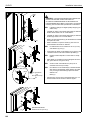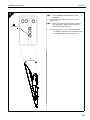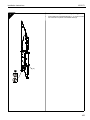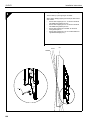
1
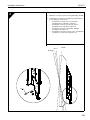
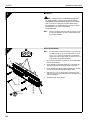
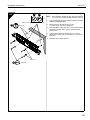
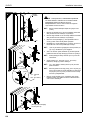
iCLPAT1
Installation Instructions
Instrucciones de instalación
Installationsanleitung
Instruções de Instalação
Istruzioni di installazione
Installatie-instructies
Instructions d´installation
Installationsinstruktioner
Monteringsanvisningar
Asennusohjeet
Instrukcja instalacji
Kurulum Yönergeleri
Összeszerelési utasítások
iCLPAT1
Installation Instructions
DISCLAIMER
Milestone AV Technologies, and its affiliated corporations and
subsidiaries (collectively, "Milestone"), intend to make this
manual accurate and complete. However, Milestone makes no
claim that the information contained herein covers all details,
conditions or variations, nor does it provide for every possible
contingency in connection with the installation or use of this
product. The information contained in this document is subject
to change without notice or obligation of any kind. Milestone
makes no representation of warranty, expressed or implied,
regarding the information contained herein. Milestone assumes
no responsibility for accuracy, completeness or sufficiency of
the information contained in this document.
Chief® is a registered trademark of Milestone AV Technologies.
All rights reserved.
WARNING: TO REDUCE THE RISK OF
BURNS, FIRE, ELECTRIC SHOCK, OR INJURY TO
PERSONS:
•
•
•
•
•
•
•
•
IMPORTANT SAFETY INSTRUCTIONS
WARNING alerts you to the possibility of
serious injury or death if you do not follow the instructions.
•
Unplug from outlet before putting on or taking off parts.
Use this mounting system only for its intended use as
described in these instructions. Do NOT use
attachments not recommended by the manufacturer.
Never operate this mounting system if it has a
damaged cord or plug. If it is not working properly,
return the mounting system to a service center for
examination and repair.
Keep the cord away from heated surfaces.
Never operate the mounting system with the air
openings blocked. Keep the air openings free of lint,
hair, and the like.
Never drop or insert any object into any opening.
Do not use outdoors unless marked for outdoor use.
Route cords and cables as shown in the installation
instructions.
To disconnect, turn all controls to the off position, then
remove plug from outlet.
WARNING: RISK OF ELECTRIC SHOCK!
Connect this mounting system to a properly grounded outlet
only. See Grounding Instructions.
CAUTION alerts you to the possibility of
damage or destruction of equipment if you do not follow the
corresponding instructions.
WARNING: FAILURE TO READ AND
FOLLOW THE FOLLOWING INSTRUCTIONS CAN RESULT
IN SERIOUS PERSONAL INJURY, DAMAGE TO EQUIPMENT
OR VOIDING OF FACTORY WARRANTY. It is the installer’s
responsibility to make sure all components are properly
assembled and installed using the instructions provided.
IMPORTANT ! : Installation and maintenance of this
product must be completed by a qualified service
technician.
CAUTION: Changes or modifications to this
unit not expressly approved by the manufacturer can void the
units FCC compliance rating and make the unit illegal to
operate.
WARNING: Failure to provide adequate
structural strength for this component can result in serious
personal injury or damage to equipment! It is the installer’s
responsibility to make sure the structure to which this
component is attached can support five times the combined
weight of all equipment. Reinforce the structure as required
before installing the component. The wall to which the mount is
being attached may have a maximum drywall thickness of
1/2 in. (12.7mm).
NOTE: The iCLPAT1 weighs 21.5 lbs (9.8 kg).
When using an electrical mounting system, basic precautions
should always be followed, including the following:
READ ALL INSTRUCTIONS BEFORE USING THIS
PRODUCT!!!!
DANGER: TO REDUCE THE RISK OF
WARNING: Exceeding the weight capacity
can result in serious personal injury or damage to equipment! It
is the installer’s responsibility to make sure the combined
weight of all components attached to the iCLPAT1 does not
exceed 150 lbs (68 kg), with a maximum display size of 61 in.
(154.9cm). Use with products heavier than the maximum weight
indicated may result in collapse of the mount and its
accessories causing possible injury.
ELECTRIC SHOCK:
1.
2
Always unplug this mounting system from the electrical
outlet before cleaning.
NOTE: This system has no user serviceable parts.
--SAVE THESE INSTRUCTIONS--
Installation Instructions
iCLPAT1
•
INSTRUCCIONES IMPORTANTES DE
SEGURIDAD
ADVERTENCIA alerta de la posibilidad
de lesiones graves e incluso la muerte si no se siguen las
instrucciones.
PRECAUCIÓN alerta de la posibilidad de
que se dañe o se destruya el equipo si no siguen las
instrucciones correspondientes.
ADVERTENCIA: NO LEER Y SEGUIR
LAS INSTRUCCIONES SIGUIENTES PUEDE RESULTAR EN
LESIONES PERSONALES GRAVES, DAÑOS DEL EQUIPO O
ANULACIÓN DE LA GARANTÍA DE FÁBRICA. Es
reponsabilidad del instalador asegurarse de que todos los
componentes estén bien montados e instalados según las
instrucciones.
¡IMPORTANTE! La instalación y el mantenimiento de este
producto deben ser realizados por un técnico cualificado.
Al utilizar un sistema de montaje eléctrico se deben seguir
siempre precauciones básicas, entre otras:
¡¡¡¡LEA TODAS LAS INSTRUCCIONES ANTES DE UTILIZAR
ESTE PRODUCTO!!!!
PELIGRO: PARA REDUCIR EL RIESGO DE
DESCARGA ELÉCTRICA:
Antes de limpiar, desenchufe siempre de la pared el sistema de
montaje.
ADVERTENCIA: PARA REDUCIR EL
RIESGO DE QUEMADURAS, DESCARGAS ELÉCTRICAS O
LESIONES PERSONALES:
•
•
•
•
•
•
Desenchufe de la pared antes de poner o quitar partes.
Utilice este sistema de montaje sólo para el uso para el
que esté determinado y tal y como indican estas
instrucciones. NO utilice accesorios no recomendados
por el fabricante.
No opere nunca este sistema de montaje si tiene un
cable o enchufe dañado. Si no funciona bien, devuelva
el sistema de montaje a un centro de servicio para su
examen y reparación.
Mantenga el cable lejos de superficies calientes.
No opere nunca el sistema de montaje con las
aberturas de aire bloqueadas. Mantenga las aberturas
de aire limpias de pelusa, pelo y cosas similares.
Nunca deje caer o inserte objetos en una abertura.
No utilice al aire libre a menos que esté indicado para
eso.
•
Guíe los cables como se indica en las instrucciones de
instalación.
Para desconectar, apague todos los mandos y luego
desenchufe de la pared.
ADVERTENCIA: ¡PELIGRO DE
DESCARGA ELÉCTRICA! Conecte este sistema de mensaje
solamente a enchufes con toma de tierra. Consulte las
instrucciones de toma de tierra.
PRECAUCIÓN: Cambiar o modificar este
aparato contra las recomendaciones del fabricante puede
anular el cumplimiento FCC del mismo y hacer que sea ilegal
utilizarlo.
ADVERTENCIA: Si este componente no
cuenta con la resistencia estructural suficiente, es probable que
el usuario sufra lesiones o se dañe el equipo. El instalador es
responsable de asegurar que la estructura en la que se
instalará el equipo pueda soportar cinco veces el peso
combinado de todo el equipo. Antes de colocar el componente,
la estructura deberá reforzarse de manera apropiada. El grosor
máximo del tabique donde se va a instalar el soporte debe ser
de 1/2" (12,7mm).
NOTA: El iCLPAT1 pesa 9,8 kg (21,5 libras).
ADVERTENCIA: Si se excede la
capacidad de soporte de peso, es probable que el usuario sufra
lesiones o se dañe el equipo. 3.El instalador es responsable de
asegurarse de que el peso combinado de todos los
componentes unidos al iCLPAT1 no exceda los 68 kg
(150 libras) y de que el tamaño de la pantalla no supere los
154,9 cm (61 pulgadas). Si se utilizan productos que superen el
peso máximo indicado podrían caerse el soporte y sus
accesorios, resultando en lesiones.
NOTA: Este sistema no tiene partes que pueda reparar el
usuario.
--GUARDE ESTAS INSTRUCCIONES--
WICHTIGE SICHERHEITSHINWEISE
WARNUNG weist darauf hin, dass die Gefahr
schwerer Verletzungen oder Lebensgefahr besteht, wenn die
Anweisungen nicht befolgt werden.
3
iCLPAT1
ACHTUNG weist auf mögliche Geräteschäden
hin, wenn die Anweisungen nicht befolgt werden.
WARNUNG: DAS NICHTBEFOLGEN
DIESER ANWEISUNGEN KANN ZU SCHWEREN
VERLETZUNGEN, GERÄTESCHÄDEN UND ZUM
ERLÖSCHEN DER GARANTIE FÜHREN. Der Monteur ist
dafür verantwortlich sicherzustellen, dass alle Komponenten
nach den beiliegenden Anweisungen montiert wurden.
WICHTIG! Montage und Wartung dieses Produkts müssen
von einem qualifizierten Kundendiensttechniker durchgeführt
werden.
Beim Gebrauch eines elektrischen Halterungssystems sind
stets die allgemeinen Vorsichtsmaßnahmen einzuhalten,
einschließlich der folgenden:
LESEN SIE VOR DEM GEBRAUCH DES PRODUKTS ALLE
ANWEISUNGEN!!!!
Installation Instructions
WARNUNG: GEFAHR EINES
ELEKTRISCHEN SCHLAGS! Schließen Sie das
Halterungssystem nur an einer geerdeten Steckdose an. Siehe
Anweisungen zur Erdung.
ACHTUNG: Nicht ausdrücklich vom
Hersteller genehmigte Änderungen oder Modifikationen an
diesem Gerät können die Übereinstimmung mit den FCCVorschriften und die Betriebsberechtigung des Geräts ungültig
machen.
WARNUNG: Wenn diese Komponente nicht
an einer Struktur mit der erforderlichen Tragfähigkeit montiert
wird, kann dies zu schweren Verletzungen oder Geräteschäden
führen! Der Monteur ist dafür verantwortlich, die Stabilität der
Struktur, an die die Komponente angebracht wird,
sicherzustellen. Die Struktur muss das fünffache
Gesamtgewicht des Geräts tragen können. Verstärken Sie vor
der Montage der Komponente ggf. die Struktur. Die Gipsschicht
der Wand, an welcher die Halterung befestigt wird, darf
maximal 12,7 mm betragen.
HINWEIS: Das Gewicht der iCLPAT1 beträgt 9,8 kg.
GEFAHR: SO REDUZIEREN SIE DIE GEFAHR
EINES ELEKTRISCHEN SCHLAGS:
1.
Trennen Sie das Halterungssystem stets von der
Netzsteckdose, bevor Sie es reinigen.
WARNUNG: SO REDUZIEREN SIE DIE
GEFAHR VON VERBRENNUNGEN, EINES FEUERS, EINES
ELEKTRISCHEN SCHLAGS ODER VON VERLETZUNGEN:
•
•
•
•
•
•
•
•
•
4
Trennen Sie das Halterungssystem stets von der
Netzsteckdose, bevor Sie Teile hinzufügen oder
entfernen.
Verwenden Sie das Halterungssystem nur für den
vorgesehenen, in der Anleitung beschriebenen Zweck.
Verwenden Sie NUR vom Hersteller empfohlene
Zubehörteile.
Betreiben Sie das Halterungssystem niemals mit
defektem Netzkabel bzw. Stecker. Sollte das
Halterungssystem nicht richtig funktionieren, wenden
Sie sich für die Fehlersuche und Reparatur an ein
Service-Center.
Halten Sie das Netzkabel von warmen/heißen
Oberflächen fern.
Betreiben Sie das Halterungssystem niemals bei
blockierten Lüftungsschlitzen. Halten Sie die
Lüftungsschlitze frei von Fusseln, Haaren u. ä.
Lassen Sie niemals Objekte in Öffnungen fallen und
führen Sie niemals Objekte in Öffnungen ein.
Verwenden Sie das Halterungssystem nicht im Freien,
wenn es nicht ausdrücklich für einen solchen Gebrauch
ausgewiesen ist.
Verlegen Sie das Netzkabel und andere Kabel wie in
der Montageanleitung dargestellt.
Wenn Sie das Halterungssystem von der Stromquelle
trennen möchten, stellen Sie alle Bedienelemente auf
„Aus“ und ziehen Sie dann den Stecker aus der
Steckdose.
WARNUNG: Das Überschreiten der
maximalen Tragkraft kann zu schweren Verletzungen oder
Geräteschäden führen! Der Monteur ist dafür verantwortlich
sicherzustellen, dass für die iCLPAT1 das Gesamtgewicht aller
Komponenten max. 68 kg und die Bildschirmgrö e max. 61 Zoll
beträgt. Eine Nutzung mit Produkten, welche die maximale
Tragkraft überschreiten, kann dazu führen, dass die Halterung
bricht und/oder herunterfällt und kann eventuell Verletzungen
verursachen.
HINWEIS: Dieses System enthält keine Teile, die vom
Benutzer gewartet werden können.
--BEWAHREN SIE DIESE ANWEISUNGEN AUF--
RECOMENDAÇÕES DE SEGURANÇA
IMPORTANTES
ATENÇÃO alerta-o para a possibilidade de
ferimentos graves ou morte se não seguir as instruções.
CUIDADO alerta-o para a possibilidade de
danos ou destruição do equipamento se não seguir as
instruções correspondentes.
Installation Instructions
ATENÇÃO: A NÃO LEITURA E O NÃO
ACATAMENTO DAS SEGUINTES INSTRUÇÕES PODEM
RESULTAR EM FERIMENTOS GRAVES, EM DANOS NO
EQUIPAMENTO OU NA ANULAÇÃO DA GARANTIA DE
FÁBRICA. É da responsabilidade do técnico de instalação
garantir que todos os componentes são devidamente montados
e instalados segundo as instruções fornecidas.
IMPORTANTE! A instalação e a manutenção deste produto
devem ser realizadas por um técnico de assistência
qualificado.
Quando utilizar um sistema de montagem eléctrico, deve tomar
sempre precauções básicas, incluindo as seguintes:
LEIA TODAS AS INSTRUÇÕES ANTES DE UTILIZAR ESTE
PRODUTO!!!!
iCLPAT1
CUIDADO: As alterações ou modificações
efectuadas nesta unidade que não sejam expressamente
aprovadas pelo fabricante podem anular a classificação de
conformidade atribuída pela FCC à unidade e ilegalizar a sua
utilização.
ATENÇÃO: A impossibilidade de se conseguir
uma resistência estrutural adequada para este componente
pode resultar em danos físicos ou danos materiais graves! É da
responsabilidade do técnico de montagem garantir que a
estrutura à qual este componente é preso consegue suportar
cinco vezes o peso combinado de todo o equipamento.
Reforçar a estrutura conforme necessário antes de se instalar o
componente. O painel acartonado da parede onde se vai fixar a
armação pode ter uma espessura máxima de 12,7 mm.
NOTA: O iCLPAT1 pesa 9,8 kg.
ATENÇÃO: Exceder a capacidade de peso
PERIGO: PARA REDUZIR O RISCO DE
CHOQUE ELÉCTRICO:
1.
Desligue sempre este sistema de montagem da tomada
eléctrica antes de limpá-lo.
ATENÇÃO: PARA REDUZIR O RISCO DE
QUEIMADURAS, INCÊNDIO, CHOQUE ELÉCTRICO OU
FERIMENTOS PESSOAIS:
•
•
•
•
•
•
•
•
•
Desligue da tomada eléctrica antes de colocar ou
remover peças.
Utilize este sistema de montagem unicamente para o
fim a que se destina, conforme descrito nestas
instruções. NÃO utilize acessórios não recomendados
pelo fabricante.
Nunca utilize este sistema de montagem se apresentar
danos no cabo ou na ficha. No caso de não estar a
funcionar correctamente, envie o sistema de
montagem a um centro de assistência técnica para ser
examinado e reparado.
Mantenha o cabo afastado de superfícies aquecidas.
Nunca utilize o sistema de montagem com as
aberturas de ar tapadas. Mantenha as aberturas de ar
livres de cotão, cabelos e afins.
Nunca largue ou insira nenhum objecto em qualquer
abertura.
Não utilize no exterior, a menos que traga a indicação
de que pode ser utilizado no exterior.
Passe os fios e cabos tal como mostram as instruções
de instalação.
Para desligar, regule todos os controlos para a posição
de desligado e retire-o da tomada eléctrica.
ATENÇÃO: RISCO DE CHOQUE
ELÉCTRICO! Ligue este sistema de montagem unicamente a
uma tomada eléctrica devidamente ligada à terra. Ver
Instruções de Ligação à Terra.
pode resultar em danos físicos ou danos materiais graves! É da
responsabilidade do técnico de montagem garantir que o peso
combinado de todos os componentes presos ao iCLPAT1 não
ultrapassa os 68 kg, com um tamanho do ecrã máximo de
154,9 cm (61"). A utilização com produtos acima do peso
máximo indicado pode levar à queda da armação e dos
respectivos acessórios, daí resultando possíveis ferimentos.
NOTA: Este sistema não contém quaisquer peças reparáveis
pelo utilizador.
--GUARDE ESTAS INSTRUÇÕES--
IMPORTANTI ISTRUZIONI DI
SICUREZZA
ATTENZIONE avverte della possibilità di
gravi lesioni o di morte se non si seguono le istruzioni per l'uso.
AVVERTENZA
avverte della possibilità di
danni o distruzione dell'unità di supporto se non si seguono le
istruzioni per l'uso.
ATTENZIONE -
LA MANCATA
CONOSCENZA O OSSERVANZA DELLE ISTRUZIONI
RIPORTATE QUI DI SEGUITO PUÒ CAUSARE LESIONI
PERSONALI, DANNI ALL'UNITÀ DI SUPPORTO O
INVALIDAMENTO DELLA GARANZIA DEL FABBRICANTE. È
responsabilità dell'installatore accertare che tutti i componenti
siano adeguatamente montati e installati in base alle istruzioni
fornite.
5
iCLPAT1
Installation Instructions
IMPORTANTE! L’installazione e la manutenzione di questo
prodotto devono essere effettuati da un tecnico qualificato.
Quando si utilizza un'unità di supporto elettronico, è necessario
osservare sempre le seguenti precauzioni di base tra cui:
LEGGERE TUTTE LE ISTRUZIONI PRIMA DI USARE
QUESTO PRODOTTO!!!!
PERICOLO! PER RIDURRE IL RISCHIO DI
SCOSSA ELETTRICA:
1.
prima di pulire l'unità di supporto, staccare la spina dalla
presa elettrica.
ATTENZIONE -
RISCHIO DI SCOSSA
ELETTRICA! Collegare questa unità di supporto soltanto a una
presa con un'adeguata messa a terra. Consultare istruzioni
sulla messa a terra.
AVVERTENZA -
Modifiche apportate a
questa unità senza un'esplicita approvazione del fabbricante
possono invalidare la conformità agli standard FCC e
l'approvazione all'uso dell'unità.
ATTENZIONE -
Una resistenza strutturale
inadeguata per questo componente può arrecare gravi lesioni
personali o danni all'unità! L'installatore ha la responsabilità di
accertare che la struttura su cui questo componente viene
montato sia in grado di sostenere cinque volte il peso totale
dell'intera unità. Rinforzare la struttura, se necessario, prima
d'installare il componente. La parete del montaggio può essere
ricoperta da un cartongesso di uno spessore massimo di 12,7
mm (1/2 poll.).
NOTA: iCLPAT1 pesa 9,8 kg (21,5 libbre).
6
Il superamento della
NOTA: Questa unità non contiene parti interne riparabili
dall'utente.
--CONSERVARE QUESTE ISTRUZIONI--
PER RIDURRE IL
RISCHIO DI USTIONI, INCENDIO, SCOSSA ELETTRICA O
LESIONI ALLE PERSONE:
•
Staccare la spina dalla presa elettrica prima di
aggiungere o rimuovere parti dell'unità.
•
Utilizzare questa unità di supporto esclusivamente per
l’uso previsto, secondo le istruzioni indicate. NON
utilizzare parti di montaggio non approvate dal
fabbricante.
•
Non azionare l'unità se il cavo o la spina elettrica sono
danneggiati. Se l'unità di supporto non funziona
correttamente, portarla a un centro di assistenza
affinché possa venire controllata e riparata.
•
Tenere il cavo elettrico lontano da superfici riscaldate.
•
Non azionare l'unità di supporto se gli sfiati dell'aria
sono bloccati. Mantenere gli sfiati dell'aria privi di
lanugine, fili e altro.
•
Evitare di far cadere o di inserire oggetti nelle aperture.
•
Non utilizzare all’aperto, salvo nel caso di modelli
appositamente previsti per un uso all’aperto.
•
Sistemare i cavi di alimentazione e gli altri cavi in base
alle istruzioni di installazione.
•
Per scollegare l'unità di supporto, spegnere tutti i
controlli (posizione Off) e staccare la spina.
ATTENZIONE -
ATTENZIONE -
portata massima specificata può causare gravi lesioni personali
e danni all'unità! L’installatore ha la responsabilità di accertare
che il peso combinato di tutti i componenti montati su iCLPAT1
non sia superiore a 68 kg (150 libbre) per le dimensioni di
schermo massime di 154,9 cm. (61 poll.). L'uso di prodotti più
pesanti del massimo peso indicato potrebbe comportare la
caduta del supporto e dei suoi accessori con potenziali lesioni
personali.
BELANGRIJKE
VEILIGHEIDSINSTRUCTIES
WAARSCHUWING waarschuwt u voor
de kans op ernstig persoonlijk letsel of de dood bij het niet
volgen van de instructies.
VOORZICHTIG waarschuwt u voor
mogelijke schade of vernieling aan de apparatuur als de
bijgeleverde instructies niet worden gevolgd.
WAARSCHUWING: HET NIET
LEZEN OF VOLGEN VAN DEZE INSTRUCTIES KAN LEIDEN
TOT PERSOONLIJK LETSEL, SCHADE AAN DE
APPARATUUR OF HET ONGELEDIG MAKEN VAN DE
FABRIEKSGARANTIE. Het is de verantwoordelijkheid van de
installateur om met behulp van de bijgeleverde instructies te
controleren dat alle onderdelen juist gebruikt en geïnstalleerd
zijn.
BELANGRIJK! Installatie en onderhoud van dit product moet
worden uitgevoerd door een gekwalificeerde
onderhoudstechnicus.
Bij gebruik van het elektrische bevestigingssysteem dienen
altijd bepaalde standaard voorzorgsmaatregelen te worden
gevolgd, inclusief de volgende:
LEES ALLE INSTRUCTIES VOORDAT U DIT PRODUCT
GEBRUIKT!!!!
Installation Instructions
GEVAAR: OM ELEKTRISCH SCHOKGEVAAR
TE VERMINDEREN:
1.
Neem de stekker van dit bevestigingssysteem altijd uit het
stopcontact voordat u het schoonmaakt.
WAARSCHUWING: OM HET
RISICO OP BRANDWONDEN, VUUR, ELEKTRISCHE
SCHOK OF PERSOONLIJK LETSEL TE VERMINDEREN:
•
•
•
•
•
•
•
•
•
Neem de stekker uit het stopcontact voordat u
onderdelen toevoegt of verwijdert.
Gebruik het bevestigingssysteem alleen zoals
beschreven in deze instructies. Maak GEEN gebruik
van onderdelen die niet door de fabrikant worden
aanbevolen.
Gebruik dit bevestigingssysteem nooit als de
bedrading of de stekker beschadigd zijn. Als het
bevestigingssysteem niet goed functioneert, breng het
dan naar een servicezaak voor inspectie en reparatie.
Houd de bedrading verwijderd van hete oppervlaktes.
Gebruik het bevestigingssysteem nooit terwijl de
luchtopeningen geblokkeerd zijn. Zorg dat de
luchtopeningen vrij zijn van stof, haar en dergelijke.
Steek of gooi nooit een voorwerp in de openingen.
Gebruik nooit buitenshuis, tenzij aangegeven wordt dat
het geschikt is voor buitengebruik.
Plaats elektrische bedrading zoals weergegeven in de
installatie-instructies.
Schakel de apparaatuur uit door alle knoppen op de uitstand te zetten en vervolgens de stekker uit het
stopcontact te verwijderen.
WAARSCHUWING: ELEKTRISCH
SCHOKGEVAAR! Dit bevestigingssysteem dient alleen op een
geaard stopcontact te worden aangesloten. Zie
aardingsinstructies.
VOORZICHTIG: Veranderingen aan
deze apparatuur zonder schriftelijke goedgekeuring van de
fabrikant kunnen de FCC compliance rating ongeldig maken en
maken het gebruik van de apparatuur illegaal.
WAARSCHUWING: Het bieden van
onvoldoende constructiesterkte voor dit onderdeel kan leiden
tot ernstig persoonlijk letsel of schade aan de apparatuur! Het is
de verantwoordelijkheid van de installateur om ervoor te zorgen
dat de constructie waaraan deze installatie wordt bevestigd vijf
maal het gewicht van alle apparatuur kan dragen. Verstevig
indien nodig de constructie voordat het onderdeel geïnstalleerd
wordt. De dikte van gipsplaat op de wand waaraan de
bevestigingsplaat wordt bevestigt mag maximaal 12,7mm zijn.
OPMERKING: De iCLPAT1 weegt 9,8 kg.
iCLPAT1
WAARSCHUWING: Het overschrijden
van de gewichtscapaciteit kan ernstig persoonlijk letsel of
schade aan de apparatuur tot gevolg hebben! Het is de
verantwoordelijkheid van de installateur om te controleren dat
het totale gewicht van alle onderdelen die worden bevestigd
aan de iCLPAT1 niet meer is dan 68 kg, met een maximale
schermgrootte van 154,9 cm (61"). Het gebruik van producten
zwaarder dan het maximum aangegeven gewicht kan
resulteren in het bezwijken van de bevestigingplaat en de
accesoires wat persoonlijk letsel tot gevolg kan hebben.
OPMERKING: Dit systeem heeft geen onderdelen die door
de gebruiker onderhouden moeten worden.
--BEWAAR DEZE INSTRUCTIES--
DIRECTIVES DE SÉCURITÉ
IMPORTANTES
AVERTISSEMENT vous avertit de la
possibilité de blessures graves ou de mort si vous ne suivez
pas les directives.
MISE EN GARDE vous avertit de la
possibilité de dommage ou destruction du matériel si vous ne
suivez pas les directives qui s’imposent.
AVERTISSEMENT : NE PAS LIRE ET
SUIVRE LES INSTRUCTIONS SUIVANTES PEUT
ENTRAÎNER DES BLESSURES CORPORELLES GRAVES,
ENDOMMAGER L'ÉQUIPEMENT OU ANNULER LA
GARANTIE DU FABRICANT. Il est de la responsabilité de
l'installateur de s'assurer que tous les composants sont
correctement montés et installés conformément aux
instructions fournies.
IMPORTANT ! L’installation et l’entretien de ce produit doivent
être effectués par un technicien en réparation et entretien
qualifié.
L'utilisation d'un système de montage électrique impose des
précautions de base qui doivent être systématiquement
respectées, notamment :
LIRE TOUTES LES DIRECTIVES AVANT D'UTILISER CE
PRODUIT !
7
iCLPAT1
DANGER : POUR RÉDUIRE LES RISQUES
D'ÉLECTROCUTION :
1.
Toujours débrancher le système de montage de la prise
électrique avant de procéder à son nettoyage.
AVERTISSEMENT : POUR
RÉDUIRE LES RISQUES DE BRÛLURE, D'INCENDIE,
D'ÉLECTROCUTION OU DE BLESSURES CORPORELLES :
•
•
•
•
•
•
•
•
•
Débrancher de la prise avant de poser ou de déposer
des pièces.
N'utiliser ce système de montage que pour l'usage
auquel il se destine conformément à ces directives. Ne
PAS utiliser d'accessoires qui ne sont pas
recommandés par le fabricant.
Ne jamais faire fonctionner ce système de montage si
son cordon ou sa prise est endommagé. Si le système
de montage ne fonctionne pas correctement, le
retourner dans un centre de maintenance pour le faire
examiner et réparer.
Tenir le cordon éloigné des surfaces chaudes.
Ne jamais faire fonctionner le système de montage en
présence d'obstructions dans les ouvertures
d'aération. Les ouvertures d'aération doivent être
dépourvues de peluches, de cheveux ou autres corps
étrangers comparables.
Ne jamais laisser tomber ou insérer un objet par une
ouverture.
Ne pas utiliser à l'extérieur, sauf indication contraire.
Acheminer les cordons et les câbles comme indiqué
dans les directives d'installation.
Pour débrancher, régler toutes les commandes en
position d'arrêt avant de débrancher la prise.
Installation Instructions
AVERTISSEMENT : L’excès de
capacité de poids peut causer de graves blessures corporelles
ou endommager le matériel ! Il est de la responsabilité de
l’installateur de s’assurer que le poids combiné de tous les
composants attachés au iCLPAT1 ne dépasse pas 68 kg, avec
une taille d’écran maximale de 154,9 cm (61"). L'utilisation de
produits dépassant le poids maximal indiqué risque de
provoquer l'effondrement du support et de ses accessoires,
avec d'éventuels risques de blessures.
REMARQUE: Ce système ne contient pas de pièces
réparables par l'utilisateur.
--RANGER CES CONSIGNES EN LIEU SÛR--
.
.
AVERTISSEMENT : RISQUE
:
D'ÉLECTROCUTION ! Ce système de montage doit
uniquement être connecté à une prise correctement mise à la
terre. Voir les Directives de mise à la terre.
,
MISE EN GARDE : Tout changement
.
ou modification apporté à cet appareil sans approbation
expresse du fabricant est susceptible d'invalider son
classement de conformité FCC et d'en rendre l'utilisation
illégale.
,
,–
,
.
!
AVERTISSEMENT : L'absence
d'apport d'une résistance structurelle appropriée pour ce
composant peut entraîner des blessures corporelles graves ou
endommager l'équipement ! Il est de la responsabilité de
l'installateur de s'assurer que la structure à laquelle ce
composant est attaché peut supporter cinq fois le poids total de
l'équipement. Veuillez-donc renforcer la structure le cas
échéant avant d'installer ce composant. Le mur sur lequel le
support est fixé doit avoir une épaisseur maximale de cloison
sèche de 12,7 mm.
REMARQUE : Le modèle iCLPAT1 pèse 9,8 kg.
8
.
,
:
!!!!
Installation Instructions
iCLPAT1
:
:
:
1.
!
.
,
,
,
,
:
.
,
.
:
,
12,7
,
.
.
.
(21,5
iCLPAT1
9,8
).
;
:
,
.
!
,
,
iCLPAT1,
,
,
68
154,9
.
,
(61
).
,
,
.
.
.
:
,
,
.
.
,
.
--
--
.
.
VIGTIGE SIKKERHEDSOPLYSNINGER
.
,
.
:
.
risiko for at beskadige eller ødelægge udstyret, hvis
instruktionerne ikke følges.
.
:
,
,
FCC
.
risiko for alvorlig personskade eller død, hvis instruktionerne
ikke følges.
FORSIGTIG gør opmærksom på, at der er
!
.
ADVARSEL gør opmærksom på, at der er
ADVARSEL: HVIS DE FORELIGGENDE
INSTRUKTIONER IKKE LÆSES OG FØLGES KAN DET
MEDFØRE ALVORLIG PERSONSKADE, SKADE PÅ
UDSTYRET ELLER AT PRODUCENTENS GARANTI
BORTFALDER. Det er montørens ansvar at sikre, at alle
komponenter er korrekt samlede og monterede ifølge de
medleverede instruktioner.
9
iCLPAT1
VIGTIGT! Installation og vedligeholdelse af dette produkt skal
Installation Instructions
BEMÆRK: iCLPAT1 vejer 9,8 kg (21,5 lbs)
udføres af en faglært servicetekniker.
Når der anvendes et elektrisk monteringssystem, skal
grundlæggende sikkerhedsregler altid overholdes, herunder:
LÆS ALLE INSTRUKTIONER, FØR DETTE PRODUKT
ANVENDES!!!!
FARE: FOR AT MINDSKE RISIKOEN FOR
ADVARSEL: Hvis vægtkapaciteten
overskrides, kan det forårsage alvorlig personskade eller
beskadigelse af udstyret! Det er installatørens ansvar at sørge
for, at den totale vægt for alle dele, som er fastgjort på iCLPAT,
ikke overstiger 68 kg (150 lbs) med en maksimal
skærmstørrrelse på 154,9 cm (61 tommer). Anvendelse af
produkter som er tungere end den angivne maksimalvægt, kan
medføre at ophænget og dets tilbehør falder ned og medfører
skader.
ELEKTRISK STØD:
1.
Tag monteringssystemet ud af stikkontakten, før det renses.
BEMÆRK: Dette system har ingen dele, som kan repareres
af brugeren.
ADVARSEL: FOR AT MINDSKE RISIKOEN
FOR FORBRÆNDINGER, BRAND, ELEKTRISK STØD ELLER
PERSONSKADE:
•
•
•
•
•
•
•
•
•
Tag det ud af stikkontakten, før dele tilføjes eller
fjernes.
Anvend kun dette monteringssystem til det formål, der
er beskrevet i disse instruktioner. Anvend IKKE udstyr,
der ikke er anbefalet af producenten.
Brug aldrig dette monteringssystem, hvis det har en
beskadiget ledning eller stik. Hvis det ikke virker
ordentligt, skal monteringssystemet indleveres til et
servicecenter til undersøgelse og reparation.
Hold ledningen væk fra varme overflader.
Anvend aldrig monteringssystemet hvis luftåbningerne
er spærrede. Hold luftåbningerne fri for nullermænd,
hår og lignende.
Undgå at tabe eller indsætte noget i nogen af
åbningerne.
Anvend ikke udendørs, medmindre det er beregnet til
udendørs brug.
Læg ledninger og kabler som vist i
installationsvejledningen.
For at frakoble det skal alle betjeningsknapper sættes
på off, og stikket derefter tages ud af kontakten.
ADVARSEL: RISIKO FOR ELEKTRISK
STØD! Dette monteringssystem må kun tilsluttet en stikkontakt
med korrekt jordforbindelse. Se vejledningen vedrørende
jordforbindelse.
FORSIGTIG: Ændringer eller forandringer af
denne enhed, som ikke er udtrykkeligt godkendt af
producenten, kan medføre, at den mister sin FCCoverensstemmelse og gør den ulovlig at anvende.
--GEM DENNE VEJLEDNING--
VIKTIGA SÄKERHETSANVISNINGAR
VARNING innebär att allvarlig skada eller
dödsfall kan inträffa om du inte följer anvisningarna.
VARNING
innebär att utrustning kan skadas
eller förstöras om du inte följer motsvarande anvisningar.
VARNING: UNDERLÅTENHET ATT LÄSA
OCH FÖLJA FÖLJANDE ANVISNINGAR KAN ORSAKA
ALLVARLIG PERSONSKADA, SKADA PÅ UTRUSTNING
ELLER UPPHÄVANDE AV FABRIKSGARANTIN. Det är
installatörens ansvar att se till att alla komponenter monteras
korrekt och installeras enligt de medföljande anvisningarna.
VIKTIGT! Installation och underhåll av denna produkt måste
utföras av behörig servicepersonal.
När du använder ett elektriskt monteringssystem ska du alltid
vidta grundläggande försiktighetsåtgärder, bland annat följande:
LÄS ALLA ANVISNINGAR INNAN DU ANVÄNDER DENNA
PRODUKT!
ADVARSEL: Hvis denne komponent
monteres på en konstruktion, der ikke er stærk nok, kan det
forårsage alvorlig personskade eller beskadigelse af udstyret!
Montøren er ansvarlig for at sørge for, at komponenten
monteres på en konstruktion, der kan bære fem gange
udstyrets samlede vægt. Forstærk konstruktionen efter behov,
før komponenten monteres. Væggen hvortil ophænget
fastgøres kan have en maksimal tykkelse af gipspladerne på
12,7mm.
10
FARA: FÖR ATT MINSKA RISKEN FÖR
ELEKTRISKA STÖTAR:
1.
Dra alltid ur elsladden från eluttaget innan du rengör detta
monteringssystem.
Installation Instructions
iCLPAT1
VARNING: FÖR ATT MINSKA RISKEN FÖR
TÄRKEITÄ TURVALLISUUSOHJEITA
BRÄNNSKADOR, BRAND, ELEKTRISKA STÖTAR ELLER
PERSONSKADOR:
•
•
•
•
•
•
•
•
•
Dra ur elsladden innan du monterar eller avlägsnar
delar.
Använd endast detta monteringssystem i avsett syfte i
enlighet med dessa anvisningar. Använd INTE tillbehör
som inte har rekommenderats av tillverkaren.
Använd aldrig detta monteringssystem om sladd eller
kontakt är skadad. Om monteringssystemet inte
fungerar ordentligt, lämna in det till ett servicecenter för
undersökning och reparation.
Placera inte sladden på varma ytor.
Använd aldrig monteringssystemet om luftöppningarna
är blockerade. Håll luftöppningarna rena från damm,
hår och liknande.
Sätt aldrig i eller tappa något i någon av öppningarna.
Använd inte utomhus såvida inte detta tillåts enligt
anvisningarna.
Ordna sladdar och kablar enligt
installationsanvisningarna.
För att stänga av enheten ställer du in alla kontroller på
av och drar sedan ur sladden från uttaget.
VARNING: RISK FÖR ELEKTRISKA STÖTAR!
Anslut endast detta monteringssystem till ett ordentligt jordat
uttag. Se Jordningsanvisningar.
VARNING: Om du utför ändringar av denna
enhet som inte uttryckligen har godkänts av tillverkaren kan
enhetens FCC-efterlevnad upphävas och enheten kan bli
olaglig att använda.
VARNING: Underlåtenhet att se till att denna
komponent har tillräcklig strukturell styrka kan orsaka allvarlig
personskada eller skada på utrustning. Det är installatörens
ansvar att se till att underlaget som denna komponent monteras
på klarar av att stötta upp fem gånger vikten för hela
utrustningen. Förstärk underlaget efter behov innan du
installerar komponenten. Gipsskivan i väggen som fästet
monteras på kan vara högst 12,7 mm tjock.
VAROITUS varoittaa vakavan vamman tai
kuoleman mahdollisuudesta, jos ohjeita ei noudateta.
HUOMAUTUS varoittaa laitteen
vahingoittumisen tai tuhoutumisen mahdollisuudesta, jos
ohjeita ei noudateta.
VAROITUS: SEURAAVIEN OHJEIDEN
LUKEMATTA TAI NOUDATTAMATTA JÄTTÄMINEN VOI
JOHTAA VAKAVAAN VAMMAAN, LAITEVAHINKOON TAI
TEHDASTAKUUN MITÄTÖINTIIN. Asentajan vastuulla on
varmistaa, että kaikki osat on koottu ja asennettu
asianmukaisesti annettujen ohjeiden mukaisesti.
TÄRKEÄÄ! Tuotteen saa asentaa ja huoltaa vain pätevä
huoltoteknikko.
Käytettäessä sähköistä asennusjärjestelmää on aina
noudatettava perusvarotoimia, joihin kuuluu myös seuraava:
LUE KAIKKI OHJEET ENNEN TÄMÄN TUOTTEEN
KÄYTTÖÄ!
VAARA: SÄHKÖISKURISKIN
PIENENTÄMISEKSI:
1.
Irrota tämä asennusjärjestelmä aina sähköpistorasiasta
ennen siivoamista.
VAROITUS: PALOVAMMA-, TULIPALO-,
SÄHKÖISKU- TAI HENKILÖVAHINKORISKIN
PIENENTÄMISEKSI:
•
•
•
OBS: iCLPAT1 väger 9,8 kg.
VARNING: Om vikten överstigs kan det orsaka
allvarlig personskada eller skada på utrustning. Det är
installatörens ansvar att se till att vikten på alla komponenter
som är monterade på iCLPAT1 inte överstiger 68 kg , med en
skärmstorlek på max 154,9 cm. Användning av produkter som
överstiger den angivna maxvikten kan leda till att fästet och
dess tillbehör faller ner, vilket kan orsaka möjlig skada.
OBS: Detta system har inga delar som användaren behöver
underhålla.
•
•
•
•
•
•
Irrota pistoke pistorasiasta, ennen kuin lisäät tai poistat
osia.
Käytä tätä asennusjärjestelmää vain näissä ohjeissa
tarkoitettuun käyttöön. ÄLÄ käytä muita kuin
valmistajan suosittelemia kiinnittimiä.
Älä koskaan käytä tätä asennusjärjestelmää, jos sen
johto tai pistoke on vahingoittunut. Jos nämä eivät toimi
kunnollisesti, toimita asennusjärjestelmä
huoltokeskukseen tarkistettavaksi ja korjattavaksi.
Pidä johto erillään kuumista pinnoista.
Älä koskaan käytä asennusjärjestelmää siten, että sen
ilma-aukot on tukittu. Huolehdi siitä, ettei ilma-aukoissa
ole nukkaa, hiuksia tai muuta vastaavaa.
Älä koskaan pudota tai aseta mitään esinettä
mihinkään aukkoon.
Älä käytä tuotetta ulkona, ellei sitä ole merkitty
ulkokäyttöön sopivaksi.
Ohjaa johdot ja kaapelit asennusohjeiden mukaisesti.
Irrota pistoke pistorasiasta kääntämällä säätimet ensin
off-asentoon ja irrottamalla pistoke vasta sitten.
--SPARA DESSA ANVISNINGAR-11
iCLPAT1
Installation Instructions
VAROITUS: SÄHKÖISKUN VAARA! Kytke
tämä asennusjärjestelmä vain asianmukaisesti maadoitettuun
pistorasiaan. Katso maadoitusta koskevia ohjeita.
WA NE! Monta i konserwacj produktu powinna
przeprowadza osoba wykwalifikowana.
Podczas u ywania elektrycznego systemu mocowania nale y
zawsze zachowywa podstawowe rodki ostro no ci, w tym:
HUOMAUTUS: Tähän yksikköön tehdyt
muutokset, joita valmistaja ei nimenomaisesti ole hyväksynyt,
voivat mitätöidä yksikköjen FCC-yhdenmukaisuusluokituksen.
Tällöin yksikön käyttö ei ole sallittua.
PRZED KORZYSTANIEM Z PRODUKTU NALE Y
ZAPOZNA SI ZE WSZYSTKIMI PUNKTAMI
INSTRUKCJI!!!
VAROITUS: Tälle osalle riittämätön
rakennevahvuus voi aiheuttaa vakavan vamman tai
laitevahingon. Asentajan vastuulla on varmistaa, että rakenne,
johon tämä osa on kiinnitetty, kestää viisi kertaa koko laitteiston
yhteen lasketun painon. Vahvista rakennetta tarvittaessa ennen
osan asentamista. Seinän, johon teline kiinnitetään, paksuus
saa olla enintään 12,7 mm (ilman laastia).
NIEBEZPIECZE STWO: ABY
ZMNIEJSZY
1.
OSTRZE ENIE: ABY ZMNIEJSZY
HUOMAUTUS: iCLPAT1 painaa 9,8 kg.
VAROITUS: Painokapasiteetin ylitys voi
aiheuttaa vakavan vamman tai laitevahingon. Asentajan
vastuulla on varmistaa, että iCLPAT1-telineeseen liitettyjen
osien yhteenlaskettu paino on enintään 68 kg ja näytön koko
enintään 154,9 cm (61"). Jos telinettä käytetään ilmoitettua
ensimmäispainoa raskaammille tuotteille, teline ja sen
varusteet saattavat romahtaa ja aiheuttaa vamman.
HUOMAUTUS: Tässä järjestelmässä ei ole käyttäjän
RYZYKO POPARZE , PORA ENIA PR DEM LUB OBRA
CIA A:
•
•
•
huollettavissa olevia osia.
--SÄÄSTÄ NÄMÄ OHJEET--
•
•
WA NE INSTRUKCJE
BEZPIECZE STWA
•
•
OSTRZE ENIE ma na celu zwrócenie
uwagi na to, i nieprzestrzeganie instrukcji grozi powa nymi
uszkodzeniami cia a lub mierci .
•
•
PRZESTROGA ma na celu zwrócenie
RYZYKO PORA ENIA PR DEM:
Przed czyszczeniem nale y zawsze od czy system
mocowania od gniazda elektrycznego.
Przed zak adaniem lub zdejmowaniem cz ci
nale y zawsze od czy system od gniazda.
Systemu mocowania nale y u ywa jedynie
zgodnie z jego przeznaczeniem i w sposób
opisany w instrukcjach. NIE WOLNO u ywa
elementów mocuj cych niezalecanych przez
producenta.
Niniejszego systemu mocowania nie wolno
ywa w razie uszkodzenia przewodu lub
wtyczki. Niedzia aj cy poprawnie system
mocowania nale y odda do centrum
serwisowego w celu sprawdzenia i naprawy.
Przewód nale y trzyma z dala od gor cych
powierzchni.
Z systemu mocowania nie nale y korzysta w
przypadku zatkanych otworów wentylacyjnych.
Otwory wentylacyjne powinny by wolne od
ókien, w osów i innych podobnych materia ów.
W otwory nie nale y wpuszcza lub wk ada
adnych przedmiotów.
Z systemu nie nale y korzysta na wolnym
powietrzu, chyba e zosta on oznaczony jako
przeznaczony do u ytku na zewn trz.
Przewody i kable nale y poprowadzi w sposób
przedstawiony w instrukcjach instalacji.
W celu od czenia nale y ustawi wszystkie
kontrolki w pozycji wy czonej, a nast pnie
wyci gn wtyczk z gniazda.
uwagi na to, i nieprzestrzeganie odpowiednich instrukcji grozi
uszkodzeniem lub zniszczeniem sprz tu.
OSTRZE ENIE: NIEPRZESTRZEGANIE
NINIEJSZEJ INSTRUKCJI SPOWODOWA MO E
POWA NE OBRA ENIA CIA A, USZKODZENIE SPRZ TU
LUB UNIEWA NIENIE GWARANCJI FABRYCZNEJ.
Odpowiedzialno za prawid owo monta u i instalacji
wszystkich elementów, zgodnie z zawartymi w niniejszej
instrukcji wskazówkami ponosi monter.
12
OSTRZE ENIE: GRO
BA PORA ENIA
PR DEM! System mocowania nale y pod cza jedynie do
gniazda z prawid owym uziemieniem. Patrz instrukcje
uziemiania.
Installation Instructions
iCLPAT1
PRZESTROGA: Zmiany i modyfikacje
:
wprowadzone do systemu, na które producent nie wyrazi w
sposób otwarty zgody, mog sprawi , i urz dzenie nie b dzie
zgodne z wymogami przepisów FCC a korzystanie z niego
dzie nielegalne.
,
.
OSTRZE ENIE: Niezapewnienie
.
!
nale ytej wytrzyma ci mechanicznej dla niniejszego elementu
mo e by przyczyn powa nych obra
cia a lub uszkodzenia
sprz tu! Monter ponosi odpowiedzialno za upewnienie si ,
czy no no konstrukcji, do której element ma zosta
przymocowany przekracza pi ciokrotnie czny ci ar
wszystkich urz dze . W razie potrzeby przed zamocowaniem
elementu nale y dan konstrukcj wzmocni . Maksymalna
grubo muru suchego ciany, do której wspornik ma zosta
przymocowany powinna wynosi 12,7mm.
.
,
,
:
!!!!
UWAGA: Waga produktu iCLPAT1 wynosi 9,8 kg
(21,5 funtów).
:
:
OSTRZE ENIE: Przekroczenie
1.
.
dopuszczalnego obci enia mo e doprowadzi do powa nych
obra
cia a lub uszkodzenia sprz tu! Do obowi zków
montera nale y upewnienie si , e sumaryczny ci ar
wszystkich elementów do czonych do iCLPAT1 nie przekracza
68 kg (150 funtów) przy maksymalnym rozmiarze wy wietlacza
wynosz cym 154,9cm (61 cali). Wykorzystanie produktów o
masie przekraczaj cej podane maksymalne obci enie mo e
spowodowa spadek wspornika i dodatków do niego,
powoduj c obra enia cia a.
:
,
,
:
.
.
UWAGA: System nie zawiera elementów nadaj cych si do
.
serwisowania przez u ytkownika.
.
--NINIEJSZE INSTRUKCJE NALE Y
ZACHOWA --
,
.
.
.
,
.
.
.
.
.
.
,
OFF
.
13
iCLPAT1
Installation Instructions
UYARI:
:
.
.
IDAK TAL MATLARIN
OKUNMAMASI VE BUNLARA UYULMAMASI, C DD K SEL
YARALANMAYA, EK PMANIN HASAR GÖRMES NE VEYA
FABR KA GARANT
N GEÇERL
Y RMES NE
NEDEN OLAB R. Tüm bile enlerin verilen talimatlar
do rultusunda uygun biçimde monte edilip kuruldu undan emin
olmak montaj yapan ki inin sorumlulu undad r.
!
.
:
FCC
ÖNEML ! Bu ürünün montaj ve bak
teknisyeni taraf ndan yap lmal r.
.
:
, nitelikli bak m
Elektrikli montaj sistemi kullan ld nda, a
dakiler de dahil
olmak üzere al nan temel önlemlere daima uyulmal r:
!
BU ÜRÜNÜ KULLANMADAN ÖNCE TÜM TAL MATLARI
OKUYUN!!!!
.
TEHL KE: ELEKTR K ÇARPMASI R SK
.
1/2" (12.7mm).
:
iCLPAT1
AZALTMAK
9.8 kg (21.5 lbs).
1.
:
UYARI: YANIK, YANGIN, ELEKTR K ÇARPMASI
!
VEYA K
iCLPAT1
68 kg (150 lbs),
154.9cm (61 in.).
•
•
.
•
:
.
--
•
•
--
•
ÖNEML GÜVENL K TAL MATLARI
•
•
UYARI, talimatlara uymaman z durumunda ciddi
yaralanma veya ölüm olas
na kar
sizi uyar r.
KKAT, ilgili talimatlara uymaman z durumunda
cihaz n hasar görmesi veya tahrip olmas olas
uyar r.
14
N:
Temizlemeden önce daima bu montaj sisteminin fi ini
prizden çekin.
na kar
sizi
•
SEL YARALANMA R SK
AZALTMAK
N:
Parça takmadan veya ç karmadan önce fi i
prizden çekin.
Bu montaj sistemini yaln zca bu yönergelerde
belirtilen kullan m amac na uygun olarak kullan n.
Üretici taraf ndan önerilmeyen eklentiler
KULLANMAYIN.
Kablosu veya fi i hasarl ysa, bu montaj sistemini
asla kullanmay n. Düzgün biçimde çal
yorsa
muayene ve onar m için montaj sistemini bir
servis merkezine iade edin.
Kabloyu s cak yüzeylerden uzak tutun.
Montaj sistemini hava menfezlerinin önü
kapal yken asla çal rmay n. Hava menfezlerini
pamuk, saç ve benzerlerinden temizlenmi
ekilde tutun.
Menfezlerden içeri herhangi bir nesne
dü ürmeyin veya sokmay n.
D ar da kullan lmak üzere tasarlanm oldu u
belirtilmedikçe d ar da kullanmay n.
Kablolar montaj talimatlar nda belirtildi i gibi
yönlendirin.
Ba lant kesmek için tüm kontrolleri kapal '
konuma getirip fi i prizden çekin.'
UYARI: ELEKTR K ÇARPMASI R SK ! Bu montaj
sistemini yaln zca do ru biçimde topraklanm
Bkz. Topraklama Talimatlar .
bir prize tak n.
Installation Instructions
iCLPAT1
KKAT: Bu birime yap lan, üretici taraf ndan
aç kça onaylanmam de iklik veya modifikasyonlar, birimin
FCC uygunluk s
geçersiz k labilir ve birimi, kullan lmas
yasad hale getirebilir.
Elektromos tartórendszer használatakor többek között a
következ alapvet óvintézkedéseket kell betartani:
A TERMÉK HASZNÁLATA EL TT OLVASSA EL AZ ÖSSZES
UTASÍTÁST
UYARI: Bu bile en için yeterli yap sal kuvvetin
VESZÉLY: AZ ÁRAMÜTÉS ELKERÜLÉSE
sa lanamamas , ciddi fiziksel hasara ve cihaz n zarar
görmesine neden olabilir! Bile enin monte edildi i yap n, tüm
cihaz n toplam a rl
n be kat na kadar a rl
ta yabildi inden emin olmak monte edenin sorumlulu undad r.
Bile eni monte etmeden önce yap güçlendirin. Düzene in
monte edildi i duvarda alç pan kal nl en fazla 12,7mm (1/2”)
olabilir.
ÉRDEKÉBEN:
NOT: iCLPAT1’in a rl
SÉRÜLÉSEK, T Z, ÁRAMÜTÉS VAGY SZEMÉLYI SÉRÜLÉS
ELKERÜLÉSE ÉRDEKÉBEN:
UYARI:
9,8 kg (21,5 lbs)’dir.
rl k kapasitesinin a lmas ciddi
yaralanmalara veya cihaz n zarar görmesine neden olabilir!
154,9 cm (61 inç) maksimum ekran boyutuna sahip iCLPAT1’e
tak tüm bile enlerin birle ik a rl
n 68 kg (150 lbs)’yi
mad ndan emin olmak monte edenin sorumlulu undad r.
Belirtilen maksimum a rl ktan daha a r ürünlerle kullan ,
düzene in ve aksesuarlar n çöküp olas yaralanmalara
sebebiyet vermesine neden olabilir.
NOT: Bu sistemde kullan
bir parça yoktur.
1.
Tisztítás el tt mindig húzza ki ezt az elektromos
tartórendszert a hálózati csatlakozóból.
FIGYELMEZTETÉS: AZ ÉGÉSI
•
•
•
n servis yapabilece i herhangi
--BU TAL MATLARI SAKLAYIN--
•
•
•
•
FONTOS BIZTONSÁGI EL ÍRÁSOK
•
•
FIGYELMEZTETÉS: arra
figyelmeztet, hogy az utasítások be nem tartása súlyos
sérüléshez vagy halálhoz vezethet.
VIGYÁZAT:
arra figyelmeztet, hogy a
megfelel utasítások be nem tartása a berendezés sérüléshez
vagy károsodásához vezethet.
FIGYELEM: A KÖVETKEZ
UTASÍTÁSOK
ELOLVASÁSÁNAK MELL ZÉSE ÉS AZ UTASÍTÁSOK
FIGYELMEN KÍVÜL HAGYÁSA SÚLYOS SZEMÉLYI
SÉRÜLÉST, A BERENDEZÉS KÁROSODÁSÁT VAGY A
GYÁRI JÓTÁLLÁS ELVESZTÉSÉT EREDMÉNYEZHETI. A
beszerelést végz személy felel ssége ellen rizni, hogy
minden összetev megfelel en össze van-e szerelve a
rendelkezésre álló utasítások alapján.
Összetev k felhelyezése vagy eltávolítása el tt
húzza ki a fali aljzatból.
A tartórendszert csak az el írt célra használja a
jelen utasításokban leírtak alapján. NE
használjon a gyártó által nem ajánlott
kiegészít ket.
Soha ne üzemeltesse ezt a tartórendszert sérült
hálózati tápkábellel vagy csatlakozóval.
Amennyiben nem m ködik megfelel en,
kivizsgálás vagy javítás céljából vigye a
tartórendszert a szervizközpontba.
Tartsa távol a vezetéket f tött felületekt l.
Soha ne használja a tartórendszert elzárt
leveg nyílásokkal. A leveg nyílásokat tartsa
szabadon szöszt l, hajtól stb.
A nyílásokba ne dobjon vagy helyezzen
tárgyakat.
Csak akkor használható kültérben, ha ez az
egységen kifejezetten feltüntetett.
A vezetékeket és kábeleket a beszerelési
utasítások alapján vezesse el.
A leválasztáshoz kapcsolja ki az összes
vezérlést, majd húzza ki a csatlakozót az
aljzatból.
FIGYELEM: ÁRAMÜTÉS VESZÉLYE! Csak
megfelel en földelt fali csatlakozóhoz csatlakoztassa ezt a
tartórendszert. Lásd a földelésre vonatkozó utasításokat.
VIGYÁZAT: Az egység gyártó által jóvá nem
hagyott bármiféle változtatása vagy módosítása semmissé
teheti az egység FCC-megfelel ség besorolását, és az egység
használata törvénytelenné válhat.
FONTOS! A termék beszerelését és karbantartását kizárólag
szakképzett szerel végezheti.
15
iCLPAT1
Installation Instructions
FIGYELEM: Személyi sérüléshez vagy a
berendezés megrongálódásához vezethet, ha a tartóelemet
olyan felülethez rögzítjük, amely nem biztosít elegend
tartóer t. A felszerelést végz személy felel ssége annak
ellen rzése, hogy az elemet tartó szerkezet elbírja-e a teljes
felszerelés össztömegének ötszörösét. Az elem felszerelése
el tt er sítsük meg a felületet. A szerelvényt fogadó fal
szárazfalazatának vastagsága legfeljebb 12,7 mm lehet.
MEGJEGYZÉS: Az iCLPAT1 súlya 9,8 kg.
FIGYELEM: A teherbírásnál nagyobb terhelés
személyi sérüléshez vagy a készülék megrongálódásához
vezethet. A beszerelést végz személy felel s annak
biztosításáért, hogy az iCLPAT1-hez mellékelt összes
összetev kombinált súlya ne haladja meg a 68 kg-ot, a kijelz
maximális mérete 154,9 cm lehet. A legnagyobb tömegnél
nagyobb tömeg termékekkel történ használat a tartóelem és
tartozékai széteséséhez vezethet, és sérüléseket okozhat.
MEGJEGYZÉS: A rendszerben nincsenek felhasználói
karbantartást igényl alkatrészek.
--TARTSA MEG EZEKET AZ
UTASÍTÁSOKAT--
16
Installation Instructions
iCLPAT1
LEGEND
Tighten Fastener
Pencil Mark
Apretar elemento de fijación
Stram fastspændingsbeslag
Marcar con lápiz
Blyantmærke
Befestigungsteil festziehen
Skruva åt fäste
Stiftmarkierung
Pennmarkering
Apertar fixador
Kiristä kiinnike
Marcar com lápis
Piirretty merkki
Serrare il fissaggio
Dokr ci element mocuj cy
Segno a matita
Oznaczenie o ówkiem
Bevestiging vastdraaien
Serrez les fixations
Potloodmerkteken
Ba lant
S
n
Marquage au crayon
Rögzít meghúzása
Loosen Fastener
Kalem
areti
Ceruzajelölés
Drill Hole
Aflojar elemento de fijación
Løsgør fastspændingsbeslag
Perforar
Borehul
Befestigungsteil lösen
Lossa fäste
Bohrloch
Borra hål
Desapertar fixador
Irrota kiinnike
Fazer furo
Porausreikä
Allentare il fissaggio
Poluzowa element mocuj cy
Praticare un foro
Otwór wiercony
Bevestiging losdraaien
Desserrez les fixations
Gat boren
Ba lant
Gev etin
Percez un trou
Rögzít kilazítása
Phillips Screwdriver
Matkap Deli i
Lyukfúrás
Adjust
Destornillador Phillips
Stjerneskuetrækker
Ajustar
Juster
Kreuzschlitzschraubendreher
Krysskruvmejsel
Einstellen
Justera
Chave de fendas Phillips
Ristipääruuviavain
Ajustar
Säätää
Regolare
Wyregulowa
Cacciavite a stella
rubokr t krzy akowy
Kruiskopschroevendraaier
Phillips
Tournevis à pointe cruciforme Phillips Tornavida
Afstellen
Ajuster
Csillagfej csavarhúzó
Open-Ended Wrench
Ayar
Beállítás
Hex-Head Wrench
Llave de boca
Åben skruenøgle
Llave de cabeza hexagonal
Gabelschlüssel
Fast nyckel
Sechskantschlüssel
Insexnyckel
Chave de bocas
Kiintoavain
Chave de cabeça sextavada
Kuusiokoloavain
Chiave a punte aperte
Klucz p aski
Chiave esagonale
Klucz z bem sze ciok tnym
Steeksleutel
Clé à fourche
Sekskantet skruenøgle
Zeskantsleutel
Aç k Uçlu Anahtar
Clé à tête hexagonale
Villáskulcs
By Hand
Alt gen Kafal (Allen) Anahtar
Hatszögfej kulcs
Socket Wrench
A mano
Med hånden
Llave de cubo
Hylseskruenøgle
Von Hand
För hand
Steckschlüssel
Hylsnyckel
Com a mão
Käsin
Chave de caixa
Hylsyavain
Chiave a brugola
Klucz nasadowy
A mano
cznie
Met de hand
À la main
Dopsleutel
El le
Clé à douilles
Kézzel
Hammer
Lokma Anahtar
Cs kulcs
Measure
Martillo
Hammer
Medir
Mål
Hammer
Hammare
Messen
Mät
Martelo
Vasara
Medir
Mitta
Martello
otek
Misurare
Przymiar
Hamer
Marteau
Meten
Çekiç
Kalapács
Mesurer
Ölçüm
Mérték
17
iCLPAT1
Installation Instructions
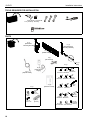
TOOLS REQUIRED FOR INSTALLATION
3/16" (5mm) - wood studs
1/2" (12.5mm) - masonry
#2
PARTS
A (1)
[Motorized
Mounting Bracket]
C (1)
[Non-Motorized
Mounting Bracket]
B (1)
[Wall Bracket]
F (1)
[IR Receiver]
C1 (1)
[Pin]
G (1)
E (1)
[Listed Power
Supply]
D (1)
[Optical Cable]
G3 (6)
G1 (8)
G2 (6)
M4x16mm M4x20mm M4x25mm
G4 (6)
G6 (6)
G5 (6)
M5x16mm M5x20mm M5x25mm
J (1)
[Remote Control]
H (1)
H1 (4)
5/16"
H3 (2)
10-24 x 1/2"
18
G7 (6)
M6x16mm
G8 (6)
M6x25mm
H2 (4)
5/16" x 2-1/2"
G10 (6)
G11 (6)
M8x20mm M8x30mm
H4 (4)
[Anchor]
G9 (1)
M5
G12 (4)
M8x50mm
G15 (8)
[Universal
G13 (8)
G14 (8)
Washer]
.750x.323x.250 .750x.344x.500
Installation Instructions
iCLPAT1
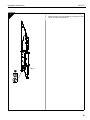
DIMENSIONS
19
iCLPAT1
Installation Instructions
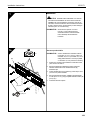
1b
1
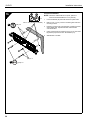
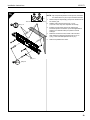
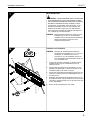
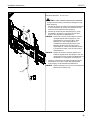
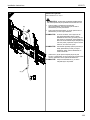
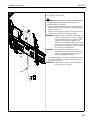
Concrete Installation
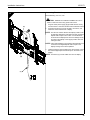
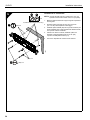
2
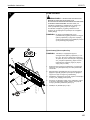
NOTE: Mount the wall bracket in four spots, spaced a
minimum horizontal distance of 12" (30.5cm).
x4
1/2" x 2-1/2" (12.5mm x 63.5mm)
3
(H4) x 4
1.
Level wall bracket (B) and mark locations of pilot holes.
2.
Drill four 1/2" x 2-1/2" (12.5mm x 63.5mm) pilot holes into
mounting surface.
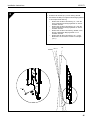
3.
Install four anchors (H4) into pilot holes, inserting end that
opens slightly first. Tap with hammer until flush with
concrete surface.
4.
Using a socket wrench, install four 5/16" x 2-1/2" hex head
lag screws (H2) and four 5/16" flat washers (H1).
5.
Slide latches to outside.
5
5
(H1) x 4
4
20
(H2) x 4
Installation Instructions
iCLPAT1
2
Mounting
Slots
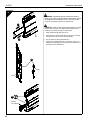
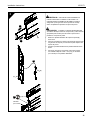
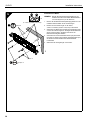
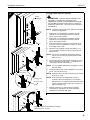
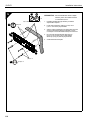
Attaching Brackets to Display
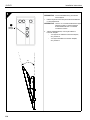
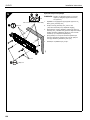
WARNING: IMPROPER INSTALLATION CAN LEAD TO
MOUNT FALLING CAUSING SERIOUS PERSONAL
INJURY OR DAMAGE TO EQUIPMENT! DO NOT substitute
hardware. Only use hardware provided or specified by
manufacturer.
1
NOTE: Locate Digital Optical Audio Output on back of display
(if available).
5
Mounting
Holes
(C)
1.
Determine and mark the vertical center position between
the left side upper and lower mounting holes in display.
2.
Determine and mark the vertical center position between
the right side upper and lower mounting holes in display.
3.
Orient non-motorized mounting bracket (C) so that
mounting holes are on bottom and mounting slots are on
top.
4.
Align mounting holes and slots in bracket (C) with upper and
lower mounting holes on left side of display.
NOTE: For mounting pattern widths less than 10-1/4", reverse
location of brackets (A) and (C).
(C)
5.
Adjust mounting bracket (C) position until mark made in
Step 1 aligns with center mark in bracket (C)
NOTE: Vertical center of mounting bracket is at bottom of third
slot.
6.
Secure bracket (C) to display using the screws provided
(G1 through G8 and G10 through G12).
NOTE: Also use universal washers (G15) if using screws (G1
through G8).
(A)
NOTE: If the display has a recessed mounting surface,
protrusions or a power box, a spacer (G13 or G14) and
longer mounting hardware must be placed between the
display and mounting bracket (C).
(G13 or G14)
(G15)
7.
(G1 through G8
and
G10 through G12)
Repeat Steps 3 through 6 for motorized mounting bracket
(A) using the same hole locations to align brackets
horizontally.
(C)
(Mounting Pattern Width
less than 10-1/4")
(A)
21
iCLPAT1
Installation Instructions
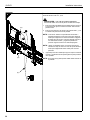
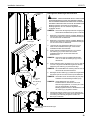
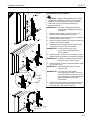
Installing Display
3
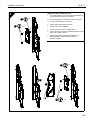
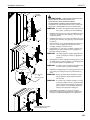
WARNING: IMPROPER INSTALLATION CAN LEAD TO
DISPLAY FALLING CAUSING SERIOUS PERSONAL INJURY
OR DAMAGE TO EQUIPMENT! Ensure mounting bracket
hooks are completely engaged over wall bracket.
1
CAUTION: DISPLAY MAY WEIGH IN EXCESS OF 40 LBS!
Always use two people and proper lifting techniques when
installing or positioning display on wall bracket.
(B)
3
2
(B)
(C)
4
(H3) x 2
Padlock
(not supplied)
22
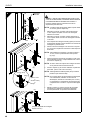
1.
Slide wall bracket (B) side latches out.
2.
Place display on wall bracket (B) by hooking the mounting
bracket hooks over the top of the wall bracket.
3.
Secure display by sliding side latches in.
4.
(Optional): For additional security, install two 10-24 x 1/2"
Phillips head self-tapping screws (H3) and/or padlocks (not
provided) into the slide latches.
Installation Instructions
iCLPAT1
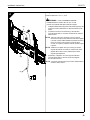
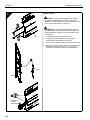
Connecting Electrical Components
4
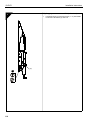
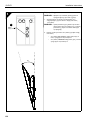
Electrical Rating: DC 12V; 0.4A
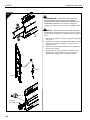
CAUTION: DAMAGE TO CABLES POSSIBLE! Do not run
cables or wires near the moving parts of this mount.
1.
Plug the Listed power supply (E) [provided with the mount]
into the iCLPAT1 control box and the home’s electrical socket.
2.
Plug the IR receiver (F) into the iCLPAT1 control box, and
attach the head to bottom side of display.
(E)
1
NOTE: The iCLPAT1 detects whether the display is ON or OFF
by detecting whether the LED light (red) from the Digital
Optical Audio Output is ON or OFF. In Auto-Mode the
iCLPAT1 tilts the display down when the LED light is ON,
and returns the display to the upright position when the
LED light is OFF.
2
NOTE: Use an optical splitter (not provided) to send signals to the
control box if the Digital Optical Audio Output of the
display is being used to drive speakers.
3.
3
(Optional) Plug the optical cable (D) into the iCLPAT1 control
box and the Digital Optical Audio Output on the back of the
display.
NOTE: IR receiver (F) must be visible from front of display.
(D)
(F)
23
iCLPAT1
Installation Instructions
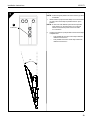
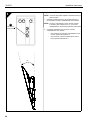
Adjusting Tilt
5
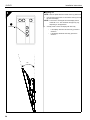
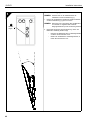
NOTE: Remove plastic tab from remote control (J) before use.
1.
AUTO
RESET
MANU
Use the down arrow button on the remote control (J) to fully
tilt down the display.
NOTE: The iCLPAT1 is designed to tilt the display down a
maximum of 13°. The maximum tilt angle may vary
depending on the application.
1
Tilt Down
2.
Visually check to see if the display tilts down fully.
•
If the display does NOT tilt down fully, proceed to
Section 6.
•
If the display DOES tilt down fully, proceed to
Section 7.
STOP
13°
24
Installation Instructions
iCLPAT1
Removing Spring to Tilt Display
6
2
x1
3
1
x2
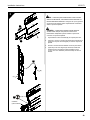
1.
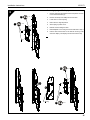
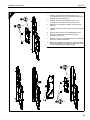
Remove and keep two Phillips screws from plastic cover on
non-motorized bracket (C).
2.
Remove and keep one Phillips screw from latch.
3.
Lower latch to remove spring.
4.
Return latch to original position.
5.
Store spring in plastic cover.
6.
Reinsert screw holding the latch.
7.
Reinstall plastic cover using two screws removed in Step 1.
8.
Use the down arrow button on the remote control (J) to tilt
down the display. The display should now tilt down fully.
6
x1
3
4
5
Spring
7
x2
25
iCLPAT1
Installation Instructions
Adjusting Upright Position of Display (Optional)
7
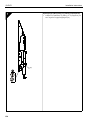
1.
(A)
1
26
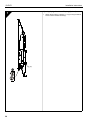
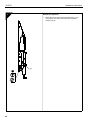
Adjust upright position of display (+/- 2°) by turning the bottom
screw on the motorized bracket (A).
Installation Instructions
iCLPAT1
Setting Preset Position
8
1.
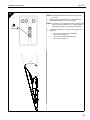
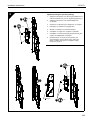
Remove pin (C1) from STORE opening.
2.
Insert pin into appropriate opening dependent on tilt angle
desired:
•
•
•
•
Insert pin into "P1" for maximum preset tilt angle of
approximately 6°.
Insert pin into "P2" for maximum preset tilt angle of
approximately 9°.
Insert pin into "STORE" for full tilt angle of 13°.
Insert pin into "UP" to lock the display in the up position
(approximately 5°).
P2 P1
UP
STORE
UP P2
P1
STORE
C1
1
27
iCLPAT1
Installation Instructions
INSTALACIÓN
1
ADVERTENCIA: UNA INSTALACIÓN INCORRECTA
PUEDE HACER QUE EL SOPORTE SE CAIGA Y EL
USUARIO SUFRA LESIONES SEVERAS O SE DAÑE EL
EQUIPO. El instalador es responsable de asegurar que la
estructura en la que se colocará el soporte sea capaz de
soportar cinco veces el peso del iCLPAT1 y que todos los
equipos agregados no superen las 150 lbs (68 kg).
NOTA: Las instrucciones incluidas sirven para la instalación
del iCLPAT1 en una pared de montantes de madera u
hormigón. Diríjase a la sección correspondiente para
más información.
1a
3
Colocación sobre montantes de madera
NOTA: Fije el soporte de pared a al menos dos montantes de
x4
madera de 2" x 4" (5,1 cm x 10,2 cm), espaciados por
un mínimo de 12'' (30,4 cm) y un máximo de 24'' (61,0
cm) de distancia. Los montantes de madera pueden
cubrirse con un tabique de 1/2" (12,7 mm) de grosor
máximo.
3/16" (5 mm)
(B)
5
1.
Con la ayuda de un localizador de montantes, ubique y
marque los dos montantes en los cuales el iCLPAT1
irá colocado.
2.
Introduciendo un clavo a través del orificio central del
soporte de pared (B), cuelgue provisoriamente el soporte
de pared en su lugar de instalación.
3.
Nivele el soporte de pared (B), marque y taladre
cuatro orificios de montaje de 3/16" (5 mm).
4.
Ajuste el soporte de pared a los montantes de la pared
usando cuatro tornillos para madera de cabeza hexagonal
de 5/16 x 2-1/2" (H2) y cuatro arandelas planas de
5/16'' (H1).
5.
Deslice los pestillos hacia fuera.
x
2
5
(H1) x 4
4
3
28
(H2) x 4
Installation Instructions
iCLPAT1
1b
1
Colocación sobre hormigón
2
NOTA: Fije el soporte de pared en cuatro puntos, ubicados a
una distancia de 12" (30,5 cm) en sentido horizontal.
x4
1.
Nivele el soporte de pared (B) y marque las ubicaciones de
los orificios guía.
2.
Taladre cuatro orificios guía de 1/2" x 2-1/2''
(12,5 mm x 63,5 mm) en la superficie de montaje.
3.
Introduzca cuatro tacos (H4) en los orificios guía,
insertando primero el extremo que se abre ligeramente.
Golpee con el martillo hasta que queden al ras del
hormigón.
4.
Utilizando una llave de vaso, instale cuatro tornillos
para madera de cabeza hexagonal de 5/16 x 2-1 2"
(H2) y cuatro arandelas planas de 5/16'' (H1).
5.
Deslice los pestillos hacia fuera.
1/2" x 2-1/2" (12,5 mm x 63,5 mm)
3
(H4) x 4
5
5
(H1) x 4
4
(H2) x 4
29
iCLPAT1
Installation Instructions
2
Montaje
Ranuras
Colocación de soportes en la pantalla
ADVERTENCIA: UNA INSTALACIÓN INCORRECTA
PUEDE HACER QUE EL SOPORTE SE CAIGA Y EL
USUARIO SUFRA LESIONES O SE DAÑE EL EQUIPO.
NO sustituya elementos de montaje. Use solamente los
elementos de montaje provistos o especificados por
el fabricante.
1
NOTA: Localice la salida de audio óptica digital en el reverso
5
Montaje
Orificios
de la pantalla (si hubiese una).
(C)
1.
Determine y marque la posición vertical central entre los
orificios de montaje superior e inferior del lado izquierdo
de la pantalla.
2.
Determine y marque la posición vertical central entre los
orificios de montaje superior e inferior del lado derecho de
la pantalla.
3.
Oriente el soporte de montaje no motorizado (C) de manera
que los orificios de montaje estén abajo y las ranuras de
montaje arriba.
4.
Alinee los orificios y ranuras de montaje en el soporte (C)
con los orificios superiores e inferiores de la parte izquierda
de la pantalla.
(C)
NOTA: Para patrones de montaje con un ancho menor a
10-1/4", invierta la ubicación de los soportes (A) y (C).
5.
Ajuste la posición del soporte de montaje (C) hasta que la
marca hecha en el Paso 1 se alinee con la marca central del
soporte de montaje (C).
NOTA: El centro vertical del soporte de montaje se encuentra
debajo de la tercera ranura.
(A)
6.
Asegure el soporte (C) a la pantalla utilizando los tornillos
provistos (G1 al G8 y G10 al G12).
NOTA: Utilice además arandelas de tamaño universal (G15) si
(G13 o G14)
utiliza tornillos (G1 al G8).
(G15)
NOTA: Si la pantalla tiene una superficie de montaje rebajada,
protuberancias o una caja de alimentación (G13 o
G14), deberá colocar un separador y un montaje más
largo entre la pantalla y el soporte de montaje (C).
(G1 al G8
y G10 al G12)
7.
Repita los Pasos 3 al 6 para el soporte de montaje
motorizado (A), usando las mismas ubicaciones de
orificios para alinear los soportes horizontalmente.
(C)
(A)
30
(Patrón de montaje de ancho
menor a 10-1/4")
Installation Instructions
iCLPAT1
Colocación de la pantalla
3
ADVERTENCIA: UNA INSTALACIÓN INCORRECTA
PUEDE HACER QUE LA PANTALLA SE CAIGA Y EL
USUARIO SUFRA LESIONES O SE DAÑE EL EQUIPO.
Asegúrese que los ganchos de los soportes de montaje
estén completamente ajustados al soporte de pared.
1
PRECAUCIÓN: LA PANTALLA PUEDE PESAR MÁS DE
40 LIBRAS. Siempre sírvase de dos personas y utilice técnicas
apropiadas para levantar peso al instalar o posicionar la
pantalla en el soporte de pared.
(B)
3
1.
Deslice los pestillos laterales del soporte de pared (B)
hacia fuera.
2.
Coloque la pantalla en el soporte de pared (B) enganchando
los ganchos del soporte por encima de la parte superior del
soporte de pared.
3.
Asegure la pantalla deslizando los pestillos laterales hacia
dentro.
4.
(Opcional): Para mayor seguridad, inserte dos tornillos
con cabezal Phillips de 10-24 x 1/2" (H3) y/o candados
(no incluidos) en los pestillos deslizables.
2
(B)
(C)
4
(H3) x 2
Candado
(no incluido)
31
iCLPAT1
Installation Instructions
Conexión de los componentes eléctricos
4
Potencia eléctrica: CD 12 V; 0,4 A
PRECAUCIÓN: LOS CABLES PUEDEN DAÑARSE!
No extienda cables cerca de las partes movibles del montaje.
1.
Enchufe la fuente de alimentación indicada (E) [que viene con
el soporte] de la caja de control de iCLPAT1 al enchufe de
pared de casa.
2.
Enchufe el receptor IR a la caja de control del iCLPAT1, y una
el cabezal a la parte inferior de la pantalla.
(E)
1
NOTA: El iCLPAT1 detecta si la pantalla está encendida o
apagada al detectar si la luz LED (roja) de la salida de
audio óptica digital se encuentra encendida o apagada.
En Modo-Auto el iCLPAT1 inclina la pantalla cuando la
luz LED está encendida, y regresa la pantalla a la
posición original cuando la luz LED está apagada.
2
NOTA: Utilice un separador óptico (no incluido) para enviar
señales a la caja de control en caso de que la salida de
audio óptica digital esté siendo usada para conectar
parlantes.
3
(D)
3.
(Opcional): Enchufe el cable óptico (D) a la caja de control del
iCLPAT1 y la salida de audio óptica digital a la parte posterior
de la pantalla.
NOTA: El receptor IR (F) debe quedar visible desde el frente de
la pantalla.
(F)
32
Installation Instructions
iCLPAT1
Ajuste de la inclinación
5
NOTA: Quite la lengüeta plástica del control remoto (J) antes
de utilizarlo.
AUTO
RESET
MANU
1
1.
Utilice la flecha que apunta hacia abajo en el control remoto
(J) para inclinar hacia abajo la pantalla hasta su punto
máximo.
NOTA: El iCLPAT1 está diseñado para inclinar la pantalla
hacia abajo en un ángulo de hasta 13º. El ángulo
máximo de inclinación puede variar de acuerdo
a su colocación.
Inclinación
STOP
2.
Verifique visualmente que la pantalla se incline hacia abajo
completamente.
•
Si la pantalla NO se inclina hacia abajo totalmente,
refiérase a la Sección 6.
•
Si la pantalla SÍ se inclina hacia abajo totalmente,
refiérase a la Sección 7.
13°
33
iCLPAT1
Installation Instructions
Sustracción del resorte para inclinar la pantalla
6
2
x1
3
1
x2
1.
Retire y conserve los dos tornillos Phillips de la cubierta
plástica del soporte no motorizado (C).
2.
Retire y conserve un tornillo Phillips del pestillo.
3.
Baje el pestillo para quitar el resorte.
4.
Vuelva a colocar el pestillo en la posición original.
5.
Conserve el resorte en un envoltorio de plástico.
6.
Vuelva a colocar el tornillo sosteniendo el pestillo.
7.
Vuelva a instalar la cubierta plástica usando los dos
tornillos que fueron retirados en el Paso 1.
8.
Utilice la flecha que apunta hacia abajo en el control remoto
(J) para inclinar hacia abajo la pantalla. La pantalla ahora
debería ahora inclinarse en su totalidad.
6
x1
3
4
5
Resorte
7
34
x2
Installation Instructions
iCLPAT1
Ajustar la posición recta de la pantalla (opcional)
7
1.
Ajuste la posición recta de la pantalla (+/- 2º) al girar el tornillo
inferior del soporte motorizado (A).
(A)
1
35
iCLPAT1
Installation Instructions
Establecer una posición predeterminada
8
1.
Retire el perno (C1) de la abertura de RESERVA.
2.
Inserte el perno en la abertura apropiada de acuerdo al
ángulo de inclinación deseado.
•
•
•
•
Inserte el perno en “P1” para predeterminar un ángulo
máximo de inclinación de aproximadamente 6º.
Inserte el perno en “P2” para predeterminar un ángulo
máximo de inclinación de aproximadamente 9º.
Inserte el perno en “RESERVA” para poder obtener el
ángulo máximo de inclinación de 13º.
Inserte el perno en “ARRIBA” para bloquear la
pantalla en la posición inclinada hacia arriba
(aproximadamente 5º).
P2 P1
RESERVA
ARRIBA P2
P1
RESERVA
C1
1
36
ARRIBA
Installation Instructions
iCLPAT1
INSTALLATION
1
WARNUNG: UNSACHGEMÄSSE INSTALLATION KANN
ZUM HERUNTERFALLEN DER HALTERUNG FÜHREN
UND SCHWERE PERSONENSCHÄDEN BZW. SCHÄDEN
AM GERÄT VERURSACHEN! Der Installateur ist dafür
verantwortlich, sicherzustellen, dass die Struktur, an der
die Halterung befestigt werden soll, das Fünffache des
Gewichts der iCLPAT1 tragen kann und dass sämtliche
daran angebrachten Geräte das zulässige Höchstgewicht
von 150 lb (68 kg) nicht überschreiten.
HINWEIS: Dieses Dokument enthält eine Anleitung für die
Installation der iCLPAT1 an einer Wand mit
Holzbalken oder an einer Wand aus Massivbeton.
Nähere Informationen finden Sie in dem
entsprechenden Abschnitt.
1a
Installation auf Holzbalken
3
HINWEIS: Montieren Sie die Wandanschlussplatte an
mindestens zwei Holzbalken (5,1 cm x 10,2 cm)
im Abstand von mindestens 30,4 cm und
höchstens 61 cm). Die Holzbalken können mit
einer Wandplatte mit einer maximalen Dicke von
12,7 mm bedeckt sein.
x4
3/16 Zoll (5mm)
(B)
1.
Suchen Sie die beiden Holzbalken, an die die iCLPAT1
installiert werden soll, mit einem Balkensucher und
markieren Sie sie.
2.
Schlagen Sie einen Nagel durch das mittlere Loch der
Wandanschlussplatte (B), um diese provisorisch an der
Installationsstelle an die Wand zu hängen.
3.
Richten Sie die Wandanschlussplatte (B) gerade aus und
markieren und bohren Sie vier Installationsbohrungen à
3/16 Zoll (5 mm).
4.
Befestigen Sie die Wandanschlussplatte mithilfe von vier
Sechskantschrauben (H2) der Größe 5/16 x 2-1/2 Zoll und
vier flachen Unterlegscheiben (H1) in der Größe 5/16 Zoll
an den Wandbalken.
5.
Ziehen Sie die Verriegelungen nach außen.
5
x
2
5
(H1) x 4
4
(H2) x 4
3
37
iCLPAT1
Installation Instructions
1b
1
Installation auf Beton
2
HINWEIS: Bringen Sie die Wandanschlussplatte auf vier
Punkten mit einem horizontalen Mindestabstand
von 12 Zoll (30,5 cm) an der Wand an.
x4
½" x 2½" (12,5 mm x 63,5 mm)
3
(H4) x 4
1.
Richten Sie die Wandanschlussplatte (B) gerade aus und
markieren Sie die Stellen für die Vorbohrungen.
2.
Bohren Sie vier Vorbohrungen in der Größe
½ Zoll x 2-1/2 Zoll (12,5 mm x 63,5 mm) in die Wand.
3.
Setzen Sie vier Dübel (H4) mit dem leicht geöffneten Ende
voran in die Vorbohrungen ein. Schlagen Sie die Dübel mit
einem Hammer tiefer in die Wand, bis sie mit der
Betonwand bündig abschließen.
4.
Schrauben Sie vier Sechskantschrauben (H2) der Größe
5/16 Zoll x 2-1/2 Zoll und vier flache Unterlegscheiben (H1)
der Größe 5/16 Zoll mithilfe eines Steckschlüssels
in die Dübel.
5.
Ziehen Sie die Verriegelungen nach außen.
5
5
(H1) x 4
4
38
(H2) x 4
Installation Instructions
iCLPAT1
2
Installationsschlitze
Anbringen der Halterungen am Bildschirm
WARNUNG: UNSACHGEMÄSSE INSTALLATION KANN
ZUM HERUNTERFALLEN DER HALTERUNG FÜHREN
UND SCHWERE PERSONENSCHÄDEN BZW. SCHÄDEN
AM GERÄT VERURSACHEN! Verwenden Sie KEINE ErsatzBefestigungsmittel. Verwenden Sie ausschließlich
Befestigungsmittel, die vom Hersteller mitgeliefert oder
angegeben wurden.
1
5
HINWEIS: Suchen Sie den Digital Optical Audio-Ausgang auf
der Rückseite des Bildschirms (sofern vorhanden).
Installationsbohrungen
(C)
1.
Bestimmen und markieren Sie den vertikalen Mittelpunkt
zwischen den oberen und unteren Installationsbohrungen
auf der linken Seite am Bildschirm.
2.
Bestimmen und markieren Sie den vertikalen Mittelpunkt
zwischen den oberen und unteren Installationsbohrungen
auf der rechten Seite am Bildschirm.
3.
Legen Sie die nicht-motorisierte Halterung (C) so an,
dass sich die Installationsbohrungen unten und die
Installationsschlitze oben befinden.
4.
Richten Sie die Installationsbohrungen und –schlitze
der Halterung (C) mit den oberen und unteren
Installationsbohrungen auf der linken Seite des
Bildschirms aus.
(C)
HINWEIS: Vertauschen Sie bei Installationsbohrweiten
unter 10-1/4 Zoll die Halterungen (A) und (C)
miteinander.
5.
(A)
Richten Sie die Position der Halterung (C) so aus, dass die
in Schritt 1 eingezeichnete Markierung mit der mittleren
Markierung der Halterung (C) übereinander liegt.
HINWEIS: Die vertikale Mitte der Halterung befindet sich am
unteren Ende des dritten Schlitzes.
(G13 oder G14)
6.
(G15)
Befestigen Sie die Halterung (C) mithilfe der mitgelieferten
Schrauben (G1 bis G8 und G10 bis G12) am Bildschirm.
HINWEIS: Verwenden Sie für die Schrauben (G1) bis (G8)
(G1 bis G8
und
G10 bis G12)
außerdem Universalunterlegscheiben (G15).
HINWEIS: Hat der Bildschirm eine vertiefte
Installationsfläche, Überstände oder einen
Stromversorgungskasten, so müssen (G13 oder
G14) ein Abstandhalter und längere
Befestigungsmittel zwischen dem Bildschirm und
der Halterung (C) angebracht werden.
(C)
7.
Wiederholen Sie die Schritte 3 bis 6 zum Anbringen der
motorisierten Halterung (A), indem Sie für die horizontale
Ausrichtung der Halterung die gleiche Position der
Bohrungen verwenden.
(Abstand der Installationsbohrungen
unter 10-1/4")
(A)
39
iCLPAT1
Installation Instructions
Installation des Bildschirms
3
WARNUNG: UNSACHGEMÄSSE INSTALLATION KANN
ZUM HERUNTERFALLEN DES BILDSCHIRMS FÜHREN UND
SCHWERE PERSONENSCHÄDEN BZW. SCHÄDEN AM
GERÄT VERURSACHEN! Vergewissern Sie sich, dass die
Halterungen vollständig in die Anschlussplatte eingehakt sind.
1
ACHTUNG: DER BILDSCHIRM KANN ÜBER 40 LB (18 KG)
WIEGEN! Arbeiten Sie bei der Installation eines Bildschirms auf
einer Wandhalterung immer zu zweit und mit ergonomischen
Hebetechniken.
(B)
3
2
(B)
(C)
4
Vorhängeschloss
(nicht enthalten)
40
(H3) x 2
1.
Ziehen Sie die Seitenschienen der Wandanschlussplatte
(B) heraus.
2.
Halten Sie den Bildschirm über die Wandanschlussplatte (B)
und haken Sie die Halterungen auf der oberen Kante der
Wandanschlussplatte ein.
3.
Befestigen Sie den Bildschirm durch Einwärtsschieben der
Seitenschienen.
4.
(Optional:) Montieren Sie für zusätzliche Sicherheit zwei
Kreuzschlitz-Blechschrauben (H3) in der Größe
14-24 x ½ Zoll und/oder Vorhängeschlösser (nicht im
Lieferumfang enthalten) in die Seitenschienen.
Installation Instructions
iCLPAT1
Anschließen der elektrischen Komponenten
4
Elektrischer Nennwert: 12 V DC; 0,4 A
ACHTUNG: KABEL KÖNNTEN BESCHÄDIGT WERDEN!
Verlegen Sie keine Kabel in der Nähe der beweglichen Teile
dieser Halterung.
(E)
1.
Stecken Sie das (mit der Halterung gelieferte) Netzkabel (E)
in den Steuerkasten der iCLPAT1 und verbinden Sie das
andere Ende des Kabels mit einer Steckdose.
2.
Stecken Sie den Stecker des IR-Empfängers (F) in den
Steuerkasten der iCLPAT1 und bringen Sie das obere
Ende auf der Unterseite des Bildschirms an.
1
2
3
HINWEIS: Die iCLPAT1 liest ab, ob die (rote) LED-Leuchte
des Digital Optical Audio-Ausgangs ein- oder
ausgeschaltet ist, und erkennt daran, ob der
Bildschirm ein- oder ausgeschaltet ist. Im
automatischen Modus neigt die iCLPAT1 den
Bildschirm abwärts, wenn die LED-Leuchte
eingeschaltet ist, und fährt den Bildschirm wieder
in die aufrechte Position, wenn die LED-Leuchte
ausgeschaltet ist.
HINWEIS: Senden Sie mit einem optischen Splitter (nicht
enthalten) Signale an den Steuerkasten, wenn der
digitale optische Audio-Ausgang des Bildschirms für
den Betrieb von Lautsprechern verwendet wird.
(D)
3.
(Optional:) Verbinden Sie das optische Kabel (D) mit dem
Steuerkasten der iCLPAT1 und mit dem Digital Optical
Audio-Ausgang auf der Rückseite des Bildschirms.
HINWEIS: Der IR-Empfänger (F) muss von der Vorderseite des
Bildschirms aus sichtbar sein.
(F)
41
iCLPAT1
Installation Instructions
Einstellen des Neigungswinkels
5
HINWEIS: Entfernen Sie vor der Inbetriebnahme die
Plastikfolie von der Fernbedienung (J).
AUTO
RESET
MANU
Neigen Sie den Bildschirm mithilfe der Abwärts-Pfeiltaste
auf der Fernbedienung (J) ganz nach unten.
HINWEIS: Die iCLPAT1 ist so ausgelegt, dass der Bildschirm
1
um maximal 13° neigbar ist. Der maximale
Neigungswinkel kann je nach Anwendung variieren.
Abwärts
neigen
2.
STOP
13°
42
1.
Überprüfen Sie anhand einer Sichtprüfung, ob sich der
Bildschirm vollständig abwärts neigt.
•
Neigt sich der Bildschirm NICHT vollständig abwärts,
so fahren Sie mit Abschnitt 6 fort.
•
NEIGT sich der Bildschirm vollständig abwärts, so
fahren Sie mit Abschnitt 7 fort.
Installation Instructions
iCLPAT1
Entfernen der Feder zum Neigen des Bildschirms
6
2
Entfernen Sie zwei Kreuzschlitzschrauben von der
Kunststoffabdeckung der nicht-motorisierten Halterung (C).
Bewahren Sie die Schrauben auf.
2.
Entfernen Sie eine Kreuzschlitzschraube von der
Verriegelung und bewahren Sie die Schraube auf.
3.
Ziehen Sie die Verriegelung abwärts, um die Feder zu
entfernen.
4.
Schieben Sie die Verriegelung wieder in ihre ursprüngliche
Position.
5.
Bewahren Sie die Feder in der Plastikabdeckung auf.
6.
Setzen Sie die Schraube für die Befestigung der
Verriegelung wieder ein.
7.
Befestigen Sie die Kunststoffabdeckung mithilfe der beiden
in Schritt 1 entfernten Schrauben.
8.
Neigen Sie den Bildschirm mithilfe der Abwärts-Pfeiltaste
auf der Fernbedienung (J) abwärts. Der Bildschirm müsste
sich jetzt vollständig abwärts kippen lassen.
x1
3
1
1.
x2
6
x1
3
4
5
Feder
7
x2
43
iCLPAT1
Installation Instructions
Einstellen der aufrechten Position des
Bildschirms (optional)
7
1.
(A)
1
44
Stellen Sie die aufrechte Position des Bildschirms (+/- 2°)
durch Drehen der unteren Schraube der motorisierten
Halterung (A) ein.
Installation Instructions
iCLPAT1
Einstellen der Grundposition
8
1.
Entfernen Sie den Stift (C1) von der Öffnung STORE.
2.
Stecken Sie den Stift je nach gewünschtem Neigungswinkel
in die entsprechende Öffnung.
•
•
•
•
Stecken Sie den Stift in die Öffnung „P1“, wenn Sie
einen maximalen Grundneigungswinkel von etwa 6°
einstellen möchten.
Stecken Sie den Stift in die Öffnung „P2“, wenn Sie
einen maximalen Grundneigungswinkel von etwa 9°
einstellen möchten.
Stecken Sie den Stift in die Öffnung „STORE“, wenn
Sie den vollständigen Neigungswinkel von 13°
einstellen möchten.
Stecken Sie den Stift in die Öffnung „UP“, um den
Bildschirm in der aufrechten Position zu verriegeln
(ca. 5°).
P2 P1
UP
STORE
UP P2
P1
STORE
C1
1
45
iCLPAT1
Installation Instructions
INSTALAÇÃO
1
AVISO: A INSTALAÇÃO INADEQUADA PODE LEVAR A
FALHA NA MONTAGEM, CAUSANDO DANOS FÍSICOS OU
DANOS MATERIAIS GRAVES! É da responsabilidade do
técnico instalador assegurar-se que a estrutura à qual a
armação é presa é capaz de suportar cinco vezes o peso da
iCLPAT1 e que todo o equipamento preso não excede os
68 kg.
NOTA: São incluídas instruções para a montagem do
iCLPAT1 numa parede de vigas de madeira ou
para aplicação numa parede sólida de betão. Avance
para o respectivo capítulo para mais informações.
1a
3
Instalação em parede de vigas de madeira
NOTA: Monte o suporte de parede em pelo menos duas vigas
x4
de madeira de 5,1 cm x 10,2 cm espaçadas entre si
entre 30 cm a 60 cm. As vigas de madeira podem ser
cobertas com painel acartonado com uma espessura
máxima de 12,7 mm.
5 mm
(B)
1.
Utilizando um detector de vigas, localize e marque
as duas vigas nas quais será instalado o iCLPAT1.
2.
Utilizando um prego que se passa pelo furo central do
suporte da parede (B), pendurar temporariamente o
suporte de parede na parede, no local da instalação.
3.
Nivele o suporte da parede (B), marque e execute
quatro furos de montagem de 5 mm.
4.
Aperte o suporte de parede às vigas da parede utilizando
quatro parafusos de cabeça sextavada de 5/16 x 2-1/2"
(H2) e quatro anilhas planas de 5/16" (H1).
5.
Faça deslizar os trincos para fora.
5
x
2
5
(H1) x 4
4
3
46
(H2) x 4
Installation Instructions
1b
iCLPAT1
1
Instalação em cimento
2
NOTA: Monte o suporte de parede em quatro pontos,
espaçados entre si numa distância horizontal
mínima de 30,5 cm.
x4
12,5 mm x 63,5 mm
3
(H4) x 4
1.
Nivele o suporte de parede (B) e marque os pontos dos
furos piloto.
2.
Executar quatro furos piloto de 12,5mm x 63,5mm na
superfície de montagem.
3.
Montar quatro buchas (H4) nos furos piloto, introduzindo
primeiro a ponta que se abre ligeiramente. Bater
ligeiramente com um martelo até ficar à face da superfície
em cimento.
4.
Utilizando uma chave de bocas, instale quatro
parafusos de cavilha sextavados (H2) de
5/16 x 2-1/2" e quatro anilhas planas (H1) de 5/16".
5.
Faça deslizar os trincos para fora.
5
5
(H1) x 4
4
(H2) x 4
47
iCLPAT1
Installation Instructions
2
Montagem
Ranhuras
Prender os suportes ao monitor
AVISO: A INSTALAÇÃO INADEQUADA PODE LEVAR
A FALHA NA MONTAGEM, CAUSANDO DANOS FÍSICOS
OU DANOS MATERIAIS GRAVES! NÃO substitua o
hardware. Utilizar apenas o hardware fornecido ou
especificado pelo fabricante.
1
NOTA: Localize a saída áudio óptica digital na parte detrás
do monitor (quando disponível).
5
Montagem
furos
1.
Determinar e marcar a posição central vertical entre
o canto superior esquerdo e os furos de montagem
inferiores no monitor.
2.
Determinar e marcar a posição vertical central entre o
canto superior direito e os furos de montagem inferiores
no monitor.
3.
Gire o suporte de montagem vertical (C) para que os furos
de montagem estejam na parte de baixo e as ranhuras de
montagem na parte de cima.
4.
Alinhe os furos de montagem e as ranhuras no suporte
(C) com os furos superiores e inferiores no lado esquerdo
do monitor.
(C)
(C)
NOTA: Para padrões de montagem com largura inferior a
10-1/4”, inverta o posicionamento dos suportes
(A) e (C).
5.
Ajuste a posição do suporte de montagem (C) até que a
marca aplicada no passo 1 esteja alinhada com a marca
de centro no suporte (C)
NOTA: O centro vertical do suporte de montagem encontrase na parte de baixo da terceira ranhura.
(A)
6.
Prenda o suporte (C) ao monitor utilizando os parafusos
fornecidos (de G1 a G8 e de G10 a G12).
NOTA: Utilize igualmente anilhas planas (G15) se utilizar
(G13 ou G14)
parafusos (G1 através do G8).
(G15)
NOTA: Se o monitor dispor de uma superfície de montagem
(de G1 a G8
e
de G10 a G12)
com reentrâncias, ressaltos ou uma caixa de
alimentação, deverão ser colocados (G13 ou G14)
um espaçadore o equipamento de montagem mais
compridos entre o monitor e o suporte de montagem
(C).
7.
(C)
Repita os passos 3 a 6 para o suporte de montagem
motorizado (A) utilizando as mesmas localizações
de furos para alinhar os suportes horizontalmente.
(Largura do padrão de montagem
inferior a 10-1/4")
(A)
48
Installation Instructions
iCLPAT1
Instalar o monitor
3
AVISO: A INSTALAÇÃO INADEQUADA PODE LEVAR À
QUEDA DO MONITOR, CAUSANDO DANOS FÍSICOS OU
DANOS MATERIAIS GRAVES! Assegure-se que os ganchos
do suporte de montagem estão completamente encaixados
sobre o suporte de parede.
1
CUIDADO: O MONITOR PODERÁ PESAR MAIS DE
40 LBS! Utilize sempre duas pessoas e técnicas de
levantamento adequadas quando instalar ou posicionar
o monitor no suporte de parede.
(B)
3
1.
Faça deslizar os trincos laterais (B) do suporte para fora.
2.
Coloque o monitor no suporte de parede (B) encaixando os
ganchos do suporte de montagem por cima do suporte de
parede.
3.
Prenda o monitor fazendo deslizar os trincos para dentro.
4.
(Opcional): Para uma segurança adicional, instale dois
parafusos auto-roscantes de cabeça Phillips (H3) de
10-24 x 1/2" e/ou cadeados (não fornecidos) nos trincos
laterais.
2
(B)
(C)
4
(H3) x 2
Cadeado
(não fornecido)
49
iCLPAT1
Installation Instructions
Ligar componentes eléctricos
4
Características eléctricas: DC 12V; 0,4A
CUIDADO: OS CABOS PODEM SER DANIFICADOS!
Não passe cabos ou fios perto de peças em movimento
desta armação.
(E)
1.
Ligue a fonte de alimentação recomendada (E) [fornecida
com a armação] na caixa de controlo do iCLPAT1 e numa
tomada eléctrica doméstica.
2.
Ligue o receptor de infravermelhos (F) à caixa de comando do
iCLPAT1, e prenda a ponta à parte inferior do monitor.
1
NOTA: O iCLPAT1 detecta se o monitor está ligado ou desligado
ao controlar se a luz do LED (vermelho) da saída áudio
óptica digital está ligada ou desligada. No modo
automático o iCLPAT1 inclina o monitor para baixo
quando a luz do LED está ligada, e devolve o monitor à
posição vertical quando a luz do LED está desligada.
2
NOTA: Utilize um repartidor de sinal óptico (não fornecido) para
enviar os sinais à caixa de comando se a Saída de Áudio
Digital Óptico do monitor estiver a ser utilizada para
alimentar altifalantes.
3
3.
(D)
(Opcional): Ligue o cabo óptico (D) na caixa de comando do
iCLPAT1 e a saída áudio óptica digital na parte detrás do
monitor.
NOTA: O receptor de infravermelhos (F) deverá estar visível
quando se olha de frente para o monitor.
(F)
50
Installation Instructions
iCLPAT1
Ajustar a inclinação
5
NOTA: Retire a patilha plástica do telecomando (J) antes
de o usar.
AUTO
RESET
MANU
1.
Utilize o botão de seta para baixo no telecomando (J)
para inclinar totalmente o monitor para baixo.
NOTA: O iCLPAT1 foi concebido para inclinar o monitor para
1
baixo num ângulo máximo de 13°. O ângulo máximo
de inclinação poderá variar consoante a aplicação.
Inclinar
para baixo
2.
STOP
Verifique visualmente se o monitor se inclina totalmente
para baixo.
•
Se o monitor NÃO se inclinar totalmente,
avance para o capítulo 6.
•
Se o monitor se INCLINAR totalmente,
avance para o capítulo 7.
13°
51
iCLPAT1
Installation Instructions
Retirar a mola para inclinar o monitor
6
2
x1
3
1
x2
1.
Retire e guarde dois parafusos Phillips da tampa plástica
do suporte não-motorizado (C).
2.
Retire e guarde um parafuso Phillips do trinco.
3.
Baixe o trinco para retirar a mola.
4.
Devolva o trinco à sua posição inicial.
5.
Guarde a mola na tampa plástica.
6.
Reintroduza o parafuso que segura o trinco.
7.
Volte a montar a tampa plástica utilizando os
dois parafusos retirados no passo 1.
8.
Utilize o botão de seta para baixo no telecomando (J) para
inclinar o monitor para baixo. O monitor deverá agora
inclinar-se totalmente para baixo.
6
x1
3
4
5
Mola
7
52
x2
Installation Instructions
iCLPAT1
Ajustar a posição vertical do monitor (opcional)
7
1.
Ajustar a posição vertical do monitor (+/- 2°) rodando o
parafuso inferior no suporte motorizado (A).
(A)
1
53
iCLPAT1
Installation Instructions
Definir a posição predefinida
8
1.
Retirar o pino (C1) da abertura STORE (embalagem).
2.
Inserir o pino na respectiva abertura consoante o ângulo de
inclinação desejado:
•
•
•
•
Introduzir o pino em “P1” para um ângulo máximo
predefinido de aproximadamente 6°.
Introduzir o pino em “P2” para um ângulo máximo
predefinido de aproximadamente 9°.
Inserir o pino em “STORE” (embalagem) para se obter
um ângulo pleno de inclinação de 13°.
Introduzir o pino em “UP” (vertical) para bloquear o
monitor na posição vertical (aproximadamente 5°).
P2 P1
STORE
UP P2
P1
STORE
C1
1
54
UP
Installation Instructions
iCLPAT1
INSTALLAZIONE
1
AVVERTENZA: L’INSTALLAZIONE ERRONEA PUÒ
CAUSARE LA CADUTA DEL SUPPORTO CON
POSSIBILITÀ DI GRAVI LESIONI PERSONALI E DANNI
ALL’APPARECCHIATURA! È responsabilità degli installatori
assicurarsi che la struttura su cui viene installato il supporto
sia in grado di sostenere cinque volte il peso dell’iCLPAT1 e
di tutte le attrezzature. Tale peso complessivo non dovrà
superare i 68 kg (150 libbre).
NOTA: si troveranno incluse le istruzioni per l’installazione
dell’iCLPAT1 su una parete con montanti di legno o su
una parete in calcestruzzo pieno. Passare alla sezione
appropriata per ulteriori informazioni.
1a
3
Installazione su montanti in legno
NOTA: Montare la staffa su almeno due montanti in legno da
x4
5,1 cm x 10,2 cm (2 poll. x 4 poll.) con una distanza
minima tra di loro di 30,4 cm (12 poll.), ma non
superiore a 61 cm (24 pollici). I montanti in legno
possono essere ricoperti da un pannello in
cartongesso di uno spessore massimo di 12,7 mm (1/
2 poll.).
3/16" (5 mm)
(B)
5
1.
Utilizzando un cercamontanti, identificare e contrassegnare
la posizione dei due montanti su cui sarà installato
l’iCLPAT1.
2.
Utilizzando un chiodo attraverso il foro centrale della staffa
(B), agganciare temporaneamente la staffa alla parete nella
posizione di installazione.
3.
Mettere in bolla la staffa a muro (B), segnare e forare
quattro fori di montaggio da 5 mm (3/16).
4.
Assicurare la staffa a parete ai montanti utilizzando quattro
viti mordenti a testa esagonale da 5/16 x 2-1/2" (H2) e
quattro rondelle piatte da 5/16" (H1).
5.
Far scorre i dispositivi di chiusura verso l’esterno.
x
2
5
(H1) x 4
4
(H2) x 4
3
55
iCLPAT1
Installation Instructions
1b
1
Installazione su calcestruzzo
2
NOTA: montare la staffa a muro in quattro punti, con una
spaziatura orizzontale minima di 30,5 cm (12 pollici).
x4
1.
Mettere in bolla la staffa a muro (B) e segnare la posizione
dei fori guida.
2.
Praticare quattro fori guida da 12,5 mm x 63,5 mm
(1/2" x 2-1/2") nella superficie di montaggio.
3.
Installare quattro tasselli (H4) nei fori guida, inserendo per
prima l’estremità che si apre leggermente. Batterli a livello
con la parete usando il martello.
4.
Usando una chiave a bussola, installare quattro viti
mordenti a testa esagonale da 5/16 x 2-1/2" (H2)
e quattro rondelle piatte da 5/16" (H1).
5.
Far scorre i dispositivi di chiusura verso l’esterno.
12,5 mm x 63,5 mm (1/2" x 2-1/2")
3
(H4) x 4
5
5
(H1) x 4
4
56
(H2) x 4
Installation Instructions
iCLPAT1
Fissaggio delle staffe allo schermo
2
Asole
montaggio
AVVERTENZA: L’INSTALLAZIONE ERRONEA PUÒ
CAUSARE LA CADUTA DEL SUPPORTO CON
POSSIBILITÀ DI GRAVI LESIONI PERSONALI E DANNI
ALL’APPARECCHIATURA! NON sostituire i componenti.
Utilizzare esclusivamente i componenti forniti o specificati
dal fabbricante.
NOTA: identificare l’uscita audio ottica digitale sul retro dello
1
schermo (se disponibile).
5
Fori
montaggio
(C)
1.
Determinare e contrassegnare la posizione centrale
verticale tra i fori di montaggio superiore e inferiore
del lato sinistro dello schermo.
2.
Determinare e contrassegnare la posizione centrale
verticale tra i fori di montaggio superiore e inferiore
del lato destro dello schermo.
3.
Orientare la staffa di montaggio non motorizzata (C) in
modo che i fori di montaggio siano in basso, e le asole
di montaggio siano in alto.
4.
Allineare fori di montaggio e asole nella staffa (C) con
i fori di montaggio superiore e inferiore del lato sinistro
dello schermo.
(C)
NOTA: per schermi di montaggio con larghezza inferiore
a 26 cm (10-1/4 pollici), invertire la posizione delle
staffe (A) e (C).
5.
Regolare la posizione della staffa di montaggio (C) fino a
che il contrassegno fatto al Passo 1 non si allinea con il
contrassegno centrale nella staffa (C).
NOTA: il centro verticale della staffa di montaggio è in fondo
alla terza asola.
(A)
6.
(G13 o G14)
NOTA: utilizzare inoltre le rondelle universali (G15) se si usano
le viti (da G1 a G8).
(G15)
(da G1 a G8
e
da G10 a G12)
NOTA: se la superficie di montaggio dello schermo è
incassata, oppure ha sporgenze o una scatola di
alimentazione, è necessario inserire distanziatori (G13
o G14) e utilizzare viti più lunghe tra lo schermo e la
staffa di montaggio (C).
7.
(C)
(A)
Fissare la staffa (C) allo schermo utilizzando le viti fornite
(da G1 a G8 e da G10 a G12).
Ripetere i passi da 3 a 6 per la staffa di montaggio
motorizzata (A), utilizzando i fori corrispondenti per
l’allineamento orizzontale delle staffe.
(Larghezza della configurazione di montaggio
inferiore a 26 cm - 10-1/4")
57
iCLPAT1
Installation Instructions
Installazione dello schermo
3
AVVERTENZA: L’INSTALLAZIONE ERRONEA
PUÒ CAUSARE LA CADUTA DELLO SCHERMO CON
POSSIBILITÀ DI GRAVI LESIONI PERSONALI E DANNI
ALL’APPARECCHIATURA! Assicurarsi che i ganci della staffa di
montaggio siano completamente inseriti sopra la staffa a muro.
1
ATTENZIONE: IL PESO DELLO SCHERMO PUÒ
SUPERARE I 18 KG! Quando si installa o posiziona lo schermo
sulla staffa a muro, impiegare sempre due persone e sollevare
utilizzando le tecniche corrette.
(B)
3
2
(B)
(C)
4
Lucchetto
(non fornito)
58
(H3) x 2
1.
Far scorrere i dispositivi di chiusura laterali della staffa a muro
(B) verso l’esterno.
2.
Collocare lo schermo sulla staffa a muro (B) agganciando con
gli appositi ganci la staffa di montaggio sopra il lato superiore
della staffa a muro.
3.
Fissare lo schermo facendo scorrere verso l’interno i
dispositivi di chiusura laterali.
4.
(Opzionale): per maggior sicurezza, installare due viti
autofilettanti con testa a croce da 10-24 x 1/2" (H3) e/o
lucchetti (non forniti) nei dispositivi laterali di chiusura.
Installation Instructions
iCLPAT1
Collegamento dei componenti elettrici
4
Specifiche elettriche: 12 V c.c; 0,4 A
ATTENZIONE: I CAVI POTREBBERO ESSERE
DANNEGGIATI! Per evitare danni ai cavi, non farli
passare in prossimità delle parti mobili del supporto.
(E)
1.
Collegare l'alimentatore (E) [incluso all'unità di supporto] alla
scatola di controllo dell’iCLPAT1 e alla presa elettrica sulla
parete.
2.
Connettere il ricevitore ad infrarossi (F) alla scatola di
controllo dell’iCLPAT1 e montarne la testina al lato inferiore
dello schermo.
1
2
NOTA: l’iCLPAT1 rileva se lo schermo è acceso o spento
rilevando se la spia (rossa) dell’uscita audio ottica digitale
è accesa o spenta. Nella modalità automatica l’iCLPAT1
inclina lo schermo verso il basso quando la spia è
accesa, e lo riporta in posizione verticale quando la spia
è spenta.
NOTA: Utilizzare uno splitter ottico (non fornito) per inviare
segnali alla scatola di controllo se l’uscita audio ottica
digitale dello schermo viene utilizzata per inviare il
segnale agli altoparlanti.
3
(D)
3.
(Opzionale): collegare il cavo ottico (D) alla scatola di
controllo dell’iCLPAT1 e all’uscita audio ottica digitale
sul retro dello schermo.
NOTA: il ricevitore ad infrarossi (F) deve essere visibile dal lato
anteriore dello schermo.
(F)
59
iCLPAT1
Installation Instructions
Regolazione dell’inclinazione
5
NOTA: rimuovere la linguetta di plastica dal telecomando (J)
prima di usarlo.
AUTO
RESET
MANU
Utilizzare il pulsante freccia in giù del telecomando (J)
per inclinare lo schermo completamente verso il basso.
NOTA: l’iCLPAT1 è progettato in modo da poter inclinare
1
lo schermo verso il basso fino a 13°. A seconda
dell’applicazione, l’inclinazione massima potrà variare.
Inclinazione
verso il basso
2.
STOP
13°
60
1.
Controllare visivamente se lo schermo si inclina
completamente verso il basso.
•
Se lo schermo non si inclina completamente verso
il basso, passare alla Sezione 6.
•
Se lo schermo si inclina completamente verso il
basso, passare alla Sezione 7.
Installation Instructions
iCLPAT1
Rimozione della molla per inclinare lo schermo
6
2
x1
3
1
x2
1.
Rimuovere e conservare due viti con testa a croce dal
coperchio in plastica della staffa non motorizzata (C).
2.
Rimuovere e conservare una vite con testa a croce dalla
chiusura.
3.
Abbassare la chiusura per rimuovere la molla.
4.
Riportare la chiusura alla posizione originale.
5.
Conservare la molla nel coperchio in plastica.
6.
Reinserire la vite della chiusura.
7.
Reinstallare il coperchio in plastica utilizzando le due viti
rimosse al Passo 1.
8.
Utilizzare il pulsante freccia in giù del telecomando (J)
per inclinare lo schermo verso il basso. Lo schermo si
dovrebbe ora inclinare completamente.
6
x1
3
4
5
Molla
7
x2
61
iCLPAT1
Installation Instructions
Regolazione della posizione verticale dello schermo
(Opzionale)
7
1.
(A)
1
62
Regolare la posizione verticale dello schermo (+/- 2°) girando
la vite inferiore della staffa motorizzata (A).
Installation Instructions
iCLPAT1
Preimpostazione della posizione
8
1.
Rimuovere il perno (C1) dall’apertura STORE.
2.
Inserire il perno nell’apertura appropriata a seconda
dell’angolo d’inclinazione desiderato:
•
•
•
•
Inserire il perno in “P1” per un angolo massimo
d’inclinazione preimpostato di circa 6°.
Inserire il perno in “P2” per un angolo massimo
d’inclinazione preimpostato di circa 9°.
Inserire il perno in “STORE” per l’angolo massimo
d’inclinazione di 13°.
Inserire il perno in “UP” per bloccare lo schermo nella
posizione verticale (inclinazione circa 5°).
P2 P1
UP
STORE
UP P2
P1
STORE
C1
1
63
iCLPAT1
Installation Instructions
INSTALLATIE
1
WAARSCHUWING! ONEIGENLIJKE INSTALLATIE KAN
LEIDEN TOT VALLEN VAN MONTAGEONDERDELEN,
WAT KAN RESULTEREN IN ERNSTIGE VERWONDINGEN
OF SCHADE AAN DE APPARATUUR! Het is de
verantwoordelijkheid van de installateur om ervoor te zorgen
dat de structuur waaraan deze installatie wordt bevestigd vijf
maal het gewicht van de iCLPAT1 kan ondersteunen en dat
alle bevestigde apparatuur niet zwaarder is dan 68 kg.
OPMERKING: Er zijn instructies bijgevoegd voor het
installeren van de iCLPAT1 in een muur met
houten dragers of een muur van massief
beton. Raadpleeg het betreffende onderdeel
voor nadere informatie.
1a
Installatie met houten dragers
3
OPMERKING: Bevestig de muurbeugel aan tenminste twee
x4
houten stijlen van 5,1 cm x 10,2 cm met een
minimale tussenafstand van 30,4 cm en een
maximale tussenafstand van 61,0 cm. De
houten stijlen mogen bedekt zijn met
gipsplaat met een maximale dikte van
12.7mm.
5 mm
(B)
5
1.
Gebruik een balkzoeker om de twee dragers waar de
iCLPAT1 op zal worden geïnstalleerd te vinden en markeer
deze.
2.
Hang de muurbeugel tijdelijk aan de muur op de
installatielocatie met een spijker in het middelste gat van de
muurbeugel (B).
3.
Plaats de muurbeugel waterpas (B), teken vier
montagegaten van 5 mm af en boor deze vervolgens.
4.
Bevestig de muurbeugel aan de dragers met vier
5/16 x 2-1/2” houtschroeven met zeskantige kop (H2)
en vier 5/16” platte plaatjes (H1).
5.
Schuif de vergrendeling open.
x
2
5
(H1) x 4
4
3
64
(H2) x 4
Installation Instructions
1b
iCLPAT1
1
Bevestiging aan beton
2
OPMERKING: Bevestig de muurbeugel op vier plaatsen, op
horizontaal minimaal 30,5 cm van elkaar.
x4
1.
Plaats de muurbeugel (B) waterpas en markeer de
montagegaten.
2.
Boor vier montagegaten van 12,5 mm x 63,5 mm in het
montageoppervlak.
3.
Plaats vier ankers (H4) in de montagegaten. Steek het
uiteinde dat iets opent eerst in de muur. Tik de ankers met
een hamer aan totdat ze helemaal in het betonnen
oppervlak z