1
Camera maintenance
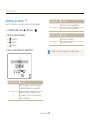
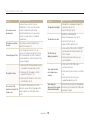
Notes about charging the battery
t If the indicator light is off, make sure that the battery is inserted
correctly.
t Turn off your camera when charging.
t Turn on your camera after charging the battery for more than 10
minutes.
t Using the flash or recording videos depletes the battery quickly.
Charge the battery until the indicator light turns green.
t If the indicator light blinks in orange or does not illuminate, reconnect
the cable, or remove the battery and insert it again.
t If you charge the battery when the cable is overheated or the
temperature is too high, the indicator light may turn orange. Charging
will start when the battery cools down.
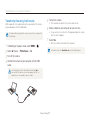
Notes about charging with a computer connected
t Use only the provided USB cable.
t The battery may not be charged when:
- you use a USB hub
- other USB devices are connected to your computer
- you connect the cable to the port on the front side of your
computer
- the USB port of your computer does not support the power output
standard (5 V, 500 mA)
Appendixes
98