1
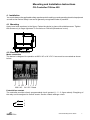
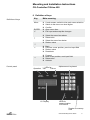
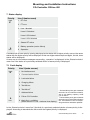
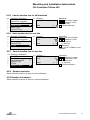
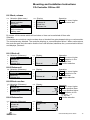
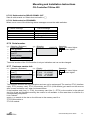
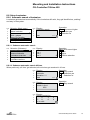
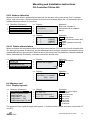
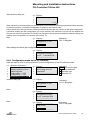
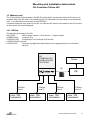
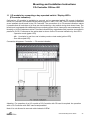
Mounting and Installation Instructions CG-Controller CGLine 400 8.7 Setup CG-Controller Line 1 2 3 4 5 6 7 Selection (Main menu) Luminaire failure Status luminaires Test menu Block, Release Setup CG-Controller Setup luminaire Memory card Line 1 2 3 4 5 6 7 8 Display Select language Time and date Next FT Next DT Relais settings Serial number Customer Service info Password Operation: Menu One menu higher Cursor position lower Cursor position higher Select menu item 8.7.1 Select language Line 1 2 3 4 5 6 7 Selection (Submenu) Select language Time and date Next FT Next DT Relais settings Serial number Customer service info Operation: Menu Accept language / Select lanuage Accept language Line 1 2 3 4 Display Sprache: deutsch Language: english Line 1 2 3 4 Display Time and date 14:15 13.05.2007 change = accept 8.7.2Time and date Line 1 2 3 4 5 6 7 Selection (Submenu) Select language Time and date Next FT Next DT Relais settings Serial number Customer service info Operation: Menu Acception and one menu higher / right / left / Reduce/increase value Acception and one menu higher 8.7.2.1 Changeover to summer time Summer time can be changed over in the submenu ‘Time and date’ by pressing button 7. Time gets risen by 1 hour. Button 7 = PQRS, S = summer time. 8.7.2.2 Changeover to winter time Winter time can be changed over in the submenu ‘Time and date’ by pressing button 9. Time gets reduced by 1 hour. Button 9 = WXYZ, W = winter time. 8.7.3 Next function test (FT) Line 1 2 3 4 5 6 7 Selection (Submenu) Select language Time and date Next FT Next DT Relais settings Serial number Customer service info Line 1 2 3 4 Display: Next FT 14:15 13.05.2007 change Interval in days: 007 Operation: Menu Acception and one menu higher / right/left / Reduce/increase value Acception and one menu higher The automatic FT gets programmed. During a DT runs the automatic FT gets not started! CEAG Notlichtsysteme GmbH 17