1
(1) Disassembling and
Cleaning the Incubator
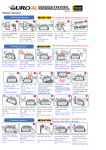
5. How to Clean
Disassembling and Cleaning the Incubator
▶ Pull out the electric cord from the connecting jack and
also take out the plug from the outlet.
In case of turning off the power immediately after using
incubator, it may be a cause of breakdown because of
the humidity remaining in the inside of main controller.
Then, it is necessary to turn it off after operating about
for 1 hour at the state of removing water for humidifi
cation of the incubator inside or reoperate it after
opening sight glass and naturally drying for 2~3 hours
in order to use machine for a long time.
Unlock and remove the locking buttons for
three parts at the front and back of incubator
by pulling them forward.
Dry main body(bottom) and tray after washing
with water cleanly and dry main body(up) about
for one day at airy area in order to remove
remaining humidity in the inside completely.
110V~120V
110V~120V
Back
ER
WAT
▶ When using humidification function, a lot of alien matter
sticks to the humidification heating element ⓐ. This may
not cause failure, but when terminating incubation please
clean the humidifying heater lightly with a soft brush.
In case of using distilled water as water for humidification,
it is possible to reduce foreign substance(scale) noticeably.
▶ If you place the main body(upper part) on the floor, please
don't let the humidification heating part touch with the floor.
EX
OEL
AUT
In case of giving some shock on the heater part ⓐ for
humidification or drawing it with a sharp thing, the heater
for humidification is damaged.
EX
OEL
AUT
In order to reduce foreign substance(scale) of the heater
part ⓐ for humidification, it is recommendable to use
distilled water as water for humidification. In case of
wanting to use other water, be sure to use it after
inquiring to the store purchased.
DIGITAL INCUBATOR
13