1
User Manual
4.
www.carpetstore.eu
Filters
In order to search through the full product database use the filter menu at the top of the page.
Enter the information in the fields and press the “Go” button. To reset the filters to default values
use the “Reset” button. It is not necessary to enter information in all fields, however the more
products will match your search criteria, the longer it will take to load the results.
5.
2nd Quality products
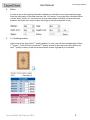
If the owner of the shop holds 2nd quality products in stock, you will see a checkbox titled “Show
2nd Quality”. Check this box to show the 2nd quality inventory. After that you will be able to see
the 2nd quality inventory inside the product details section (right panel) in a red table.
Last modified: 28 February 2013
3