1
3.1
Running a PADRES System in a Single Physical Machine
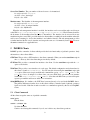
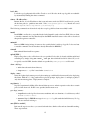
The parameters of the PADRES system shown in Figure 1 running on a single machine is given in Table 1.
The port numbers are chosen arbitrarily. However, it is better to choose high port numbers to avoid conflicts
with the ports used by other services.
Broker A
ID:
Location:
Port A:
Client X
Location:
Broker:
BrokerA
localhost
1100
localhost
Broker A
Broker B
ID:
Location:
Port B
Client Y
Location:
Broker:
BrokerB
localhost
1101
Broker C
ID: BrokerC
Location: localhost
Port C 1102
localhost
Broker C
Table 1: PADRES system parameters.
When launching a PADRES system, the broker overlay has to be created before instantiating the clients.
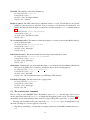
The broker overlay can be created using the following commands:
$ startbroker -uri socket://localhost:1100/BrokerA -n socket://localhost:1101/BrokerB
$ startbroker -uri socket://localhost:1101/BrokerB
$ startbroker -uri socket://localhost:1102/BrokerC -n socket://localhost:1101/BrokerB
Notes:
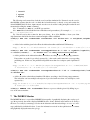
• Option -uri is used to specify the URI of the broker and option -n is to specify the neighbors.
• A broker URI must have the format of <comm protocol>://<hostname>:<port#>/<broker id>.
The comm protocol can be either ‘rmi’ or ‘socket’; hostname can be the DNS name or the IP address
of the machine where the broker is instantiated; port# is the port number where the broker is listening
at for incoming connections; and broker id is the unique identifier of the broker.
• Only one broker can listen at a particular port of a host.
• Broker ID must be unique and should not contain the ‘-’ (hyphen) character.
• The neighbors are given in a comma separated (with no space) list of broker URIs.
• When two brokers are connected in the overlay, it is enough to specify the relation only at one side
(in the above example, only BrokerA and BrokerC use the -n option.)
• There is no stipulated order in which the brokers have to be started. Brokers will detect whether the
specified neighbors are alive by periodically sending connection requests.
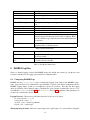
• For detailed description of the options used with the startbroker command, run it with -help option
(Section 4.2.)
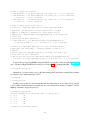
Now, start the clients:
$ startclient -i ClientX -b socket://localhost:1100/BrokerA
$ startclient -i ClientY -b socket://localhost:1102/BrokerC
2