Download FREEDOM SD2 USER GUIDE

Transcript
PROGRAMMING
NETWORK CONFIGURATION
Note: This configuration process is limited to Microsoft PC’s. Sorry, no Mac’s.
To use your computer to program your FREEDOM SD2 Card simply format the SD card to
FAT32 and:
1. Select “START”, “ALL PROGRAMS”, “ACCESSORIES” and “Note Pad”
on your computer.
2. Enter the Network Configuration number from the selection below starting
at the first position of the file. Just the Network Configuration number is
all that you need.
3. Name this file “NomadSD.dat” and save it onto your SD Card in the Root
Directory. Once it is used, be sure to place it into the “MotoSAT
Configuration File” or appropriate folder.
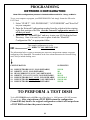
This sample configuration is set for
002 DIRECTV NON SKEWABLE 101
002
The information below is used for obtaining the Network Configuration Number for proper
configuring of the NomadSD. The numbers in the first column determine the Network being
used. Always include leading zeros.
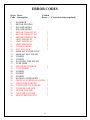
CONFIGURATION
SATELLITES
000
002
004
006
014
016
018
119/110
101
92/81
101/119
119/110/61.5
110/110/148
119/110
DISH NETWORK MODE, NON SKEWABLE,
DIRECTV MODE, NON SKEWABLE,
BELL EXPRESSVU MODE, NON SKEWABLE
DIRECTV ENHANCED MODE, NON SKEWABLE,
DISH NETWORK EAST MODE, NON SKEWABLE
DISH NETWORK WEST MODE, NON SKEWABLE
DISH NETWORK MODE, NON SKEWABLE
TO PERFORM A TEST DISH
To do a TEST DISH simply add 128 to any of the above i.e. 000 becomes 128, 003 becomes
131 and so on. After you perform a TEST DISH return the configuration
(NomadSD2.dat) back to the original configuration so that it will not perform
a TEST DISH each time the power is turned on.
10