1
User’s Guide
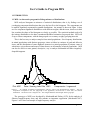
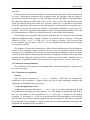
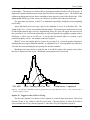
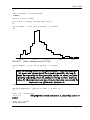
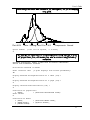
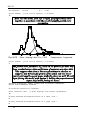
the histogram. The axes are not labeled, but the positions of the means µ1, …, µk are indicated
with triangles. The abcissa is scaled so that no component extends off either side of the graph. If
lognormal or gamma distributions are being fitted the abcissa line begins at zero. The leftmost and
rightmost grouping intervals are shown extending to their respective ends of the abcissa line. If the
graph extends off the top of the screen you can have it re-drawn with reduced vertical scale.
The plots done by Options 10 and 11 are numbered sequentially during the session, beginning
at Plot #001.
Apple Macintosh users can copy a plot to the clipboard or save it as a MacDraw file. The
graphs in this User’s Guide were produced in this manner. Macintosh users can also elect to create
an ultra-high resolution plot with a 4× magnification factor; this plot will appear the usual size on
the screen but if it is saved on the clipboard or as a file and opened with a graphics program such as
MacDraw it will be seen at its full size. It can be then be reduced when it is printed, to give
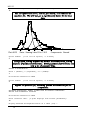
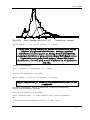
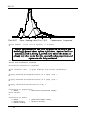
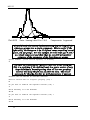
publication-quality results. An example is shown in Figure 5.
IBM PC users can send the plot to a printer by pressing Y or y when the graph is displayed,
although this may require additional software, as explained in §1.4. Pressing almost any other key
will clear the screen and bring the next prompt for an Option number.
Mainframe users may choose to send the plot to an off-line plotter; this prompt comes before
the plot is displayed on the screen. Mainframe screen graphics are in text mode.
Plot #001
Data: Heming Lake Pike 1965
Components: Lognormal
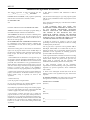
Figure 5. An example of ultra-high resolution graphics from the Apple Macintosh version. This is the same fit as
shown in Figures 1 and 2.
Option 12. Toggle to echo all I/O to I/O log.
The first time Option 12 is chosen, a file is opened to record all input and output. Plots from
Options 10 and 11 are written to this file in text mode. Choosing Option 12 when the I/O file is
open suspends the I/O log; choosing Option 12 when the I/O log is suspended re-opens it.
17