1
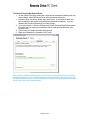
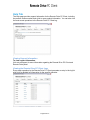
To view the system logs:
1. On the Help page, click the View System Logs button. The most recent
operations, including backup, restore, and delete operations are listed by
type, status, and date and time.
2. In System Logs, do any of the following:
a. To view details for a particular action, click the corresponding
Status link. The log opens in a separate window and contains a
summary of the operation. Depending on the operation type,
this information includes the processed files that are backed up
or unprocessed as well as a breakdown of the actual files
transferred.
b. To delete all logs, click the Clear Logs button.
3. Click Cancel to go back to the main Help page.
-Page 23 of 27-