1
702 User Guide and Technical Information
#
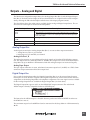
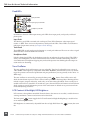
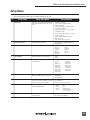
Setup Name
Setup Description
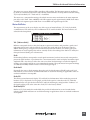
Setup Options
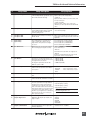
58
HP: Favorite Mode
Selects the audio source monitored when the
Rotary Switch is pressed during recording or
playback.
Inputs 1,2
Tracks A,B
Monitor A,B
Input 1,1
Input 2,2
Track A,A
Track B,B
Monitor A,A
Monitor B,B
Inputs 1,2 (MS)
Tracks A,B (MS)
Tracks A,B (MS)
Inputs 1+2,1+2
Tracks A+B,A+B
59
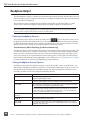
HP: Playback Mode
Selects the audio source sent to headphones
upon playback.
• No change
• Same as options listed above
60
HP: Warning Bell Level
Set the output level of the multi-function warning bell.
off, −60 to –12 dBFS in 1 dB steps
61
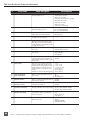
HP: Rec/Stop Bell
Alerts the user with one beep at the start of
recording and two beeps when the recording
is stopped
• Disabled
• Enabled
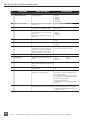
62
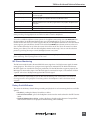
Tone: Level
Set the output level of the reference tone
−40 to 0 dBFS in 1 dB steps
63
Tone: Frequency
Allows the user to set the frequency of the
reference tone oscillator
100–10,000 Hz in 100 Hz steps
64
Tone: Mode
Select the destination of the reference tone or
to disables it completely
• disabled
• to record tracks only
• to outputs only
• to record tracks and outputs
65
Drive: Tests
Performs a speed test on the CompactFlash
media installed and external drives. Data
transfer speed is measured in KB/s.
Caution: Drive test will disable processing and mute
outputs for duration of test. Outputs will not return
until test is exited.
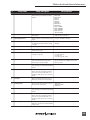
66
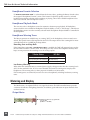
CF: Space
Shows the drive file system, total size, and
space remaining on connected CompactFlash
medium.
67
CF: (Erase)
Formats installed CompactFlash medium
Caution, while various PC utilities are able to
recover files from re-formatted drives, once
formatted, old audio data is not accessible by
the 702.
68
CF: Repair
Runs a utility that will repair minor errors in
the directory structure of the CompactFlash.
69
CF: Empty Trash
Allows user to delete files previously sent to
the trash as well as false takes.
70
EXHDD: Space
Shows the drive file system, total size, and
space remaining on connected Compact Flash
medium.
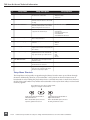
71
EXHDD: (Erase)
Formats attached FireWire storage volume
• Empty Trash
• Empty False Takes
• Empty both
Caution, while various PC utilities are able to
recover files from re-formatted drives, once
formatted, old audio data is not accessible by
the 702.
72
EXHDD: Repair
Runs a utility that will repair minor errors in
the directory structure of the external FireWire
storage volume.
59