1
options, etc. until it looks right. However, you might sometimes want to transform the data a few times in a row, and in that case you
would choose “Transform Transformed data”.
Baseline Correct
- For a 1D file, performs baseline correction by averaging the first and last n/16 of the points and subtracting the result from the entire
image.
- For a 2D file, averages the points in the corners of the image, to a depth of n/16.
- For a 3D file the baseline is calculated from eight (n/16)3 cubes in the corners of the dataset.
- In all cases, real and imaginary baseline corrections are performed independently.
- Note that the correction averages the first and last n/16 points, so trying to baseline correct an exponential decay curve will not produce
the desired effect, as the first points are not noise.
- This baseline correction algorithm is also not suitable for spiral data; the sorting algorithm for spirals now contains an appropriate
correction that should be used instead.
Filtering
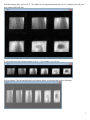
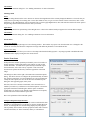
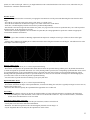
- The three types of filter available are Hanning, Exponential and Trapezoid. Examples of each type of filter are shown in the figure
below.
- All three filters emphasize the middle part of a dataset and reduce noise along the extremities to some degree. The differences lie in the
actual shape of the filter being used.
Hanning Filter
Exponential Filter
Trapezoid Filter
Blurring width in pixels
- This option only appears when you’ve selected exponential filtering.
- This number corresponds to an exponential filter factor that will cause the specified blurring width in pixels. By default, this number is
5, which corresponds to exponential filter factor of 6. If only blurring width is specified, the corresponding exponential filter factor is used
for exponential filtering. If only exponential filter factor is specified, this value will be used to perform exponential filtering. If both
blurring width and exponential filter factor are specified and these two values are not consistent according to the internal mapping rule,
you will be ask to select one of them to perform exponential filtering.
- You will be able to predict the effect of blurring if you specify this value.
Exponential Filter Factor
- This option only appears when you’ve selected exponential filtering.
- This number determines the shape of the exponential filter; as noted in the dialog box itself, this is typically an integer between 1 and 10,
though it does not have to be.
- This value determines how quickly the exponential filter approaches zero at either end.
Zero Filling
- Zero filling pads a dataset with zeros to increase the apparent number of points collected and improve resolution of the final image.
- To enable zero-filling in a certain dimension, select a value to zero-fill from the combo box. Any box which contains 1 (which is the
default) causes that dimension to not be zero-filled.
Perform First-Order Phase Correction
- For any kind of Fourier transform except half K-space transforms, instructs ACCISS to do
a linear phase correction on the data after transformation.
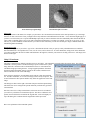
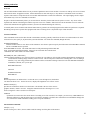
- Eliminates “checkerboard” patterns in the real and imaginary channels of most images. If
only the magnitude data will be analyzed, this option has no visible effects.
13