1
Starmate ST5 Remote Control Buttons
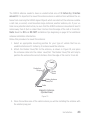
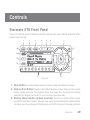
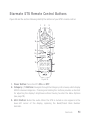
Figure 35 and the section following identify the buttons of your ST5’s remote control.
1
2
3
4
5
6
16
7
15
8
14
13
12
9
11
10
Figure 35
1. Power Button: Turns the ST5 On and Off.
2. Category < / > Buttons: Navigate through the Category List screens, which display
SIRIUS channel categories. Pressing and holding the buttons provides a shortcut
for adjusting the display’s brightness without having to enter the Menu Options
(see page 79).
3. Mute Button: Mutes the audio. When the ST5 is muted an icon appears in the
lower-left corner of the display, replacing the Band/Preset Bank Number
indicator.
Controls
51