1
StorageCraft Cloud Services User Guide
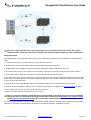
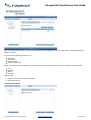
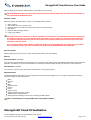
Note: The solid connecting lines in the image between the local business network and the data centers
indicate transfer of data over the internet. Dashed lines represent physical shipping of seed or BMR drives.
Image Description
Each alphabet letter in the image above is described by the corresponding information below (identified by matching alphabet
letter).
A. Local business network (everything inside your normal business network)
B. ShadowProtect clients (devices which create encrypted StorageCraft backup image files)
C. ImageManager client (manages and replicates encrypted StorageCraft backup image files to the cloud)
D. The StorageCraft Cloud, for the purposes of this user guide, is defined as everything outside your local business network.
E. Primary data center is where VMs, cloud devices and backup images are stored in the cloud.
F. Secondary data center (mirrored) is identical to the primary data center but is located in another geographical region to protect
against a major "localized" disaster. If the primary data center goes down, the secondary data center is there to provide the same
services as the primary data center.
G. Replicate to the cloud (ImageManager sends encrypted backup images over an internet connection to the cloud).
H. Seed the cloud by populating a USB seed drive. The USB drive is shipped to StorageCraft. See seeding the cloud for details.
I. Mirror data from the primary data center to the secondary data center.
J. Recover files and folders via internet browser from the cloud.
Note: You can also virtualize (create VMs and a virtual network in the cloud) using one of the cloud backup
images but this is not indicated in the image for the sake of clarity. See the cloud services program models
and StorageCraft Cloud service levels pages to learn more about specific features and limitations.
K. Recover systems and data by requesting a Bare Metal Recovery (BMR) USB drive. The drive will be populated with the selected
data from the data center and shipped from StorageCraft to the address specified in the BMR drive request.
© 2013 StorageCraft Technology Corporation
StorageCraft Support Center
Page 4 of 40