1
Table of Contents
System Requirements ........................................................................................................................... 3
Screen Settings ................................................................................................................................. 3
Text Size ........................................................................................................................................... 4
Security ............................................................................................................................................. 4
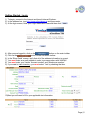
Getting Started - Login .......................................................................................................................... 5
User Management ................................................................................................................................ 7
Quick Quote .......................................................................................................................................... 8
Create a Quote and Work Order ......................................................................................................... 10
Create a Cash Quote ...................................................................................................................... 10
NAGS Based Quote: .................................................................................................................... 10
Special Feature: .............................................................................................................................. 12
Working with Work Orders ........................................................................................................... 13
Schedule a Job ............................................................................................................................ 13
Service Address ........................................................................................................................... 13
Print a Work Order ....................................................................................................................... 14
Complete a Work Order – Convert to Invoice .............................................................................. 15
Working with Invoices ......................................................................................................................... 15
How to Create a Quick Invoice .................................................................................................... 16
Adjustments and Credit Memos .......................................................................................................... 17
Adjustments..................................................................................................................................... 17
Credit Memo .................................................................................................................................... 18
Placing and Managing Vanfax Orders ................................................................................................ 20
Short-cuts & Miscellaneous Features ................................................................................................. 23
My Work Panel ................................................................................................................................ 23
Document & Image Attachments ..................................................................................................... 23
Attaching a Document or Image .................................................................................................. 23
Viewing an Attached Document or Image .................................................................................... 25
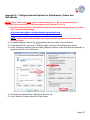
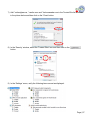
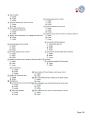
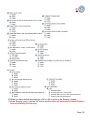
Appendix A - Configure Internet Explorer for Attachments, Orders and QuickBooks.......................... 26
Configure the Registry for Attachments ........................................................................................... 30
Appendix B – Installing Crystal Report Viewer .................................................................................... 31
Appendix C – Installing DBPIX Attachment Plug-in ............................................................................ 32
Install the Attachment Plug-in .......................................................................................................... 32
Appendix D – eDirectGlass© QuickBooks Setup ................................................................................. 33
Appendix E – eDirectGlass© Security & Privacy ................................................................................. 41
Page | 2