1
Configuration
2.14.4
Selecting a ring pattern (NSL System only)
The ring pattern selection is part of the Database Menu.
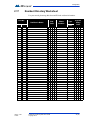
Table 2:
Available Ring Pattern
Ring
Pattern
1
Available Ring Pattern
2s ON
4s OFF
standard
ring A
2
800ms
ON
400ms
OFF
800ms
ON
4s OFF
distinct
ring B
3
200ms
ON
400ms
OFF
200ms
ON
400ms
OFF
800ms
ON
4s OFF
distinct
ring C
4
200ms
ON
400ms
OFF
800ms
ON
400ms
OFF
200ms
ON
4s OFF
distinct
ring D
5
2.14.5
One single ringing burst
Editing Records
To edit a record
1.
Select “Edit Record” and use the up/down key to scroll through the
residents.
2.
Press the telephone button to select the resident’s name for editing.
1212>Smith
1213 Jones
1214 Hath
1215 Johnson
24 (42)
LT-968
3.
Use the down arrow key to scroll down the list of fields, such as Apartment
number, Resident name, Dial code Keyless code, relay code, telephone
number, etc.
4.
Once the arrow is pointing to the field that requires a change, press the
telephone key to edit.
5.
Re-enter the correct information. See paragraph 2.14.2 for instructions on
entering data.
6.
When you are finished editing the record, press the info key. The display
returns to the record list. At this point you may edit another record or press
the information key to return to the record list.
Telephone Access System User Guide
Copyright 2010
Version 1.00.1