1
Congratulations
MOTOROLA XT720
MOTOROLA XT720 gives you a premium browsing
and messaging experience with the very latest from
Google™.
• Browsing. Get more from the Web, with a huge
screen and full HTML. Search, browse, everything
you want to do, all made easier.
• Maps, entertainment, and more. The latest
technology and apps. Google Maps™ to find your
way. Easy access to Google™ and thousands of
Android applications to expand your world.
Caution: Before assembling, charging or using your
phone for the first time, please read the important
legal and safety information packaged with your
phone. Once your phone is up and running, press
Menu
> Settings > About phone > Safety
information to read the full information.
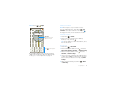
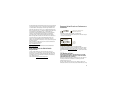
Your phone
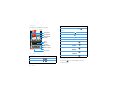
the important keys & connectors
3.5mm Headset Jack
Power Key
Press to put the
display to sleep,
or hold to turn off.
HDMI Output
Micro USB
Connector
Charge or
connect to PC.
Volume Keys
Touchscreen
Home Key
Press to return to
the home screen.
Back Key
Press to go back.
Camera Key
Menu Key
Press to open
menu options.
Microphone
Search Key
Press for text
search.
More information
On your computer—Go to www.motorola.com/
myXT720.
Note: Your phone might look a little different.
Congratulations
1