1
TECHNISONIC INDUSTRIES LIMITED
2.19
FRONT PANEL PROGRAMMING (FPP) MODE
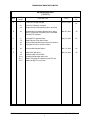
TDFM-9300 radios can be ordered with optional Front Panel Programming (FPP) in each Digital
module. In addition, the Analog modules also support FPP. Type ”A” modules have the capability
to program channel information such as frequencies, PL tones, modulation types, etc. from the
front panel. ‘FPP’ will show up as one of the soft menu items at the bottom of the screen if this
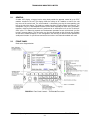
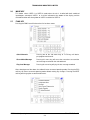
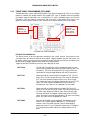
option has been ordered. When the FPP soft key is pressed, the following screen will appear:
SIDE BUTTONS
TOGGLE
BETWEEN RX
AND TX ITEMS
DISPLAYS THE
CURRENT
MODULE, ZONE
AND CHANNEL
BEING EDITED
FPP Menu for TYPE A modules
FPP ON TYPE A MODULES:
The display shows all of the information contained in the current channel. Pressing one of the
side menu keys will select the attribute to be edited. Toggling between transmit and receive can
be done by either pressing the menu key again or by pressing the knob with the exception of the
Name line which toggles between Zone Name and Channel Name.
Toggle the RX NAC/TX NAC key to access the Talkgroup ID menu.
RX/TX Freq.
The RX and TX frequencies can be changed by entering a new
value via the keyboard. After entering the RX frequency, press the
OK soft key. The menu will prompt for a TX Freq. Push the top
side button to manually toggle between RX and TX frequencies.
RX/TX TPL
Rotate the knob to scroll through the available RX TPL (CTCSS
tones). Press the OK soft key to accept. The menu will prompt for
a TX TPL tone. Rotate the knob to select. Press OK to accept.
The second side button also toggles between the RX and TX TPL
codes. TPL tones cannot be programmed if DCS codes are
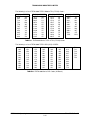
already active. See Table 2.1 for supported TPL tone codes.
RX/TX DPL
Rotate the knob to scroll through the available RX DPL (DCS
codes). Press the OK soft key to accept. The menu will prompt for
a TX DPL code. Rotate the knob to select. Press OK to accept.
The third side button also toggles between the RX and TX DPL
codes. DPL tones cannot be programmed if TPL tones are already
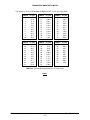
active. See Table 2.2 for supported DPL codes.
RX/TX NAC
Enter the desired NAC via the keyboard. The Network Access
Code is a hex number between 000 and FFF. The standard
number is 293. The middle soft menu key will allow toggling
between 0-9 and A-F. In A-F mode the number keys 1-6 program
A- F. Programming a NAC code on an analog channel has no
effect.
TDFM-9300 Operating Instructions
TiL 13RE470 Rev. E
2-12