1
TECHNISONIC INDUSTRIES LIMITED
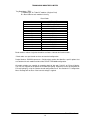
Modules 1 through 6 of the TDFM-9000 Transceiver are programmable by Motorola CPS™. The
following settings may be programmed for each Conventional Channel in a module:
TX Frequency
TX PL/DPL Code
RX Frequency
RX PL/DPL Code
Time-Out Timer
Scan List
Phone Numbers
Talkgroup IDs
Encryption Key Assignment
Zone
Channel
Name
RX Signal Voice Type
TX Signal Voice Type
Network Access Code
TX Power
Private Call Type
The following settings can be programmed for each mode in a P25 Trunked and/or
SmartNet/SMART ZONE equipped radio:
System Type
System ID (NAC)
Individual ID (UID)
Coverage Type
Affiliation Type
Control Channel (s)
Talkgroups
Status
Encryption Key Assignment
TG Strapping
Zone
Scan List
Scan Type
Interconnect
Phone Display Format
Private Call Operation
Site Alias
The function keys, along with the rest of the keypad, revert to normal number keys during
transmit and when NUM LOCK is selected by pressing the rotary knob.
The F1 – F4 keys can be programmed as Hot Memory keys as mentioned in Section 2.7.
Depending on the setting in the configuration menu, the keys can be permanently set to Hot
Memories (channels) or used for other functions (normal). When the F1 – F4 keys are in the
normal mode, they can still be used for Hot Memory Recall if the FUNC key is pressed first.
2.9
MUP(4) AND MDN(7) KEYS (Memory Up and Down Keys)
These keys provide the same function as the rotary knob does when it is set to CHAN. These
keys can be used to scroll through the channels. A single press will step the channel by one, but
a push and hold will scroll to a desired channel number. The function of the rotary knob is
automatically set to CHAN when either of these keys is pressed.
2.10
UP(5) AND DN(8) KEYS
The keys provide the same function as the left, right, up, and down arrow keys on the portable.
The UP key equates to the right arrow key and the DN is the left. These keys are used for a
variety of functions, but in the normal operating mode they are used to scroll through the soft key
menus.
2.11
BRT(6) AND DIM(9) KEYS
Use these keys to dim or brighten the display. The radio powers up at full brightness for normal
use but can be dimmed for night operations.
TDFM-9000 Installation Instructions
TiL 11RE441 Rev. C
2-6