1
TECHNISONIC INDUSTRIES LIMITED
2.18
KEYLOADING MODE
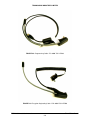
If the TDFM-9000 is equipped with hardware encryption, then the Encryption keys will need to be
loaded using a Motorola KVL 3000+® or KVL 4000 Keyloader and a KVL-9000 cable, (TiL P/N
127500).
Modules in the TDFM-9000 can easily be keyloaded by simply selecting the band and plugging in
the keyloader and cable into the programming connector on the front of the radio.
Turn on the keyloader and connect the cable to the TDFM-9000. The selected band will display
"KEYLOADING". Follow the Motorola Keyloader instructions for uploading the actual keys to the
radio.
If other bands require keys, press the next soft key to select the next module, wait 1 second for
the module to sense the keyloader, and then upload the key(s).
When keyloading is done, remove the keyloader cable and Power cycle the TDFM-9000 to
resume normal operation.
2.19
FRONT PANEL PROGRAMMING (FPP) MODE
All type “A” and some type II modules have the capability to program channel information such as
frequencies, PL tones, modulation types, etc. from the front panel. ‘FPP’ will show up as one of
the soft menu items at the bottom of the screen if this option has been ordered. When the FPP
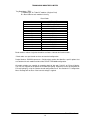
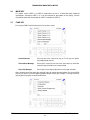
soft key is pressed, the following screen will appear:
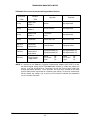
The display shows all of the information contained in the current channel. Pressing one of the
side menu keys will select the attribute to be edited. Toggling between transmit and receive can
be done by either pressing the menu key again or by pressing the knob with the exception of the
Name line which toggles between Zone Name and Channel Name.
TDFM-9000 Installation Instructions
TiL 11RE441 Rev. C
2-11