1
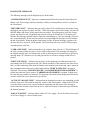
Mode Key Summary cont.
A
B
C
D
E
F
S
T
X
Set an Account On-Line.
Set an Account Off-Line.
Set a Line Card On-Line.
Set a Line Card Off-line.
Suspend Time(Do NOT Change)
Print Line Card Port Retries table.
Computer option
Set Log Filter in a Client's panel
Remote Shunting/Clearing Zones
Authority Levels
All of the above modes are selected by entering a valid ID (default is 18) followed by the
Command key and <RETURN> if access code is less than 4 digits. All modes are available to
users 17 and 18. Modes 5,6, and 9 are not available to users 1 thru 16.
Mode Descriptions
(0 Key) LOG ON/OFF
This mode allows the operator to log On and Off. Alternate selections of this mode will toggle
the operator status from logged ON to logged OFF. Operation of the Non Access Mode Single
key commands is only allowed when an Operator is logged on.
(1 Key) SET TIME/IDs/OPTIONS
Three choices are given in this mode. The operator can set the Date and Time, set User IDs or set
User options on a client's panel.
When this mode is selected 'SEND DATA TO CLIENT' is displayed followed by 'ENTER A/C
000-000'. Enter the customer account number followed by <RETURN>.
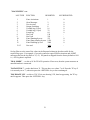
'TIME---IDS-OPTIONS' is then displayed. Select the required option by pressing the key
directly under the option i.e., Sunshine, Half Moon, ?.
C key
TIME - selection of time will transmit the current date, time and day
number from the Front panel to a client=s panel.
E key
IDs - this allows the IDs of all panel users (except 3GS) to be
remotely set.
H key
OPTIONS - this allows the Options of all panel users (except 3GS)
to be remotely set.
11