1
Mode Descriptions cont.
assistance in shunting the offending zone. The Station Operator could use the 'Request Data Open Zones' (see Single Key Functions below) function to verify the status of the zones prior to
placing a shunt.
(S key) COMPUTER SET UP
This mode is accessed by entering '17 SHIFT 8 (S)' and allows the COMPUTER MODE to be
set If no computer is connected, the buzzer on the front panel can be set to a selection of options.
See the following chart. If an automation computer is connected, refer to the 4136 manual for the
option choices.
BUZZER CONTROL
This determines which messages reported to the central station cause the controller beeper to
sound. If the system is configured for computer mode, then the controller beeper is never
activated except in the case of a technical fault (printer fault, computer not responding etc.). If no
computer is connected then the beeper can be controlled such that only certain messages cause it
to sound. BUZZER CONTROL defaults to 0 on start up and at this setting only zone alarm
conditions cause the beeper to sound.
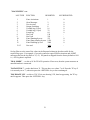
The table below shows the various settings allowed. BUZZER CONTROL can have a value
between 0 and 15. To select a value, first decide from the table below which messages should
cause the beeper to sound and then add the values indicated in the left column for all message
types selected. For example if the beeper should sound on status alert messages and subscriber
actions then set the BUZZER CONTROL to 6 (2+4).
Value Message type
----- -----------0
Zone alarms
1
Zone restorals
2
Status alert messages
4
Subscriber actions
8
Messages other than those above
16
No buzzer ever
16