1
3.3 Reset PIN
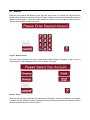
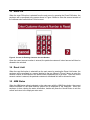
When the reset PIN option is selected from the main menu by pressing the Reset PIN button, the
employee will be prompted to the screen shown in Figure 8 below to enter the account number of
the customer who wants his/her PIN to be reset.
Figure 8. Screen for Entering Customer Account Number
Once the correct account number is entered, the particular customer’s locked account will then be
allowed to be unlocked.
3.4 Reset Limit
When the reset limit option is selected from the main menu by pressing the Reset Limit button, the
employee will be prompted to a screen identical to the one shown in Figure 8 above to enter the
account number of the customer who wants his/her withdrawal limit to be reset. Once the correct
account number is entered, the particular customer’s withdrawal limit will be allowed to reset.
3.5 ABM Status
When the ABM status option is selected on the main menu with the ABM Status button, the current
status information of the ABM machine system will be displayed to the employee. When the
employee is done viewing the status information, he/she can press the Cancel button to exit the
screen and return to the employee main menu.