1
EN
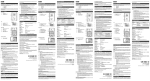
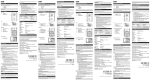
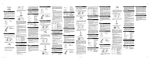
THERMO / HYGRO SENSOR SETUP (RTGR328N)
1.
2.
3.
4.
5.
6.
FOLD OUT STAND
1. Fold-out the stand
2. Lock it into place
Open the battery compartment with a small Phillips
screwdriver.
Insert the batteries.
Set the channel and radio signal format. The switches
are located in the battery compartment.
SWITCH
OPTION
Channel
Channel 1 – 5. If you are using
more than one sensor, select a
different channel for each sensor.
Radio Signal
Format
EU (DCF) / UK (MSF)
2
For best results:
•
Insert the batteries and select the unit, channel, and
radio signal format before you mount the sensor.
•
Place the sensor out of direct sunlight and moisture.
•
Do not place the sensor more than 100 meters
(328 feet) from the main (indoor) unit.
•
Position the sensor so that it faces the main (indoor)
unit, minimizing obstructions such as doors, walls,
and furniture.
•
Place the sensor in a location with a clear view to
the sky, away from metallic or electronic objects.
Press RESET. Then set the temperature unit.
SWITCH
OPTION
Temp
°C / °F
1
NOTE The transmissino range may vary and is subject
to the receiving range of the main unit.
Close the battery compartment.
Secure the sensor with the wall mount or using the
fold-out stand.
You may need to experiment with various locations to get the
best results.
CLOCK
This remote sensor can automatically synchronize the date
and time with official time-keeping organizations in Frankfurt
(Germany) and Rugby (England). When the sensor is within
1500 km (932 miles) of a RF signal, the reception icon will
blink during reception.
7