1
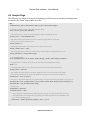
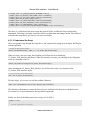
Sensor Web Interface User Manual www.versiontwo.ca September 10, 2014 Sensor Web Interface - User Manual © 2014 by Version 2.0 Inc Version 2.0 Inc. P.O. Box 504 1476 Stittsville Main Street Ottawa, Ontario K2S 1A6 Canada Tel: (613) 663-3004 Fax: (613) 836-5153 Email: [email protected] www.versiontwo.ca Change Log Author Date Changes Alex Van Leyen 2014-05-02 Original Document. Alex Van Leyen 2014-06-05 Minor Edits. Alex Van Leyen 2014-08-13 Added in new Daemon class. Alex Van Leyen 2014-09-10 Added Sample Page, and updated scripts to reflect recent changes. www.versiontwo.ca 2 Sensor Web Interface - User Manual 3 Table of Contents 1 Introduction.............................................................................................................................................5 2 Prerequisites............................................................................................................................................5 3 Installing..................................................................................................................................................6 4 Using the Plug-in....................................................................................................................................6 4.1 Quick and Dirty...............................................................................................................................6 4.2 Sample Page....................................................................................................................................8 4.3 Writing a Script...............................................................................................................................9 4.3.1 GetData..................................................................................................................................10 4.3.1.1 Run the Script................................................................................................................10 4.3.1.2 Understand the Script.....................................................................................................11 4.3.2 GetImage................................................................................................................................12 4.3.2.1 Run The Script...............................................................................................................12 4.3.2.2 Understanding the Script................................................................................................13 4.3.3 Replace..................................................................................................................................13 4.3.3.1 Run The Script...............................................................................................................13 4.3.3.2 Understanding the Script................................................................................................14 5 Automated Updates...............................................................................................................................14 5.1 Embedded PHP..............................................................................................................................14 5.2 Running a Daemon........................................................................................................................16 5.2.1 Using Cron.............................................................................................................................16 5.2.2 Using the Daemon Interface Class........................................................................................16 6 Web Interface Function Reference Sheet..............................................................................................17 6.1 V2_Sensor_Web_Interface............................................................................................................17 6.2 V2_Sensor_Web_Interface_Daemon............................................................................................20 6.3 V2_SWI_Tools..............................................................................................................................24 www.versiontwo.ca Sensor Web Interface - User Manual 4 Figure Index Figure 1: How it all flows together............................................................................................................5 Figure 2: Getting the PHP Version.............................................................................................................5 Figure 3: URL............................................................................................................................................6 www.versiontwo.ca Sensor Web Interface - User Manual 5 1 Introduction Figure 1: How it all flows together. The Sensor Web Interface is a small "drop-and-play" software package, designed to provide your web server with a simple interface for publishing the data collected from your Sensor Outposts. This manual assumes you have some technical experience with managing a web server. 2 Prerequisites Before installing the plug-in package on your web server, you will need to check the following: 1. Which version of PHP are you running? This package requires PHP 5.3.3 or higher. You can check which version your server is running by creating a simple PHP script that calls phpinfo(): <?php phpinfo(); ?> Upload this script onto your web server, then point your browser to the location that it's stored at. When the page loads in your browser, the version will be at the top, like so: Figure 2: Getting the PHP Version www.versiontwo.ca Sensor Web Interface - User Manual 6 2. Have you made your data publicly available to the web? This Plug-in package will not work unless you have granted the Public Web User read access. 3 Installing Installing the plug-in into your web server is as easy as 1-2-3: 1. Extract the files from the Plug-in's zip file. 2. Upload the files onto your web server. 3. Done! Keep track of where you uploaded the Plug-in's files, are you'll need to reference this location in your own scripts. 4 Using the Plug-in In this section, we'll explain what you can do with your Plug-in kit, and how to do it. We'll start off with the easy stuff, then work our way up to the more advanced topics near the end. 4.1 Quick and Dirty Before writing any code, you should check if your data is publicly accessible over the web. Open your preferred web browser (IE, Chrome, Firefox, etc) and type the following into your address bar: http://<server>/sensor-data/@<sensor number> Example: Figure 3: URL Replace the <values> with the values that matches your setup: • <server> is the host name/IP address of the server. In the example above, <server> has been replaced with Version 2's users.shangalulu.com server. • <sensor number> is the number assigned to your Sensor Outpost. This value is provided in the Sensor Administrative Client. In the above example, we're attempting to pull data from Sensor Outpost 2. www.versiontwo.ca Sensor Web Interface - User Manual 7 When you press enter, one of two things can happen: You will get a page filled with text (which is good!), or you get a pair of empty square brackets "[]" (which is not good). If you get a pair of empty brackets, check the following issues, then try again: 1. Did you grant the read permission to the Public Web User? 2. Is the Sensor Number correct? 3. Has the Sensor Outpost sent any data to the server yet? If the answers to the above questions are all "Yes", and you are still experience technical difficulties, we recommend you contact your vendor, or request a support ticket from Version 2. If your Sensor Outpost has a camera installed on it, you can retrieve the most recent photo using the same method above: http://<server>/sensor/@<sensor number>,<variable name> Replace <variable name> with the name of the variable the Sensor Outpost records the photo with. For example, consider the following ASL script: var image my_image = camera.get_image( ) send( my_image) Every time this script is run, ASL loads the image acquired from the camera into a variable called "my_image". In this case, <variable name> should be replaced with my_image. www.versiontwo.ca Sensor Web Interface - User Manual 4.2 Sample Page The following is a sample web page. It will attempt to pull the most recent image and temperature recorded by the Sensor Outpost near our office. <?php include("Library_Sensor_Web_Interface_PHP/V2_Sensor_Web_Interface.php"); // Initialize an instance of the Sensor Web Interface object. $swi = new V2_Sensor_Web_Interface(); // The source server is where we will be pulling the image and temperature from. $source_server = "users.shangalulu.com"; // The sensor number must match your Sensor Outpost's assigned ID. To get the ID, // please refer to the ServerAdmin client. $sensor_number = 5; // The image variable name must match the name used in the asl script. $image_variable_name = "img1" // The image destination is where the image will be deposited after it is pulled from the server. $image_destination = "images/stittsville.jpg"; /// GET THE IMAGE. $swi->getImage($source_server, $sensor_number, $image_variable_name, $image_destination ); // Setting time to 0 will make the server retrieve the most recent temperature reading. $time = 0; // The unique token will be used as an identifier for the result cache. More on this below. $unique_token = "stittsville"; // The variable list will tell the server which variables to retrieve. This list can be of any length. // The results returned from the server will match the order they are inserted in the variable list. $variable_list = array( "so_temp" ); // The server will send the data back in a jsonified string. You must decode the string before you may use it. $encoded_data = $swi->getData( $source_server, $sensor_number, $time, $unique_token, $variable_list ); $decoded_data = json_decode($encoded_string); // Default value $temperature = "unknown"; if ($decoded_data !== null) { // The temperature returned will be in Kelvins. In this example, we will convert it back to Celsius. // The temperature is still considered of type String. The function doubleval() will tell PHP to treat // the value as a double instead. $temperature = doubleval( $decoded_data[0]->value ) - 273.15; } ?> www.versiontwo.ca 8 Sensor Web Interface - User Manual 9 <html> <head> <title>Version 2 | Sensor Outpost Demo</title> </head> <body> <div id="demo"> <h1>Sensor Outpost Live Demo</h1> <center><img src="<?php echo $image_destination; ?>"></img> </center> <p>The current temperature is <?php echo ( is_numeric( $temperature ) )? @number_format($temperature,2) : $temperature; ?> °C.</p> </div> </body> </html> 4.3 Writing a Script Now that you can verify that you can publicly pull the data from your Sensor Outpost, you can start putting a script together. Inside the Interface's kit is a folder called "demo", which holds a small collection of command line PHP scripts. These scripts have been created to assist you in making your own scripts, and should not be used in production environments. The following table will briefly explain what each of these files are: File Name Purpose ClearCache.php Clears the Plug-in's internal cache. Execute this script when you want to force the web server to pull in fresh information. GetData.php Gets the most recent data from the Sensor Server. GetImage.php Gets the most recent photo from the Sensor Server. Replace.php Replaces %variable tokens% with their respective values. files/ files/demo.php An example of how to write a web page with inline PHP code. files/template.html An example of how to write a template document to pass through Replace.php www.versiontwo.ca Sensor Web Interface - User Manual 10 4.3.1 GetData // Include the Web Interface library. include_once(dirname(dirname(__FILE__)) . "/V2_Sensor_Web_Interface.php"); // Get the arguments $Source_Server = (empty($argv[1])? "" : $argv[1] ); $Sensor_Id = intval( (empty($argv[2])? 0 : $argv[2] ) ); $Time = intval( empty($argv[3])? 0 : $argv[3] ) ); $Variables = array_slice($argv, 4); // Create an instance of the Web Interface. $swi = new V2_Sensor_Web_Interface(); // Get the data. $unique_name = "demo"; $data = $swi->getData($Source_Server, $Time, $unique_name, $Variables ); if ($data === null) { // On error, print out the error message. echo $swi->getError(); } else { // print out the data. echo $data; } The code listed above is from GetData.php. This script is designed to gather the most recent sensor data from the Source Server, and print it all to the console. 4.3.1.1 Run the Script If you have console access on your web server (such as an SSH connection through PuTTY), you can execute this script by typing the following at the command line: $> php <Path/To/Interface>/demo/GetData.php "<Source Server>" <Sensor Number> Replace the <variables> with their respective values: • <Path/To/Interface> is the path where you installed the interface files. • <Source Server> is the host name / IP address of your source server • <Sensor Number> is the number assigned to your Sensor Outpost. If GetData is successful, you will get an output that may look like the following: www.versiontwo.ca Sensor Web Interface - User Manual 11 [{"variable_name":"V2_UNIQUE_DEVICE_NUMBER","value":0}, {"variable_name":"V2_DEVICE_UNIX_TIME","value":"1378998001"}, {"variable_name":"A2_solar_panel_voltage","value":27.176703296703}, {"variable_name":"B1_iob_input_voltage","value":1}, {"variable_name":"C2_outside_temperature","value":295.16465201465}, {"variable_name":"D2_inside_temperature","value":299.50164835165}, {"variable_name":"V2_CHECKSUM32","value":"2244211671"}, {"variable_name":"V2_DATA_SET_END_RANDOM_NUMBER","value":"1765165387"}] The above is a collection of the most recent data from all of the variables the Sensor Outpost has transmitted. This sting is currently encoded in JSON, a popular data-interchange format. You will need to decode this string before you can use it in your own scripts. 4.3.1.2 Understand the Script We're now going to step through the script above, and explain what's going on at each part. We'll begin with the inclusion: // Include the Web Interface library. include_once(dirname(dirname(__FILE__)) . "../V2_Sensor_Web_Interface.php"); When you write your own script, the first thing you will need to do is include the V2_Sensor_Web_Interface.php library. When you include your script, you should give the full path to where you installed it, like so: include_once("path/to/your/plug-in/kit/V2_Sensor_Web_Interface.php"); After including the V2_Sensor_Web_Interface, you will need to create a new instance of the V2_Sensor_Web_Interface object: // Create an instance of the Web Interface. $swi = new V2_Sensor_Web_Interface(); This this object, you can use it to call the getData() function: $data = $swi->getData($Source_Server, $Time, $unique_name, $Variables ); This function will attempt to contact the Source Server, and request for the most recent data from it. See Section 6.1 for more information about getData's arguments. Finally, we check if the $data returned is a string, or if its NULL: if ($data === null) { // On error, print out the error message. www.versiontwo.ca Sensor Web Interface - User Manual 12 echo $swi->getError(); } else { // print out the data. echo $data; } If $data is NULL, an error has occurred. The function getError() will provide more information about what the cause of failure was. 4.3.2 GetImage include_once(dirname(dirname(__FILE__)) . "/V2_Sensor_Web_Interface.php"); // Get the arguments $Source_Server = (empty($argv[1])? "" : $argv[1]); $Sensor_Id = intval((empty($argv[2])? 0 : $argv[2] ) ); $Variable_Name = (empty($argv[3])? "" : $argv[3] ); $Local_File_Path = (empty($argv[4])? "" : $argv[4] ); $Time = intval( (empty($argv[5])? 0 : $argv[5] ) ); $swi = new V2_Sensor_Web_Interface(); // Get the image if (! $swi->getImage( $Source_Server, $Sensor_Id, $Variable_Name, $Local_File_Path, $Time) ) { echo $swi->getError(); } The code listed above is from GetImage.php. This script is designed to acquire the most recent photo taken from your Sensor Outpost. On success, this script will store the photo locally at the local file path you provided. 4.3.2.1 Run The Script If you have console access on your web server (such as an SSH connection through PuTTY), you can execute this script by typing the following at the command line: $> php <Path/To/Plug-in>/demo/GetImage.php "<Source Server>" <Sensor Number> "<Variable Name>" "<Local File Path> Replace the <variables> with their respective values: • <Path/To/Plug-in> is the path where you installed the plug-in files. • <Source Server> is the host name / IP address of your source server www.versiontwo.ca Sensor Web Interface - User Manual • <Sensor Number> is the number assigned to your Sensor Outpost. • <Variable Name> is the name of the variable the photo was transmitted with. • <Local File Path> is the local location where the photo will be stored. 13 4.3.2.2 Understanding the Script This script operates in the same way as GetData, only now you're now calling getImage() instead of getData(). Refer to section 6.1 for more information on getImage(). 4.3.3 Replace $PATH = dirname(dirname(__FILE__)); include_once($PATH . "/V2_Sensor_Web_Interface.php"); include_once($PATH . "/V2_SWI_Tools.php"); // Get the arguments $Source_Server = ( empty( $argv[1] )? "" : $argv[1] ); $Sensor_Number = intval( empty( $argv[2] )? 0 : $argv[2] ); $Source_Path = ( empty( $argv[3] )? "" : $argv[3] ); $Destination_Path = ( empty( $argv[4] )? "" : $argv[4] ); $swi = new V2_Sensor_Web_Interface(); // Get the Data $data = $swi->getData( $Source_Server, $Sensor_Number ); if ($data === NULL) { echo $swi->getError(); return; } // Replace the contents of the template file with the Data collected above $tool = new V2_SWI_Tools(); if (!$tool->HTMLReplace( $data, $Source_Path, $Destination_Path )) { echo $tool->getError(); return false; } 4.3.3.1 Run The Script If you have console access on your web server (such as an SSH connection through PuTTY), you can execute this script by typing the following at the command line: $> php <Path/To/Plug-in>/demo/Replace.php "<Source Server>" <Sensor Number> "<Path/To/TemplateFile>" "<Path/To/OutputFile>" Replace the <variables> with their respective values: www.versiontwo.ca Sensor Web Interface - User Manual 14 • <Path/To/Plug-in> is the path where you installed the plug-in files. • <Source Server> is the host name / IP address of your source server • <Sensor Number> is the number assigned to your Sensor Outpost. • <Path/To/TemplateFile> is the path and file name of the template file Replace will work with. • <Path/To/OutputFile> is the path and file name of the file Replace will store its output into. 4.3.3.2 Understanding the Script Replace.php will search for %variable-names%, and replace them with their respective values. For example: Say you wanted to include the most recent temperature recorded by your Sensor Outpost, and the Sensor Outpost records the data with the variable name of "temperature". Your Template File should look like the following: Current Temperature: %temperature% The trick to this script is the HTMLReplace() function, found in the V2_SWI_Tools class. See section 6.3 for more information on the HTMLReplace() function. 5 Automated Updates Now that you've seen how the Library works in action, you'll probably want to start writing scripts to automatically update your public information. For the sake of this document, there are two ways you can approach this. The first method is to embed some PHP code into your HTML document. The second method is to create your own Replace.php script, and attach it to a daemon. 5.1 Embedded PHP You can embed PHP code into your public web page so that every visit to that page will make an attempt to update the data presented. To do so, try the following: 1. Create a new file. Call it "helloworld.php". 2. On the first line, include the V2_Sensor_Web_Interface.php file. 3. On the next line, create a new instance of V2_Sensor_Web_Interface. 4. On the next line, define an array of strings. Populate it with the names of the variables you want to use. 5. Call getImage(). Tell it to save the image as "foo.jpg". 6. Call getData(). Store the result inside a variable called "encoded_string". 7. Pass encoded_string through json_decode. Store the result in "decoded_object". www.versiontwo.ca Sensor Web Interface - User Manual 15 8. At the locations where you want your variables printed, simply print out the values stored inside the decoded object. Keep in mind that the variables are stored in an array of objects; and follow the same order that you requested for them in step 4. 9. Save the script. 10. Run the script. For reference, your script should look like the following: <?php // Include the Interface. include( "PATH/TO/INTERFACE/V2_Sensor_Web_Interface.php"); // Create an instance of the interface object. // Minimum time permitted between requests is 60 seconds. (default) $swi = new V2_Sensor_Web_Interface(); $source_server = "users.shangalulu.com"; $sensor_number = 2; $variable_name = "img1"; $image_destination = "images/foo.jpg"; // Get the image. $swi->getImage( $source_server, $sensor_number, $variable_name, $image_destination ); $time = 0; $unique_token = "foo" $list_of_variables = array("A2_solar_panel_voltage", "C2_outside_temperature"); // Get the data. The unique token "demo" enables the Interface to optimize its requests. $encoded_string = $swi->getData( $source_server, $sensor_number, $time, $unique_name, $list_of_variables ); // Decode the data. The @ symbol tells PHP to muffle warnings from the function next to it. $decoded_data = @json_decode($encoded_string); // Default values. $A2_solar_panel_voltage = "unknown"; $C2_outside_temperature = "unknown"; if ($decoded_data !== null) { $A2_solar_panel_voltage = doubleval( $decoded_data[0]->value ); $C2_outside_temperature = doubleval( $decoded_data[1]->value ) - 273.15; } ?> <html> <head> <title>Demo Page</title> </head> <body> www.versiontwo.ca Sensor Web Interface - User Manual 16 <!-This is a dirt simple HTML page. --> <img src="<?php echo $image_destination; ?>"</img> <p> The current temperature outside is <?php echo $C2_outside_temperature; ?> Celsius.<br> The Solar Panel voltage is <?php echo $A2_solar_panel_voltage; ?> volts.<br> </p> </body> </html> 5.2 Running a Daemon 5.2.1 Using Cron If you have access to the crontab command on your server, you can create a daemon to automatically update the data on your page. If you type crontab -e at the command line, you will open up your cron editor. Add the following lines to your crontab: */1 * * * * php "path/to/demo/GetImage.php" "<server>" 2 "<variable name>" "/path/to/my_image.jpg" */1 * * * * php "/path/to/demo/Replace.php" "<server>" 2 "path/to//template.html" "path/to/output.html" Update the fields as necessary to fit your environment. The end result should have output.html being updated once every minute. 5.2.2 Using the Daemon Interface Class If you don't have access to cron, the Sensor Web Interface package includes an alternate interface class named V2_Sensor_Web_Interface_Daemon. This class is identical to its non daemon counterpart, with the exception that it will asynchronously request for data. This approach will greatly enhance the page load speed, which means less time waiting for the page to load. To use the Daemon Interface class, take the example from section 5.1, and make the following changes: <?php // Include the Interface. include( "PATH/TO/INTERFACE/V2_Sensor_Web_Interface_Daemon.php"); // Create an instance of the interface object. // Minimum time permitted between requests is 60 seconds. (default) $swi = new V2_Sensor_Web_Interface_Daemon(); ... Once you've made these changes, save the document, and give it a try. If the images/data fail to load, refresh the page a few times. www.versiontwo.ca Sensor Web Interface - User Manual 17 6 Web Interface Function Reference Sheet 6.1 V2_Sensor_Web_Interface string getError( void ) Gets the error message from the last action this object performed. Parameters: none Returns: This function returns the error message as a string. Example: <?php include( "PATH/TO/INTERFACE/V2_Sensor_Web_Interface.php"); $swi = new V2_Sensor_Web_Interface("users.shangalulu.com"); if( !$swi->getImage(1) ) { echo $swi->getError(); } // This will print getImage's error message "Variable name must be present." to the screen. ?> bool getImage( string Source Server, int Sensor Number, string Variable Name, string Local File Path, int Time=0 ) Retrieve the most recent photo tied to Variable Name from the Sensor Outpost. Parameters: Source Server The address to the Source server. Sensor Number The ID of the Sensor Outpost you are pulling data from. Variable Name The variable name assigned to the photos taken from the Sensor Outpost's camera. Local File Path The local file path and name to give to the photo collected from the server. This does not have to be in the same location as your script. Time A filter. If set to a non-zero value, getImage() will attempt to get the last image taken at or before Time. If set to zero (0), this getImage() will get the most recent photo taken. Default value is 0. www.versiontwo.ca Sensor Web Interface - User Manual 18 Returns: This function returns a Boolean value. True on success, false on failure. Refer to getError() for more information on the cause of the error. Example: <?php include( "PATH/TO/INTERFACE/V2_Sensor_Web_Interface.php"); $swi = new V2_Sensor_Web_Interface( ); $source_server = "users.shangalulu.com"; $sensor_number = 1; $variable_name = "img1"; $local_file_path = "my_image.jpg"; if( !$swi->getImage( $source_server, $sensor_number, $variable_name, $local_file_path) ) { echo $swi->getError(); } ?> The above example should create a file called my_image.jpg at the same location where this script was executed. Be sure to change the parameters in getImage to match your set up! string getData( string Source Server, int Sensor Number, int Time=0, string Unique Name="", string[] Variables=[] ) Retrieves the most recent data collected from the Sensor Outpost. Parameters: Source Server Sensor Number The address to the Source server. The ID of the Sensor Outpost you are pulling data from. Time A filter. If set to a non-zero value, getImage() will attempt to get the last image taken at or before Time. If set to zero (0), this getImage() will get the most recent photo taken. Default value is 0. Unique Name Optimization. If a name is given, getData will cache the data collected from the Sensor Outpost into a file with the provided name. Giving a request a name may increase its performance. Variables An array of variable names. If not provided, getData() will retrieve the most recent data from all of the variables the Sensor Outpost has recorded. If set, getData() will only get the most recent data recorded for the variables listed. www.versiontwo.ca Sensor Web Interface - User Manual 19 Returns: This function returns the data collected as a json encoded string. You can decode the string using a json decoder. In PHP, the function is called json_decode(). If an error occurs, this function will return NULL. Example: <?php include( "PATH/TO/INTERFACE/V2_Sensor_Web_Interface.php"); $swi = new V2_Sensor_Web_Interface( ); $source_server = "users.shangalulu.com"; $sensor_number = 1; $time = 0; $unique_name = "demo"; $variable_names = array( "var1", "var2", "var3"); $encoded_data = $swi->getData( $source_server, $sensor_number, $time, $unique_name, $variable_names ) ) if ( $encoded_data === NULL ) { echo $swi->getError(); return; } $decoded_data = json_decode( $encoded_data ); print_r( $decoded_data ); ?> www.versiontwo.ca Sensor Web Interface - User Manual 20 6.2 V2_Sensor_Web_Interface_Daemon string getError( void ) Gets the error message from the last action this object performed. Parameters: none Returns: This function returns the error message as a string. Example: <?php include( "PATH/TO/INTERFACE/V2_Sensor_Web_Interface_Daemon.php"); $swi = new V2_Sensor_Web_Interface_Daemon("users.shangalulu.com"); if( !$swi->getImage(1) ) { echo $swi->getError(); } // This will print getImage's error message "Variable name must be present." to the screen. ?> bool getImage( string Source Server, int Sensor Number, string Variable Name, string Local File Path, int Time=0 ) Retrieve the most recent photo tied to Variable Name from the Sensor Outpost. Parameters: Source Server The address to the Source server. Sensor Number The ID of the Sensor Outpost you are pulling data from. Variable Name The variable name assigned to the photos taken from the Sensor Outpost's camera. Local File Path The local file path and name to give to the photo collected from the server. This does not have to be in the same location as your script. Time A filter. If set to a non-zero value, getImage() will attempt to get the last image taken at or before Time. If set to zero (0), this getImage() will get the www.versiontwo.ca Sensor Web Interface - User Manual 21 most recent photo taken. Default value is 0. Returns: This function returns a Boolean value. True on success, false on failure. Refer to getError() for more information on the cause of the error. Example: <?php include( "PATH/TO/INTERFACE/V2_Sensor_Web_Interface_Daemon.php"); $swi = new V2_Sensor_Web_Interface_Daemon( ); $source_server = "users.shangalulu.com"; $sensor_number = 1; $variable_name = "img1"; $local_file_path = "my_image.jpg"; if( !$swi->getImage( $source_server, $sensor_number, $variable_name, $local_file_path) ) { echo $swi->getError(); } ?> The above example should create a file called my_image.jpg at the same location where this script was executed. Be sure to change the parameters in getImage to match your set up! string getData( string Source Server, int Sensor Number, int Time=0, string Unique Name="", string[] Variables=[] ) Retrieves the most recent data collected from the Sensor Outpost. Parameters: Source Server Sensor Number The address to the Source server. The ID of the Sensor Outpost you are pulling data from. Time A filter. If set to a non-zero value, getImage() will attempt to get the last image taken at or before Time. If set to zero (0), this getImage() will get the most recent photo taken. Default value is 0. Unique Name Optimization. If a name is given, getData will cache the data collected from the Sensor Outpost into a file with the provided name. Giving a request a name may increase its performance. Variables An array of variable names. If not provided, getData() will retrieve the most recent data from all of the variables the Sensor Outpost has recorded. If set, getData() will only get the most recent data recorded for the variables listed. www.versiontwo.ca Sensor Web Interface - User Manual 22 Returns: This function returns the data collected as a json encoded string. You can decode the string using a json decoder. In PHP, the function is called json_decode(). If an error occurs, this function will return NULL. Example: <?php include( "PATH/TO/INTERFACE/V2_Sensor_Web_Interface_Daemon.php"); $swi = new V2_Sensor_Web_Interface_Daemon( ); $source_server = "users.shangalulu.com"; $sensor_number = 1; $time = 0; $unique_name = "demo"; $variable_names = array( "var1", "var2", "var3"); $encoded_data = $swi->getData( $source_server, $sensor_number, $time, $unique_name, $variable_names ) ) if ( $encoded_data === NULL ) { echo $swi->getError(); return; } $decoded_data = json_decode( $encoded_data ); print_r( $decoded_data ); ?> bool imageNeedRefresh( string Local File Path ) Checks if the page may need to be refreshed to ensure that it gets the latest image. Parameters: Local File Path The local file path and name to give to the photo collected from the server. This does not have to be in the same location as your script. Returns: This function will return true if calling getImage will result in the host making a request to the sensor server. If an update is not required, it will return false. Example: <?php include( "PATH/TO/INTERFACE/V2_Sensor_Web_Interface_Daemon.php"); $swi = new V2_Sensor_Web_Interface_Daemon( ); www.versiontwo.ca Sensor Web Interface - User Manual $local_file_path = "my_image.jpg"; if( $swi->imageNeedRefresh( $local_file_path ) ) { echo "A refresh is required!"; } ?> www.versiontwo.ca 23 Sensor Web Interface - User Manual 24 6.3 V2_SWI_Tools string getError( void ) Gets the error message from the last action this object performed. Parameters: none Returns: This function returns the error message as a string. Example: <?php $tool = new V2_SWI_Tools(); if (! $tool->HTMLReplace() ) { echo $tool->getError(); } // This will print HTMLReplace's error message "Parameter Mismatch" to the screen. ?> bool HTMLReplace( string encoded_data, string source_path, string destination_path ) Replaces the variables in HTML_source_path with their respective values from encoded_data, and outputs the resulting page into HTML_destination_path. All variable names must match the names given from the Sensor Outpost, and they must be surrounded by %'s. This function does not change the source file. Parameters: encoded_data source_path destination_path This is the data returned fromV2_Sensor_Web_Interface::getData() The source file to modify. The destination file to output the changes to. Returns: This function returns a Boolean value. On success, this function will return true. On failure, this function will return false. Failure is commonly attributed to either a misspelling of the source file's name, or a lack of permission to create the destination file. Refer to the output of getError() for more information on the error. Example: www.versiontwo.ca Sensor Web Interface - User Manual <?php $source_server = "users.shangalulu.com"; $sensor_number = 1; $swi = new V2_Sensor_Web_Interface(); $encoded_data = $swi->getData( $source_server , $sensor_number ); $tool = new V2_SWI_Tools(); if ( $tool->HTMLReplace($encoded_data, "/path/to/my/source_file.html", "/path/to/my/destination_file.html") === false ) { echo $tool->getError(); } ?> www.versiontwo.ca 25