1
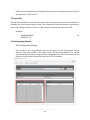
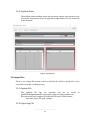
5.4 Interpreting Results 5.4.1 Regular Expressions The regular expressions listed in the input file are placed in the Regular Expressions windows. You can select them to view various information about the data associated with that regular expression. The left and right windows are identical, when both sides have a regular expression selected, there will be a histogram showing the data for each regular expression. 5.4.2 Regular Expression Properties The regular expression properties windows show the results of statistical tests specifically for the regular expression selected above. The KS Test Statistic is result of running the One-Sided Kolmogorov Smirnov Normality Test on the data in the selected regular expression; this is not the p-value. P-Value is the p-value derived from the KS Test Statistic, any p-value above 0.05 accepts the null hypothesis that the data comes from a normal distribution, any p-value below 0.05 rejects the null hypothesis. Best Distribution is the closest matching distribution from a selected pool of distributions. The selected pool is: Uniform Exponential Gamma Weibull Normal Beta Logistic Johnson SB Johnson SU Triangular Logarithmic Normal Total Items is the amount of data points in the input file associated with the selected regular expression. 21