1
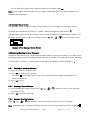
(6) Press to move the cursor to the hour digits. (7) Press , or to adjust the hour digits. (8) Repeat steps 6 and 7 to adjust the minutes, AM/PM/24 hour and date. to activate your selection. The (9) Press symbol is displayed on the Standby screen. 2.9.2 Set Alarm to Alert Daily (1) Follow steps 1 through 8 in “To Set a One-Time Alarm” to set the alarm time. (2) When setting the date in step 8, press , or until you see double dashes for the month, day, and year (--/--/--). Example of Set-Alarm Screen for a Daily Alert (3) Press and to activate your selection. The alarm is now set to alarm every day at the specified time is displayed on the Standby screen. 2.10 Message Alarm This feature allows you to set a one-time or daily alarm for a selected personal message. You can set an alarm for up to five personal messages. When a message alarm is set, replaces in the Message-status screen. At the time the alarm sound, is again displayed unless the alarm is set to alert daily. Press to display the message for which the alarm is set. If the alarm time passes without being acknowledged, flashes until the message is read. 2.10.1 Set a One time Message Alarm (1) From the Message status screen, press , , or to select the message you want to alarm. (2) Press (3) Press (4) Press . to move the cursor to . . The Set-message-alarm screen is displayed. Example of Set-Message-Alarm Screen The alarm symbol shows the current alarm status. enabled, is displayed if the message alarm is is displayed if the message alarm is disabled. (5) Press until (6) Press to move the cursor to the hour digits. is displayed. Eagle Sentry USER MANUAL VER.1 PAGE: 10 of 13