1
2.11.2 Disable Private Time
3. Notebook
3.1 Storing Personal messages in your Notebook
3.2 Deleting Message from your notebook
3.3 Message Storage
3.4 Automatic Message Deletion
4. Duplicate Message
5. Backlight
6. Low Battery Indication
Introduction
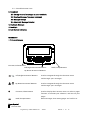
1.1 Control Buttons
Function/Select Buttons
Left/Right Directional Buttons
Read/Escape Buttons
Up/Down Directional Buttons
/
Left/Right Directional Buttons
Used to navigate through the Function menu
and through your messages
/
Up/Down Directional Buttons
Used to navigate through the Function menu
and through your messages
Function/Select Buttons
Used to display the Function menu, to select a pager
function, to activate your selection, and turn on your
pager.
Read/Escape Button
Read messages, Exit setting pager and confirm it.
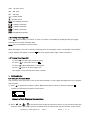
Pager Symbol
Choose Alert
Eagle Sentry USER MANUAL
VER.1
PAGE: 3
of
13