1
Evolution UC-33 Advanced User Guide
Non-Volatile Memory
The UC-33 uses non-volatile memory so that you can continue where you left off even
after powering down and restarting. The current UC-33 controller and channel
assignments are stored whether you have stored your setup to a memory locations or
not. Also stored is Draw Bar mode (on/off), DATA LSB and DATA MSB data, global
Memory Dump
channel setting and last used memory preset.
Pressing the MEMORY DUMP buttons will send out a number of Sys Ex data packets
that represent the 33 memories you have set up in your UC-33. This is a useful way
of storing or backing up the contents of your memory presets externally.
You can record the complete memory dump in to a standard sequencer. To recall the
memory dump back to the UC-33, play the MIDI track containing the recorded memory dump to the UC-33, making sure that the UC-33 drivers are selected as output for
that particular track.
The current controller assignments are not affected by a memory dump, or a memory
send to the UC-33. Once a memory dump has been sent to the UC-33, you will need
to recall a preset to access the new memory settings.
Assigning A Device ID To The UC-33
Pressing the “DEV. ID” buttons will allow you to assign a Device ID to the UC-33. The
default Device ID is 127, which means when a memory dump is performed, that dump
can be received by any UC-33, regardless of the Device ID setting.
If a device ID is assigned to any number other than 127, the memory dump performed
will be specific to UC-33's with the same device ID. If the device ID of a UC-33 differs
from the one recorded with the memory dump, the data will be ignored.
The device ID is a handy way of differentiating between multiple UC33's. Otherwise,
we recommend you keep the device ID setting as 127.
When you press the Device ID buttons, you will see the small 2-digit display on LCD
display 'id'. The 3-digit display represents the assigned Device ID. You can enter a
new device ID using the numeric keypad, or the '+' and '-' buttons.
For more information on SysEx messages and device ID, please go to page 18.
Resetting The UC-33 To The Factory Default Setting
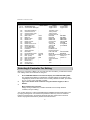
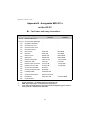
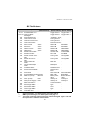
The UC-33 comes with 33 useful presets stored in it's memory (for complete list, see
Appendix H). You can reset the UC-33 back to the factory defaults on power-up by
holding down the +/- buttons.
13