1
Evolution UC-33 Advanced User Guide
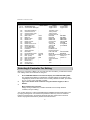
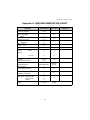
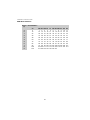
Assignable MIDI Buttons
ASSIGN
Description
0-119
120-127
Standard MIDI CC's
Channel Mode Messages -
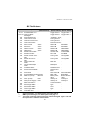
Bank LSB (Press Data Msb (Press
Twice)
Twice)
Toggle Value 2
Toggle Value 1
Toggle Value 2
Toggle Value 1
Pitch Bend Sensitivity
Channel Fine Tune
Channel Coarse Tune
Channel Pressure
RPN Coarse
RPN Fine
NRPN Coarse
NRPN Fine
Master Volume*
Master Pan*
Master Coarse Tune*
Master Fine Tune*
Chorus Mod rate**
Chorus Mod Depth**
Feedback**
Send to Reverb**
Pitch Bend
Program/Bank Preset
MIDI CC (on/off)
Note (on/off)
Note (on/off toggle)
MMC Command***
Reverb type **
Reverb time **
Chorus type **
Controller Off****
Sensitivity value
Tuning amount
Tuning amount
Pressure amount
RPN LSB
RPN MSB
RPN LSB
RPN MSB
NRPN LSB
NRPN MSB
NRPN LSB
NRPN MSB
Volume LSB
Volume MSB
Pan LSB
Pan MSB
Tuning LSB
Tuning MSB
Tuning LSB
Tuning MSB
Mod rate
Mod depth
Feedback level
Reverb send level Pitch shift LSB
Pitch shift MSB
Bank LSB
Bank MSB
Button release value Button press value
Velocity off
Velocity on
Velocity off
Velocity on
Command select.
Type
Time
Type
-
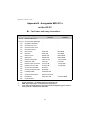
128
129
130
131
132
133
134
135
136
137
138
139
140
141
142
143
144
145
146
147
148
149
150
151
152
255
Program
(Press Twice)
Value
Value
Value
Value
Program
MIDI CC
Note
Note
-
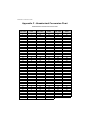
Selecting A Controller For Editing
Before you can assign a MIDI cc to one of the UC-33’s controllers, you will need to select
it for editing. There are 2 methods for doing this:
1.
2.
Press CONTROL SELECT. The LCD will display the CONTROLLER symbol.
The symbol will be flashing to indicate the controller settings can be altered. The
3-digit display will show the number of the currently selected controller, proceeded
by a 'C', or an 'F' if the controller is a fader.
Type in the number of the controller using the numeric keypad, or the +/buttons.
or
Move a fader/rotary controller.
Simply moving a fader/rotary controller will make it the currently selected
controller, ready for editing.
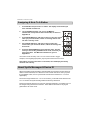
You can also select any of the 4 assignable buttons labelled with the transport bar icons
by simply pressing them. It is however not possible to select any of the 10 numerical
buttons by pressing them, since during edit mode, they are used to enter numerical
values. To program these buttons, please use the first method.
8