1
Evolution UC-33 Advanced User Guide
About The Advanced Guide
In the UC-33 Advanced Guide we have made the assumption that you have been
through the UC-33 Getting Started Guide which should have been supplied in printed
form with your UC-33. If you do not have this guide, please contact your local distributor or download it from our website www.evolution.co.uk
The Getting Started Guide should insure that you are now familiar with the basic operation of the UC-33 so that we now can focus on more in-depth features.
First however, we need to explain some terminology we use throughout the guide.
Terminology
Edit Mode:
Edit Mode describes the short period after a function button has been pressed during
which the parameters of that function can be altered. The numeric keypad can be
used to alter a parameter during this time. No data is sent out of the UC-33 when it is
in Edit mode except for program and bank changes . LCD symbols shown in Edit mode
will flash to show you that a particular parameter can be edited. If a number is part
entered, and a new controller turned, that number will become the relevant parameter
number for the new controller and the 3 second editing period will re-trigger.
Default mode :
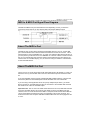
Default Mode describes the state of the UC-33, when no function buttons have been
pressed within the last 3 seconds. In Default mode, the LCD will show the controller
symbol, and the 2 digit display will show the last selected controller. The 3 digits
display the currently assigned MIDI CC number.
2