1
uBug12JE User Manual
Introduction
Welcome! uBug12JE is a Java-based multi-platform program designed specifically to interact with the serial monitors programmed into the Flash of most
Technological Arts HCS12 and S12X microcontroller modules. It is able to program and erase memory, disassemble a range of program memory, and assist in
debugging user developed applications. This manual provides the information needed to use all the capabilities that uBug12JE has to offer.
We'll start by explaining how to install the program onto your computer. Next we will outline how to connect your computer to your MCU module (target) so that
uBug12JE can communicate with it. Then you'll be shown how to use uBug12JE to program the target with an S-record file. You will next learn how to take
advantage of the user-defined buttons to make the development cycle easier, along with some miscellaneous features. We then provide a Glossary listing all of the
commands available in uBug12JE. This is followed by a short list of essential rules to follow when developing software with uBug12JE. The manual concludes with
an Appendix describing the procedure, if needed, to program the serial monitor into your target MCU, as required by uBug12JE.
uBug12JE provides a means to program S12 and S12X targets and troubleshoot most user developed code issues without the use of an external BDM pod. This
includes capabilities to examine and change memory locations, register values, single step through code, and set multiple breakpoints at any point in memory. For
debugging capabilities beyond this, a BDM pod will be needed. The Technological Arts UBSDMLT pod is a good low-cost choice for this.
Installation
The uBug12JE installer can be downloaded from the Technological Arts archive site at:
http://support.technologicalarts.ca/docs/uBug12%20JE/
The installer program will need to be saved to your computer hard drive and then run. On Windows systems, it will install uBug12 under Program Files on the C:
drive by default. It will also install in the corresponding default directories for Mac and Linux systems.
Once the program is installed, a shortcut to the program will be added to your desktop. This will make starting it up easier.
uBug12 works best with the latest version of the Java JRE installed. (i.e. Java 6 Update 30 or later) When you upgrade your JRE, you MUST uninstall all older
JRE versions first!
uBug12 requires the use of the RXTX library to function. This library allows uBug12 to use a Serial Port to communicate with an S12 MCU. Your system must
already have its native drivers installed to use the serial port for general communication. RXTX just allows Java to access that native OS driver. If there is an issue
getting connected, you may need to install this library manually onto your system. (See: http://rxtx.qbang.org/wiki/index.php/Main_Page)
The installer can attempt to install the RXTX library for you. There are several variations available, so if one does not work, uninstall uBug12 and reinstall with
another version. If none of these work, try installing it manually onto your system. (You can deselect installation of the library in the installer to do this.)
Linux installation may require RXTX be installed manually by the root account. For Ubuntu, installing the librxtx-java package should be enough.
uBug12 also uses the Serial library from Processing. (Copyright (c) 2004 Ben Fry & Casey Reas) This is released under the GNU Lesser General Public
License, as published by the Free Software Foundation. The modified source code has been included so you can see what was changed, and are free to change it
further, if you wish, for your platform.
Windows:
ALL - If USB-to-Serial is being done, first plug in the USB cable between the computer and the S12 board. Windows will prompt that it has found new hardware, and
is searching for a driver. On Vista, this Microsoft Update for the driver will seem to take forever. Be patient.
XP - Works well with standard RXTX install.
Vista - Works with RXTX 2.2 Prerelease.
Windows 7 Starter - Works with RXTX 2.2 Prerelease.
Windows 7 for 64 bit - Works best with the default 32 bit version of the Java JRE installed, and 32 bit RXTX drivers, such as the Prerelease 2.2 version. (The default
JRE is 32 bit because the default browser used is the 32 bit version of IE.) Reliability issues have occurred with the 64 bit JRE and 64 bit RXTX on some systems.
Again, this is not an issue with uBug12 itself.
Mac: You may need to install RXTX manually.
Linux: Be sure there are native drivers installed first for the serial port, especially if it is a USB-to-serial port. Also, you will need to manually set the execution bit
on the shortcut for it to be able to run the program when clicked.
The program can be started without a module connected to the computer, and it can be useful to do this just to see the program run. With the shortcut as explained
above, just double-click on the icon to start the program. You will see a flash page with the Technological Arts logo for a couple of seconds, before the main program
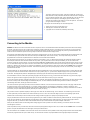
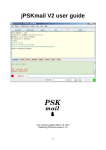
starts up. If it starts correctly, you should see a program window as shown below. Otherwise you will need to review the steps taken previously to install the program.
If there is a problem, try uninstalling the program, redownloading it, and reinstalling. This should take care of most issues.
The program screen has four sections. At the top is the Menu bar, containing the
menu words File and Help. Underneath that are four buttons that can be configured
to run user-defined command scripts. (This is described later.) The main part of the
window is the text output box, where uBug12 types the results of running
commands. At the bottom of the window is a one line text input box. This is where
you type commands for uBug12 to execute.
The program can be terminated by one of the following actions:
1. Clicking on the red 'X' in the upper right corner.
2. Selecting File on the Menu bar, and then Exit.
3. Typing EXIT on the command line, followed by the Enter key.
Connecting to the Module
WARNING: The MCU board contains electrostatic sensitive components, and it is recommended that standard electrostatic precautions be taken when handling
the module. There does not have to be a visible spark for a dangerous voltage to affect the electronics. Just walking accross a carpet on a dry day is enough to
build up a potentially damaging amount of static charge. Recommended precautions include using a wrist grounding strap and/or a grounded workstation. The
module can also be installed in a protective housing to keep it isolated from undesired external voltage sources.
You will need a Freescale MCU board with a variant of the HCS12 or S12X processors, such as one of the processor boards available from Technological Arts, with
an available serial port. (Some boards come with a built-in serial port-to-USB adapter, which can also be used.) The on-chip Flash memory must also be
programmed with a serial monitor compatible with the one described in the Freescale document AN2548.
Next, the board must be connected to your computer via a cable for communication to occur. For "Adapt" style boards (and other boards with RS-232C interface),
this will require an RS-232C serial connection between the two systems. If your computer does not have a serial port available, you can use a USB to serial
converter to provide the necessary interface. The Technological Arts #USB2COM or #USB232 USB to serial converter interface products will work, should you need
one. The serial cable should go to the 9-pin D connector on the module, which is mapped to SCI0 on the MCU. (If the S12 module you are using has a built-in USB
interface (e.g. Esduino), just connect it to your computer via a USB cable.) Once the serial cable is in place check to make sure the Load/Run switch is in the Load
position, and then power can be applied to the module. That's all that is required to get the two systems physically connected. You are then ready to have uBug12
communicate with the board.
It is also possible that your Technological Arts "Adapt" module has been programmed with a version of the serial monitor that uses SCI1, if it exists, rather than SCI0.
This may be the case if the module was either received from or set up by another party. If so, you will need an adapter that plugs into the 4-pin header next to SCI0
on the board. Technological Arts provides a cable (#SCPC9) for SCI1 that plugs into the header and provides a standard 9-pin D connector, just like SCI0.
Once the hardware connection is made, start up the uBug12 program. After the program is running, you will see two text sections that occupy most of the program
window. The upper box is where the program prints its output. The one-line lower text box is where you type in commands.
For your first command, type 'HELP', followed by the Enter key on your computer. All commands are completed by use of the Enter key. The upper output box should
then show a summary of the commands uBug12 understands at that point. The list of available commands will change based on whether or not uBug12 is
communicating with a board, and the type of MCU on that board.
The second command to type in uBug12 is 'CON', which is shorthand for CONnect, to connect to the board via the serial connection. Just typing 'CON' will cause
the program to search for the connected serial port. If you specify a Windows COM port, this will need to be specified as in 'CON 5' for COM port 5. If the
connection is successful, the program will report that the connection is established by printing "CONNECTED". Otherwise you will get "Connection Error: Unable to
open COM1". (The port number will be replaced by the actual port number you specify.)
The port name can also be specified completely for all OS types. Port names are case sensitive though, even for Windows. So 'COM5' is legal, but 'com5' isn't.
On some systems the port search variation of the CON command may not work. This is not an issue with uBug12, but is due to the Operating system and its
interaction with its native serial port drivers. Instead, first EXIT uBug12, restart the program, then specify the port explicitly with CON.
It may be possible that the version of the serial monitor programmed into your module is modified to communicate using a different baud rate. This will not generally
be the case, as all boards from Technological Arts are programmed to use the default baud rate of 115200. However if your serial monitor program has been
changed for baud rate, you will have to use the 'CON' command with both a port number and baud rate specified. Example: CON 5 9600
At this point the module should be communicating with the uBug12 program. If reset is pressed on the board, most likely you will need to enter the same 'CON'
command again to reconnect.
If there are problems, check your serial cable, make sure the board has power applied and the green LED is on, and make sure the Load/Run switch is in the Load
position. Then press the Reset button on the board again, and retry the CON command.
The next command to use is 'VERSION'. This will check the version of the serial monitor currently installed in Flash. uBug12 requires that the microcontroller have a
serial monitor programmed into the top 2K of Flash memory. The serial monitor is based on the popular AN2548 version originally developed for the HCS12
processor series, but is adapted to the particular CPU environment. If your flash does not have a serial monitor programmed into it, you will need to program it into
the flash memory. However to do this will require the use of a BDM pod. (See the Appendix for the upgrade procedure.)
Programming the Module
The most common use for uBug12 will be to program the Flash and/or EEPROM memory, if it exists. This can easily be done with the FBULK, FLOAD, and ELOAD
commands. FBULK will clear both Flash and EEPROM memory. FLOAD will program Flash, and ELOAD will load an S-record into EEPROM. Both FLOAD and
ELOAD, when run, will prompt for you to select the S-record file to load into memory.
uBug12 will accept both S1 and S2 type S-record files. S2 files are interpreted to be in a banked or linear format. (The software figures this out from the address
field and the memory type being programmed.) Banked format means that the most significant byte of the 24 bit address in each record line is used to program the
associated PAGE register for the memory. (The S12X series for example has multiple PAGE registers, PPAGE for Flash, and EPAGE for EEPROM.) The other 16
bits in the address must be in the bank area for that memory. For Flash this mean between $8000 and $BFFF. EEPROM S2 records must have the 16 bit address in
the range for your MCU type. What this means is that to use an S2 file to program Flash on an S12X series device starting at $4000, the S-record will have its start
address as $FD8000. Standard S12 devices would use $3D8000.
WARNING: If you are planning to use the serial monitor to program and erase EEPROM, it is recommended that you NOT write the EEPROM write protect byte.
(Location $0FFD for S12X devices. Check your MCU documentation to get the location for your board.) This will set write protection for the EEPROM, which
includes that location. This means the module will prevent further erasing or programming of the specified section by the serial monitor. If this is done, the
possibility exists that a value could be accidentally written into this memory location that will disable the entire EEPROM from any further writing or erasure.
Should that occur, the only way to reset the EEPROM memory will be with the use of a BDM pod.
After memory is programmed, uBug12 will report how long it took to accomplish. If there is a time of zero reported, it most likely means that uBug12 found the S2
record was not formatted as expected. (I.e. Incorrect address range.)
Script Command Buttons
At the top of the uBug12 program window, above the text boxes, there are four buttons. These are provided for user-defined functions. The first one is already
defined with a sample script that executes the 'help start' command. You can change this to your own defined function. For example, instead of having to type 'CON
5' every time you need to reconnect to the board, a button can be set up to do this automatically. uBug12 can also be set up to run a command or commands at start
up.
To do this, you will have to manually create a text file listing the commands you want run, one command per line. As a test, create a text file called 'connect.txt', and
have it contain the following two lines:
CON 5 <-- Replace the number here with whatever COM port you use
VERSION
Now at the top of the uBug12 window, click on File. Under this will be an option for 'Script Paths'. Click on this option. Once selected, a new dialog box will appear.
This will allow you to set up the name for each of the four buttons, as well as enter the path to the command script text file to parse when the associated button is
clicked. The first path name text box will not have a button name text box to go with it. This is because this first entry is for the command script to use when the
program is first started.
Go ahead and enter a name of 'Connect' for the first button name text box. Use the 'Browse' button at the end of the line to browse to where you have saved the
'connect.txt' file created above. After the file is accepted, you will see the file path in the path text box. Finally, press on OK to accept these changes.
The main screen will now be updated with the first button showing 'Connect' as its label. Clicking on this button will now run the connect command, followed by
VERSION.
The other script buttons can be set up similarly. A typical setup could be for Connect, Erase, Program, and Debug for the four button names.
One other command available with command scripts is the apostrophe character. This is used to denote the start of a comment, as in this example line:
' This script does xxx.
The comment will print to the uBug12 output window when it is encountered, as will each command in the script as it is run. However comments do not cause any
communication with the S12 board.
uBug12 Miscellaneous Features
The uBug12 Menu bar provides a few extra features that allow you to tailor your usage of the program.
First, File > Save Transcript will prompt you for a filename to save a copy of your session on. This is great if you want to automatically record disassembler output,
memory dumps, or just troubleshooting steps taken. Selecting the option again will turn off the recording session.
Second, File > Load S-Record provides a shortcut to burning Flash. If all you need to do is burn in an S-record, just select this function after the program starts. It
will automatically do the following:
Prompt for an S-record filename to burn to Flash. If it exists, it will then continue.
Use CON to search for the serial port, and connect to the board.
Use FBULK to erase the Flash memory.
Use FLOAD to load in the S-Record to Flash.
The Help Menu provides options to:
Provide an alternate method of generating the output to the HELP command.
Initiate a browser session to the Technological Arts website.
Provide an About box that shows the uBug12 Java Edition version, and other information related to contacting Technological Arts.
Another feature is that of History. You can use the keyboard arrow keys to scroll through previously executed commands. This makes it easy to repeat or modify any
command line already run, without having to retype the entire line.
Command Glossary
This section lists all the commands used by uBug12. The commands fall into several categories:
Registers: RD, RM, D, X, Y, SP, PC, A, B, CCR, CCH, PP, EP, RP, GP
Memory: BF, BFW, MD, MDW, MM, MMW
Flash/EEPROM: FBULK, EBULK, FPERASE, FLOAD, ELOAD, RLOAD, VERF, FVERF, FSAVE
Informational: DEVICE, MEMINFO, VERSION
Debugging: GO, HALT, RESET, TRACE, BR, BRB, BRC, BRD, DISASM
GUI: CON, DISCON, ABORT, EXIT, HELP, DOS, TERM, CLEAR
Each of the uBug12 commands will now be listed in ASCII order. Command options will be shown in curly braces, like {filename}. Required parameters will be in
italics, such as data8value. All numbers are assumed to be in hexadecimal by the parser. For 8 bit values, if a number is provided larger than 8 bits, then only the
lower 8 bits are used. For 16 bit values, if a number is provided larger than 16 bits, then only the lower 16 bits are used.
A
Syntax: A data8value
Name: Modify A Register
Description: Changes the current value of the A register to data8value.
Other Considerations: None
ABORT
Syntax: ABORT
Name: Abort the currently running command thread.
Description: When a command is executed, it is forked off as another process. ABORT can be used on only potentially long running commands such as VERF,
FLOAD, FSAVE, MD, MDW, etc., to end that process in a clean way.
Other Considerations: On commands that are expected to run quickly, ABORT has no affect. Instead, internal timeout counters will abort the thread if it does not
complete in a timely fashion.
B
Syntax: B data8value
Name: Modify B Register
Description: Changes the current value of the B register to data8value.
Other Considerations: None.
BF
Syntax: BF startAddress endAddress data8value
Name: Block Fill with byte values
Description: Fills each byte in the specified data range, inclusive, with the value of data8value.
Other Considerations: WARNING: It is not recommended to use BF to program Flash or EEPROM memory. These memories are best programmed by word values
rather than byte values.
BFW
Syntax: BFW startAddress endAddress data16value
Name: Block Fill with Word value.
Description: Fills each 16-bit word in the specified data range, inclusive, with the value of data16value.
Other Considerations: It is best to use this command starting at an even word boundary. (i.e. Address Bit 0 has a value of 0.)
WARNING: Flash and EEPROM should only be programmed on even word boundaries with 16 bit values.
BR
Syntax:
BR
address12
{gpage}
BRB
address12
{gpage}
BRC
address12
{gpage}
BRD
address12
{gpage}
Name: Define Breakpoint A, B, C, or D in the MCU Debug module.
Description: Sets the hardware debug module with a breakpoint to a memory location. That breakpoint is triggered when it is accessed, either by an instruction
execution, or a read or write of data at that location.
Other Considerations: It is possible to enter up to either two or four breakpoints, depending on the MCU type. However there are several rules to keep in mind when
using Breakpoints:
1. You must use the BR command to enter the first breakpoint. Doing so will clear out any other breakpoints that have been set.
2. Never set a breakpoint on an instruction that changes the system clock, even if it is to the same value. If you do, when the breakpoint is hit, uBug12 will drop
the connection.
3. The BR command can be followed by BRB, BRC, and/or BRD. It is recommended that they be set in this order.
4. Since the S12X series uses a 23 bit physical address space, the actual address used by the S12X type Debug module is a Global Address, which is why the
GPage for the breakpoint can be entered as part of the command. If this is left out, the program assumes a value of $7F, which will work for any
standard Flash location in that series. (PPAGE = $FE)
5. If a breakpoint is set for any other location for the S12X series (i.e. RAM or EEPROM), You will need to set GPAGE value AND adjust the address accordingly
to be in the Global address space.
6. Use of the TRACE command clears out all breakpoints.
7. Once a breakpoint is triggered, the Debug module is disarmed. You will need to re-enter at least one breakpoint to rearm the module.
CCH
Syntax: CCH data8value
Name: Change Condition Code Register High byte value for S12X series.
Description: This sets the upper byte of the 16-bit Condition Code register in the S12X CPU. The lower three bits are the only ones used, and they hold the Interrupt
Priority Level (IPL) value. IPL can only have values between 0 and 7 inclusive. This is a way of prioritizing interrupts so that no interrupts at this level or below will be
serviced.
Other Considerations: If IPL is set to 7, no maskable interrupts will be serviced, even if the I bit is cleared in standard Condition Code register (Lower 8 bits of
Condition Code register).
CCR
Syntax: CCR data8value
Name: Change Condition Code Register value
Description: This changes the flags in the Condition Code Register, which is used to control program flow, arithmetic operations, and interrupt handling. The bits
correspond to the following flags:
Bit 7 Stop enable
Bit 6 XIRQ mask
Bit 5 Half Carry
Bit 4 Interrupt mask
Bit 3 Negative
Bit 2 Zero
Bit 1 Overflow
Bit 0 Carry/Borrow
Other Considerations: Changing the CC register can cause the user program behavior to become unpredicable.
CLEAR
Syntax: CLEAR
Name: Clear the screen display.
Description: Clears the text area on the screen.
Other Considerations: None.
CON
Syntax: CON {comport {baudrate}}
Name: Connect to target board.
Description: This sets up the communication between uBug12 and the serial monitor in the Flash memory. It will search for the Serial port if it is not specified.
Otherwise it must be given the OS name for the port. The default value for 'baudrate' is 115200, and need only be specified here if there is a modification to the
serial monitor in Flash that requires a different value.
Other Considerations: CON will report a failure if the cable is not physically making a connection, the port name listed is incorrect, or if the baud rate is not matching
between uBug12 and the serial monitor. If using CON to search for the port causes uBug12 to hang, then you will need to EXIT uBug12, restart the program, and
specify the port explicity with CON. Also, incorrect parameters will put uBug12 in a state that will require a restart of the program.
Port names are case sensitive, even with Windows! (e.g. COM5)
You may also use a shortcut for Windows of only specifying a port number (i.e. '5' for 'COM5'). uBug12 will then prepend the 'COM' string.
D
Syntax: D data16value
Name: Change D register to value.
Description: Changes the current value of the D register to data16value.
Other Considerations: Remember that D is a concatenation of the A and B registers, with A being the most significant byte.
DEVICE
Syntax: DEVICE
Name: Print out device type connected to uBug12.
Description: This checks the Device ID register on the chip, and prints out the device type. Sample output is:
MC9S12XDP512 Rev 1.0
Other Considerations: None.
DISASM
Syntax: DISASM {num_instr {address}}
Name: Disassemble instruction(s) in memory.
Description: Show assembler source for num_instr lines, specified in decimal, and starting at address, given in hexadecimal. If address is absent, the current
PC value is used. If the number of instructions to decode is not specified, then only the next instruction will be done.
Other Considerations: Some indexed instructions may appear in a non-standard format. Also, if decoding in the PPage area of Flash, it will use the current PPage
value.
DISCON
Syntax: DISCON
Name: Disconnect from target board.
Description: Terminates the serial communication between uBug12 and the Technological Arts module. uBug12 will respond with "DISCONNECTED". The CON
command will be needed to establish the connection again if needed.
Other Considerations: This is only useful if you want to have another application use the same serial port to talk to the target board, and don't want to terminate
uBug12 while that communication is taking place.
DOS
Syntax: DOS Native_OS_command
Name: Native Operating System command execution
Description: This is designed to be used in a command script to allow automation of the troubleshooting process. For example, to start up a text editor, a command
line in Windows could be set up as:
DOS "C:\Program Files\WinEdit\WinEdit.exe" "C:\S12XIDE\IDE\Fcode.asm"
Other Considerations: For Windows, it is best to enclose command components in double quote characters, particularly if pathnames have spaces in them. It is also
recommended using the full pathname for the executable, and any parameters that need it, as in the example above. This command is intended mainly for use in
command script text files, rather than manual use with the input text box. Windows built-in commands must be entered as in this example:
dos cmd /c dir
EBULK
Syntax: EBULK
Name: Erase Full EEPROM
Description: Erases all of the on-chip EEPROM memory, except protected memory at the top of EEPROM if that has been set up.
Other Considerations: WARNING: If you are planning to use the serial monitor to program and erase the EEPROM, it is recommended that you NOT write protect
the EEPROM. This means the module will prevent further erasing or programming of the specified section by the serial monitor. Be careful, as the possibility
exists that a value could be accidentally written into the memory location that will disable the entire EEPROM from any further writing or erasure. Should that
occur, the only way to reset the EEPROM memory will be with the use of a BDM pod.
ELOAD
Syntax: ELOAD {filename}
Name: EEPROM program of S-record.
Description: Programs EEPROM memory with an S1 or S2 S-record file.
Other Considerations: If a filename is not provided, uBug12 will present a dialog box for the user to select the S-record file. S1 files will use the default EPAGE
value of $FE for the S12X series. S2 files are assummed to be in a banked format. This means that the most significant byte of the 24 bit address in each record line
is used to program the associated EPAGE register on the S12X. The other 16 bits in the address must be in the bank area for that memory. EEPROM S2 records
must have the 16 bit address between $0800 and $0BFF. What this means is that to use an S2 file to program EEPROM starting at $0C00, the S-record will have
its start address as $FF0800.
WARNING: If you are planning planning to use the serial monitor to program and erase the EEPROM, it is recommended that you NOT write the EEPROM
location at $0FFD for S12X devices, etc. (Check the documentation for your MCU for the precise memory location used to set write protection.) This will set write
protection for the EEPROM, which includes that location. This means the module will prevent further erasing or programming of the specified section by the serial
monitor. If this is done, the possibility exists that a value could be accidentally written into this memory location that will disable the entire EEPROM from any
further writing or erasure. Should that occur, the only way to reset the EEPROM memory will be with the use of a BDM pod.
EP
Syntax: EP data8value
Name: Set EPAGE register to value.
Description: This is an S12X series command. Setting the EPAGE register determines which EEPROM 1K bank is visible in the CPU address space from $0800 to
$0BFF. Usually EEPROM size is 4K, so there are only four banks available.
Other Considerations: If the PC register is currently pointed to somewhere in this range, unpredictable results will occur when a TRACE or GO instruction is used.
The standard valid values are from $FC through $FF. uBug12 will reject any other values.
EXIT
Syntax: EXIT
Name: Exit uBug12 program.
Description: This terminates the uBug12 program.
Other Considerations: Aliases of BYE and QUIT are also accepted.
FBULK
Syntax: FBULK
Name: Erase all Flash and EEPROM memories.
Description: This will erase all Flash and EEPROM memory on the MCU, except for any protected areas.
Other Considerations: If the protected area of EEPROM needs to be reprogrammed, a BDM pod will be required to do this.
FLOAD
Syntax: FLOAD {filename}
Name: Load Flash memory from S-record.
Description: Programs Flash memory with an S1 or S2 S-record file in either banked or linear format.
Other Considerations: If a filename is not provided, uBug12 will present a dialog box for the user to select the S-record file. S1 files will use the default PPAGE value
of $FE, $3D, or $3E, as appropriate for the MCU type. S2 files are determined to be in either banked or linear format based on MCU type and address range in the
S-record. This means that for the banked format, the most significant byte of the 24 bit address in each record line is used to program the associated PPAGE
register on the MCU. The other 16 bits in the address must be in the bank area for that memory. Flash S2 records must have the 16 bit address between $8000 and
$BFFF. What this means is that to use a banked S2 file to program S12X Flash starting at $4000, the S-record will have its start address as $FD8000.
FPERASE
Syntax: FPERASE {data8value}
Name: Erase specific PPAGE in Flash memory space.
Description: Erases the specified 16K page in Flash memory.
Other Considerations: Only valid values for the MCU type are allowed. All others are rejected. If no value is given, the default reset value will be used.
FSAVE
Syntax: FSAVE {filename}
Name: Save Flash contents to file.
Description: The entire contents of the MCU Flash is written to disk using the provided filename. If a filename is not provided, you will be prompted for one.
Other Considerations: The S-record file is in banked S2 format.
FVERF
Syntax: FVERF {filename}
Name: Fast Verify Flash memory contents with S-record.
Description: This is an optimized compare for an S-record file with the current contents of Flash memory ONLY. S1 or S2 records can be used.
Other Considerations: If a filename is not given with the command, uBug12 will prompt for one. The output will also be lengthy if the S-record is completely different
from memory.
GO
Syntax: GO {address}
Name: Start User application execution.
Description: This starts the user application code at {address}.
Other Considerations: Internally this does an RTI assembly instruction. If the address is not specified, the current value of the PC register is used.
GP
Syntax: GP data8value
Name: Set GPAGE register value.
Description: This is an S12X command. This sets the GPAGE register with the lower 7 bits of data8value. GPAGE can not have bit 7 set, so the command will
always keep this bit at zero.
Other Considerations: The GPAGE register is only used by instructions made for Global Addressing, like GLDAA.
HALT
Syntax: HALT
Name: Halt user application execution.
Description: This command is used when a user application is running, to stop program execution immediately, and force the serial monitor to take over.
Other Considerations: HALT is generally used to troubleshoot when an application is stuck in a loop, or not behaving properly.
HELP
Syntax: HELP {command}
Name: List uBug12 commands to screen.
Description: List uBug12 commands that are currently allowed, based on current connection status to MCU and type of MCU, or show detailed help for the stated
command.
Other Considerations: None.
MD
Syntax: MD startAddress {endAddress}
Name: Memory Display byte
Description: Displays the memory locations from startAddress to endAddress inclusive. If endAddress is not provided, MD will display eight bytes starting at
startAddress.
Other Considerations: None.
MDW
Syntax: MDW startAddress {endAddress}
Name: Memory Display Word
Description: Displays the memory locations from startAddress to endAddress inclusive. If endAddress is not provided, MDW will display eight words starting at
startAddress.
Other Considerations: None.
MEMINFO
Syntax: MEMINFO
Name: Show device memory information.
Description: Displays the memory parameters for this MCU, such as ranges for PPAGE, RAM and other memory as applicable for this device.
Other Considerations: None.
MM
Syntax: MM address data8value
Name: Memory Modify byte
Description: The byte in memory at address is written to have the value of data8value.
Other Considerations: If address is in RAM, then the MM command is automatically re-entered on the command line with the next sequential address. All that is
needed is the new value for that location to be entered. This allows small routines to be entered quickly into RAM for testing. The repeat mode is exited by just
pressing the Enter key without inputting a value to write to the prompted location.
WARNING: It is not recommended to use MM to program Flash or EEPROM memory. These memories are best programmed by word values rather than byte
values.
MMW
Syntax: MMW address data16value
Name: Memory Modify Word
Description: The word in memory at address is written to have the value of data16value.
Other Considerations: It is best to use this command at an even word boundary. (i.e. Address Bit 0 has a value of 0.)
WARNING: Flash and EEPROM should only be programmed on even word boundaries with 16 bit values.
PC
Syntax: PC data16value
Name: Set Program Counter value.
Description: Changes the current value of the Program Counter register to data16value.
Other Considerations: Changing the PC register will change what the next instruction executed will be when TRACE or GO are used, if GO does not have an
address specified.
PP
Syntax: PP data8value
Name: Set PPAGE register value.
Description: This changes the Flash page visible in the CPU address space from $8000 through $BFFF.
Other Considerations: If the PC register is set to an address in this region, changing PPAGE will cause unpredictable results if user program execution resumes with
TRACE or GO. Only valid values are accepted. uBug12 will reject any other values.
RD
Syntax: RD
Name: Register Display
Description: Displays the contents of the S12(X) CPU registers, along with PPAGE, and other related registers. A typical result would look like this:
PP PC
FE FFFF
SP
4000
X
0000
Y
0000
D = A:B
00:00
CCR = SXHI NZVC
1101 0000
IPL EP RP GP
00 FE FD 00
Other Considerations: The register values are as the application program sees them, not as the serial monitor is currently using them.
RESET
Syntax: RESET
Name: Reset target board
Description: Forces a hardware reset of the module.
Other Considerations: This command causes a COP timeout to force a hardware reset on the board.
RLOAD
Syntax: RLOAD filename
Name: Load S-record into RAM memory.
Description: Programs RAM memory with an S1 or S2 S-record file.
Other Considerations: If a filename is not provided, uBug12 will present a dialog box for the user to select the S-record file. S1 files will use the default RPAGE value
of $FD for the S12X series. S2 files are assummed to be in a banked format. This means that the most significant byte of the 24 bit address in each record line is
used to program the associated RPAGE register on the S12X. The other 16 bits in the address must be in the bank area for that memory. RAM S2 records must
have the 16 bit address between $1000 and $1FFF. What this means is that to use an S2 file to program RAM starting at $2000, the S-record will have its start
address as $FE1000.
RM
Syntax: RM registerName data8/16value
Name: Register Modify
Description: Updates the specified register with the value provided. Valid register names are: A, B, D, CCH, CCR, SP, PC, X, Y, PP, EP, RP, and GP.
Other Considerations: This command is included for compatibility, as usually one would just reference the register itself to modify its contents.
RP
Syntax: RP data8value
Name: Set RPAGE register value.
Description: This is an S12X command, and sets which 4K page of RAM memory is visible in the CPU memory space from $1000 through $1FFF.
Other Considerations: If the PC register is currently pointed to somewhere in this range, unpredictable results will occur when a TRACE or GO instruction is used.
Only valid values will be accepted. uBug12 will reject any other values.
SP
Syntax: SP data16value
Name: Set Stack Pointer register value.
Description: Changes the current value of the Stack Pointer register to data16value.
Other Considerations: If this is changed and the user application is currently in a subroutine, when an RTS is done the program will return to whatever value is on
the top of the stack. Also, since the serial monitor keeps all the CPU register values on the stack when it is running, changing the Stack Pointer here will change all
the values shown for the other registers. It is best to only let the application program change the SP value.
TERM
Syntax: TERM {terminal-program-path}
Name: Terminal program
Description: Calls the terminal program. By default this is TeraTerm Pro on Windows systems, which you can obtain for free at http://support.technologicalarts.ca
/docs/Third%20Party/TeraTermPro/. However you can choose to specify a path to your own terminal program. You can also change the default program called, by
going to the Menu bar to: File > Script Paths
Other Considerations: The program will first close the serial connection from uBug12 to the board before calling the terminal program, which is assumed will reopen
the same serial connection when it is opened.
TRACE
Syntax: TRACE
Name: Trace Single instruction of user application.
Description: This executes one CPU instruction of the user's application, pointed to by the PC register. Immediately after using TRACE, the Enter key can be hit
repeatedly to single step through the subsequent instructions. The mode can be exited by simply entering a different command on the text line.
Other Considerations: Using TRACE clears out all previously set breakpoints. It can not be used to single step through the serial monitor itself. It must not be used
to single step through any code that is setting the CPU clock, even if it is to the same value as the serial monitor, as this will cause communication to break between
uBug12 and the serial monitor.
VERF
Syntax: VERF {filename}
Name: Verify memory contents with S-record.
Description: This command compares the contents of an S-record file with the current contents of Flash/EEPROM/RAM memory. There is no distinction between the
memory types when doing the comparison. S1 and S2 records can both be used.
Other Considerations: If a filename is not given with the command, uBug12 will prompt for one. Execution of this command can take a long time with large S-record
files. The output will also be lengthy if the S-record is completely different from memory.
VERSION
Syntax: VERSION
Name: Show current Serial Monitor Version in Flash.
Description: This reads a fixed location in the serial monitor code where the version numbers are recorded. It prints to the screen the version number, along with the
date of that version. Sample output is:
Serial Monitor Version 2.3
5/19/9
Other Considerations: None.
X
Syntax: X data16value
Name: Set X register value.
Description: Changes the current value of the X register to data16value.
Other Considerations: None.
Y
Syntax: Y data16value
Name: Set Y register value.
Description: Changes the current value of the Y register to data16value.
Other Considerations: None.
Writing Compatible Applications
There are several points to keep in mind when writing applications if you plan to use uBug12 and the serial monitor for debugging. If these rules are not followed,
the serial monitor will not be able to be used for troubleshooting. Instead, a BDM pod will be required.
1. The S12(X) CPU clock speed must match between the serial monitor and the application. Since the serial monitor sets the SCI port values for baud rate
based on clock speed, changing the clock rate will cause uBug12 and the serial monitor to lose communication. This also means that if the application has
code to configure the CPU clock, even if it is to the same rate as the serial monitor, you will not be able to use breakpoints or single step through that piece of
code.
2. The serial monitor fixes the Direct Page register on the S12X type MCUs at the default value of $00. Since this is a write-once register, an application will not
be able to change it if the serial monitor is running. Furthermore, if it is changed, the serial monitor will no longer function correctly, since it uses direct
addressing for code accessing the registers from $0000 through $00FF.
3. The S12X serial monitor fixes the write-once IVBR register to the default value of $FF. This sets up where the interrupt vectors are held. The monitor has to
do this so that it can handle SCI interrupts correctly when troubleshooting. The serial monitor then uses a pseudo-vector table at $F710-$F7FF for user
applications, which mirror the default locations at $FF10-$FFFF.
4. Your application can not use the same SCI port as the serial monitor. By default, the serial monitor uses SCI0. If you need SCI0 for your application, the serial
monitor in Flash will have to be reprogrammed with a version that uses a different serial port, such as SCI1.
5. If you need to use the HALT command when debugging, the application has to leave interrupts enabled as often as possible. This is because the serial
monitor uses the SCI interrupt when HALT is done. If interrupts are masked when you need to HALT, then HALT will have no effect.
Appendix
How to Use a BDM Pod to Upgrade the Serial Monitor
You may also choose to reinstall the serial monitor if you need a different option, like different baud rate, serial port, or CPU clock speed. To reinstall the serial
monitor program, you will need to follow the procedure below. This assumes that the Technological Arts UBDM12XG5 BDM pod is being used, with Hyperterminal
on a Windows computer to communicate with the BDM pod.
1. Download the current version of the serial monitor assembly source from the Technological Arts web site at: http://support.technologicalarts.ca/docs/
2. You will need to modify the assembly code to implement the options you want. This is documented in the source. You can choose to use SCI0 or SCI1 for
uBug12 interaction, and set the baud rate that is used by the SCI port selected. Once this is done, save the source and assemble it to generate an S-record
file. (You can go to http://mamoru.tbreesama.googlepages.com/ to get an IDE that will explain how to set up a freeware assembler and IDE to work with the Adapt board.)
3. With power off the module, connect the BDM pod to the board using the 10 pin BDM connector.
4. Connect the BDM serial interface to your computer serial port.
5. Start up Hyperterminal, or some similar terminal program, to communicate with the BDM pod over its serial interface. The program will have to have
XON/XOFF enabled on it for flow control. Hyperterminal allows this to be selected when the connection is first set up.
6. Connect power to the board. This will also power the BDM pod via the BDM interface. The terminal screen should show the startup message for the
D-BUG12 program.
7. Type the command STOP to stop the serial monitor from running.
8. Type FBULK to erase all Flash contents. This will also clear out any user application stored into Flash memory.
9. Type FLOAD ;B. The ";B" extension to this command is important.
10. On Hyperterminal, go to the top of the window and select Transfer > Send Text File.
11. Hyperterminal will now prompt for the filename to transfer. Select the correct S-record file with the adaptation of the Serial Monitor you need to install.
12. The BDM pod will respond with a '*' character for each segment of the file that it burns into memory.
13. Once completed, D-BUG12 will present the command prompt again. Disconnect power from the module at this point, and remove the BDM pod. Terminate the
terminal program. You are now ready to use the board with uBug12 Java Edition.
Last Updated ( Tuesday, 08 May 2012 07:17 )