1
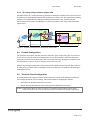
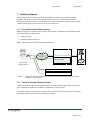
User Guide 5.3.2 IP Connect IP routing using customer unique APN The APN resides on a routing domain separated from Maingate, which lets the customer choose IP addresses for both GPRS terminals and applications on server side. The separation of routing domain is accomplished with a Maingate Managed VPN Router setup, which makes the interface between customer and Maingate in customer premises. This setup is described with Figure below. Maingate premises Customer has separate routing domain on distribution routers Customer premises Customer APN VPN (Separated from Maingate) Primary Internet access (2 operators) Delivered by Maingate Customer Internal network Primary router GPRS Secondary Internet access (1 operator) GGSN HSRP redundancy Access network Firewall Server - Application Secondary router GPRS APN VRF and VLAN ”VPN” IPSec VPN Customer responsability Figure 3 - Terminal communication through the VPN tunnel. 5.4 Firewall Configuration The customer must secure that the customer’s firewall is open to allow the types of IP sessions to pass that are used by terminal and application. If not, the IP packets will be blocked by the customer’s firewall and communication will not function correctly. Maingate’s firewall towards the VPN tunnel is open to allow for all types of IP sessions to pass. When using Managed VPN Router with routers placed behind customer firewall, there will also be rules set up to enable traffic to Maingate. These are defined in User Guide for the Managed VPN Router service. 5.5 Terminal Client Configuration IP communication through IP Connect will not function correctly, if the terminal’s IP client is not configured with the correct settings. The terminal must be configured as follows: Allow dynamic IP address allocation over PPP Default Route or alternatively static routing must be defined for IP Connect NOTE! If the Default Route or static routing is not configured, the terminal will be able to connect correctly to IP Connect, but not be able to communicate with the application. Page 7 (11)