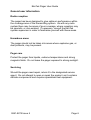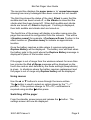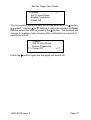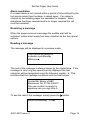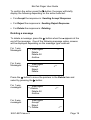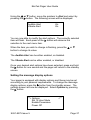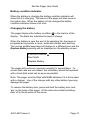
1
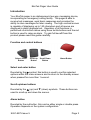
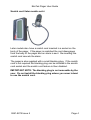
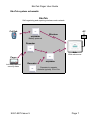
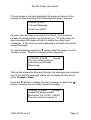
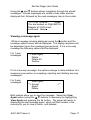
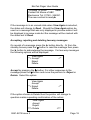
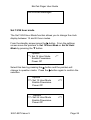
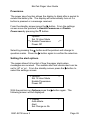
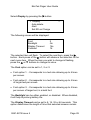
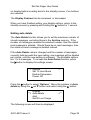
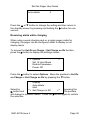
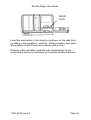
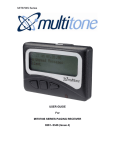
EkoTek Pager User Guide USER GUIDE for EkoTek Pager 9261-8275 Issue 5 EkoTek Pager User Guide CONTENTS Introduction Compliance General user information EkoTek system schematic Switching on the pager Status and warning messages Using menus Switching off the pager Raising an alarm using the red button Raising an alarm using the snatch cord (later models only) Cancelling an alarm Dead man alert Man down alert Location alarm Alarm acceptance Alarm escalation Receiving a message Reading a message Viewing a message again Accepting, rejecting and deleting two-way messages Deleting a message Delete all messages Archiving a message Reviewing archived messages Deleting archived messages Delete all archived messages Set 12/24 hour mode Power save Setting the alert options Setting the message display options Setting auto delete Receiving alerts while charging Battery condition indicator Changing the battery 2 3 5 6 7 8 8 9 9 11 11 12 12 13 14 14 15 15 15 17 18 19 20 21 22 23 24 25 26 26 27 29 30 31 31 EkoTek Pager User Guide Introduction Your EkoTek pager is an alphanumeric two-way messaging device, incorporating an emergency calling facility. The pager is able to receive text messages, send basic responses and provides the ability to store messages for later viewing. The high contrast screen is capable of displaying up to 150 characters and all menus are displayed in plain language text. Operation of all functions is performed via intuitive menus using three tactile buttons and the red button is used to raise an alarm. To gain full benefit from this product please read this guide carefully. Function and control buttons Select / Enter Button Scroll Up Button Scroll Down Button Alarm Button Select and enter button Denoted by the X symbol, this button is used to confirm selected options within the menu screens and to return to the standby screen when pressed for more than 1 second. Scroll up/down buttons Denoted by the S (up) and T (down) symbols. These buttons are used to scroll up and down the menus. Alarm button Denoted by the red button, this can be either single or double press. Operation depends on the system configuration. 9261-8275 Issue 5 Page 3 EkoTek Pager User Guide Snatch cord (later models only) Later models also have a snatch cord inserted in a socket on the body of the pager. If the pager is snatched the cord disengages from the body of the pager and an alarm is sent. Re-inserting the snatch cord cancels the alarm. The pager is also supplied with a small blanking plug. If the snatch cord is not required the blanking plug can be installed in the snatch cord socket and the snatch cord feature is then disabled. IMPORTANT NOTE: The blanking plug is not removable by the user. Do not install the blanking plug unless you never intend to use the snatch cord. 9261-8275 Issue 5 Page 4 EkoTek Pager User Guide Compliance This product complies with the requirements of the EU Radio and Telecommunications Terminal Equipment Directive 99/5/EC. FCC and Industry Canada statement of compliance This device complies with Part 15 of the FCC Rules and Industry Canada Standard RSS 210. Operation is subject to the following two conditions: (1) this device may not cause harmful interference and (2) this device must accept any interference that may cause undesired operation. Unauthorised modification to this equipment will void the user's authority to continue to operate the device within the scope of the Industry Canada and FCC Part 15 Rules. A full technical specification for this product may be obtained from your Multitone representative. WEEE Directive and product disposal At the end of its serviceable life, this product should not be treated as household, or general waste. It should be handed over to the applicable collection point for the recycling of electrical and electronic equipment, or returned to the supplier for disposal. 9261-8275 Issue 5 Page 5 EkoTek Pager User Guide General user information Radio reception The pager has been designed to give optimum performance within the coverage area of the transmitting system. As with any radio system there may be areas of poor coverage, where reception may be sporadic, or non-existent. If necessary, consult the EkoTek system supervisor in order to familiarise yourself with these areas. Hazardous areas The pager should not be taken into areas where explosive gas, or dust products, may be present. Pager care Protect the pager from liquids, extreme temperatures and strong magnetic fields. Do not leave the pager exposed to strong sunlight. Servicing Should the pager need repair, return it to the designated service agent. Do not attempt to open or repair the product, as it contains delicate components and requires specialised test equipment. 9261-8275 Issue 5 Page 6 EkoTek Pager User Guide EkoTek system schematic EkoTek Self-organising and repairing wireless mesh network AC Call fob Repeater Wireless Power Adaptor Battery powered Repeater Hub With web server Pager Repeater Includes personal security alarm Repeater 9261-8275 Issue 5 Repeater to repeater distance typically 10 to 15m Page 7 EkoTek Pager User Guide Switching on the pager To switch on, press and hold the X button for more that half a second. A message will then be displayed for three seconds, whilst self-checks are being performed. Finally, the standby screen will be displayed: 11!34AM 12.03.07 Day An exclamation mark (!) will flash between the Hours and the Minutes (11!34AM). This indicates that the pager is in the process of detecting the EkoTek wireless network. Once the network is detected this will change to a flashing ‘colon’ or ‘period’ symbol. If the pager does not switch on, check that a fresh battery is correctly installed; see ‘Changing the battery’. Status and warning messages When the pager is switched on the standby screen is displayed. This consists of the time and date, battery charge plus additional status and warning messages. A typical screen is shown below: 11:34AM 12.03.07 Paul Smith Silent =First Floor North Day The first line is the clock displaying the current time and date: the time may be in either a 12 or 24-hour format. The battery icon shows the battery charge. In the top right hand corner the pager will display Day or Night: this is used to indicate the shift mode. 9261-8275 Issue 5 Page 8 EkoTek Pager User Guide The second line displays the pager name or ‘n’ unread messages, showing how many messages have been received but not viewed. The third line shows the status of the alert, Silent to warn that the audible alert has been turned off, or No Vibrate to show that the vibrate alert has been turned off. When both audible and vibrate alerts are turned off, Silent is displayed. If nothing is displayed, then both audible and vibrate alert are turned on. The fourth line of the screen will display a location name once the pager has received its configuration from the network. This will be =[location name] (for example, =Conference Room 1) when in the exact location or -[location name] to indicate an approximate location. Once the battery reaches a state where it requires replacement, Replace Battery will be displayed. The battery icon will flash when the battery gets to the point where the Replace Battery message is displayed in place of the location name. If the pager is out of range from the wireless network for more than two minutes the Out of Range message will be displayed on the fourth line and an alert defined by the mode settings (beep/vibrate) is given. In situations where the battery requires replacement and the pager is out of range only Replace battery will be displayed. Using menus Use the S or T buttons to move through the menu entries. The X button is used to select an option shown by the **> <** pointers. If the pointers change to ??> <??, confirmation is required using another Xbutton press. Switching off the pager From the standby screen press and release the X button. The settings screen will now be displayed: 9261-8275 Issue 5 Page 9 EkoTek Pager User Guide **> Options Set 12 Hour Mode Enable Powersave Power Off <** The two pointers show the item that will be selected if the X button is pressed. Use the S or T buttons to move the pointers to Power Off and select this item by pressing the X button. The pointers will change to question marks showing that confirmation is required to switch the unit off: Options Set 12 Hour Mode Enable Powersave ??> Power Off <?? Press the X button again and the pager will switch off. 9261-8275 Issue 5 Page 10 EkoTek Pager User Guide Raising an alarm using the red button Note: This feature must be enabled by the EkoTek system supervisor. To raise an alarm press the red button. Depending on how the EkoTek system is configured this may require a single or a double press. Please confirm this with the EkoTek system supervisor. On pressing the red button the pager will either beep and/or vibrate in sequence with a flashing alert lamp. Please note that the precise nature of this acknowledgement depends on the system configuration. When the alarm is raised the screen will display the following information: 11:34AM 12.03.07 Paul Smith Day Raising Alarm When the alarm has been received by the EkoTek hub the display will change as follows: 11:34AM 12.03.07 Paul Smith Day Alarm Delivered Raising an alarm using the snatch cord (later models only) Note: This feature must be enabled by the EkoTek system supervisor. Later models also have a snatch cord inserted in a socket on the body of the pager. If the pager is snatched the cord disengages from the body of the pager and an alarm is sent. The pager 9261-8275 Issue 5 Page 11 EkoTek Pager User Guide behaves in a similar fashion to when an alarm is raised using the red button. Cancelling an alarm At any stage following the initiation of an alarm it can be cancelled. To cancel an alarm raised using the red button press and hold the X button. To cancel an alarm raised using the snatch cord (where fitted) re-insert the snatch cord into the socket on the top side of the pager. The display will confirm this action with the following message: 11:34AM 12.03.07 Paul Smith Day Clearing Alarm When the alarm has cleared on the system, the fourth line of the display will return to displaying the pager location. Dead man alert Note: This feature must be enabled by the EkoTek system supervisor. The ‘dead man’ alert operates by initiating an alert to the pager at pre-set time intervals. This alert must be acknowledged by a single press on any of the pager buttons (other than the red alert button) within a pre-set time period. Please note that the system supervisor configures both the frequency of the ‘dead man’ alert and the required response time. 11:34AM 12.03.07 Paul Smith Day Press any key to cancel 9261-8275 Issue 5 Page 12 EkoTek Pager User Guide If the alert is not acknowledged within the pre-set time period the pager will automatically raise an alarm. Note: at any stage during the ‘Dead Man’ alert process it is possible to cancel the alarm by pressing and holding the X button. Man down alert Note: This feature must be enabled by the EkoTek system supervisor. The ‘Man Down’ alert operates by automatically initiating an alert sequence if the pager is tipped over (e.g. if the user should fall): If the pager is not returned to an upright position after a preset time interval the pager will beep and display the following warning: 11:34AM 12.03.07 Paul Smith Day Return unit to upright This allows the unit to be returned to an upright position, terminating the alarm sequence. If the pager is not righted it will raise an alarm as follows: 11:34AM 12.03.07 Paul Smith Day Raising Alarm 9261-8275 Issue 5 Page 13 EkoTek Pager User Guide 11:34AM 12.03.07 Paul Smith Day Alarm Delivered Please note that at any stage during the ‘Man Down’ alert process it is possible to cancel the alarm by returning the pager to an upright position and by pressing and holding the X button. Location alarm The pager is equipped with a location alarm feature. This facility must be enabled by the EkoTek system supervisor. If the location alarm feature is set an alert is raised when the pager enters an unauthorised zone. Depending on how the EkoTek system has been configured, the pager may beep and vibrate as well. If the pager is returned to an authorised area the location alarm will automatically be cleared. When a location alarm is raised the following is displayed: 11:35AM 12.03.07 Paul Smith Day Unauthorised Zone Alarm acceptance When an alarm has been accepted the pager will display ‘Alarm Accepted’. It will also emit two LED flashes and might also beep twice and/or vibrate twice, depending on the system configuration. 11:35AM 12.03.07 Paul Smith Day Alarm Accepted 9261-8275 Issue 5 Page 14 EkoTek Pager User Guide Alarm escalation If a raised alarm is not cleared within a period of time defined by the hub device mode then the alarm is raised again. If an alarm is cleared by the initiating pager the escalation is stopped. When assistance has been received and is no longer required the call must be cancelled. Receiving a message When the pager receives a message the audible alert will be activated, unless silent mode has been selected via the front panel options. Reading a message The message will be displayed in a preview mode: Your car will be ready for collection next Monday afternoon■ The end of the message is always shown by the character ■. If the message is very long and cannot be fully displayed the last character will be designated using the following symbol h. This indicates that the message continues onto the next screen: Contact Mr Moore of ABC Electronics Tel: 01763-246391. The new contract is ready for signature can you sign thish To see the rest of the message, simply press the X button: before Wednesday. JILL■ 9261-8275 Issue 5 Page 15 EkoTek Pager User Guide If the message is not acknowledged the pager will return to the standby screen indicating that a message has been received: 3:54PM 12.03.07 1 Unread Message =First Floor North As each new message is received it is stored. The maximum number of messages that can be stored is 6. To make room for new messages the pager will start to delete the oldest read messages. If there are no read messages it will delete the oldest unread message. To read a message, press the T button whilst the pager is in the standby screen. The first message will be displayed: 4:38 PM 12.09.06 Unread Your car will be ready for collection next Monday afternoon■ The top line shows the time and the date the message was received and to the right the message status will be displayed: this will be either Unread or Read. Press the T button to display the next message, or select the S button to display the previously viewed message. 9:05AM 12.09.06 Unread Contact Mr Moore of ABC Electronics Tel: 01763 - 246391. The new contract is readyh 9261-8275 Issue 5 Page 16 EkoTek Pager User Guide Using the S and T buttons allows navigation through the stored messages. Unread messages are sorted in time order and are displayed first, followed by the read messages, also in time order. 2:17 PM 12.09.06 Read You are booked on Flight BA153. Departs at 18:05 ticket confirmed. Helen■ Viewing a message again While a message is being displayed, press the X button and the message option screen will be displayed. The display response will be dependent upon the message type received. If it is a one-way message the following options will be displayed: For 1-way messages: **> View Again Delete Delete All Archive <** If it is a two-way message, the options change to allow initiation of a response (see section on accepting, rejecting and deleting two-way messages): For 2-way messages: View Again **> Accept Reject Delete <** Both options allow you to view the message. Select the View Again option (using the S T buttons if necessary) by highlighting View Again and pressing the ► button. The pager will return to displaying the last message again, which will then remain in the memory for you to view in future, until deleted. 9261-8275 Issue 5 Page 17 EkoTek Pager User Guide 9:05AM 12.09.06 Read Contact Mr Moore of ABC Electronics Tel: 01763 - 246391. The new contract is ready► If the message is in an unread state when View Again is selected, the status will change to Read. Should the View Again option be used on a message that was only displayed in preview mode it will be displayed in preview mode but the message will be marked with the status set to Read. Accepting, rejecting and deleting two-way messages On receipt of a message press the ► button directly. Or from the standby screen press the T button to read the message then press the ► button to acknowledge the message. For two-way messages the following options will be displayed: View Again **> Accept Reject Delete <** Accept by pressing the X button: For other responses to the message press the T button and move the pointers to: Reject or Delete. Select the option: View Again Accept **> Reject Delete <** If the option chosen is Delete then the pointer will change to question marks requesting confirmation of the action: View Again Accept Reject ??> Delete 9261-8275 Issue 5 <?? Page 18 EkoTek Pager User Guide To confirm the action press the X button: the pager will briefly display the following depending on the action selected: For Accept the response is: Sending Accept Response For Reject the response is: Sending Reject Response For Delete the response is: Deleting Deleting a message To delete a message, press the X button when the ■ appears at the end of the message. One of the following message option screens will be displayed depending on the message type received: For 1-way Messages: For 2-way Messages: **> View Again Delete Delete All Archive View Again **>Accept Reject Delete <** <** Press the T button to move the pointers to the Delete item and select by pressing the X button: For 1-way messages: For 2-way messages: View Again **>Delete Delete All Archive View Again Accept Reject **> Delete 9261-8275 Issue 5 <** <** Page 19 EkoTek Pager User Guide The pointers will change to question marks to show that confirmation of the delete action is required. If you do not want to delete, press the S or T buttons. To confirm that you wish to delete the message, press the X button again and the screen will briefly display Deleting. When the current message has been deleted, the previously received message will be displayed. If you wish to delete this message repeat the procedure above. To return to the standby screen press and hold the X button for one second. If there are no more messages, the following screen will be displayed before returning to the standby screen: No messages Delete all messages To delete all the messages, press the X button when the ■ appears at the end of the message. The message option screen will be displayed: **> View again Delete Delete All Archive <** Press the T button to move the pointers to the Delete All item and select by pressing the X button: View again Delete ??> Delete All Archive 9261-8275 Issue 5 <?? Page 20 EkoTek Pager User Guide The pointers will change to question marks, to show that confirmation of the delete action is required. If you do not want to delete, press the S or T buttons. To confirm that you wish to delete the message, press the X button again and the screen will briefly display Deleting. Having deleted all the messages the following screen will be displayed before returning to the standby screen: No Messages Note: all messages will be deleted, including any unread alarm messages. Archiving a message Note: The Archive feature is available to all 1-way messages. However, for 2-way messages the Archive feature can only be accessed once the message has been viewed and accepted or rejected or if it is a personal alarm it has been accepted or cleared (not necessarily by this pager). Messages may be stored for reference, by using the Archive facility. The pager cannot automatically delete archived messages when the message memory is full, only the user can delete messages. At the end of the message you wish to archive, press the X button to see the message option screen. Move the pointers to the Archive item with the S or T button: View again Delete Delete All **> Archive <** Select Archive with the X button and the pointers will change to question marks. 9261-8275 Issue 5 Page 21 EkoTek Pager User Guide Confirm your selection by pressing the X button again. The screen will briefly display Archiving. When the current message has been archived, the screen will show the previously received message. If you wish to archive this message, repeat the procedure. If there are no other messages, you may return to the standby screen by pressing and holding the X button for one second. The following screen will be displayed before returning to the standby screen: No Messages If the message archive is full the following screen will be displayed: Archive Memory Full The screen will return to displaying the current message. You will need to make space in the archive by deleting a message if you still want to proceed with archiving the current message. Reviewing archived messages To review your archived messages, press the S button whilst the pager is displaying the standby screen: 10.50AM 12.09.06 Archive Bring 2 new demo models to the meeting at 11.30 next Tuesday. Ruth■ 9261-8275 Issue 5 Page 22 EkoTek Pager User Guide The first screen of the most recent archived message will be displayed. You may select the archived message that you want to review, by pressing the S or T buttons until the first screen of the message is displayed. If the archived message is several screens long, you can view subsequent screens by pressing the X button. The last screen of the message will contain the ■ symbol. The top line shows the time and date that the message was received and to the right the message status Archive is displayed. Deleting archived messages To delete an archived message, press the X button when the ■ symbol appears at the end of the message. The message option screen will be displayed: **> View again Delete Delete All <** Press the T button to move the pointers to the Delete item and select by pressing the X button. The pointers will change to question marks. View again ??> Delete Delete All <?? If you do not want to delete, press the S or T buttons. To confirm that you wish to delete the message press the X button again and the screen will briefly display Deleting. 9261-8275 Issue 5 Page 23 EkoTek Pager User Guide When the current message has been deleted, the previously archived message will be displayed. If you wish to delete this message, repeat the procedure. If there are no more archived messages, the following screen will be displayed before returning to the standby screen: No Archived Messages Delete all archived messages To delete all of the archived messages, press the X button when the ■ symbol appears at the end of a message. The message option screen will be displayed: **> View again Delete Delete All <** Move the pointers to the Delete All item by pressing the T button. Select by pressing the X button and the pointers will change to question marks: View again Delete ??> Delete All <?? If you do not want to delete all the messages press the: S or T buttons. To confirm that you wish to Delete All the messages, press the X button again and the screen will briefly display Deleting. Having deleted all the archived messages the system will display the following screen before returning to the standby screen: 9261-8275 Issue 5 Page 24 EkoTek Pager User Guide No Archived Messages Set 12/24 hour mode The Set 12/24 Hour Mode function allows you to change the clock display between 12 and 24 hour modes. From the standby screen press the X button. From the settings screen move the pointers to Set 12 Hour Mode or Set 24 Hour Mode by pressing the T button: Options **> Set 12 Hour Mode Enable Powersave Power Off <** Select this item by pressing the X button and the pointers will change to question marks. Press the X button again to confirm the selection. Options ??> Set 12 Hour Mode Enable Powersave Power Off Options ??> Set 24 Hour Mode Enable Powersave Power Off 9261-8275 Issue 5 <?? <?? Page 25 EkoTek Pager User Guide Powersave The power save function allows the display to blank after a period to extend the battery life. The display will automatically turn on if a button is pressed or a message received. From the standby screen press the X button. From the settings screen move the pointers to Enable Powersave or Disable Powersave by pressing the T button: Options Set 12 Hour Mode **> Enable Powersave Power Off <** Select by pressing the X button and the pointers will change to question marks. Press the X button again to confirm the selection. Setting the alert options The pager allows full control of how the pager alerts when messages are received. The audible alert and vibrate alert can be set to ‘off’ or ‘on’. From the standby screen press the X button to select the settings screen: **> Options Set 12 Hour Mode Enable Powersave Power Off <** With the pointers on Options press the X button again. The following screen will be displayed: **> Display Auto-delete Alert Set Charge no Rx 9261-8275 Issue 5 <** Page 26 EkoTek Pager User Guide Using the S or T button, move the pointers to Alert and select by pressing the X button. The following screen will be displayed: Audible Alert Vibrate Alert On On You are now able to modify the alert options. The currently selected item will flash. Each press of the X button will advance the selection to the next menu item. When the item you wish to change is flashing, press the S or T button to change its value: The Audible Alert can be either enabled, or disabled. The Vibrate Alert can be either enabled, or disabled. Once your desired alert options have been selected, press and hold the X button for one second and the pager will return to the standby screen. Setting the message display options Your pager is equipped with display options and these may be set according to your personal requirements. To change the message display options, press the X button from the standby screen. The settings screen will now be displayed. Select Options by pressing the X button: **> Options Set 12 Hour Mode Enable Powersave Power Off 9261-8275 Issue 5 <** Page 27 EkoTek Pager User Guide Select Display by pressing the X button: **> Display Auto-delete Alert Set RX on Charge <** The following screen will be displayed: Font Backlight Display Timeout Contrast 2 On 16s 16 The selected item will flash. To select the next item, press the X button. Each press of the X button will advance the selection to the next menu item. When the item you wish to change is flashing, press the S or T buttons to change its value. The Font option can be set to 1, 2 or 3: • Font option 1: - Corresponds to a text size allowing up to 6 lines per screen. • Font option 2: - Corresponds to a text size allowing up to 4 lines of larger text per screen. • Font option 3: - Corresponds to a text size allowing up to 4 lines per screen of larger text, in a bold font. The Backlight can be either enabled, or disabled. When disabled, it will help to prolong battery life. The Display Timeout can be set to 8, 16, 32 or 64 seconds. This option determines the length of time that selected screens remain 9261-8275 Issue 5 Page 28 EkoTek Pager User Guide on display before reverting back to the standby screen, if no buttons are selected. The Display Contrast can be increased, or decreased. When you have finished setting your display options, return to the standby screen by pressing and holding the X button for 1 second. Setting auto delete The Auto Delete function allows you to set the maximum number of stored messages, excluding those in the Archive memory. If the number of messages exceeds the selected number, then the oldest read message is deleted. Should there be no read messages, then the oldest un-read message is deleted instead. If the Auto Delete value is changed and the number of messages currently held exceeds the new setting, one message will be deleted per minute, until the new setting is achieved. The available options are 1 to 6 messages. To access the Auto Delete function, press the Xbutton to display the settings screen: **> Options Set 12 Hour Mode Enable Powersave Power Off <** Press the X button to select ‘Options’. Move the pointers to Autodelete by using the S or T button and select using the X button: Display **> Auto-delete Alert Set RX on Charge <** The following screen will then be displayed: 9261-8275 Issue 5 Page 29 EkoTek Pager User Guide Auto-delete 5 Press the S or T button to change the setting and then return to the standby screen by pressing and holding the X button for one second. Receiving alerts while charging When using a quad charging rack or a single pager cradle for charging, the pager can be configured either to display or not display alerts. To access the Set Rx on Charge / Set Charge no Rx function, press the X button to display the settings screen. **> Options Set 12 Hour Mode Enable Powersave Power Off <** Press the X button to select Options. Move the pointers to Set Rx on Charge or Set Charge no Rx by pressing the T button: Display Auto-delete Alert **> Set Charge no RX Select by pressing the <** X button and the pointers will change to question marks. Press the X button again to confirm the selection. 9261-8275 Issue 5 Page 30 EkoTek Pager User Guide Battery condition indicator When the battery is charging the battery condition indicator will show that it is charging. The name of the pager will also move to the bottom line. When the battery is fully charged the battery condition indicator shows a full icon. Changing the battery The pager displays the battery condition ( ) in the top line of the display. The black bar indicates the level of charge. When the battery is near the end of its operating life, the pager is programmed to provide a visual, audio and vibrate alert warning. The normal audible beep alert will change to a different tone and the Replace Battery warning will be displayed on the standby screen: 4:55 PM 12.09.06 Paul Smith Replace Battery The pager will continue to operate normally for several days. To ensure that calls are not missed, the old battery should be replaced with a fresh AAA sized cell as soon as possible. Note: The pager must be fitted with NiMH batteries if it is to be used with a charger. Use of the charger with any other battery type may damage the pager. To remove the battery door, press and hold the battery door lock ‘pip’ on the back of the pager. At the same time slide the battery door off in the direction of the arrow. 9261-8275 Issue 5 Page 31 EkoTek Pager User Guide DOOR LOCK Insert the new battery in the direction as shown on the case back, by sliding in the negative (-) end first. Slide the battery door back into position so that it locks automatically with a click. Dispose of the old battery carefully with consideration for the environment and do not recharge or incinerate alkaline batteries. 9261-8275 Issue 5 Page 32 EkoTek Pager User Guide Notes: 9261-8275 Issue 5 Page 33 EkoTek Pager User Guide Multitone Electronics plc Multitone House Shortwood Copse Lane Basingstoke Hampshire England RG23 7NL Part No. 9261-8275 9261-8275 Issue 5 Page 34