1
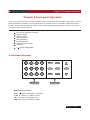
Chapter 3 Front-panel Operation
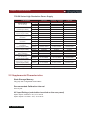
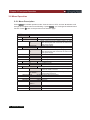
Comm. Parity
Communication parity bit set
None< Default >
Even
Odd
Address Set
Setting communication address(range from 0to 254)
Address= ﹡﹡
Port Mode
Select function of port
Trigger< Def >
RI/DIF
DIGITAL I/O
Trig Source
Setting trigger mode
Immediat<Def>
Trigger signals from Shift
+ Trigger
key
Trigger signals from the TRIG connector in the rear
External
panel.
Bus
Communication command trigger mode.
RI Mode
Control the output mode
Off< Default >
Disable this function
Latching
Live
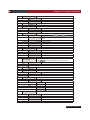
DFI Source
Discrete Fault Indicator
Off< Default >
QUES
Question Bit
OPER
Operation Bit
ESB
Event State Bit
RQS
Require Bit
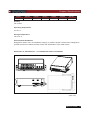
Setting keypad password.
Key Lock Set
Press Enter directly to disable the key lock function.
Password= ﹡﹡﹡﹡
Exit
System Set
Max Volt. set
Setup the Maximum Voltage.
Max= ﹡﹡﹡﹡
Step Volt Set
Set voltage step
Step=﹡﹡﹡﹡
Exit
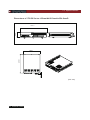
List Set
Call ListFile
Recall list operation file.
Edit ListFile
Edit list operation file.
Continuous
Once
Repeat
Step
Once
Repeat
Users can choose 4 kinds of memory space to save the list
Save Mode Set
file.
8 X 25 Steps
4 X 50 Steps
2 X 100 Steps
1 X200 Steps
Exit
USER’S GUIDE 21