1
Dear User,
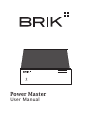
Thank you for purchasing BRIK Power Master.
Please read this User Manual before operating the machine to ensure its
best performance and your safety.
Instructions:
Connecting BRIK
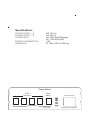
Use 2.1mm diameter cables (thinner ones) to connect BRIK 12V In items to
Power Master’s DC12V sockets.
Use the 2.5mm diameter cable (thicker one) to connect BRIK Integrated
Amplifier 20V In to Power Master’s DC20V socket.
Connecting Mains
This unit is supplied with a power supply suitable for your country’s mains
supply. Before connecting, check the label to ensure the local power supply is
compliant.
CAUTION: Connect the power cable to the Power Master’s AC 115V / AC 230V
socket before connecting to the mains. Once this has been done, press the
Power button on the front panel to turn on the machine.
Switching On/Off
Press Power button on the front panel of Power Master to turn on/off all
machines connected.
Use the switch on an individual item’s rear panel or press Power button on its
front panel to turn on/off the individual item.
-- Power Master is designed for BRIK Integrated Amplifier with additional
BRIK items. Do NOT use Power Master as the power supply to other machines.
Power Master
Power