1
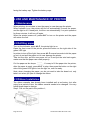
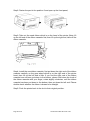
Step2: Fasten the part in the position 2 and open up the front panel;
Step3: Take out the used ribbon which is on the head of the printer (Note: lift
up the left end of the ribbon cassette first, then lift up the right end, take off the
ribbon cassette.
Step4: Install the new ribbon cassette, first put down the right end of the ribbon
cassette carefully on the gear wheel which is on the right end of the printer
head, then lift up the left end a little. If you find the right end of the ribbon
cassette has not been put down to the bottom, please hold down the knob of
the ribbon cassette with your finger, rotate slightly clockwise, until the ribbon
cassette has been put down to the bottom, then put down the left end. Please
double check whether the ribbon is drawn to be straight.
Step5: Push the printer back in the slot to their original position.
Page 16 of 16
AL-Manual-110ES-WL-S2-En-102