1
Amate Electroacústica,s.l.
2.INSTALLATION
2.1.Interconnecting the system
To set the remote connection with the Master-Audio DSPController-equipped speaker
systems, it is necessary to interconnect them with the supplied data cable (networklike cable RJ-45 to RJ-45).
At the rear panel of each cabinet two RJ-45 female connectors are found, with the
label “RS-485 BUS”. The one used to receive the data is labelled as “IN” and the
other one, to send data to another system, is labelled as “LINK”. It is recommended to
follow this rule; however it is not necessary because the two connectors are internally
bridged.
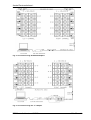
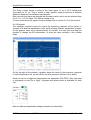
Fig. 3. Connecting 4 MA210/D (audio, power supply and data)
The data signal must be sent from the PC located at the sound control to the
cabinets. The output of the USB-485 converter is equipped with a male DB9
connector, where a DB9 to female XLR3 cable (supplied) is connected. So, balanced
microphone cable with XLR connectors in combination with the supplied XLR3-RJ45
adaptors is enough to interconnect all the system. This is very convenient, since XLR
cables are very common in audio applications. The following interconnection
schemes are possible:
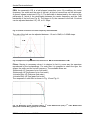
1) Daisy-chain connection: see Fig. 4 for details. The signal is brought from one
cabinet to the other. In this case, the following accessories are needed:
1xAdaptor RJ45 to XLR Female
2xAdaptors RJ45 to XLR Male
2) “Y”-connection: using a “Y” adaptor (see Fig. 5). The signal is divided in two
branches, one per channel. For this configuration, the following adaptors are needed:
2xAdaptors RJ45 to XLR Female
1x“Y”-Adaptor (1 XLR Male to 2 XLR Female)
All cable adaptors (RJ-45 to XLR as well as the “Y”) are supplied together with the
system’s “connection kit” and the USB converter.
DSPController.Version 1.2 ENG
Feb 09
4