1
2.6 Connection of Extensions
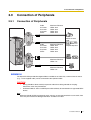
2.6.3
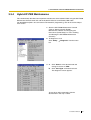
Digital EXtra Device Port (Digital XDP) Connection
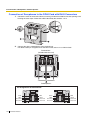
A DPT can be connected to another DPT on the Digital XDP connection. In addition, a DPT
connected to a Super Hybrid Port can also have an SLT connected in Parallel mode or XDP mode.
Notes
•
•
•
Both DPTs must be KX-T7600 series DPTs (excluding KX-T7640).
Parallel mode or XDP mode can be selected through system programming.
If XDP mode is enabled through system programming, parallel connection is not possible.
Refer to "1.10.9 Parallelled Telephone" and "2.1.1 Extension Port Configuration" in the
Feature Guide for further information.
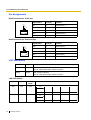
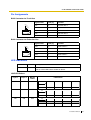
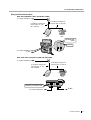
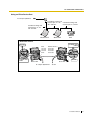
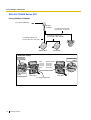
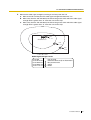
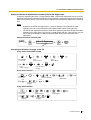
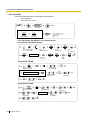
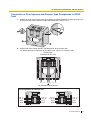
With KX-T7600 Series DPT (except KX-T7600E Series)
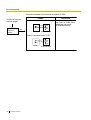
Using a Modular T-Adaptor
To a Super Hybrid Port
Modular
T-Adaptor
2-conductor wiring cord
Connect pins "T" and "R".
4-conductor wiring cord
Connect pins "D1" and "D2".
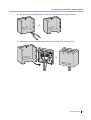
4-conductor wiring cord
Connect pins "D1" and
"D2".
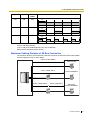
SLT
Master DPT
Slave DPT
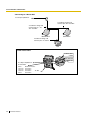
Back View of DPTs
TO TEL
TO MAIN UNIT
/ PABX
Cable
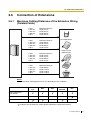
ø 0.4 mm:
ø 0.5 mm:
ø 0.6 mm:
CAT 5:
TO MAIN UNIT
/ PABX
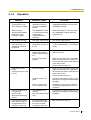
Maximum Distance
Under 30 m
Under 50 m
Under 60 m
Under 50 m
Master DPT
To a Super Hybrid Port
76
Installation Manual
Slave DPT