1
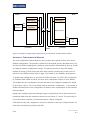
Master
Slave
1600 - 8h
(RPDO mapping)
Object Dictionary
PDO
PDO
CANopen
2124h
(seat switch)
CANopen
traction
application
seat
switch
1A00 - 8h
(TPDO mapping)
Object Dictionary
6800h [1]
(digital inputs 1-8)
(consumer)
CANbus
digital
inputs
local
I/O
(producer)
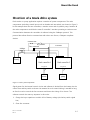
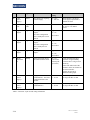
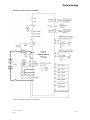
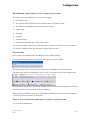
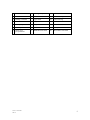
Figure 18 Example of a digital input mapped to the seat switch object via PDO and the CANbus
Automatic Configuration Mapping
The auto-configuration feature allows the user to select their vehicle I/O from a list of predefined configurations. The principle is identical to the manual process described above, but
the PDO and VPDO mappings are created by each controller automatically at start up as well
as CANopen network configuration settings. This feature provides an easy and reliable
method of setting up both single and multi node systems, providing they match one of a
selection of pre-defined setups (refer to page 1 for details on the available configurations).
To enable auto configuration on all nodes set 5810h sub-index 1 to 0CFFh (This corresponds
to “Enabled”/”Both VPDO and PDO” for all IO auto configuration options in Drive Wizard).
This enables the auto configuration of local and remote (via CANopen) analogue IO, digital
IO and motor control. This is the default state for automatic configuration.
It is possible to
disable individual parts of the configuration to allow for user customization via the methods
described above.
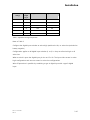
Digital input, analogue input and analogue output configurations can be selected from the
predefined tables and their numbers entered into sub-indices 3, 5 and 6. This need only be
set on the master controller if a multimode system is being configured.
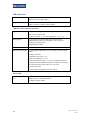
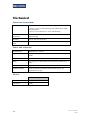
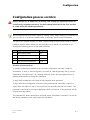
CAN node function and configuration can also be defined via the auto configure feature. For
each node the following should be specified:
6-14
Doc. # 177/52701
Rev2