1
iStorage diskGenie - Getting Started
Before you begin
Be sure to review the following information before you begin to use the iStorage
diskGenie.
Attention: Use only the included cables with your iStorage diskGenie. You
might damage the drive if you use a cable not included with the iStorage
diskGenie.
The iStorage diskGenie is designed for portable use without an AC power
adapter and in most cases will be able to power on a single USB port. In
the event that the iStorage diskGenie is unable to power on a single USB
connection, use the included USB Y-cable.
Connecting the iStorage diskGenie
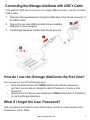
1. Attach the integrated USB cable of the iStorage diskGenie drive to an available
USB port on your computer, as shown below.
2. The iStorage diskGenie indicator light should glow red.
If the Indicator light
does not power, use the
included USB Y-cable.
Refer to directions on the
following page
www.istorage-uk.com
6