1
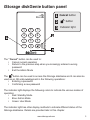
iStorage diskGenie button panel
1
2
1
2
abc
def
4
ghi
5
jkl
mno
7
8
wxyz
cancel
0
pqrs
tuv
3
3
Cancel button
button
Indicator light
6
9
The “Cancel” button can be used to:
• Cancel current operation
• Return to the previous step when you knowingly entered a wrong
password
• Exit the Admin Mode
The
button can be used to access the iStorage diskGenie and it can also be
used as an OK acknowledgement in the following operations:
• Entering a password
• Confirming a new password
The indicator light displays the following colors to indicate the various modes of
operation:
• Red: Standby Mode
• Blue: Admin Mode
• Green: User Mode
The indicator light has other display methods to indicate different status of the
iStorage diskGenie. Details are provided later in this chapter.
www.istorage-uk.com
5