1
Chapter 1: Introduction to MapInfo ProViewer
Displaying the Map Legend
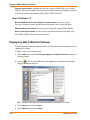
The map’s legend explains the meaning of the different shapes, colors, and fill patterns.
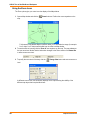
1. Open a Map window and click the
Show/Hide Legend command.
Legend button or select the Options menu and the
Note Not all maps have legends.
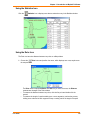
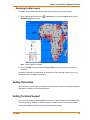
2. Choose the Map menu option and the Previous View command to return the map from the
beginning.
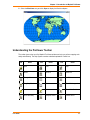
We have provided the icon descriptions, the Glossary, and the online help to support you as you
navigate through more mapping adventures!
Getting Online Help
Use ProViewer‘s comprehensive online Help, including sections on menu commands and dialog box
descriptions, to answer your ProViewer questions.
Getting Technical Support
If you encounter problems installing MapInfo ProViewer, our technical support specialists can help.
Technical Support for MapInfo ProViewer is limited to installation issues. For workspace-related
issues, see the MapInfo Professional user who created the workspace.
User Guide
21