1
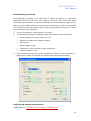
FOXIT READER 4.2 User Manual Displaying rulers Please choose View > Rulers. Hiding rulers Please choose View > Rulers, or right-click the horizontal ruler or the vertical ruler and then choose Hide Rulers. Creating ruler guides Do one of the following: Drag down from the horizontal ruler to create a horizontal guide, or drag to the right of the vertical ruler to create a vertical guide. Double-click a location on the horizontal ruler to create a vertical guide, or double-click a location on the vertical ruler to create a horizontal guide. Moving ruler guides Click and hold the guide, and then drag it to a new location. Changing unit of measurement Right-click the horizontal ruler or the vertical ruler, and select a measurement system for the rulers. Deleting ruler guides To delete a guide, click the guide to select it, and then press the Delete key. To delete all guides on a certain page, scroll to the page, right-click in the ruler area and choose Clear Guides on Page. To delete all guides, right-click in the ruler area and choose Clear All Guides. Measuring the Objects The Measure Tools enable you to measure distances and areas of objects in PDF documents. The measure tools are especially useful when you need to know the distances or areas associated with objects in a form or computer-aided design 62