1
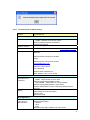
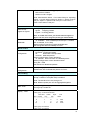
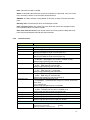
Switch(config-ext-acl)#permit ip 192.168.10.1
A.B.C.D Source wildcard bits
Switch(config-ext-acl)#permit ip 192.168.10.1 0.0.0.1
A.B.C.D Destination address
any
Any destination host
host
A single destination host
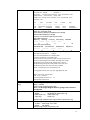
Switch(config-ext-acl)#permit ip 192.168.10.1 0.0.0.1
192.168.10.100 0.0.0.1
[IFNAME] Egress interface name
Switch(config-ext-acl)#permit ip 192.168.10.1 0.0.0.1
192.168.10.100 0.0.0.1 gi17
Note: Follow the below rule to configure ip extended access list.
IP Rule: Permit/Deny Source_IP wildcard Dest_IP wildcard
Egress_Interface
TCP Rule: Permit/Deny tcp Source_IP wildcard Dest_IP wildcard eq
Given_Port_Number Egress_Interface
UDP Rule: Permit/Deny udp Source_IP wildcard Dest_IP wildcard
eq Given_Port_Number Egress_Interface
ICMP Rule: Permit/Deny icmp Source_IP wildcard Dest_IP wildcard
ICMP_Message_Type ICMP_Message_Code Egress_Interface
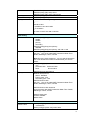
Add MAC
Switch(config)# mac-address-table static 0012.7701.0101 vlan 1
interface fa1
mac-address-table unicast static set ok!
Port Security
Switch(config)# interface fa1
Switch(config-if)# switchport port-security
Disables new MAC addresses learning and aging activities!
Note 1: Rule: Add the static MAC, VLAN and Port binding first, then
enable the port security to stop new MAC learning.
Note 2: Not all the model support this feature, check the product
detail specification.
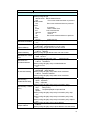
Disable Port Security
Display
Switch(config-if)# no switchport port-security
Enable new MAC addresses learning and aging activities!
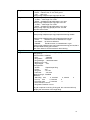
Switch# show mac-address-table static
Destination Address Address Type
Vlan
Destination Port
------------------- --------------- ------- -----------------------0012.7701.0101
Static
1
fa1
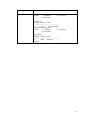
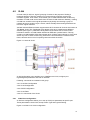
802.1x
Enable
Switch(config)# dot1x system-auth-control
The Port-Based Network Acess Control is globally enabled
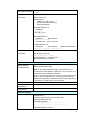
Disable
authentic-method
radius server-ip
Switch(config)# no dot1x system-auth-control
The Port-Based Network Acess Control is globally disabled
Switch(config)# dot1x authentic-method
local Use the local username database for authentication
radius Use the Remote Authentication Dial-In User
Service (RADIUS) servers for authentication
Switch(config)# dot1x authentic-method radius
Switch(config)#
Switch(config)# dot1x radius
Switch(config)# dot1x radius server-ip 192.168.10.120 key
1234
92