1
For Your Convenience
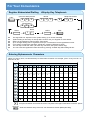
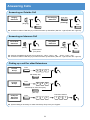
Register Abbreviated Dialling <Display Key Telephone>
(Common Abbv.)/Private
CALL
8
5
Bin No.
3
?
?
Telephone Number
?
9
?
?
(Group Abbv.)
8
5
4
Name
HOLD
?
HOLD
SPK
?
The digit of Bin No. depends on the system setting. (0-9 / 00-99 / 000-999)
System setting is necessary for Group Abbv. function. Ask your Supplier for more details.
Name can be entered by Dial Pad Keys. (See below)
Up to 24 digits dialling can be registered, and up to 12 characters can be registered as name.
If you want to continue the operation, dial Bin No. instead of SPK Key to finish.
You can skip to enter the name. (No enter any character, then press “HOLD” Key).
You can erase the registered number & name by pressing “CLEAR” Key after dialling Bin No..
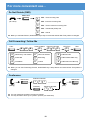
Entering Alphanumeric Characters
When you enter a name, use Dial Pad Keys to enter letters as below. For example, press “2” key once for “A”,
twice for “B”, etc…
Number of Key Presses
1
2
3
4
5
6
7
8
9
1
@
[
¥
]
^
_
‘
{
2
A
B
C
a
b
c
2
3
D
E
F
d
e
f
3
4
G
H
I
g
h
i
4
5
J
K
L
j
k
l
5
6
M
N
O
m
n
o
6
7
P
Q
R
S
p
q
r
s
7
8
T
U
V
t
u
v
8
9
W
X
Y
Z
w
x
y
z
9
0
0
!
“
#
$
%
&
‘
(
)
+
,
-
.
/
:
;
<
=
1
#
DND/CONF
10
11
12
13
}
>
?
Accepts a character and moves the cursor one place to the right. Press twice to insert a “space”.
Clear the character entry to the left, one character at a time. (Backspace Key)
3