1
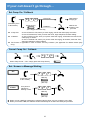
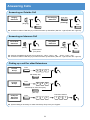
Placing Calls Place an Outside Call <Quick Access> Trunk Key Telephone Number ? ? ? ? Listen for Dial Tone before dialling a Telephone Number. You can have function keys for Trunks or Trunk Groups. Ask your Supplier. Place an Outside Call <Access by Code> Telephone Number CALL 0 ? ? ? ? Trunk Group No. 8 0 4 8 0 5 ? Trunk No. (e.g. Trunk 5) 0 5 Listen for Dial Tone before dialling a Telephone Number. In case the number of Trunk Group is more than 10, you should enter 3 digits (e.g. 011 : Group 11) after dialling “804”. Ask your Supplier more details. Place an Intercom Call <Dial Access> CALL Extension Number ? ? ? Pressing CALL key after dialling an extension number is also possible. Your call will ring or voice-announce. If you hear ringing, wait for an answer. If you hear a beep, begin speaking. Dialling “1” changes voice/ring mode. (in case the destination is Key Telephone) 4