1
Comfort Quick Start Guide
Getting to Know Your Keypad
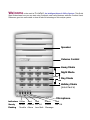
The Keypad is the control centre for Comfort. In addition to arming and disarming the security
system, your Keypad allows you to record and access your messages on the built-in answering
machine, gives short-cut access to commonly used menus and functions, and acts as an
intercom with other Keypads on the premises. This section introduces you to the buttons, controls
and indicators on the Keypad
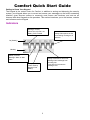
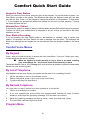
Indicators
Steady if disarmed
Blinking if Trouble
(Phone Cut, AC Fail, Low
Battery, Zone Trouble
Steady if Microphone is ON,
for recording message or in
intercom
On (Steady)
Blinking
Steady if Armed
Blinking if Alarm or Alert
State
Steady if New Memo from user.
Blinking if New message from
incoming call
Press # to find out who the
message is for
Steady if AC Fail
(Power Failure)
Blinking if Low
Battery
3