1
PowerLab 8 User’s Guide
Charge, discharge, cycle
or monitor a
pack
1.
2.
3.
4.
5.
6.
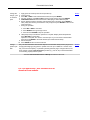
Apply power and select power source (see above).
Connect pack.
Press INC or DEC to select desired User Preset, then press ENTER.
For each question, press INC or DEC to select correct answer, then press ENTER.
CHECKING PACK indicates PowerLab 8 is attempting to detect attached pack.
Screen displays preset’s chemistry. If this matches pack’s chemistry, press ENTER to
start. (If they don’t match, just wait for the next prompt, then press ENTER to return to the
User Preset list.)
7. During the operation:
n
n
n
Details
Press INC or DEC to view data.
Press ENTER to change charge current.
Press and hold ENTER to stop the operation.
8. “Beep beep beep” indicates the operation is complete. Display shows elapsed time.
Press INC/DEC to review data.
Operation is complete, but “session” remains open so you can review collected data.
Press and hold ENTER to terminate session (this erases session data).
9. Disconnect pack.
10. Press ENTER to return to User Preset list.
Charge
packs in parallel
Only use REVOLECTRIX Safe Parallel Adapters and stackable safety banana plugs when
charging/discharging/cycling packs in parallel. Connect up to 9 batteries—of same chemistry, cell count and capacity—in parallel by stacking banana plugs. Charge as above, but
enter number of packs at Parallel Packs? question (e.g., 2P, 3P, 4P). PowerLab 8 divides
current setting equally between packs.
*Assumes Choose Power Source at Startup is enabled in the CCS.
For Full Instructions - See enclosed DVD or
download from website.
–7–
Details